

Yume Comic
Turn your ideas into full manga or webtoon pages instantly with AI, no drawing skills needed.
About Yume Comic
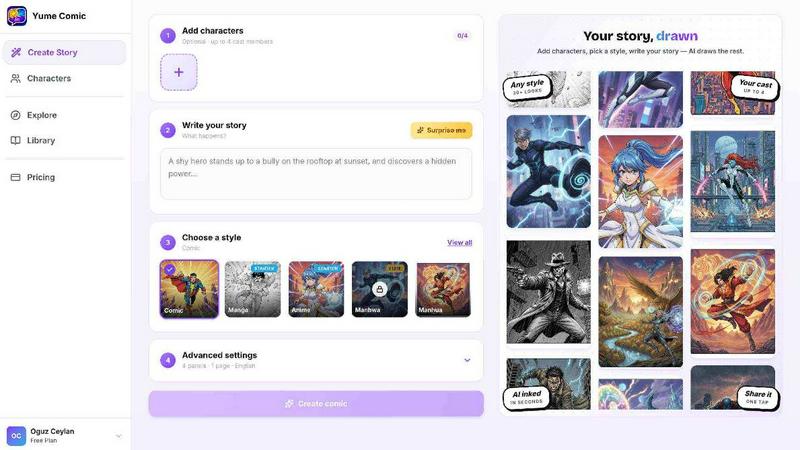
Yume Comic is an AI-powered comic creation tool designed to turn your story ideas into full comic pages, manga panels, or webtoon strips in minutes. Whether you are a storyteller, a social media creator, a manga fan, or just someone who loves visual storytelling, Yume Comic removes the biggest barrier to entry: the need for drawing skills. You simply describe your idea, character, or scene, and the AI handles the rest. The tool works entirely in your browser, so there is no software to download or expensive tablet to buy. You can create everything from high-energy action panels to soft emotional scenes, all while keeping your characters consistent across every panel. Yume Comic supports multiple styles including classic shonen manga, moody manhwa, bright webtoon, and vintage comic strips. Its main value proposition is simple: you be the director and writer, and let the AI handle the heavy lifting of perspective, anatomy, and layout. It empowers anyone with a story to see their imagination come to life without spending years learning how to draw. The platform is available in over 15 languages, making it accessible to creators around the world. Whether you dream of a dramatic rainy standoff or a cozy cafe meeting, Yume Comic helps you get that scene out of your head and onto the page instantly.
Features of Yume Comic
Prompt to Page
Turn a one-line idea into a full multi-panel layout in seconds. You simply type a few lines about your character and what happens next, and the AI reads your prompt to build a complete comic page with dialogue bubbles and cinematic angles. No sketching or perspective planning is required. Just drop in your idea, hit the button, and watch your first draft come to life in seconds.
Consistent Character Design
One of the hardest parts of making a series is ensuring your main character looks the same from panel to panel. Yume Comic handles this heavy lifting for you. Once you define your protagonist, they stay consistent throughout your entire webtoon or manga. Their hair, outfit, and face remain perfectly on model every single time, so you can focus on plot and dialogue.
Multiple Style Switching
Why stick to one look when you can try them all? This free comic maker lets you switch between classic shonen manga, moody noir, vibrant vertical manhwa, or bright webtoon styles with a single click. It is perfect for testing different vibes for your characters. You can see how your hero looks in a gritty action scene or a soft romance setting instantly.
Browser-Based Creator
Forget about expensive tablets or complicated software that takes years to learn. Yume Comic works right in your browser, so you can start creating on your phone or laptop. There is nothing to install or configure. Just open the website, sign up, and begin turning your ideas into professional-looking comic pages immediately. This makes it accessible to anyone with an internet connection.
Use Cases of Yume Comic
Social Media Content Creation
Social media creators can use Yume Comic to generate eye-catching comic strips and panels for their feeds. Instead of spending hours on illustrations, you can quickly produce a short manga-style story about a funny moment or a dramatic scene. These visuals stand out in crowded timelines and help you engage followers with unique, shareable content that looks professionally made.
Storyboarding for Writers and Authors
Writers and novelists can use Yume Comic to visualize scenes from their books or scripts. If you have a character description or a key scene in mind, you can generate a comic panel to see how it looks visually. This helps with character development, scene blocking, and even pitching ideas to publishers or collaborators without needing an artist on retainer.
Fan Art and Fan Manga Creation
Manga and anime fans can create their own fan stories featuring beloved characters or original heroes. You can experiment with different styles like shonen, manhwa, or webtoon to see how your favorite characters would look in a different art style. It is a fun way to explore your creativity and share your unique take on popular worlds with the fan community.
Educational and Training Visuals
Teachers and trainers can use Yume Comic to create engaging visual stories for lessons or training materials. A historical event, a scientific process, or a social story can be turned into a short comic that is easier for learners to understand and remember. The tool makes it simple to produce professional-looking educational comics without needing any artistic skills.
Frequently Asked Questions
Do I need any drawing skills to use Yume Comic?
No, you do not need any drawing skills at all. Yume Comic is built specifically for people who want to create comic visuals without learning how to draw. You simply describe your idea in text, and the AI generates the panels, characters, and layouts for you. It handles perspective, anatomy, and composition so you can focus on your story.
Can I keep my characters looking the same across multiple panels?
Yes, character consistency is one of the core features of Yume Comic. Once you define your protagonist, the AI ensures they look the same in every panel of your story. Their hair, outfit, face, and overall appearance stay consistent, which is especially important for longer webtoons or manga series where character continuity matters.
What styles can I create with Yume Comic?
You can create a wide variety of styles including classic black-and-white shonen manga, moody noir comics, vibrant vertical manhwa, bright webtoon strips, and vintage comic book looks. You can switch between these styles with a single click to see how your story looks in different aesthetics. This flexibility lets you experiment until you find the perfect vibe for your world.
Is Yume Comic free to use?
Yes, Yume Comic offers a free tool that lets you start creating comic pages from text prompts right away. You can generate multi-panel layouts, use different styles, and keep your characters consistent without paying anything upfront. The free version is designed to let you explore the platform and see your ideas come to life before considering any premium options.
Similar to Yume Comic

Dola AI
Create AI videos from text or images with Dola AI. Free sign-up credits, pick a video model, download your clips. Image generation also available.

Pawaime
Pet portraits with you in them: upload one photo of you and one of your pet, pick a scene, get a realistic portrait. 2 free photos.

Selzee
Selzee is an AI ad generator that finds winning ads right now and recreates them for your brand, with your products, logo, fonts and colours.

AngleForge
Turn one product photo into marketplace-ready images: studio shots, new angles, lifestyle scenes and backgrounds for Amazon, Shopify and Etsy.

AppIconGenerator
Generate iOS and Android app icons from any image and export all platform sizes for free.

Hotel Lobby AI
Hotel Lobby AI turns two portraits into a duet video in an orange recording booth with motion, lip-sync, and audio.

Tiny Desk AI Video Maker
Turn three photos into a vertical Tiny Desk-style concert video with original sound.

ZombieTrend AI
ZombieTrend AI turns two photos into a cinematic zombie love story video with sound, no watermark, and a free preview.