
Alternatives to Seedance 3.0 AI Video Generator
Explore the best alternatives and competitors to Seedance 3.0 AI Video Generator.
Explore 20 alternatives to Seedance 3.0 AI Video Generator. Compare features, pricing, and find the best fit for your needs.

Ozil AI
Put yourself in the viral Ozil goal video from one photo. Silent 9:16 720p MP4, no watermark, from $6.99.

Klype AI
Writes LinkedIn and social posts in your own measured voice and checks every draft for AI tells and invented claims.
Genjutsu AI Video Editor
Edit existing videos with AI: swap characters, outfits, objects or scenes while using the source clip to guide motion and camera framing.
Bulin 47 Video Generator
AI Video Bulin47 lets you put yourself in the viral Bulin47 video trend with AI. Upload your photo, create a personalized Bulin47 video, and share it
Bulin 47 AI Freestyle Video Generator
Upload any photo and get your own Bulin 47 AI Freestyle video

AI Face Swap Video
Swap any face into any video online with AI in minutes. Upload a clip and a photo, get natural lighting and expressions. Free credits on sign-up.

Restore Old Photos - Retrocap
AI photo restoration app for iPhone and Android: repair scratches and tears, colorize black-and-white photos, sharpen faces and animate old portraits.

ColdCrow
AI cold email writer: turn one line about a prospect into personalized outreach with a deliverability score in seconds. Free trials, no credit card.

Rumpelstiltskin AI Video Generator
Make the viral Rumpelstiltskin tiptoe dance meme video from two photos

Bulin 47 AI
Bulin 47 AI puts your face into the viral Bulin 47 freestyle video from one photo. Get a 5–19-second vertical MP4 for TikTok and Reels.
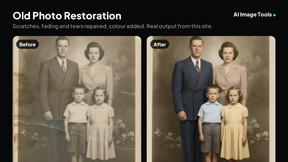
AI Image Tools
Text to image, photo edits, background removal and restoration. Pick Nano Banana, FLUX, Seedream or GPT Image and see the price first.

ImageAICraft
GPT Image 2 AI Image Generator & Editor for Text-to-Image and Image-to-Image Creation

MeiGen AI
AI photo editor and image generator: upload a photo, describe the change in plain English, pick GPT Image 2, Nano Banana Pro or Seedream.
Parlune
Learn a language from real content, not vocab dumps. Parlune turns your favourite foreign-language YouTube videos into immersive, audio-synced lessons
About Seedance 3.0 AI Video Generator Alternatives
Seedance 3.0 AI Video Generator is a powerful tool in the content creation and marketing space that allows you to turn text prompts, images, video clips, and even audio references into cinematic video drafts. It sits at the intersection of video production and image generation, designed to help creators and teams rapidly produce campaign assets, launch videos, and product storytelling pieces without needing a full production crew. Its standout abilities include maintaining multi-shot continuity and generating native sound, making it a compelling choice for fast-paced creative work. However, users often start looking for alternatives for a few common reasons. You might find that your specific workflow requires a different pricing model, perhaps a subscription that better fits a smaller budget or a pay-as-you-go structure for occasional use. Others might need features that Seedance 3.0 doesn't emphasize, such as advanced manual editing controls, higher resolution outputs for broadcast, or deeper integrations with specific editing software like Adobe Premiere or DaVinci Resolve. Platform needs also play a role—you might prefer a tool that offers a mobile app, a browser-based interface with no downloads, or a dedicated API for automation. When evaluating alternatives, focus on what matters most for your projects: the quality of the video output, the flexibility of the input types (text, image, video, audio), the speed of generation, and how well the tool fits into your existing creative pipeline.
FAQs about Seedance 3.0 AI Video Generator Alternatives
What is Seedance 3.0 AI Video Generator?
Seedance 3.0 is an AI-powered video generator that enables creators and teams to produce cinematic video drafts quickly from text prompts, images, video clips, and audio references. It is designed for content creation and marketing workflows, offering features like multi-shot continuity and native sound generation. This tool streamlines the process of creating campaign assets, launch videos, and product storytelling without needing a traditional production setup.
Who is Seedance 3.0 AI Video Generator for?
Seedance 3.0 is built for creators, marketers, and teams who need to rapidly produce video content for campaigns, product launches, and creative experiments. It is especially useful for those who value fast cinematic drafts from mixed inputs like text, images, and audio. Whether you are a solo content creator or part of a larger marketing team, this tool helps you iterate on visual stories quickly.
Is Seedance 3.0 AI Video Generator free?
The provided content does not specify whether Seedance 3.0 has a free tier or trial. Typically, AI video generators of this caliber offer a range of pricing options, from free limited plans to paid subscriptions based on usage or features. To determine the exact pricing and availability of a free version, you should check the official Seedance website or documentation.
What are the main features of Seedance 3.0 AI Video Generator?
Seedance 3.0 supports multiple workflows including text-to-video, image-to-video, video-to-video, and multi-reference workflows. It allows you to use text prompts, images, clips, and audio references as inputs. A key feature is its ability to maintain multi-shot continuity across scenes and generate native sound, making the outputs more cinematic and cohesive. These features make it suitable for creating campaign assets, launch videos, and product storytelling.