
4Generate vs OGimagen
Side-by-side comparison to help you choose the right AI tool.

4Generate is your free online toolbox with generators, validators, and handy tools for everyday tasks.
Last updated: February 28, 2026

OGimagen instantly creates beautiful, platform-perfect social images and meta tags from your content.
Last updated: March 11, 2026
Visual Comparison
4Generate

OGimagen
Feature Comparison
4Generate
Vast Library of Specialized Generators
4Generate excels at creating realistic, functional data on demand. Beyond simple password or number generators, it offers tools for generating region-specific documents like Brazilian CPF, CNPJ, and RENAVAM numbers, which are invaluable for software testing and form filling. You can also create QR codes (including Wi-Fi access ones), barcodes, fake JWTs for development, and even structured data like full fake person or company profiles. This extensive collection turns complex data creation into a one-click task.
Comprehensive Validation and Verification Tools
Creating data is one thing; checking its validity is another. 4Generate pairs its generators with robust validators. You can instantly verify the authenticity of CPF numbers, credit card numbers (for format testing), PIS/PASEP codes, and JWTs. This is crucial for developers ensuring their applications handle data correctly, for administrators checking submitted forms, or for anyone who needs to confirm the structural integrity of an important number or token.
Developer-Focused Utilities (DevTools)
Catering directly to programmers and web developers, 4Generate includes a dedicated DevTools section. Here you'll find essential utilities like Hash Generators (MD5, SHA, etc.), Base64 Encoders/Decoders, URL Encoders, UUID Generators, and a Binary Code Translator. These tools streamline routine coding tasks, debugging, and data transformation, eliminating the need to write small scripts or search for separate online converters.
Practical Everyday Calculators and Converters
The platform understands daily practical needs, offering a suite of easy-to-use calculators and converters. This includes a Percentage Calculator, Time Converter, Hours Calculator for work shifts, a Days Between Dates Counter, and area calculators for various shapes. For content work, there are text tools like a Character/Word Counter, Text Case Converter, and even an Instagram Caption Generator. It's like having a Swiss Army knife for both professional and personal calculations.
OGimagen
AI-Powered Generation
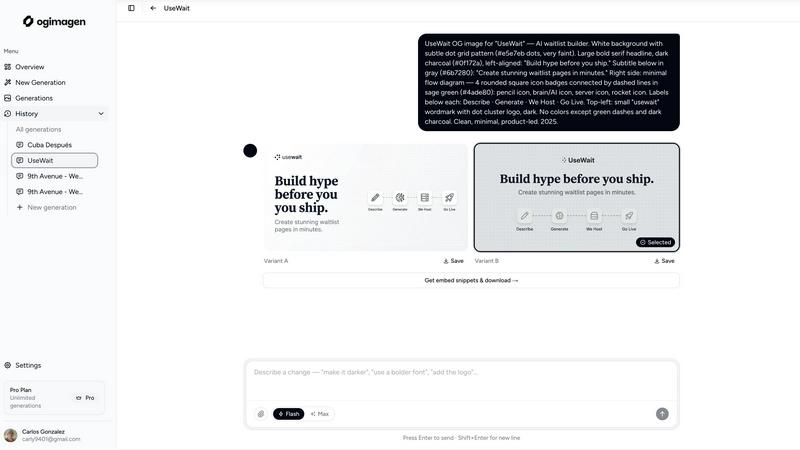
Simply enter your title and description, and OGimagen's AI will instantly create two beautiful, unique image variants for you to choose from. The AI handles the design, typography, and layout, ensuring a polished and professional result every time. You can further customize the output with your brand color and select from different style presets to match your project's aesthetic, all without any design skills required.
Multi-Platform Optimization
OGimagen doesn't just create one image; it automatically generates and optimizes three different formats from a single generation to meet each platform's specific requirements. You get a 1200x630px image for Facebook and other OG platforms, a 1200x600px Twitter Card, and a 1200x627px LinkedIn Card. This ensures your preview looks pixel-perfect everywhere your link is shared, saving you from manually resizing and reformatting.
Framework-Specific Meta Tags
After generating your images, OGimagen provides ready-to-paste code snippets for your specific web framework. Free users get the standard HTML meta tags, while Pro users unlock snippets for modern frameworks like Next.js (App and Pages Router), Astro, SvelteKit, and Remix. This feature eliminates the guesswork and manual coding, letting you ship your new social cards in seconds.
MCP (Model Context Protocol) Integration
For Pro users, OGimagen integrates directly into your coding workflow through MCP. You can connect it to tools like Claude Code, Cursor, or Windsurf and generate images, list past generations, and grab embed snippets without ever leaving your code editor. This seamless integration is a game-changer for developers who want to maintain their flow and efficiency.
Use Cases
4Generate
Software Development and Testing
Developers can massively accelerate their workflow. Use the CPF/CNPJ generators to populate test databases with valid Brazilian tax IDs. Employ the JWT Generator and Validator to debug authentication flows. Utilize the Hash Generator and Base64 Converter for data processing tasks. The UUID Generator is perfect for creating unique identifiers. All these tools help in building and testing applications without relying on external data sources.
Academic and Student Projects
Students working on assignments, theses, or presentations will find a treasure trove of helpers. The Percentage and Rule of Three calculators assist with math problems. The Lorem Ipsum Generator provides placeholder text for design mockups. The Character Counter ensures essays meet length requirements. The Privacy Policy Generator can help with project documentation. It's a supportive toolkit for getting academic work done efficiently.
Business Administration and Form Handling
Administrative professionals often deal with forms and data validation. 4Generate allows them to quickly generate sample client information (like names, bank accounts, or company details) to test form functionality. The validators can be used to double-check identification numbers submitted in forms. The Hours Calculator and Date tools are perfect for managing payroll, schedules, and project timelines.
Creative Design and Content Creation
Designers and content creators can leverage specific tools to enhance their work. The Glassmorphism and Claymorphism Generators help create modern CSS effects with ease. The Favicon Generator creates website icons instantly. The Font Generator and Strikethrough Text tool add flair to social media posts or graphics. The QR Code Generator is ideal for linking physical materials to digital content, perfect for marketing materials or personal projects.
OGimagen
Blog Post Promotion
Every time you publish a new blog post, you need an eye-catching social preview. With OGimagen, you can generate a unique, branded image for each article in seconds. Simply input the post's title and a short excerpt, and you have a professional card ready to boost shares and clicks when you or your readers share the link on social media.
SaaS Product Launches
When launching a new feature or product, first impressions on social platforms are critical. OGimagen allows SaaS teams to quickly create consistent, high-quality Open Graph images that reflect their brand. This ensures that every announcement link shared on LinkedIn, Twitter, or in community channels like Discord looks polished and trustworthy.
Developer Workflow Integration
Developers building websites can integrate OGimagen's MCP feature directly into their editor. While coding a new page or component, they can generate the required OG image on the fly and immediately insert the correct meta tags into their Next.js or Astro project. This streamlines the development process and ensures no page goes live without proper social previews.
Marketing Campaigns
For marketing teams running campaigns with multiple landing pages or content pieces, creating individual social images can be a bottleneck. OGimagen scales this process effortlessly. Team members can generate a batch of on-brand images for all campaign assets quickly, ensuring visual consistency and saving valuable design resources.
Overview
About 4Generate
4Generate is your ultimate, free online toolbox designed to declutter your digital life and simplify a massive range of everyday tasks. Imagine having a single, powerful website that replaces dozens of bookmarked pages and standalone apps. That's 4Generate. It's an all-in-one platform packed with hundreds of handy generators, validators, calculators, and converters, all accessible instantly from your browser without any downloads or installations. Whether you're a developer needing to encode a URL, a student calculating percentages, a designer creating a glassmorphism effect, or just someone who needs a quick password or a valid CPF number for form testing, 4Generate has a tool for that. Its core mission is to be the "one box" for all your utility needs, saving you time and hassle. With a clean, user-friendly interface available in multiple languages (Portuguese, English, Spanish, French, and German), it's built for everyone—from tech professionals and business owners to students and casual users. No more bookmark mess; just reliable, quick solutions right at your fingertips.
About OGimagen
OGimagen is your AI-powered assistant for creating stunning Open Graph images in seconds. It's designed for developers, content creators, and marketers who want their shared links to look professional and engaging without the hassle of manual design work. The tool takes your content—like a title and description—and uses artificial intelligence to generate beautiful, production-ready social card images that are perfectly optimized for platforms like Facebook, Twitter (X), and LinkedIn. Beyond just creating images, OGimagen provides the exact meta tag snippets you need to embed them into your website, whether you're using Next.js, Astro, SvelteKit, or plain HTML. This end-to-end solution ensures your links stand out in feeds, helping to dramatically improve click-through rates with minimal effort. You can even try it instantly without signing up, making it the fastest way to level up your link previews.
Frequently Asked Questions
4Generate FAQ
Is 4Generate completely free to use?
Yes, absolutely! 4Generate is a 100% free online platform. You can access and use all its generators, validators, calculators, and tools without any cost, registration, or subscription. The project is supported by user donations (the "Support Project" coffee icon) and related services, but the core toolbox remains free for everyone.
What kind of data do the generators create? Is it real?
The generators are designed to create structurally valid data. For example, a CPF Generator will produce a number that passes official validation algorithms. However, this data is for testing, development, and educational purposes only. The generated personal, financial, or document numbers are random and fictitious—they should never be used for real-world identification, fraud, or to impersonate actual individuals or entities.
Do I need to create an account to use the tools?
No account is required! One of the key benefits of 4Generate is its instant accessibility. You can visit the website and start using any tool immediately. There is no sign-up process, which means no passwords to remember and no personal data to provide. Your privacy and convenience are prioritized.
Can I use 4Generate on my mobile phone?
Definitely! 4Generate is a web-based platform with a responsive design. This means the website automatically adjusts its layout to work perfectly on desktops, laptops, tablets, and smartphones. You can easily generate a QR code, calculate a percentage, or validate a number directly from your mobile browser, making it a truly portable toolbox.
OGimagen FAQ
How does AI generation work?
OGimagen's AI analyzes the text content you provide, such as your title and description, to understand the context and key elements. It then applies design principles, typography, and layout rules to create a visually appealing image that highlights your content. You can guide the style with presets and brand colors, but the AI handles the creative composition, ensuring a unique and professional result every time.
What's the difference between Starter, Growth, and Pro?
Starter and Growth are one-time purchase packs for 10 and 25 generations, respectively, with CDN hosting for 45 or 90 days. The Pro plan is a monthly subscription that includes 50 generations per month, permanent CDN hosting, and exclusive access to the MCP integration for editor workflow tools. Pro is designed for ongoing, high-volume use with priority processing.
What is MCP integration?
MCP (Model Context Protocol) integration allows OGimagen to connect directly with compatible code editors and AI assistants like Claude Code, Cursor, and Windsurf. Once connected, you can generate images, access your generation history, and copy embed code snippets through commands within your editor, without switching to a web browser. This is a Pro plan feature.
Which frameworks are supported for meta tag snippets?
OGimagen provides snippets for a wide range of frameworks. All users get plain HTML. Pro users additionally get framework-specific snippets for Next.js (both App Router and Pages Router), Astro, SvelteKit, and Remix. This ensures you have the correct, optimized code structure for your project's architecture.
Alternatives
4Generate Alternatives
4Generate is a versatile online toolbox in the web builders category, packed with free generators and validators for everyday tasks. It's a fantastic resource for quickly creating passwords, validating documents, and converting data without any software installation. Users often explore alternatives for various reasons. Some might need a tool with a different set of specialized generators, while others could be looking for a platform that integrates directly with their workflow or offers a different user experience. It's all about finding the right fit for your specific needs. When searching for a different tool, consider what matters most to you. Look at the range of generators offered, the ease of use, and whether the platform supports your language. A good alternative should feel intuitive and reliably handle the tasks you perform most often.
OGimagen Alternatives
OGimagen is an AI-powered tool in the developer tools category, designed to create beautiful Open Graph images quickly. It helps developers and content creators generate production-ready social cards that make shared links look professional and engaging, ultimately boosting click-through rates on social media. People often explore alternatives for various reasons. This could be due to budget constraints, needing a different set of features, or requiring integration with a specific platform or workflow. Some may seek more design control, while others prioritize simplicity or a different pricing model. When evaluating other options, consider your core needs. Look at the balance between ease of use and customization, the quality and speed of the AI image generation, compatibility with your tech stack, and of course, the overall value for the price. The right tool should fit seamlessly into your process and help you create stunning previews without extra hassle.