
Advanced AI image generator and editor with Z image vs Hush Touch | Voice-to-Text for MacOS
Side-by-side comparison to help you choose the right AI tool.

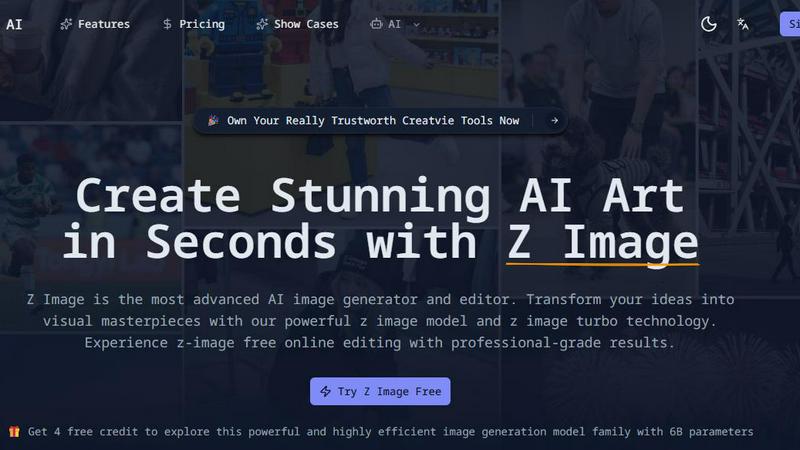
Advanced AI image generator and editor with Z image
Create stunning, bilingual AI-generated images in seconds with Z Image's advanced editing and photorealistic quality.
Last updated: February 26, 2026

Hush Touch | Voice-to-Text for MacOS
Hush Touch is an offline voice-to-text app for Mac that learns your vocabulary and improves accuracy with every use.
Last updated: February 26, 2026
Visual Comparison
Advanced AI image generator and editor with Z image
Hush Touch | Voice-to-Text for MacOS

Feature Comparison
Advanced AI image generator and editor with Z image
Blazing-Fast Generation
Experience image creation like never before with Z image's 8-step Turbo inference technology. Generate stunning visuals in sub-second times, allowing you to maintain your creative flow without interruptions.
Professional Quality
The advanced 6B parameter model of Z Image ensures that every image produced is of professional quality. It excels in photorealism, capturing intricate details and delivering accurate representations of your prompts.
Bilingual Support
Z Image stands out with its flawless bilingual text rendering capabilities. Whether your prompts are in English or Chinese, the generator ensures seamless integration of text into images, making it accessible for diverse users.
Open-Source Ecosystem
Z Image is built on an open-source model with Apache 2.0 licensing. This allows for customization and fine-tuning by users, fostering a community-driven approach to development and creativity.
Hush Touch | Voice-to-Text for MacOS
On-Device Processing
Hush Touch processes all voice dictation entirely on your Mac, ensuring your data remains private and secure. This means there is no dependency on cloud services, allowing for offline use without compromising on performance.
Dual Engine Recognition
Combining the capabilities of two Apple dictation engines, Hush Touch provides a more robust transcription experience. The DictationTranscriber focuses on natural speech flow and punctuation, while the SFSpeechRecognizer enhances your experience with custom vocabulary recognition.
Adaptive Learning
The adaptive learning feature allows Hush Touch to learn from your corrections and frequently used terms. This means that the app gets smarter with every use, making it particularly effective for specialized vocabulary in fields like medicine or technology.
Context Modes
Hush Touch offers various context modes, including General, Email, Code, and Notes modes. This flexibility allows you to tailor your dictation experience to the specific writing task at hand, improving accuracy and efficiency.
Use Cases
Advanced AI image generator and editor with Z image
Creative Art Generation
Artists can leverage Z Image to generate unique artworks from simple text prompts, offering a new dimension to their creative processes. This tool helps artists visualize concepts and explore different styles quickly.
Marketing and Advertising
Marketers can create eye-catching visuals for campaigns or social media posts in seconds. With Z Image, producing bespoke graphics tailored to specific audiences becomes effortless and efficient.
Education and Training
Educators and trainers can use Z Image to create engaging visual aids that enhance learning experiences. By transforming complex concepts into visual representations, educators can improve comprehension and retention.
Game Development
Game developers can utilize Z Image to generate concept art, character designs, or environmental visuals. The rapid generation of high-quality images allows for faster prototyping and iteration during game design processes.
Hush Touch | Voice-to-Text for MacOS
Drafting Emails
With Hush Touch, you can easily draft professional emails without typing a single word. Just activate the app, speak your thoughts naturally, and let it convert your words into text seamlessly.
Taking Notes in Meetings
Whether you are in a meeting or a lecture, Hush Touch allows you to take notes hands-free. Simply dictate your thoughts, and the app will capture everything accurately, enabling you to focus on the discussion at hand.
Writing Content Creatively
For writers and content creators, Hush Touch is a valuable tool. You can brainstorm ideas, outline articles, or even write entire drafts using your voice, making the creative process feel more fluid and spontaneous.
Coding and Technical Documentation
Developers can utilize Hush Touch to dictate code snippets or technical documentation without needing to switch between keyboard and voice. The app’s ability to learn technical jargon ensures that your commands are transcribed accurately.
Overview
About Advanced AI image generator and editor with Z image
Advanced AI image generator and editor with Z image is a cutting-edge tool designed to transform your ideas into stunning visual art with remarkable speed and precision. Utilizing a powerful 6B parameter model enhanced by Decoupled-DMD technology, Z Image allows users to create high-quality images from text prompts in mere seconds. Whether you are an artist looking to enhance your creative process, a marketer seeking unique visuals, or simply someone who loves to explore AI-generated art, this tool caters to various users. With its bilingual support for both English and Chinese, Z Image ensures that language barriers do not hinder creativity. The main value proposition of Z Image lies in its ability to deliver professional-grade visuals rapidly while maintaining an intuitive user experience, making it an essential tool for anyone in need of high-quality imagery.
About Hush Touch | Voice-to-Text for MacOS
Hush Touch is an innovative voice-to-text application designed specifically for macOS users seeking a seamless dictation experience. This app enables users to convert their spoken words into text quickly, naturally, and with a high level of privacy. Hush Touch operates entirely on-device, meaning you can use it offline without relying on cloud services. Utilizing two powerful Apple transcription engines, combined with an Apple Intelligence final pass, Hush Touch ensures that the transcriptions are not only accurate but also contextually relevant. With a lightweight footprint of just 5.5 MB, the app integrates effortlessly into your daily writing workflows, allowing you to draft emails, messages, notes, and documents hands-free. Ideal for anyone who values privacy and efficiency, Hush Touch enhances your writing process by learning your vocabulary over time, eliminating filler words, and improving punctuation. Plus, for a one-time payment of $20, you can enjoy a lifetime license with no recurring fees.
Frequently Asked Questions
Advanced AI image generator and editor with Z image FAQ
What makes Z Image different from other AI image generators?
Z Image combines advanced technology, including a 6B parameter model and Turbo inference, to deliver faster and more photorealistic image generation. Its bilingual support for English and Chinese also sets it apart.
Is Z Image user-friendly for beginners?
Yes, Z Image is designed with an intuitive interface that makes it accessible for both beginners and advanced users. The simple steps guide users from idea conception to image generation seamlessly.
Can I use Z Image for commercial purposes?
Absolutely! Z Image allows users to create images that can be used commercially, as it operates under an open-source license, providing flexibility for various uses.
What hardware do I need to run Z Image effectively?
Z Image is optimized to run efficiently on consumer-grade hardware, specifically on GPUs with 16GB VRAM. This makes it accessible for most users without requiring high-end computing equipment.
Hush Touch | Voice-to-Text for MacOS FAQ
How does Hush Touch ensure privacy?
Hush Touch operates entirely on-device, meaning your voice data is processed locally on your Mac. There is no cloud dependency or data collection, ensuring complete privacy.
Can I customize the vocabulary in Hush Touch?
Yes, Hush Touch allows you to add up to 500 custom terms and learns from your corrections over time. This feature is particularly useful for specific jargon and phrases relevant to your profession.
Is Hush Touch compatible with all macOS versions?
Hush Touch is designed for macOS, and while it is compatible with most recent versions, it is recommended to check the specific system requirements on the official website to ensure compatibility.
What is the cost of Hush Touch?
Hush Touch is available for a one-time payment of $20, providing a lifetime license with no ongoing subscription fees. This makes it a cost-effective choice compared to other dictation software options.
Alternatives
Advanced AI image generator and editor with Z image Alternatives
The Advanced AI image generator and editor with Z image is a cutting-edge tool that falls under the category of AI Assistants, specifically designed for creating and editing images with photorealistic quality. This innovative product leverages sophisticated algorithms to allow users to generate stunning visuals quickly and efficiently, making it a popular choice among graphic designers, marketers, and content creators alike. Users often seek alternatives to Advanced AI image generator and editor with Z image for a variety of reasons, including pricing options, feature sets that better suit their specific needs, or compatibility with different platforms. When exploring alternatives, it's important to consider factors such as image quality, ease of use, the range of features offered, and whether the software can run efficiently on the hardware you have. Finding the right fit can significantly enhance your creative workflow and overall satisfaction.
Hush Touch | Voice-to-Text for MacOS Alternatives
Hush Touch | Voice-to-Text for MacOS is a powerful dictation application designed for macOS users seeking a fast, natural, and private way to convert spoken words into written text. As an AI assistant, it excels in offline voice-to-text capabilities, relying on advanced Apple transcription technologies to enhance accuracy and efficiency. Users often explore alternatives to Hush Touch for various reasons, including pricing considerations, feature sets, or compatibility with other platforms. When searching for a voice-to-text solution, it’s essential to evaluate factors such as ease of use, offline functionality, privacy measures, and how well the product integrates into your existing workflow to ensure it meets your specific dictation needs.