
AI Convert Hub vs Pinssaver
Side-by-side comparison to help you choose the right AI tool.

AI Convert Hub
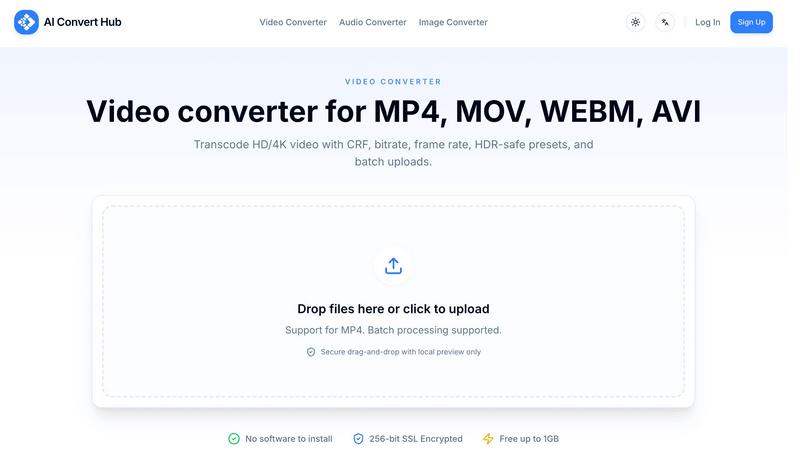
AI Convert Hub converts and compresses your videos, audio, and images quickly and securely right in your browser.
Last updated: February 28, 2026

Pinssaver
Download Pinterest videos and images for free in HD or 4K quality, with no watermarks.
Last updated: February 28, 2026
Visual Comparison
AI Convert Hub
Pinssaver

Feature Comparison
AI Convert Hub
Universal Format Support
AI Convert Hub breaks down file compatibility barriers by supporting a massive library of over 200 video, audio, and image formats. Go beyond common types like MP4 and JPG to work with specialized formats such as HEIC photos from iPhones, high-efficiency WEBM videos, and professional camera RAW files. This universal support ensures that no matter where your file comes from or where it needs to go, you have a single, dependable tool to handle the conversion seamlessly.
AI-Optimized Compression
This feature intelligently reduces file sizes while vigilantly guarding quality. Instead of using basic compression that can degrade your media, AI Convert Hub employs advanced algorithms to analyze your files and apply the most efficient compression settings. This means you can shrink a large video for email or web upload significantly, but the final output will retain stunning visual and audio clarity, making it perfect for preserving quality in storage-limited scenarios.
Advanced Codec-Level Controls
For users who need fine-tuned results, AI Convert Hub provides professional encoding parameters directly in your browser. You're not just picking an output format; you can adjust technical details like the Constant Rate Factor (CRF) for video quality, bitrate limits, frame rate, audio channel configuration, and more. This level of control is typically found in complex desktop software, making it a game-changer for developers, videographers, and audio engineers who demand specific outcomes.
Secure Batch Processing
Efficiency meets security with this powerful combination. You can drag and drop entire folders or select dozens of files at once for simultaneous conversion, saving you hours of manual work. Every step of the process is protected by 256-bit SSL encryption, ensuring your files are transferred securely. Furthermore, the platform automatically cleans up all file artifacts after processing, so your data remains private and isn't stored on servers indefinitely.
Pinssaver
Free & Unlimited Downloads
Pinssaver is completely free to use with no hidden fees, subscriptions, or download limits. You can save as many Pinterest videos, images, and GIFs as you want without ever reaching for your wallet. This commitment to being free ensures that everyone, from students to professionals, can access and archive the content that inspires them without any barriers or restrictions.
High-Quality Output (HD, 2K, 4K)
Don't settle for blurry, low-resolution saves. Pinssaver prioritizes quality, allowing you to download your Pinterest content in the best available resolution. Whether the original pin is in HD, 2K, or stunning 4K, our tool fetches that high-quality file for you. This means your saved videos and images remain crisp, clear, and perfect for both personal viewing and professional creative projects.
No Watermarks & Privacy-Safe
Your downloads come out clean and original, without any annoying Pinssaver watermarks or branding added. More importantly, we value your privacy. The tool requires no login, doesn't track your activity, and never stores your personal data or the links you process. You can download with confidence, knowing your browsing habits and saved content remain completely private.
Cross-Device & Browser Compatibility
Pinssaver works seamlessly wherever you are. It's fully optimized for use on Android and iOS smartphones, Windows and Mac computers, and tablets of all sizes. Simply open your preferred browser—like Chrome, Safari, Edge, or Firefox—visit the Pinssaver website, and you're ready to go. There's no need for different tools for different devices.
Use Cases
AI Convert Hub
Content Creators Preparing Social Media Clips
A video creator can upload a long, high-resolution recording and use AI Convert Hub to quickly batch-convert segments into multiple formats and resolutions optimized for YouTube, Instagram, and TikTok. The AI compression ensures file sizes are manageable for upload without losing the sharp, engaging quality that audiences expect, streamlining their entire publishing workflow.
Web Developers Optimizing Site Assets
A developer building a website needs images in next-gen formats like WebP and AVIF for faster loading times. They can drag in hundreds of PNG and JPG files, convert them all in a batch with optimized compression, and use the advanced controls to fine-tune the balance between quality and file size, directly improving their site's performance and user experience.
Teams Collaborating on Multimedia Projects
A marketing team working on a campaign can share large video and image assets. Team members can use AI Convert Hub to compress these files for easy email sharing or cloud storage without specialized software. The consistent, high-quality output and secure transfer process ensure everyone works with the right files efficiently and safely.
Students and Professionals Handling Documents
A student compiling a presentation can convert screen recordings to MP4, trim audio clips to WAV format for a project, and compress a folder of scanned images to reduce the overall file size for submission. The free tier and no-installation requirement make it an ideal, accessible tool for everyday academic and professional multimedia tasks.
Pinssaver
Building Personal Mood Boards
Creative professionals like graphic designers, interior decorators, and fashion stylists use Pinssaver to download visual inspiration from Pinterest. They can save color palettes, fabric textures, layout ideas, and stunning photographs to compile into personal digital mood boards. This offline archive becomes an invaluable, organized resource for brainstorming and executing new projects.
Saving Tutorials for Offline Learning
DIY enthusiasts, cooks, and crafters often find detailed video tutorials on Pinterest for everything from woodworking to baking. With Pinssaver, they can download these step-by-step guides directly to their phone or tablet. This allows them to follow along in their workshop or kitchen without worrying about buffering videos or using up mobile data, making the learning process smooth and uninterrupted.
Archiving Travel & Lifestyle Inspiration
Travel bloggers and adventure seekers use Pinterest to dream up future trips. Pinssaver lets them download breathtaking destination videos, hotel tours, and packing tip GIFs to create a personal travel inspiration folder. These saved clips can be revisited anytime to plan itineraries or simply to daydream, all without needing an internet connection.
Content Creation & Research
Influencers, marketers, and social media managers use Pinssaver as a research tool. They can download trending video formats, popular image styles, or engaging GIFs from Pinterest to analyze trends and gather references for their own content. Having these examples saved offline helps in brainstorming sessions and ensures they can study successful content anytime.
Overview
About AI Convert Hub
AI Convert Hub is your all-in-one, browser-based solution for converting and compressing video, audio, and image files. It's designed to replace clunky desktop software and unreliable online converters by offering a professional-grade toolset right in your web browser. Whether you're a content creator needing to prepare a video for social media, a developer optimizing web assets, or a team member handling a batch of documents, AI Convert Hub streamlines your workflow with speed and precision. Its core value lies in combining powerful, codec-aware controls with an incredibly user-friendly interface. You get the depth of technical control professionals need—like adjusting bitrate, frame rate, and CRF values—alongside the simplicity of drag-and-drop batch uploads that anyone can use. With support for over 200 formats, robust security via 256-bit SSL encryption, and a generous free tier, it's the reliable and efficient conversion hub for a diverse audience looking to get work done without compromise.
About Pinssaver
Pinssaver is your go-to, free online tool designed to effortlessly save the videos, images, and GIFs you discover on Pinterest. Ever found the perfect recipe tutorial, a stunning home decor idea, or a hilarious GIF on Pinterest and wished you could keep it? Pinterest is fantastic for discovery, but it doesn't let you download content for offline use. That's the gap Pinssaver fills perfectly. It's a sleek, web-based downloader that works directly in your browser on any device—be it your phone, tablet, or computer. There's no app to install and no account to create. Simply copy the link from Pinterest, paste it into Pinssaver, and get a high-quality, watermark-free download in seconds. It's built for anyone who loves Pinterest, from casual browsers saving inspiration for a weekend project to professional content creators building mood boards and reference libraries. With a strong commitment to user privacy, speed, and a beautifully simple interface, Pinssaver empowers you to keep your favorite finds forever, turning fleeting inspiration into a permanent personal collection.
Frequently Asked Questions
AI Convert Hub FAQ
Is it free to use?
Yes, AI Convert Hub offers a generous free tier that allows you to perform conversions without even registering. You get daily credits to handle files up to 1GB in size, which is perfect for most everyday tasks. For heavier usage, higher limits, and priority processing, you can explore their premium plans.
Do you keep my files?
Your privacy and security are paramount. All file transfers are protected with 256-bit SSL encryption. Most importantly, the system is designed to automatically delete your original files and converted artifacts from its servers shortly after the processing is complete. Your data is not stored long-term or used for any other purpose.
How do I change video quality?
AI Convert Hub gives you professional control over video quality. During the conversion process, you can access advanced settings where you can choose presets or manually adjust parameters like the output resolution, bitrate, frame rate, and the CRF (Constant Rate Factor) value. A lower CRF means higher quality, giving you precise command over the final output.
What makes AI Convert Hub different from other online converters?
Unlike simple tools that just change file extensions, AI Convert Hub provides a full-featured, professional encoding pipeline in your browser. The combination of true codec-aware controls, AI-optimized compression, secure batch processing, and support for over 200 formats sets it apart. It's built for both ease of use and technical depth, without ads or hidden limits.
Pinssaver FAQ
Is Pinssaver really free to use?
Yes, absolutely! Pinssaver is 100% free. There are no subscription plans, hidden costs, or limits on how many videos, images, or GIFs you can download. You can use all its features without ever paying a dime.
What quality can I download Pinterest videos in?
Pinssaver downloads videos in the highest quality available from the original Pinterest pin. This often includes options like HD (720p or 1080p), 2K, and even 4K resolution. The tool will present you with the available quality options so you can choose the best one for your needs.
Do I need to install an app or create an account?
No, you do not. Pinssaver is a web-based tool that works directly in your internet browser. There is no app to download from any store, and you never need to sign up or create an account. This makes it incredibly convenient and quick to start using.
Is it legal and safe to use Pinssaver?
Pinssaver is safe to use as it operates within standard web protocols and does not require any personal information. Regarding legality, the tool itself is a neutral platform. However, it is crucial to respect copyright laws. Downloaded videos and images belong to their original creators. You should only use downloaded content for personal, offline viewing and inspiration, and always adhere to Pinterest's terms of service and copyright rules.
Alternatives
AI Convert Hub Alternatives
AI Convert Hub is a popular online tool in the productivity and management category, designed to make converting and compressing video, audio, and image files a breeze. Users often explore other options for various reasons, such as needing a different pricing model, specific features not offered, or compatibility with a particular operating system or workflow. When you're on the hunt for a different solution, it's smart to consider a few key factors. Think about the range of file formats you need, the importance of processing speed for your projects, and whether you require advanced controls for fine-tuning your media. Security and privacy policies are also crucial, especially when handling sensitive files. Ultimately, the best choice depends on your unique needs. Whether you're a solo content creator or part of a large team, identifying the features that matter most will guide you to the right tool for simplifying your file management tasks.
Pinssaver Alternatives
Pinssaver is a popular and free online tool in the social media utility category, designed specifically for downloading videos, images, and GIFs from Pinterest. It's loved for its simplicity and ability to deliver high-quality, watermark-free content directly to your device. Users often explore alternatives for various reasons. Some might need a tool that works across different social platforms, while others may prioritize advanced features like batch downloading or a dedicated mobile app. Changes in a tool's availability, speed, or interface can also prompt a search for other options. When looking for a different tool, consider what matters most for your workflow. Key factors include the range of supported platforms, download quality and speed, the presence of watermarks, and overall ease of use. A reliable alternative should fit seamlessly into how you collect and organize inspiration, making the process efficient and hassle-free.