
AI Landscape Design vs HD Photo Converter
Side-by-side comparison to help you choose the right AI tool.

AI Landscape Design
Turn your photos or ideas into beautiful, professional landscape designs instantly.
Last updated: March 1, 2026

HD Photo Converter
HD Photo Converter instantly turns blurry photos into sharp, high-definition images with AI.
Last updated: March 11, 2026
Visual Comparison
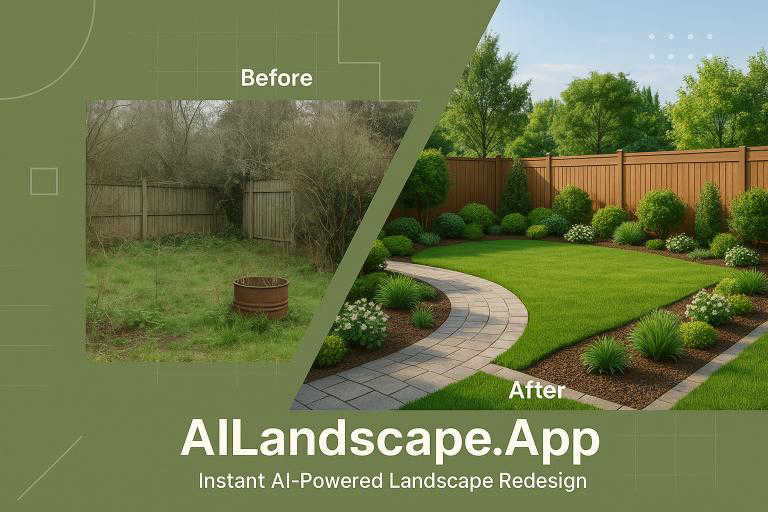
AI Landscape Design
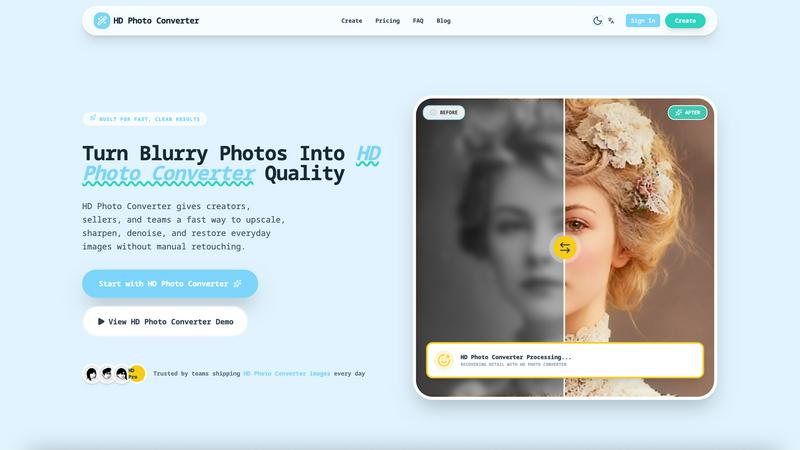
HD Photo Converter
Feature Comparison
AI Landscape Design
Photo-to-Design Transformation
Start with a simple photo of your current garden, backyard, or patio. Upload the image to provide our AI with the perfect canvas. The tool then intelligently analyzes your space and seamlessly integrates new design elements, allowing you to see exactly how different styles and features would look in your specific environment before you ever lift a shovel.
Multiple Professional Design Styles
Instantly apply a cohesive, professional theme to your space with just one click. Choose from a curated selection of styles such as Modern Minimalist, Japanese Zen, English Cottage, or Tropical Paradise. This feature allows you to explore the complete aesthetic transformation of your yard, helping you discover a look that truly resonates with your personal taste and the architecture of your home.
Custom Prompt for Detailed Visions
Go beyond pre-set styles and describe your dream landscape in your own words. Whether you want to "add a rustic stone pathway," "create a modern deck with a fire pit," or "plant a low-maintenance succulent garden," our AI understands your instructions. This text-to-design feature lets you be as detailed as you like, ensuring the final visualization matches your unique vision.
Instant, High-Quality Visualization
See your ideas come to life in seconds. Once you upload a photo and select a style or enter a custom prompt, our AI generates beautiful, high-quality landscape renderings. This instant feedback loop allows for rapid experimentation. You can generate dozens of options, A/B test different ideas with zero risk, and quickly converge on a design you love, all without complex software to learn.
HD Photo Converter
One-Click AI Enhancement
Simply upload your photo, and with a single click, the AI goes to work. It intelligently analyzes your image to apply the perfect balance of upscaling for size, sharpening for detail, and denoising for a clean finish. This all-in-one process eliminates the need to juggle multiple tools or complex settings, delivering a professionally enhanced image in under 5 seconds.
Intelligent Portrait & Face Recovery
This feature specifically targets portraits, expertly recovering facial details that are often lost in low-light conditions or due to image compression. It enhances clarity in eyes, skin texture, and hair while maintaining a natural and consistent look. It's perfect for improving profile pictures, campaign photos, or any portrait where preserving identity and enhancing quality is key.
Batch Processing for Bulk Upscaling
Need to enhance an entire catalog of product photos or a folder of old scans? HD Photo Converter's batch processing capability lets you upscale and improve multiple images at once with just one click. This saves an enormous amount of time compared to manual editing or running complex scripts, making it ideal for teams and businesses with high-volume image needs.
Side-by-Side Preview Before Download
Before you commit to your enhanced image, the tool provides a clear, side-by-side comparison of the original and the AI-processed version. This instant preview allows you to verify the quality of the enhancement, ensuring you get the exact result you want before downloading the final HD photo, giving you complete confidence in the output.
Use Cases
AI Landscape Design
Homeowner Backyard Renovation
Homeowners can finally visualize their renovation dreams. If you're unsure about adding a patio, changing your lawn, or planting new garden beds, simply upload a photo and test the ideas. This helps in planning, budgeting, and getting excited about the project with a clear visual goal, all while avoiding expensive missteps.
Landscape Architect Concepting
Professionals can use the tool for rapid initial concept development and client presentations. Quickly generate multiple aesthetic directions for a client's property based on a site photo. This speeds up the early design phase, facilitates better client communication, and helps narrow down preferences before investing time in detailed CAD drawings.
Real Estate Staging & Curb Appeal
Real estate agents and developers can enhance property listings by visualizing the potential of outdoor spaces. Show buyers what a barren backyard could become with a cozy deck or a lush garden. This "virtual staging" for exteriors can significantly boost perceived property value and help potential buyers envision their future life there.
DIY Garden Planning
DIY enthusiasts and gardening hobbyists can plan their seasonal projects with precision. Experiment with different plant arrangements, hardscape materials, and layout changes. See how a vegetable garden would fit, or where a new flower bed would look best, ensuring your weekend projects are well-planned and visually successful.
HD Photo Converter
eCommerce Product Listing Enhancement
Online sellers and shop owners can use HD Photo Converter to instantly upgrade low-quality supplier images into crisp, clean catalog assets. This improves product clarity for customers, reduces the chance of marketplace listing rejections, and helps create a more professional and trustworthy storefront with visually consistent imagery.
Social Media Content Preparation
Creators, influencers, and social media managers can ensure their feeds always look polished. The tool quickly prepares photos taken from various devices and under different conditions, removing compression artifacts and enhancing details to create eye-catching thumbnails, stories, and posts that stand out in a crowded feed.
Family Photo Archive Restoration
Breathe new life into cherished old photographs, scanned prints, or faded digital memories. HD Photo Converter is excellent for restoring vintage portraits and family photos by reducing noise, fixing blurriness, and recovering lost details, allowing you to preserve and share your history in stunning high definition.
Professional Portrait Retouching
Photographers, models, and agencies can streamline their workflow by using HD Photo Converter for initial retouching. It provides a fast foundation by automatically enhancing skin texture, sharpening facial features, and improving overall image clarity, freeing up more time for creative adjustments and artistic decisions.
Overview
About AI Landscape Design
AI Landscape Design is your creative, intelligent partner for transforming any outdoor space from a blank canvas or a vague idea into a stunning, realistic visualization. It's an AI-powered tool that democratizes professional landscape design, making it accessible to everyone regardless of budget, training, or experience. Whether you're a homeowner dreaming of a backyard oasis, a DIY enthusiast planning a garden refresh, or a professional like a landscape architect or real estate developer needing quick concepts, this tool is designed for you.
The core value is simple: it removes the traditional barriers to great design. You no longer need expensive software, years of training, or a hefty budget to explore beautiful, functional outdoor designs. By simply uploading a photo of your yard or describing your vision in words, you can experiment with various professional styles, see photorealistic results in seconds, and make confident decisions. It saves significant time and money, reduces the fear of costly mistakes, and unlocks creative possibilities for gardens, patios, decks, and commercial exteriors. Think of it as your personal outdoor stylist, ready to help you visualize and create the perfect space that fits your lifestyle and enhances your property's value and your enjoyment of it.
About HD Photo Converter
HD Photo Converter is your friendly, AI-powered assistant for transforming ordinary or problematic photos into stunning, high-definition images. It's built for anyone who wants professional-looking results without the complexity of traditional photo editing software. Whether you're a creator polishing social media content, a business owner enhancing product photos, or someone looking to restore precious family memories, this tool simplifies the entire process. Its core value lies in delivering faster, cleaner, and more predictable photo improvements. Instead of spending minutes or hours manually retouching blurry, noisy, or low-resolution images, you can upload a photo and get a sharper, cleaner, and more detailed version in just seconds. It combines powerful AI functions like upscaling, sharpening, denoising, and portrait recovery into one seamless workflow, making high-quality visual output accessible to everyone, regardless of their technical skill level.
Frequently Asked Questions
AI Landscape Design FAQ
How do I get started with AI Landscape Design?
Getting started is easy and free! Just visit the tool, upload a clear photo of the outdoor space you want to transform. Then, either choose a pre-defined style (like Modern or Zen) or type a custom description of what you'd like to see. Click 'Generate,' and in seconds, you'll have a new AI-powered visualization of your dream landscape to explore and download.
Do I need any design experience to use this tool?
Absolutely not! AI Landscape Design is built specifically for everyone, regardless of design experience. The interface is simple and intuitive. If you can take a photo and describe what you want in plain English (or any supported language), you can create stunning designs. The AI handles all the complex design principles for you.
What kind of photos work best for uploading?
For the best results, use a clear, well-lit photo taken during the day that shows the entire area you want to redesign. A straight-on shot is better than a wide-angle or fisheye lens. Ensure the key areas (lawn, patio, garden beds) are visible. The AI uses this as its canvas, so a good quality photo leads to a more accurate and impressive transformation.
Can I use the designs created with the free mode?
Yes, the free mode allows you to experience the core functionality of the tool. You can generate designs using a shared compute quota. Please note that images generated in the free mode will include a watermark and are set to be public by default. For private, watermark-free, and higher-priority designs, you would need to explore the premium subscription options.
HD Photo Converter FAQ
How many free images can I process?
Every user gets 1 free HD image generation per day. This is a great way to test the tool's capabilities with your own photos regularly without any commitment. For more frequent use, you can purchase credit packs to continue enhancing images.
What kind of image formats does it support?
HD Photo Converter supports common image formats like JPG and PNG. You can upload your blurry or low-quality photos in these formats, and the tool will process and provide you with a high-quality download in a compatible format, typically a high-resolution JPG or PNG file.
Is it difficult to use for beginners?
Not at all! HD Photo Converter is designed with a zero-learning curve. The process is a simple three-step flow: upload your image, click the enhance button, and download the result. There are no complicated settings or technical knowledge required, making it accessible for everyone.
Can I use it for commercial projects?
Absolutely. HD Photo Converter is built to deliver reliable, repeatable quality suitable for commercial use. Many brands and teams use it to prepare images for websites, marketing materials, and product listings. It's a trusted tool for creating publish-ready assets that help drive customer trust and engagement.
Alternatives
AI Landscape Design Alternatives
AI Landscape Design is a smart tool in the design and image software category. It uses artificial intelligence to help you create professional-looking landscape visualizations from a simple photo or text description, making outdoor planning faster and more accessible. People often look for alternatives for various reasons. They might need a different pricing model, such as a one-time purchase versus a subscription. Others may require specific features like 3D modeling, plant databases, or compatibility with certain operating systems. It's also common to seek tools that cater to a particular skill level, from total beginner to professional designer. When evaluating other options, consider what's most important for your project. Key factors include the ease of use, the quality and realism of the visual outputs, the available design styles and elements, and how well the tool integrates with your overall planning process. Finding the right fit means balancing your budget with the features that will truly help you bring your outdoor vision to life.
HD Photo Converter Alternatives
HD Photo Converter is an AI-powered tool in the image enhancement category, designed to quickly transform portraits and photos into sharper, cleaner, and more professional-looking high-definition images. It's built for creators, businesses, and everyday users who want to streamline their photo improvement without diving into complex editing software. Users often explore alternatives for a variety of reasons. This could be due to budget constraints, a need for different features like batch processing or specific filters, or simply because they require a tool that works on a different platform, such as a mobile app or a specific operating system. Finding the right fit depends on your unique workflow and goals. When choosing an alternative, it's wise to consider a few key factors. Think about the core features you need most, your comfort level with different interfaces, and the value for the price. A good alternative should match your technical skill level and efficiently solve the specific photo enhancement challenges you face most often.