
AIPhotoTalk vs ReelsMakerAI
Side-by-side comparison to help you choose the right AI tool.

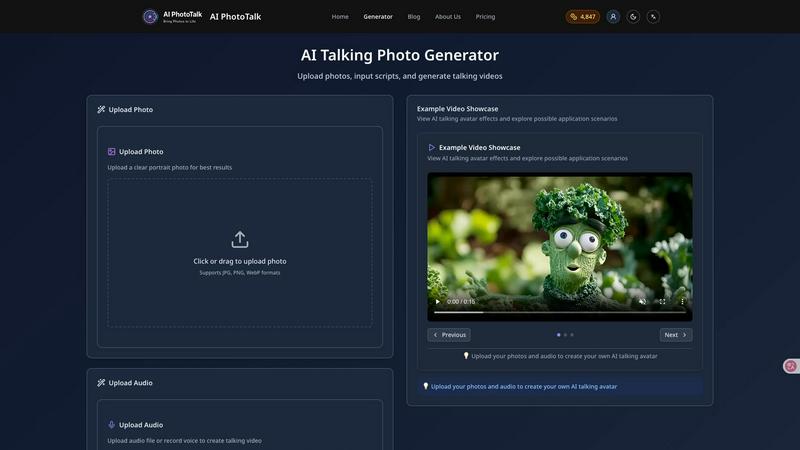
AIPhotoTalk transforms any photo into a realistic talking video in just 30 seconds, with stunning 4K quality and support for over 30 languages.
Last updated: March 11, 2026

ReelsMakerAI
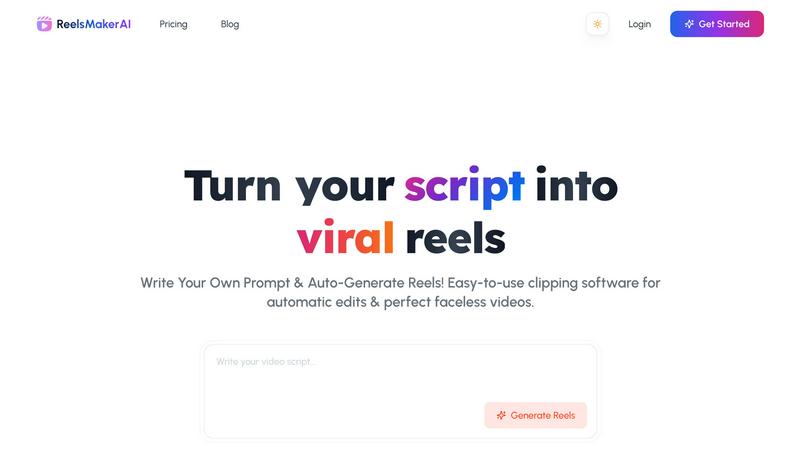
ReelsMakerAI effortlessly transforms your scripts into eye-catching, professional-quality video reels in minutes.
Last updated: February 26, 2026
Visual Comparison
AIPhotoTalk
ReelsMakerAI
Feature Comparison
AIPhotoTalk
Professional Lip Sync Technology
AIPhotoTalk utilizes advanced AI algorithms to ensure perfect lip synchronization and natural facial expressions in your videos. This feature enhances the authenticity of your animations, making them feel more realistic and engaging for viewers.
Multi-language Voice Synthesis
With support for over 30 languages, AIPhotoTalk's multi-language voice synthesis allows you to reach a global audience. This feature is ideal for businesses and educators aiming to create inclusive content that resonates with diverse groups.
4K Professional Video Output
AIPhotoTalk generates videos in stunning 4K resolution, ensuring that your content looks sharp and professional. This high-quality output is perfect for business presentations, marketing campaigns, and any project where visual excellence is paramount.
30-Second Generation Speed
Speed is crucial in today's fast-paced digital environment. AIPhotoTalk's advanced processing technology enables you to create realistic talking videos in under 30 seconds, streamlining your workflow and saving valuable time.
ReelsMakerAI
Text to Video Generation
ReelsMakerAI utilizes the most advanced AI engine to transform your text prompts into professional-quality videos. This feature automates script writing, visual creation, and narration, allowing users to focus on their ideas while the AI handles the technical details.
Background Music Library
The platform includes a curated collection of royalty-free background music tracks to elevate your videos. With options like "Else - Paris" and "Prelude in E minor," users can enhance their reels with engaging soundscapes that complement their visuals perfectly.
Generation Presets
Users can choose from various preset styles including 4K Realistic, Collage, Cinematic, and Digital Art. This feature allows creators to tailor their videos to match their unique content vision, ensuring a professional and cohesive final product.
Voice Selection
ReelsMakerAI offers a range of premium AI voices, such as Alloy, Ash, Coral, and Echo. This feature enables users to select natural-sounding narration options that align with their content, adding a personalized touch to every video.
Use Cases
AIPhotoTalk
Social Media Videos
AIPhotoTalk is perfect for creating engaging talking videos for platforms like TikTok and Instagram. Users can easily turn personal photos into captivating clips that grab attention and drive engagement.
AI Spokesperson Clips
Businesses can utilize AIPhotoTalk to create professional spokesperson clips that represent their brand. This feature is particularly useful for promotional videos, product launches, and corporate announcements.
Educational Explainer Videos
Educators can transform traditional learning materials into interactive explainer videos. By using AIPhotoTalk, teachers can create animated lessons that make complex topics more accessible and enjoyable for students.
Animated Historical Characters
History enthusiasts and educators can animate historical figures using AIPhotoTalk, bringing them to life for presentations or educational content. This innovative approach makes learning about history more engaging and memorable.
ReelsMakerAI
Content Creators
ReelsMakerAI empowers content creators to effortlessly transform their ideas into viral reels. With AI-powered script generation and automated editing, creators can focus on their creativity without being bogged down by the technical aspects of video production.
Businesses
For businesses, ReelsMakerAI is a valuable tool to create professional marketing videos that enhance brand engagement. By saving time and reducing production costs, companies can produce high-impact videos that drive sales and customer interaction.
Educators
Educators can leverage ReelsMakerAI to develop engaging educational content that simplifies complex topics. By making learning visually appealing, teachers can improve learning outcomes and maintain student interest in various subjects.
Agencies
Agencies can scale their video production capabilities using ReelsMakerAI's AI automation. This allows them to maintain high-quality standards while increasing profit margins, as they can produce more content in less time.
Overview
About AIPhotoTalk
AIPhotoTalk is an innovative AI-powered tool that transforms static portrait photos into engaging, lifelike talking videos in mere seconds. This cutting-edge technology is designed for anyone who wants to create dynamic video content without the need for complex editing skills. Simply upload a clear photo, type your script, and watch as AIPhotoTalk generates a lip-synced video in real-time. It caters to a wide array of users, including marketers looking to enhance their promotional materials, educators seeking to make learning more interactive, and content creators eager to produce eye-catching social media clips. With AIPhotoTalk, you can easily bring your ideas to life, creating professional-quality videos that captivate your audience and convey your message effectively.
About ReelsMakerAI
ReelsMakerAI is an innovative AI-driven platform designed to simplify the video creation process for social media, specifically targeting TikTok, Reels, and Shorts. This tool automates the transformation of simple scripts or prompts into professional-grade videos, allowing users to generate engaging content with minimal manual effort. Its advanced text-to-video technology enables creators to produce high-quality videos that resonate with audiences, regardless of their technical skills. Whether you are a content creator, business, educator, or agency, ReelsMakerAI serves as a virtual editor that not only enhances creativity but also maximizes posting frequency. With features like auto-beat syncing and instant captioning, it ensures videos are perfectly tailored for mobile consumption and optimized for social media reach, making it an invaluable asset for anyone looking to elevate their digital presence.
Frequently Asked Questions
AIPhotoTalk FAQ
How does AIPhotoTalk work?
AIPhotoTalk works by using advanced AI technology to analyze uploaded photos and generate lip-synced talking videos. Simply upload a portrait, enter your script, and the tool creates a video in under 30 seconds.
What types of photos work best for AIPhotoTalk?
Clear, high-quality portrait photos yield the best results. The photo should have good lighting and a straightforward background to ensure realistic animation and lip-sync accuracy.
Can I use AIPhotoTalk for commercial purposes?
Yes, AIPhotoTalk offers a commercial use license, allowing businesses and creators to use the generated videos for professional applications, marketing, and content creation.
Is there a limit to the number of languages supported?
AIPhotoTalk supports over 30 languages, making it a versatile tool for creating content for diverse audiences. This feature allows users to reach and engage with a broader demographic effectively.
ReelsMakerAI FAQ
What types of videos can I create with ReelsMakerAI?
You can create a variety of short-form videos suitable for platforms like TikTok, Instagram Reels, and YouTube Shorts. The tool supports educational, promotional, and entertaining content, making it versatile for various needs.
How easy is it to use ReelsMakerAI?
ReelsMakerAI is designed to be user-friendly, requiring no technical expertise. With its simple three-step process—enter your prompt, watch the AI create content, and download your video—you can produce professional-quality reels in minutes.
Is there a limit to the length of videos I can create?
ReelsMakerAI specializes in short-form videos, typically designed to fit the format requirements of platforms like TikTok and Instagram Reels. This ensures your videos are concise, engaging, and suitable for mobile viewing.
Can I customize my videos after they are generated?
Yes, ReelsMakerAI allows for customization even after the initial video generation. You can modify elements like text, visuals, and audio to align better with your brand or personal style before finalizing the video.
Alternatives
AIPhotoTalk Alternatives
AIPhotoTalk is an innovative AI-powered tool that allows users to transform static photos into engaging talking videos in just a matter of seconds. It fits within the video content creation category, serving a wide range of applications from social media clips to educational videos. Users often find themselves exploring alternatives due to factors like pricing, unique features, or specific platform compatibility that may better suit their needs. When considering alternatives to AIPhotoTalk, it's important to identify what features are most valuable for your projects. Look for options that offer user-friendly interfaces, quick rendering times, and flexibility in terms of output formats. Ensuring the tool meets your specific requirements, whether for marketing, education, or personal use, will ultimately enhance your content creation experience.
ReelsMakerAI Alternatives
ReelsMakerAI is an innovative, AI-driven platform designed to transform written scripts into engaging short-form videos for popular social media channels like TikTok, Reels, and Shorts. Falling into the categories of content creation and video editing, it simplifies the video production process by using advanced text-to-video technology. This allows users to create professional-quality videos with little to no technical expertise, making it an attractive option for both creators and businesses looking to enhance their social media presence. Many users seek alternatives to ReelsMakerAI for various reasons, including pricing structures, feature sets, and specific platform compatibility needs. When searching for a suitable alternative, it’s essential to consider factors such as ease of use, available editing tools, the quality of generated content, and the level of customer support provided. Assessing these criteria will help ensure that you find a solution that meets your unique video creation requirements.