
AllForms vs ToolPortal
Side-by-side comparison to help you choose the right AI tool.

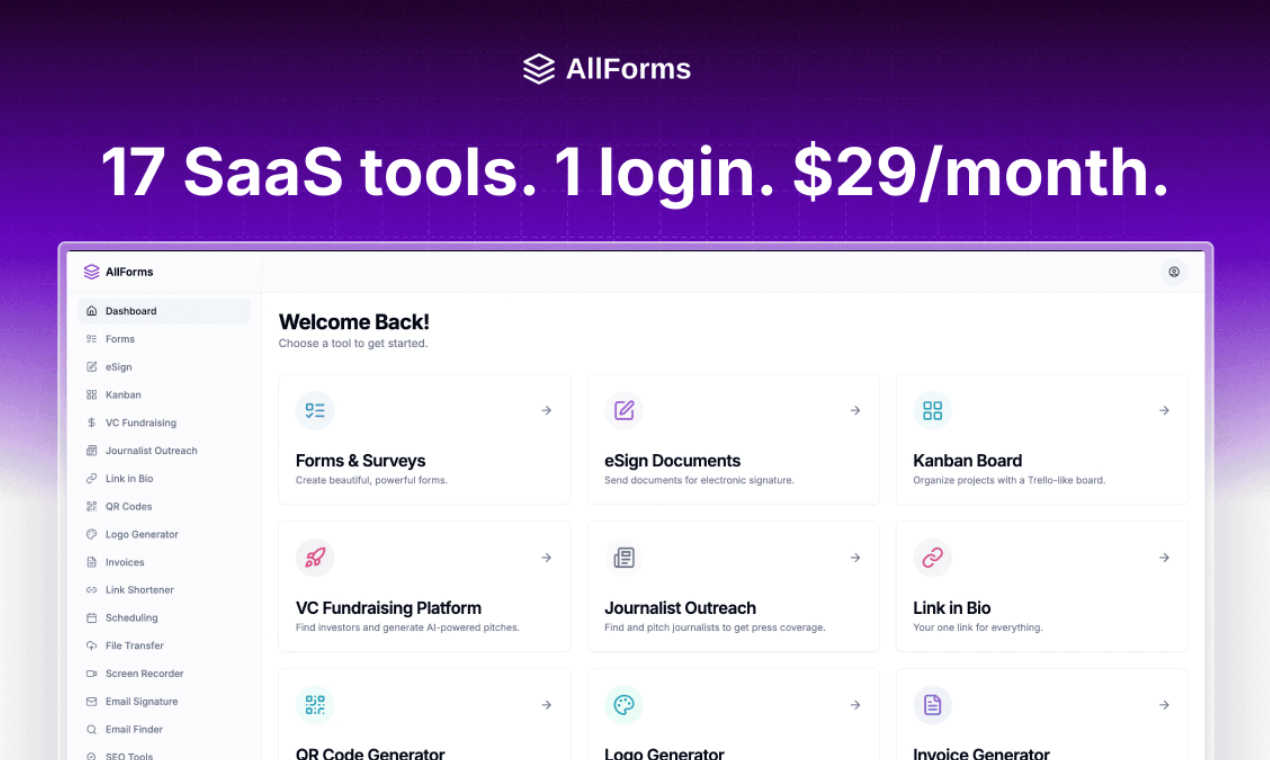
Replace 17 expensive tools with one beautiful platform for just $29 a month.
Last updated: March 1, 2026

ToolPortal
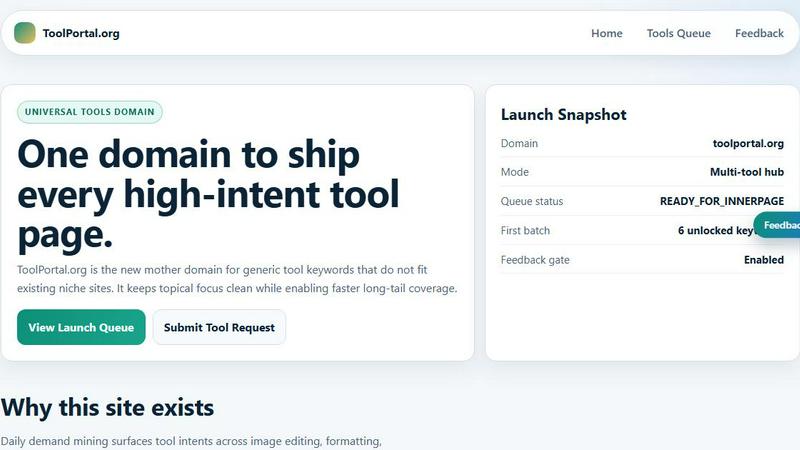
ToolPortal is your go-to online directory with over 300 free tools for developers, designers, and content creators to streamline their tasks.
Last updated: April 4, 2026
Visual Comparison
AllForms
ToolPortal
Feature Comparison
AllForms
AI-Powered Chat Assistant
Say hello to your built-in business co-pilot. This feature provides an intelligent chat assistant capable of handling customer support inquiries, generating marketing copy, brainstorming ideas, and automating simple tasks. It replaces the need for a separate ChatGPT subscription, offering similar powerful AI functionality directly within your business hub for content creation and customer interaction without the extra cost.
Legally-Binding E-Signatures
Get contracts and documents signed quickly and securely without ever leaving the platform. This tool allows you to send documents for signature, track their progress in real-time, and receive instant notifications when they're completed. It provides all the core functionality of services like DocuSign, enabling you to close deals faster and maintain a professional, legally-compliant workflow with your clients and partners.
Integrated SEO & Domain Analysis
Conduct essential SEO research directly within AllForms. This feature lets you check domain authority, analyze URL metrics, research keyword difficulty, and view search volume and cost-per-click data for your target terms. It offers the crucial insights provided by tools like Semrush, helping you optimize your online presence and content strategy without subscribing to a separate, expensive SEO platform.
Unified Scheduling & Calendar Management
Simplify appointment booking by allowing clients and colleagues to see your availability and book meetings seamlessly. You can set your working hours, create different event types (like consultations or intro calls), and enjoy automatic timezone conversion. This eliminates the back-and-forth emails and replaces tools like Calendly, making scheduling a frictionless part of your client interaction process.
ToolPortal
Comprehensive Tool Index
ToolPortal features a dense index of 261 live tools organized into specific categories, including generators, checkers, converters, formatters, and image editing tools. This organization allows users to quickly navigate to the tools they need without unnecessary friction.
Dual Search Modes
Users can choose between two search methods: a direct keyword search for when they know the exact tool name or a task description mode that suggests tools based on the stated job. This flexibility caters to both experienced users and those who may be unsure of what they need.
Daily Refresh Cycle
ToolPortal is committed to continuous improvement, with new pages and UI updates being rolled out daily. This ensures that users always have access to the latest tools and features, enhancing the overall experience and keeping the content fresh and relevant.
Instant Access Without Login
One of the standout features of ToolPortal is that it requires no login or account creation. Users can open any tool page and run it immediately, eliminating barriers to access and allowing for a seamless workflow.
Use Cases
AllForms
The Freelancer Consolidating Their Stack
A freelance graphic designer uses AllForms to manage their entire client lifecycle. They create a project inquiry form, generate and send a proposal with the e-signature tool, schedule the kickoff meeting, and later use the AI assistant to help write a case study. They save money by canceling separate subscriptions for form builders, scheduling apps, and AI tools, all while presenting a polished, professional front.
The Startup Streamlining Operations
A small startup uses AllForms as its operational command center. The team tracks their sales pipeline in the Kanban board, shares large pitch decks with investors via the file sharing tool, creates branded short links for campaigns, and uses the investor database to find potential funding leads. This consolidation saves them thousands per month, allowing them to reinvest funds into growth instead of software.
The Agency Managing Client Projects
A marketing agency utilizes AllForms to handle multiple client accounts efficiently. They build custom feedback forms for projects, use the SEO tool for audit reports, record quick screen-share videos for tutorials using the Loom alternative, and create professional email signatures for their team. Having everything in one platform reduces context-switching and ensures all client data and communications are centralized.
The Consultant Closing Deals Faster
A business consultant leverages AllForms to accelerate their sales and service delivery. They find lead contact emails with the email finder, send consulting agreements for e-signature, schedule discovery calls effortlessly, and later generate and send invoices—all from a single dashboard. This integrated approach minimizes administrative tasks and helps them close deals and get paid more quickly.
ToolPortal
Social Media Content Creation
Content creators can utilize the text styling tools available in ToolPortal, such as glitch or gothic text generators, to produce eye-catching social media posts. This allows for enhanced engagement and unique branding.
Quick Image Editing
Marketers and designers can use the image tools to crop photos, remove backgrounds, and prepare assets for various platforms in a matter of minutes. This efficiency is crucial for meeting tight deadlines in the fast-paced digital landscape.
Validation and Quality Checks
Developers can rely on the validation tools for tasks such as checking DMARC records or running speed tests to ensure their projects meet quality standards before publishing. This helps maintain a high level of professionalism.
Format Conversion
Students and professionals alike can benefit from the conversion tools offered by ToolPortal, which allow for quick and easy transformation of units, time, and text formats. This is particularly useful for those working on reports or data analysis.
Overview
About AllForms
AllForms is the ultimate all-in-one business platform designed to liberate entrepreneurs, freelancers, and small to medium-sized businesses from the chaos and cost of juggling multiple software subscriptions. If you're tired of managing a dozen different logins, dealing with clunky integrations, and watching hundreds of dollars disappear from your account each month for tools like DocuSign, Calendly, and Semrush, AllForms is your solution. Its core promise is powerful yet simple: replace 17+ essential business tools with one beautifully integrated, lightning-fast platform for a single, flat fee of $29 per month. This isn't just about saving over $1,000 monthly; it's about radically simplifying your workflow. Imagine moving seamlessly from creating a client proposal and getting it e-signed, to scheduling a follow-up meeting, to analyzing your website's SEO—all within the same, intuitive interface. AllForms consolidates everything from AI-powered chat and unlimited form building to appointment scheduling, file sharing, and investor databases, eliminating disjointed workflows and boosting your productivity from day one. With a 7-day free trial and a 30-day money-back guarantee, it offers a completely risk-free opportunity to consolidate your tech stack and finally get control of your operational efficiency and software spending.
About ToolPortal
ToolPortal is a robust online directory offering over 300 free, browser-based tools designed to cater to a wide range of needs. Whether you're looking to convert text formats, validate JSON code, edit images, or perform SEO checks, ToolPortal has something for everyone. It serves as a one-stop-shop for developers, marketers, writers, and anyone who needs quick access to practical online utilities without the hassle of installation or sign-up. The intuitive interface allows users to search for tools by keyword or describe their task in plain language, making it easy to find the right tool in seconds. With a focus on user experience, ToolPortal ensures that all tools are live and ready to use immediately, streamlining workflows and enhancing productivity.
Frequently Asked Questions
AllForms FAQ
What exactly is included in the $29/month plan?
The $29 monthly subscription includes access to the core functionalities of all 17+ tools integrated into the AllForms platform. This encompasses AI chat, e-signatures, unlimited form building, SEO analysis, appointment scheduling, file sharing, email finding, logo design, invoice generation, and more. It's a single, flat fee with no per-feature upsells, designed to replace your existing stack of individual subscriptions.
Is there a free trial or a money-back guarantee?
Yes, absolutely! You can start with a full-featured 7-day free trial to explore the platform and see if it fits your workflow. If you choose to subscribe but aren't satisfied, AllForms also offers a 30-day money-back guarantee. This gives you over a month to test it risk-free and ensure it delivers the value and simplification you need for your business.
How does AllForms replace a specific tool like Semrush or Calendly?
AllForms integrates the most-used core features of these popular tools directly into its platform. For example, it includes keyword research, domain analysis, and URL metrics similar to Semrush's core offerings. For scheduling, it provides availability setting, booking pages, and calendar sync like Calendly. While it may not include every advanced feature of the premium enterprise tiers of those standalone tools, it covers the essential functionalities that most small businesses and freelancers actually use daily.
Can my team use AllForms with me?
Yes, AllForms is built for collaboration. The platform allows you to manage team members within your account, enabling seamless collaboration on projects, documents, and workflows. Your team can share access to forms, documents, and analytics, ensuring everyone is on the same page without needing multiple individual subscriptions for different services.
ToolPortal FAQ
What types of tools does ToolPortal offer?
ToolPortal offers a wide variety of tools across categories such as generators, checkers, converters, formatters, and image editing utilities. This diversity ensures that users can find tools for nearly any online task.
Do I need to create an account to use ToolPortal?
No, ToolPortal does not require any account creation or login. Users can access and run tools directly in their browser without any barriers, making it quick and easy to get started.
How often are new tools added to ToolPortal?
ToolPortal features a daily refresh cycle, meaning new tools and updates are continually being integrated into the platform. This commitment to freshness ensures users have access to the latest tools available.
Can I search for tools without knowing their names?
Absolutely! ToolPortal allows users to describe their tasks in plain language, and it will suggest the best-fit tools based on that description. This user-friendly feature helps those who may not be familiar with specific tool names.
Alternatives
AllForms Alternatives
AllForms is a comprehensive all-in-one business platform in the productivity and management category. It consolidates the core features of over 17 popular SaaS tools into a single, integrated solution for a flat monthly fee. Users often explore alternatives for various reasons. Some may have very specific feature needs that require a specialized tool, while others might be on a strict budget and seek a free plan. Platform compatibility, team size, and the desire for a simpler, single-purpose app are also common factors driving the search. When evaluating an alternative, consider your true business needs. Look beyond just the price tag and assess the depth of the features you'll actually use. Ease of use, integration capabilities with your existing workflow, and the quality of customer support are equally important for long-term satisfaction.
ToolPortal Alternatives
ToolPortal is a robust online tools directory designed specifically for developers, designers, SEO professionals, and content creators. With over 300 free browser-based tools, it offers a wealth of resources across various categories, including productivity, web development, and SEO. Users often seek alternatives to ToolPortal for several reasons, such as varying feature sets, user interface preferences, or specific platform needs that might not be met by ToolPortal. When looking for an alternative, consider factors like the types of tools offered, ease of navigation, user experience, and whether the platform requires any installation or sign-up. It's also essential to assess the reliability and support provided, as well as how frequently the tools are updated to meet current industry standards.