
Assured vs File Studio
Side-by-side comparison to help you choose the right AI tool.

Assured
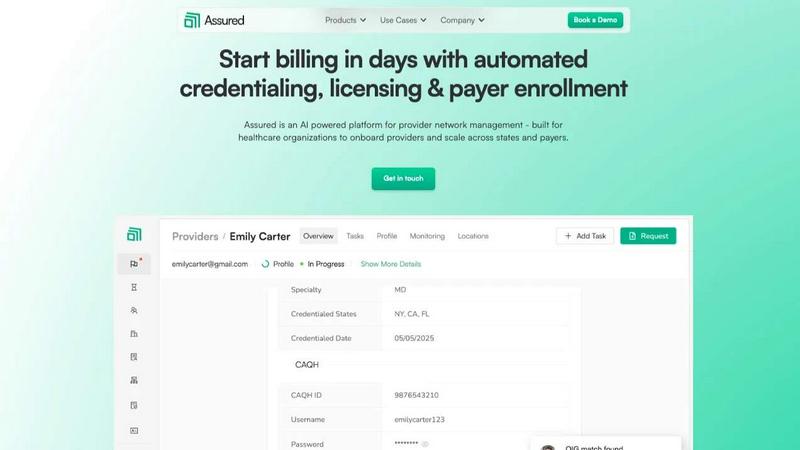
Assured uses AI to automate provider credentialing and enrollment so healthcare companies can start billing in days, not months.
Last updated: April 4, 2026

File Studio
File Studio is your private offline toolkit for converting, editing, and managing files and PDFs.
Last updated: February 28, 2026
Visual Comparison
Assured
File Studio

Feature Comparison
Assured
AI-Powered Primary Source Verification
Assured's AI engine automates the verification of provider credentials by checking over 2,000 primary sources simultaneously. This eliminates the slow, sequential manual checks that traditionally take weeks. The system instantly validates licenses, education, work history, and sanctions, flagging any issues within 24 hours to ensure compliance and dramatically accelerate the initial verification step.
Automated Payer Enrollment & Roster Management
This feature streamlines the entire payer enrollment process. Assured auto-generates completed applications specific to each payer's requirements and can submit them directly through payer portals. It also automates roster management, tracking submissions, follow-ups, and statuses in real time, which helps achieve a 95% first-pass approval rate and gets providers in-network 30% faster.
Proactive Credentialing & Licensing Renewals
Never let a credential expire again. Assured's platform proactively monitors all provider credentials and licenses, automatically initiating the renewal process 60 days before expiration. It handles submissions and follow-ups across all 50 states, removing the administrative chaos and risk associated with manual renewal tracking for multi-state organizations.
Real-Time Provider Network Monitoring
Gain a single, always-updated source of truth for your entire network. Assured continuously monitors your provider data against its 2,000+ verification sources, alerting you to any changes like new sanctions, license updates, or expirations. This ensures you're never surprised at audit time and can maintain a fully compliant, in-network provider roster.
File Studio
100% Offline Processing
Every single action in File Studio happens locally on your device. When you convert a PDF to images, merge documents, or compress a folder of photos, not one byte of your data is uploaded to the internet. This guarantees maximum privacy and security for sensitive files, and it also means you can work without an internet connection, anytime and anywhere.
Comprehensive PDF Toolkit
File Studio includes five powerful tools dedicated to PDF management. You can easily merge multiple documents into one, split a large PDF into individual pages, or reorder and rotate pages to create the perfect layout. It also lets you remove passwords from secured PDFs you have access to and clean metadata, all within the safe, offline environment of your desktop.
Versatile Image Conversion & Editing
With support for over 20 image formats, File Studio handles all your conversion needs. It seamlessly converts iPhone HEIC photos to universal JPGs, transforms WebP images for editing, and processes 14 different RAW camera formats. Beyond conversion, you can resize, compress, crop, add watermarks, and even create collages, making it a versatile hub for image preparation.
Efficient Batch Processing
Save immense time by processing hundreds of files at once. Whether you need to convert an entire folder of HEIC images to JPG, compress a batch of photos for a website, or split a stack of scanned contracts, File Studio can handle it in a single operation. This batch functionality works across both PDF and image tools, streamlining repetitive tasks effortlessly.
Use Cases
Assured
Scaling a Digital Health Company Across States
For a digital health startup expanding its telehealth services, manually managing state-specific licensing and payer rules for new providers is a massive barrier. Assured automates multi-state licensure and payer enrollment, allowing the company to onboard providers uniformly and get them seeing patients in new states within weeks instead of months, enabling rapid, compliant growth.
Eliminating Credentialing Backlogs for Health Systems
Large health systems often face crippling backlogs where new hires wait 60+ days to be credentialed, delaying patient care and revenue. Assured's automated, end-to-end credentialing cuts this to days, clearing backlogs, accelerating time-to-revenue, and freeing up dozens of administrative hours per week for strategic work.
Ensuring Continuous Compliance for Provider Groups
Provider groups need to ensure every clinician remains in good standing with multiple payers and state boards. Manually checking for sanctions or expiring licenses is error-prone. Assured provides real-time monitoring and alerts, flagging issues 22 days earlier on average, which protects revenue and prevents compliance violations before they happen.
Streamlining Payer Enrollment for Specialized Clinics
A specialty clinic adding new physicians faces complex, payer-specific enrollment forms and slow follow-up processes. Assured automates application completion and submission, then actively tracks each enrollment through to approval. This results in a 95% first-pass rate, getting specialized care in-network faster so patients can access vital treatments without delay.
File Studio
Preparing Documents for Secure Submission
Many online forms, like visa applications or client portals, require specific file formats and sizes. With File Studio, you can securely convert your PDF ID scans to JPG, compress the images to meet strict upload limits, and merge multiple pages into a single document—all offline to ensure your personal information never travels over the web unnecessarily.
Organizing and Archiving Client Work
Freelancers and photographers can use File Studio to efficiently manage project deliverables. Convert batches of RAW or HEIC photos to standard formats for client previews, create compressed versions for email, and assemble final image selections or contracts into a single, professional PDF portfolio. Doing this locally keeps unreleased work completely confidential.
Simplifying Personal Document Management
For anyone dealing with personal paperwork, File Studio is a lifesaver. You can merge multiple bank statements into a single PDF for tax season, split a large scanned manual into individual chapters, or remove personal metadata from a document before sharing it. The offline nature is perfect for handling sensitive items like tax forms or property deeds.
Optimizing Digital Content for Web Use
Bloggers, small business owners, and remote workers can quickly prepare images for websites, social media, or presentations. Resize photos to exact dimensions, compress them to load faster without losing quality, and convert modern formats like AVIF or WebP to more compatible types. Batch processing makes light work of updating an entire website's image gallery.
Overview
About Assured
Assured is an AI-powered provider network management platform built to help healthcare organizations scale efficiently and stop losing revenue to administrative delays. It automates the complex, manual processes of credentialing, licensing, payer enrollment, and ongoing network monitoring. Designed for provider groups, health systems, payers, and digital health companies, Assured tackles the core problem of disconnected data and slow, error-prone manual work. Its core value proposition is dramatic speed and accuracy: get providers credentialed in 48 hours instead of 60+ days, achieve 95% first-pass approval rates for payer enrollments, and detect sanctions 22 days earlier than manual methods. As an NCQA-certified Credentials Verification Organization (CVO), Assured leverages AI to verify credentials across 2,000+ primary sources in parallel, auto-generate applications, and submit directly to payer portals. This means faster provider onboarding, quicker revenue generation, and complete peace of mind with real-time data monitoring, all from a single, centralized platform.
About File Studio
File Studio is your all-in-one, privacy-focused desktop toolkit for managing PDFs and images, and it does everything right on your own computer. In a world where we're constantly asked to upload files to the cloud, File Studio offers a powerful alternative: 100% offline processing. This means your sensitive documents—like passports, signed contracts, or client IDs—never leave your Mac or Windows PC. It's built for anyone who values security and simplicity, from photographers and freelancers handling client work to remote workers managing confidential agreements. The app packs over 15 essential tools into one clean interface, allowing you to merge, split, and password-protect PDFs, or convert, resize, and compress images across more than 20 formats including modern types like HEIC, WebP, and AVIF. With a straightforward one-time purchase and no subscriptions or accounts required, File Studio delivers reliable, powerful file management that puts your privacy first and streamlines your digital workflow.
Frequently Asked Questions
Assured FAQ
How does Assured reduce provider onboarding time and administrative costs?
Traditional credentialing is a manual, sequential process that takes 60+ days. Assured uses AI to perform verifications across thousands of sources in parallel and automates application submissions, reducing credentialing to about 48 hours. This efficiency saves organizations an estimated $4,200 to $5,800 in administrative costs per provider annually by eliminating manual labor and accelerating revenue-generating patient visits.
What makes Assured more reliable than traditional credentialing vendors?
Traditional vendors often rely on offshore teams and manual data entry, which can be slow and error-prone. Assured is an NCQA-certified CVO that uses AI for accuracy and speed, provides real-time data from primary sources, and offers full transparency within the platform. Its automated systems achieve a 95% first-pass approval rate for enrollments and detect issues far earlier, providing greater reliability and compliance confidence.
Can Assured integrate with our existing systems like our EMR or ATS?
Yes, absolutely. Assured is built with connectivity in mind. It offers plug-and-play APIs that allow you to seamlessly connect the platform to your existing Applicant Tracking System (ATS), Electronic Medical Record (EMR), or CRM like Salesforce. This ensures data flows smoothly between systems, eliminating duplicate data entry and creating a unified workflow.
How does the real-time network monitoring work?
Assured continuously scans its database of over 2,000 primary sources, including state medical boards, sanction lists, and payer rosters. It automatically compares this live data against your provider roster. If any change is detected—such as a new sanction, license update, or expiration—the platform immediately alerts your team, allowing for proactive management long before an audit or billing issue occurs.
File Studio FAQ
Is my data ever uploaded to the cloud?
No, absolutely not. File Studio is designed with a core principle of privacy. All processing—every conversion, edit, and compression—is performed locally on your Mac or Windows computer. Your files never leave your device, ensuring 100% offline security. This is ideal for sensitive documents you don't want to risk uploading.
Do you offer a free trial?
Yes, File Studio offers a free trial so you can test all its features and ensure it fits your workflow before making a purchase. You can download the app and explore its 15+ tools to see how it handles your PDFs and images offline.
What formats does File Studio support for images?
File Studio supports a wide range of over 20 image formats. This includes common types like JPG and PNG, modern formats like HEIC (from iPhones), WebP, and AVIF, as well as 14 different professional RAW camera formats from manufacturers like Canon, Nikon, and Sony, making it incredibly versatile for all users.
Can I use File Studio on both Mac and Windows?
Yes, File Studio is fully compatible with both macOS and Windows operating systems. You purchase one license, and it works on your chosen platform. The interface and feature set are consistent across both, providing a reliable and familiar experience whether you're on a Mac or a PC.
Alternatives
Assured Alternatives
Assured is a specialized provider network management platform that automates credentialing and payer enrollment for healthcare organizations. It falls into the productivity and management software category, helping teams drastically reduce administrative backlogs and get providers to revenue faster. Users often explore alternatives for various reasons. Some may need a solution that integrates with a specific EHR or practice management system they already use. Others might be evaluating options based on budget constraints, looking for a different feature set, or requiring a platform that scales differently for a very large or very small organization. When choosing an alternative, it's crucial to consider a few key factors. Look for a platform's certification status, like NCQA-CVO, which is a gold standard for quality. Evaluate the depth of automation, especially for time-consuming tasks like primary source verification and payer application submission. Finally, consider the vendor's focus on security and compliance, as they will be handling sensitive provider data.
File Studio Alternatives
File Studio is a powerful desktop application for managing, converting, and editing PDFs and images. It falls into the productivity and file management category, standing out by performing all tasks 100% offline on your computer, which is a major plus for privacy-conscious users. People often explore other options for various reasons. Some might be looking for a different pricing model, like a free tool or a subscription service. Others may need specific features not offered here, or require software that runs on a different operating system like Linux. When considering other software, think about your core needs. Key factors include whether you require cloud access or strict offline privacy, the specific file formats you work with most, and your budget for either a one-time purchase or an ongoing subscription. Matching these needs to a tool's capabilities will help you find the right fit.