
AutomagicWP vs Humanize
Side-by-side comparison to help you choose the right AI tool.

AutomagicWP updates all your WordPress plugins across every connected site with just one simple upload.
Last updated: February 27, 2026

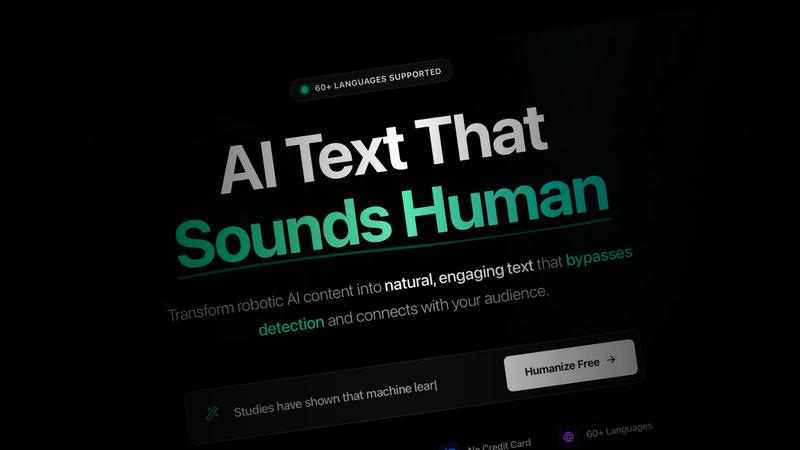
Humanize transforms AI-generated text into engaging, human-like content that resonates with your audience in 90+.
Last updated: March 3, 2026
Visual Comparison
AutomagicWP

Humanize
Feature Comparison
AutomagicWP
One-Click, Site-Wide Updates
Upload a new plugin or theme version just one time to your AutomagicWP dashboard. Every WordPress site connected via a simple API key will automatically detect and install this update through the standard WordPress update system. You never have to log into individual client dashboards again, saving immense time and ensuring consistency across your entire managed portfolio.
Professional Plugin Repository
Give your plugins a polished, official look within the WordPress admin. AutomagicWP lets you upload icons, banners, and screenshots, and write full descriptions, changelogs, and FAQs. This creates a user experience for your clients that mirrors plugins from the official WordPress.org repository, building trust and professionalism for your work.
Seamless CI/CD Integration
Automate your entire release pipeline. Connect your GitHub repository, and when you push a tag, AutomagicWP's GitHub Action automatically packages and deploys the new release. This creates a true "set it and forget it" workflow where merging code can directly result in an update being available to all connected sites, with zero manual steps in between.
Comprehensive Release Management
Keep every version organized and accessible. Each release you upload stores the version number, PHP requirements, and a changelog. You get a clear version history and can download any past release directly from your dashboard. This is crucial for rollbacks, auditing, and maintaining a reliable distribution history for your code.
Humanize
AI Humanizer
The AI Humanizer feature allows users to transform robotic AI text into engaging, natural content. You can choose from three levels of transformation: Quick for light edits, Deep for more substantial changes, and Complete for a full transformation. Each option ensures that the original meaning of the text is preserved while making it sound more human.
AI Detector
Humanize includes an AI Detector to help users analyze their text and determine if it has been generated by AI. This tool provides a detailed score based on perplexity and burstiness, allowing you to understand the likelihood of the content being flagged as AI-generated. It's perfect for ensuring authenticity in your writing.
Symbols Finder
The Symbols Finder helps identify hidden Unicode characters, zero-width spaces, and invisible symbols that can disrupt the readability of your text. This feature is essential for cleaning up your content, ensuring it is free of any hidden issues that could affect its presentation or functionality.
Privacy Focused
Humanize prioritizes user privacy by ensuring that your content is never stored or used for training purposes. The processing of your text is immediate, and once completed, the text is discarded, giving you peace of mind while you create authentic content.
Use Cases
AutomagicWP
WordPress Development Agencies
Agencies managing updates for 10, 20, or 100+ client sites can centralize all their custom plugin and theme updates. Onboard a client site once with an API key, and all future updates are handled automatically. This eliminates a major time sink, reduces human error, and allows the agency to scale its service offerings efficiently.
Independent Plugin & Theme Developers
Solo creators selling premium WordPress products can use AutomagicWP as a lightweight, private distribution platform. It handles secure update delivery and provides a professional update interface for customers, without the need to build a complex licensing server or integrate with a large marketplace.
Freelancers with Recurring Clients
Freelancers who maintain sites for several long-term clients can stop the monthly "update ritual." By deploying client-specific plugins through AutomagicWP, they ensure all sites are always on the latest, most secure version effortlessly, leading to happier clients and more predictable, valuable maintenance work.
Teams Using Modern Development Workflows
Development teams that use GitHub and practice continuous integration can hook AutomagicWP directly into their process. Pushing a tag triggers a build and release, ensuring that tested code is what gets deployed. The REST API also allows for deeper integration into custom internal tools and dashboards.
Humanize
Students & Academics
Students can use Humanize to refine AI-generated essays, research papers, and theses. By transforming generic content into their unique voice, they can avoid plagiarism while enhancing their academic submissions with a personal touch.
Content Marketers
Content marketers can leverage Humanize to scale their content production without sacrificing authenticity. By turning AI-generated drafts into engaging blog posts and landing pages, they can boost SEO performance and drive conversions effectively.
Copywriters
Copywriters can benefit from Humanize by using AI to brainstorm ideas and then humanizing the content to ensure that it resonates with their target audience. This approach allows them to produce compelling ads, sales copy, and emails that reflect their individual style.
Agencies & Teams
Agencies and teams can utilize Humanize to deliver high-quality content to clients efficiently. By maintaining brand voice and authenticity while scaling output, they can handle more client work without compromising on quality.
Overview
About AutomagicWP
AutomagicWP is your private, automated distribution hub for WordPress plugins and themes. It's built to completely eliminate the tedious, manual process of updating client sites. Instead of logging into dozens of wp-admin dashboards to upload ZIP files, you simply upload a release to AutomagicWP once. Every WordPress site you've connected will then update itself automatically using WordPress's own, native update mechanism. This means your clients get updates seamlessly, and you get hours of your week back.
It's perfect for WordPress agencies managing a portfolio of client sites, solo developers who are tired of the repetitive "ZIP loop," and creators of premium plugins or themes who need a professional distribution channel without the overhead of a full e-commerce platform. Beyond just shipping files, AutomagicWP gives your plugins a professional presence with support for icons, banners, screenshots, and detailed changelogs right within the wp-admin. With features like CI/CD via GitHub Actions and a comprehensive REST API, it integrates smoothly into modern development workflows. In short, AutomagicWP turns plugin and theme updates from a chore into a completely automated, reliable process.
About Humanize
Humanize is an innovative AI tool designed to transform AI-generated text into natural, human-like writing that effectively engages your audience. With support for over 90 languages, this platform allows users to convert robotic and formal content into authentic, flowing prose that bypasses major AI detection systems. Whether you are a student, content marketer, copywriter, or business professional, Humanize empowers you to maintain the essence of your message while enhancing its readability and relatability. This tool is especially valuable for those who want to use AI as a starting point for content creation and add their personal voice without the risk of triggering plagiarism detection. With its user-friendly interface, Humanize provides instant results, ensuring that your writing remains both compelling and trustworthy.
Frequently Asked Questions
AutomagicWP FAQ
What is AutomagicWP?
AutomagicWP is a private WordPress plugin and theme distribution platform. It allows you to upload a release once and have it automatically update on every connected WordPress site. It's designed to replace the manual process of logging into multiple wp-admin areas to upload ZIP files, saving developers and agencies significant time.
How does automatic plugin updating work?
You install a lightweight Composer package or mu-plugin on each client's WordPress site and provide an API key from your AutomagicWP account. This connects the site to your private repository. When you publish a new release, WordPress's built-in update checker sees it just like an update from the official directory and installs it automatically on its normal schedule.
Is AutomagicWP free to start?
Yes! AutomagicWP offers a free Starter tier with no credit card required to sign up. This plan includes 1 plugin, 500 MB of storage, 20 releases, and automatic updates. You can fully test the service and manage a small project at no cost.
Does AutomagicWP work with private or commercial plugins?
Absolutely. This is a primary use case. AutomagicWP is designed as a private repository, so your code is never published publicly. It's an ideal solution for distributing commercial, premium, or custom-built plugins and themes directly to your customers or client sites securely.
Humanize FAQ
How does Humanize bypass AI detection?
Humanize employs advanced algorithms that have been tested against major AI detectors like GPTZero and Turnitin. It consistently achieves human scores of 95% or higher, ensuring that your content remains undetected while sounding authentic.
What levels of transformation does the AI Humanizer offer?
The AI Humanizer provides three levels of transformation: Quick for minor edits, Deep for more significant changes, and Complete for a thorough reworking of your text. This flexibility allows you to choose the level that best suits your needs.
Is my content safe with Humanize?
Yes, Humanize is privacy-focused. Your content is processed immediately and not stored or used for any training purposes. You can create with confidence knowing your data is secure.
Can I use Humanize for multiple languages?
Absolutely! Humanize supports over 90 languages, allowing users to convert AI-generated text into engaging, human-like writing in virtually any language, preserving cultural context and idioms.
Alternatives
AutomagicWP Alternatives
AutomagicWP is a specialized tool in the WordPress ecosystem, designed to streamline how developers and agencies distribute and update plugins and themes across multiple sites. It automates the tedious manual process of uploading ZIP files to individual dashboards, making it a powerful solution for managing a portfolio of client websites or distributing premium products. Users often explore alternatives for various reasons. Some might need a different pricing structure or a free tier to start. Others may require deeper integration with specific hosting platforms, version control systems like Git, or more advanced user management features. The specific needs of a solo developer differ from those of a large agency, so the ideal tool can vary. When evaluating options, consider your core workflow. Look for reliable automation that saves time, secure update delivery, and compatibility with your existing tools. A solution should reduce your administrative burden, not add complexity, ensuring you can focus on building great websites instead of managing updates.
Humanize Alternatives
Humanize is an innovative tool designed to transform AI-generated text into writing that feels natural and human-like. It falls under the categories of Blogging & Publishing, Content Creation, and Marketing, making it a versatile option for various writing needs. Users often seek alternatives to Humanize for reasons such as pricing, feature sets, or compatibility with specific platforms. The right alternative should offer similar capabilities, meet budget constraints, and seamlessly integrate with your existing workflow to ensure an easy transition. When searching for an alternative, it's essential to consider factors like the quality of text output, language support, user-friendliness, and customer support. Look for tools that not only replicate the human touch in writing but also cater to your specific requirements, whether it's for blogging, marketing, or other content creation needs. A reliable alternative should provide a balance of features that enhance your writing process without compromising on quality.