
AutomagicWP vs Pipeline
Side-by-side comparison to help you choose the right AI tool.

AutomagicWP updates all your WordPress plugins across every connected site with just one simple upload.
Last updated: February 27, 2026

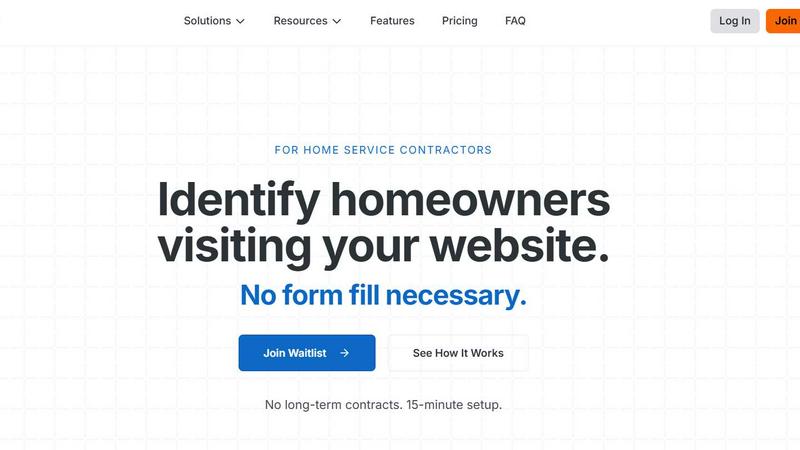
Pipeline uncovers anonymous website visitors, transforming them into valuable leads without any form submission needed.
Last updated: February 26, 2026
Visual Comparison
AutomagicWP

Pipeline
Feature Comparison
AutomagicWP
One-Click, Site-Wide Updates
Upload a new plugin or theme version just one time to your AutomagicWP dashboard. Every WordPress site connected via a simple API key will automatically detect and install this update through the standard WordPress update system. You never have to log into individual client dashboards again, saving immense time and ensuring consistency across your entire managed portfolio.
Professional Plugin Repository
Give your plugins a polished, official look within the WordPress admin. AutomagicWP lets you upload icons, banners, and screenshots, and write full descriptions, changelogs, and FAQs. This creates a user experience for your clients that mirrors plugins from the official WordPress.org repository, building trust and professionalism for your work.
Seamless CI/CD Integration
Automate your entire release pipeline. Connect your GitHub repository, and when you push a tag, AutomagicWP's GitHub Action automatically packages and deploys the new release. This creates a true "set it and forget it" workflow where merging code can directly result in an update being available to all connected sites, with zero manual steps in between.
Comprehensive Release Management
Keep every version organized and accessible. Each release you upload stores the version number, PHP requirements, and a changelog. You get a clear version history and can download any past release directly from your dashboard. This is crucial for rollbacks, auditing, and maintaining a reliable distribution history for your code.
Pipeline
Real-Time Visitor Identification
Pipeline offers real-time identification of website visitors, capturing essential information such as names, addresses, and emails without requiring any form fills. This allows businesses to engage with potential customers immediately, turning anonymous traffic into actionable leads.
Seamless CRM Integration
Pipeline easily integrates with popular CRM systems, ensuring that captured leads are automatically pushed into your existing workflows. This means you can focus on nurturing relationships without the hassle of manual data entry.
Automated Follow-Up Actions
With Pipeline, you can trigger automated actions based on visitor identification, such as sending welcome emails or queuing postcards for immediate delivery. This helps keep your brand top-of-mind with potential customers right when they're interested.
Comprehensive Analytics Dashboard
The platform provides a user-friendly analytics dashboard that allows contractors to monitor lead generation performance in real-time. This feature helps track the effectiveness of campaigns and understand visitor behavior, enabling data-driven decision-making.
Use Cases
AutomagicWP
WordPress Development Agencies
Agencies managing updates for 10, 20, or 100+ client sites can centralize all their custom plugin and theme updates. Onboard a client site once with an API key, and all future updates are handled automatically. This eliminates a major time sink, reduces human error, and allows the agency to scale its service offerings efficiently.
Independent Plugin & Theme Developers
Solo creators selling premium WordPress products can use AutomagicWP as a lightweight, private distribution platform. It handles secure update delivery and provides a professional update interface for customers, without the need to build a complex licensing server or integrate with a large marketplace.
Freelancers with Recurring Clients
Freelancers who maintain sites for several long-term clients can stop the monthly "update ritual." By deploying client-specific plugins through AutomagicWP, they ensure all sites are always on the latest, most secure version effortlessly, leading to happier clients and more predictable, valuable maintenance work.
Teams Using Modern Development Workflows
Development teams that use GitHub and practice continuous integration can hook AutomagicWP directly into their process. Pushing a tag triggers a build and release, ensuring that tested code is what gets deployed. The REST API also allows for deeper integration into custom internal tools and dashboards.
Pipeline
Boosting Lead Generation for HVAC Companies
HVAC contractors can leverage Pipeline to capture and follow up on the large volume of visitors to their websites. By identifying potential customers who don’t fill out forms, they can initiate outreach campaigns and convert more visitors into booked appointments.
Enhancing Conversion Rates for Plumbing Services
Plumbing companies can utilize Pipeline to turn anonymous web traffic into actionable leads. With the ability to identify visitors, they can engage with homeowners who are actively searching for plumbing services, improving their conversion rates significantly.
Streamlining Outreach for Roofing Contractors
Roofing contractors can benefit from Pipeline by capturing the information of homeowners who visit their sites. By following up with these leads through personalized emails or postcards, they can maintain visibility and increase the likelihood of securing contracts.
Maximizing Opportunities for Electrical Services
Electrical contractors can use Pipeline to identify and engage with potential clients browsing their websites. By capturing leads that would otherwise go unnoticed, they can enhance their marketing efforts and grow their business without increasing ad spend.
Overview
About AutomagicWP
AutomagicWP is your private, automated distribution hub for WordPress plugins and themes. It's built to completely eliminate the tedious, manual process of updating client sites. Instead of logging into dozens of wp-admin dashboards to upload ZIP files, you simply upload a release to AutomagicWP once. Every WordPress site you've connected will then update itself automatically using WordPress's own, native update mechanism. This means your clients get updates seamlessly, and you get hours of your week back.
It's perfect for WordPress agencies managing a portfolio of client sites, solo developers who are tired of the repetitive "ZIP loop," and creators of premium plugins or themes who need a professional distribution channel without the overhead of a full e-commerce platform. Beyond just shipping files, AutomagicWP gives your plugins a professional presence with support for icons, banners, screenshots, and detailed changelogs right within the wp-admin. With features like CI/CD via GitHub Actions and a comprehensive REST API, it integrates smoothly into modern development workflows. In short, AutomagicWP turns plugin and theme updates from a chore into a completely automated, reliable process.
About Pipeline
Pipeline is an innovative tool designed to help home service companies maximize their lead generation efforts by identifying anonymous traffic on their websites. Unlike traditional methods that rely on visitors filling out forms, Pipeline captures vital information about potential customers simply by tracking their activity. This means that even if a visitor does not engage directly with your site, Pipeline can still provide you with their name, address, and email. On average, Pipeline can identify up to 40% of site visitors, significantly outperforming the industry standard conversion rate of just 4%. By transforming anonymous traffic into valuable leads, Pipeline empowers contractors to fill their sales pipelines efficiently and effectively. With easy integration into existing CRMs and automated follow-up features, Pipeline is the perfect solution for HVAC, plumbing, roofing, electrical, and other home service contractors looking to enhance their marketing strategies and improve their bottom line.
Frequently Asked Questions
AutomagicWP FAQ
What is AutomagicWP?
AutomagicWP is a private WordPress plugin and theme distribution platform. It allows you to upload a release once and have it automatically update on every connected WordPress site. It's designed to replace the manual process of logging into multiple wp-admin areas to upload ZIP files, saving developers and agencies significant time.
How does automatic plugin updating work?
You install a lightweight Composer package or mu-plugin on each client's WordPress site and provide an API key from your AutomagicWP account. This connects the site to your private repository. When you publish a new release, WordPress's built-in update checker sees it just like an update from the official directory and installs it automatically on its normal schedule.
Is AutomagicWP free to start?
Yes! AutomagicWP offers a free Starter tier with no credit card required to sign up. This plan includes 1 plugin, 500 MB of storage, 20 releases, and automatic updates. You can fully test the service and manage a small project at no cost.
Does AutomagicWP work with private or commercial plugins?
Absolutely. This is a primary use case. AutomagicWP is designed as a private repository, so your code is never published publicly. It's an ideal solution for distributing commercial, premium, or custom-built plugins and themes directly to your customers or client sites securely.
Pipeline FAQ
How does Pipeline identify visitors?
Pipeline uses a simple line of code that you add to your website's header. This script allows it to track and identify anonymous visitors in real-time, providing you with their contact information.
Is there a long-term contract required to use Pipeline?
No, Pipeline does not require long-term contracts. It offers a straightforward, flexible solution with a quick setup process, allowing you to start capturing leads almost immediately.
What types of businesses can benefit from Pipeline?
Pipeline is specifically designed for home service contractors, including HVAC, plumbing, roofing, electrical, and landscaping companies. Any business that relies on online customer engagement can benefit from its features.
How quickly can I see results with Pipeline?
Many users report seeing significant results shortly after implementation. Once the code is added to your website, Pipeline begins identifying visitors immediately, allowing you to start engaging leads right away.
Alternatives
AutomagicWP Alternatives
AutomagicWP is a specialized tool in the WordPress ecosystem, designed to streamline how developers and agencies distribute and update plugins and themes across multiple sites. It automates the tedious manual process of uploading ZIP files to individual dashboards, making it a powerful solution for managing a portfolio of client websites or distributing premium products. Users often explore alternatives for various reasons. Some might need a different pricing structure or a free tier to start. Others may require deeper integration with specific hosting platforms, version control systems like Git, or more advanced user management features. The specific needs of a solo developer differ from those of a large agency, so the ideal tool can vary. When evaluating options, consider your core workflow. Look for reliable automation that saves time, secure update delivery, and compatibility with your existing tools. A solution should reduce your administrative burden, not add complexity, ensuring you can focus on building great websites instead of managing updates.
Pipeline Alternatives
Pipeline is a tool designed to help businesses identify anonymous traffic visiting their websites, particularly in the home services sector. By capturing valuable information about visitors who don't fill out forms, Pipeline enables companies to significantly increase their lead generation efforts. This product falls under the marketing category, focusing on enhancing visibility and communication with potential customers. Users often seek alternatives to Pipeline for various reasons, including budget constraints, specific feature requirements, or integration capabilities with existing platforms. When searching for a suitable alternative, it’s essential to consider aspects such as pricing models, ease of use, compatibility with your current systems, and the specific marketing needs of your business. A comprehensive understanding of these factors will help in selecting the right tool to enhance your lead generation strategy.