
BarBrain vs ChartFromText
Side-by-side comparison to help you choose the right AI tool.

BarBrain
BarBrain simplifies inventory management for the hospitality industry, cutting your counting time in half while ensuring accurate results.
Last updated: April 4, 2026

Instantly create beautiful pie charts from your text data in seconds with our free online generator.
Last updated: February 28, 2026
Visual Comparison
BarBrain

ChartFromText
Feature Comparison
BarBrain
Parallel Counting on Multiple Devices
BarBrain allows users to count inventory simultaneously across multiple iOS and Android devices. This feature enhances efficiency by enabling staff to work together, significantly reducing the time spent on inventory tasks and streamlining the counting process.
Comprehensive Product Catalog
With over 30,000 products in its catalog, BarBrain enables users to manage a wide variety of items including beverages, food items, and housekeeping supplies. This extensive catalog helps businesses track all their inventory needs in one place, ensuring that nothing is overlooked.
Automated Inventory Reporting
After each inventory count, BarBrain generates an automatic and comprehensive inventory report. This eliminates the need for manual data entry and post-processing, providing business owners with reliable and accurate results without the usual hassle.
Intuitive Food and Beverage Tracking
BarBrain incorporates a user-friendly fill-level slider for tracking open food and beverage products. This feature allows for quick and easy entry of both opened and whole units, ensuring that inventory counts are precise and up-to-date.
ChartFromText
Instant Text-to-Chart Conversion
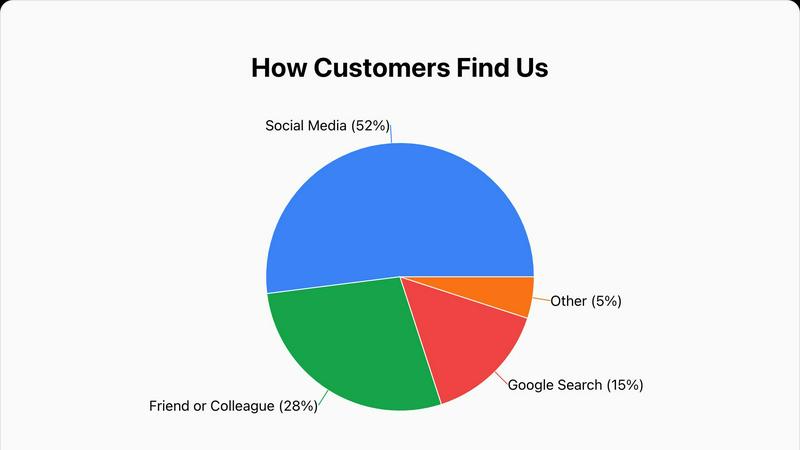
The hallmark feature of ChartFromText is its ability to generate a chart directly from pasted text. You don't need to manually plot points or build complex tables. Simply copy data in a simple 'Label, Value' format from any source and paste it into the input field. The tool's smart parser understands the format instantly, converting your raw text into a structured visual chart within seconds, saving you immense time and effort.
Comprehensive Customization Options
While the process is simple, you still have full control over your chart's appearance. You can add a custom title, choose a background color to match your brand or presentation theme, and select how data labels are displayed. Options include showing values inside the chart slices, using connecting lines for clarity, or opting for a clean, separate legend. This flexibility ensures your final chart looks exactly how you envision it.
High-Resolution PNG Downloads
Every chart you create with ChartFromText can be downloaded as a high-resolution PNG image file. This ensures your visuals remain crisp, clear, and professional-looking whether they are embedded in a digital presentation, printed in a report, or shared online. You get a polished, ready-to-use graphic without any watermarks or quality loss.
Free & No-Account Required Access
ChartFromText is committed to being truly accessible. It is completely free to use with no hidden fees, subscription tiers, or premium feature locks. Most importantly, you can start creating and downloading charts immediately without having to sign up for an account or provide any personal information. This respects your privacy and gets you to your finished chart faster.
Use Cases
BarBrain
Single Bar Management
For independent bar owners, BarBrain simplifies inventory management, allowing them to reduce counting time and focus on enhancing customer experiences. Users can monitor stock levels accurately and make informed purchasing decisions.
Multi-Location Restaurant Oversight
Restaurant groups can leverage BarBrain to maintain consistent inventory practices across multiple locations. The software provides a unified overview of inventory usage across all sites, enabling better resource allocation and cost management.
Hotel Food and Beverage Inventory
Hotels with restaurants or bars can use BarBrain to conduct comprehensive inventory counts of all food and beverage products across various outlets. This ensures that all locations maintain optimal stock levels and minimize waste.
Event Management for Catering
Caterers can utilize BarBrain to efficiently track inventory for events. With the ability to quickly assess stock levels and manage supplies, they can ensure that events are well-stocked and that waste is minimized.
ChartFromText
Student Assignments and Projects
Students can effortlessly elevate their essays, science fair projects, or research papers by adding professional-looking charts. Instead of describing data in paragraphs, they can paste survey results, experimental data, or historical figures from their notes directly into ChartFromText to create clear, impactful visuals that demonstrate understanding and improve their grades.
Business and Financial Presentations
Professionals can quickly generate charts for meetings, reports, or client proposals. Whether it's visualizing a project's budget allocation, showing quarterly sales breakdowns, or illustrating market share, ChartFromText turns spreadsheet data into compelling pie or bar charts in moments, making complex financial information easy for any audience to digest.
Educational Teaching Materials
Teachers and professors can use ChartFromText to create engaging visual aids for their lessons. By transforming statistical data, historical trends, or scientific proportions into charts, educators can explain concepts more clearly, capture students' attention, and provide visual handouts that enhance learning and retention in the classroom.
Content Creation for Blogs and Social Media
Bloggers, marketers, and social media managers can use ChartFromText to create eye-catching graphics for their content. Visualizing poll results, survey data, or simple statistics in a colorful pie or bar chart is a proven way to increase reader engagement, make articles more shareable, and present information in a snackable, visually appealing format.
Overview
About BarBrain
BarBrain is a revolutionary inventory management tool specifically designed for the hospitality industry. It addresses the unique challenges faced by bar and restaurant owners who often struggle with outdated inventory practices that are time-consuming and error-prone. With BarBrain, owners can quickly count stock in minutes rather than hours, enabling them to focus more on customer service and less on tedious inventory tasks. The software provides precise calculations for the cost per drink and dish, identifies waste and shrinkage in real time, and consolidates supplier orders for easy management. BarBrain is tailored for operators of all sizes, whether you manage a single cocktail bar or a large multi-location restaurant group. The platform is user-friendly with no complex training required, making it an essential tool for improving operational efficiency and protecting your margins.
About ChartFromText
ChartFromText is a free, user-friendly online tool that transforms plain text data into beautiful, professional charts in seconds. It’s designed to make data visualization accessible to everyone, regardless of their technical skills or design experience. The core idea is simple: you copy your data from a spreadsheet, document, or any text source, paste it into the tool, and instantly generate a visual chart. It supports various chart types, including pie charts, bar graphs, and line graphs, making it a versatile solution for many needs.
This tool is perfect for students who need to illustrate reports, educators creating engaging teaching materials, content creators looking to spice up their blogs or social media, and professionals who need quick charts for presentations or internal reports. ChartFromText eliminates the complexity and learning curve of traditional software like Excel or specialized design programs. There’s no need to create an account or deal with watermarks—it’s completely free and ready to use. With its focus on speed, simplicity, and high-quality output, ChartFromText empowers anyone to turn raw numbers into compelling visual stories effortlessly.
Frequently Asked Questions
BarBrain FAQ
How does BarBrain reduce inventory time?
BarBrain significantly streamlines the inventory process, allowing users to complete counts in minutes rather than hours. Its intuitive design and multi-device functionality enhance efficiency, leading to time savings of over 75%.
Is training required to use BarBrain?
No, BarBrain is designed with user-friendliness in mind. There are no complex training manuals or bloated feature sets, allowing users to jump right in and start managing their inventory effectively.
What types of products can I manage with BarBrain?
BarBrain supports a broad range of products, including spirits, soft drinks, food items, and housekeeping supplies. This versatility makes it suitable for various hospitality businesses.
Can I access BarBrain from different locations?
Yes, BarBrain can be accessed on multiple devices simultaneously, making it easy for teams to collaborate and count inventory from different locations, whether in a single establishment or across multiple sites.
ChartFromText FAQ
What data format should I use?
The tool is designed to understand a simple, comma-separated format. Enter your data with each item on a new line, like this: Label, Value. For example: Marketing, 22000 or Apples, 45. You can copy this directly from a spreadsheet column or type it manually. The parser is smart and will handle it seamlessly.
Is ChartFromText really free?
Yes, absolutely! ChartFromText is a completely free online tool. There are no hidden costs, no subscription fees, and no premium features locked behind a paywall. You can create, customize, and download as many charts as you need without any limitations or watermarks on your images.
Do I need to create an account to use it?
No, you do not need an account. We value your privacy and convenience. You can access all features of ChartFromText immediately upon visiting the website. There is no sign-up process, no email required, and no login necessary to start creating and downloading your charts.
Can I create charts other than pie charts?
Yes! While the provided context highlights the pie chart generator, ChartFromText is designed to create multiple chart types. Based on the initial description, the tool also supports the creation of bar graphs and line graphs, giving you flexibility depending on what best represents your specific data set.
Alternatives
BarBrain Alternatives
BarBrain is an innovative inventory management tool specifically designed for the hospitality industry, focusing on bars and restaurants. It streamlines the often tedious process of counting bottles and tracking inventory, enabling operators to manage their stock quickly and accurately. Users frequently seek alternatives to BarBrain for various reasons, including pricing concerns, specific feature requirements, or the need for compatibility with existing platforms. When choosing an alternative, it's essential to consider factors such as ease of use, the ability to tailor features to hospitality needs, and how well the solution integrates with your current operations.
ChartFromText Alternatives
ChartFromText is a free online tool in the data visualization and productivity category. It specializes in turning simple text into clear pie charts, bar graphs, and line graphs in seconds, making it a great choice for quick, simple charting needs. Users often explore other options for various reasons. Some might need more advanced chart types, deeper data analysis, or integration with other software platforms. Others may be looking for different pricing models, like a one-time purchase instead of a subscription, or require collaboration features for team projects. When evaluating other tools, consider your primary goal. If you need speed and simplicity for basic visuals, prioritize ease of use. For complex data stories, look for robust customization and export options. Also, think about where you'll use the charts—ensuring compatibility with your presentation software or website is key.