
Blueberry vs Fallom
Side-by-side comparison to help you choose the right AI tool.

Blueberry
Blueberry is an all-in-one Mac app that unifies your editor, terminal, and browser for seamless web app development.
Last updated: February 26, 2026

Fallom gives you real-time observability to track, debug, and optimize your AI agents and LLM calls.
Last updated: February 28, 2026
Visual Comparison
Blueberry

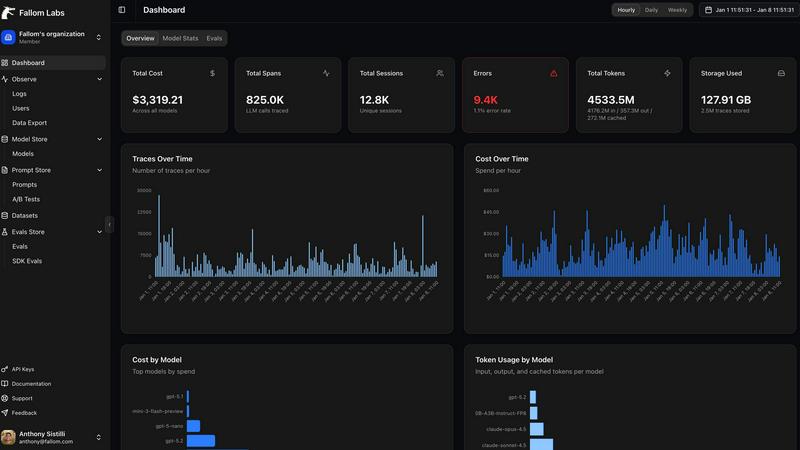
Fallom
Feature Comparison
Blueberry
Integrated Workspace
Blueberry combines a code editor, terminal, and preview browser into one cohesive environment. This integration allows developers to work more efficiently without the constant need to switch between different applications, enhancing focus and productivity.
Live Context with AI
The platform's built-in MCP server enables AI models to access your entire workspace. This means your AI can see open files, terminal output, and running applications, giving it the full context needed to assist you effectively, whether it's answering questions or suggesting code snippets.
Preview Across Devices
Blueberry comes equipped with built-in desktop, tablet, and mobile view previews. This feature allows you to see exactly how your application will look across different devices, ensuring a consistent user experience without leaving the Blueberry workspace.
Pinned Apps and Customization
You can keep essential tools like GitHub, Linear, Figma, and PostHog docked within your workspace. These pinned apps load with your project and share live context with your AI, allowing for a more integrated and efficient workflow. Additionally, you can customize your workspace setup per project, saving time and effort.
Fallom
End-to-End LLM Tracing
Fallom provides comprehensive, granular tracing for every LLM interaction in your system. You can track the full journey of a request, including the exact prompt sent, the model's output, any tool or function calls made by an agent, token usage, latency, and the calculated cost. This complete visibility is essential for understanding performance, debugging unexpected behavior, and optimizing each call for better efficiency and lower expenses.
Real-Time Cost Attribution & Dashboard
Gain instant clarity on your AI spending with Fallom's live dashboard. It automatically breaks down costs by model, user, team, or customer, turning opaque API bills into actionable insights. You can see a live feed of calls, monitor for spending anomalies, and attribute expenses accurately for internal chargebacks or client billing, ensuring full financial transparency and control over your AI budget.
Compliance-Ready Audit Trails
Built for regulated industries, Fallom creates immutable, detailed audit logs of every AI interaction. It supports critical compliance needs like model versioning, user consent tracking, and input/output logging, helping you meet requirements for standards like the EU AI Act, SOC 2, and GDPR. This feature provides the necessary documentation to demonstrate responsible AI usage and data handling.
Timing Waterfall & Tool Call Visibility
Debug complex, multi-step agent workflows with ease using Fallom's visual timing waterfall diagrams. These charts break down the exact sequence and duration of LLM calls, tool executions, and processing steps, making it simple to pinpoint latency bottlenecks. Coupled with deep visibility into every tool call—showing function names, arguments, and results—you can quickly identify and fix inefficiencies in your agentic chains.
Use Cases
Blueberry
Streamlined Development
Developers can use Blueberry to streamline their coding process by having access to their terminal, code editor, and browser in one workspace. This allows for quick edits, testing, and debugging without losing focus or context.
Collaborative Product Building
Product teams can collaborate more effectively by using Blueberry's integrated features. The ability to share live project contexts with team members and AI assistants enhances communication and collaboration, leading to better product outcomes.
Rapid Prototyping
Designers and developers can quickly prototype applications using Blueberry's live preview feature. By seeing changes in real-time across different devices, teams can iterate faster and make informed design decisions, ultimately speeding up the development cycle.
Enhanced Learning and Experimentation
For those learning to code or experimenting with new technologies, Blueberry offers an intuitive environment where users can easily test out code snippets and receive AI-assisted guidance. This feature helps new developers to learn through practice while maintaining an organized workspace.
Fallom
Optimizing AI Agent Performance
Development teams use Fallom to monitor and debug their production AI agents. By analyzing timing waterfalls and tool call traces, engineers can identify why an agent is slow—perhaps a specific database query or external API call is lagging—and optimize the workflow to improve response times and user experience significantly.
Managing and Forecasting AI Costs
Finance and engineering leaders leverage Fallom's cost attribution features to track spending across different projects, teams, and models. This allows for accurate budgeting, forecasting, and internal chargebacks. Teams can identify if a specific feature or user is driving unexpected costs and take action, such as optimizing prompts or switching models, to stay within budget.
Ensuring Regulatory Compliance
Compliance and legal officers in healthcare, finance, or enterprise software use Fallom to maintain robust audit trails for AI systems. The platform logs all necessary data (inputs, outputs, model versions, user consent) in an immutable format, providing the evidence needed to pass security audits and demonstrate adherence to industry regulations and internal governance policies.
Improving LLM Application Reliability
SRE and DevOps teams implement Fallom for real-time monitoring and alerting on their LLM-powered applications. By watching the live dashboard for error spikes, latency increases, or hallucination rate changes, they can detect and resolve incidents proactively before they impact end-users, ensuring high reliability and uptime for critical AI services.
Overview
About Blueberry
Blueberry is an innovative macOS application designed to streamline the product development process for modern builders. By integrating your code editor, terminal, and browser into a single, focused workspace, Blueberry eliminates the chaos of juggling multiple windows and applications. This AI-native platform is particularly beneficial for developers, product managers, and designers who want to build and ship web applications efficiently. With Blueberry, you can connect AI models like Claude, Gemini, and Codex through its built-in MCP server, allowing for real-time access to your project files, terminal outputs, and live previews. The main value proposition of Blueberry lies in its ability to provide constant context, enabling you to focus on creative coding without the cumbersome task of switching between different tools. Say goodbye to the hassle of copy-pasting context and embrace a seamless workflow that enhances productivity.
About Fallom
Fallom is your all-in-one observability platform built from the ground up for the age of AI. It's designed to bring crystal-clear visibility to the complex world of large language models (LLMs) and AI agents running in production. Think of it as a powerful dashboard that lets you see every single LLM call, trace every step of an agent's reasoning, and understand exactly what's happening under the hood of your AI applications. For developers and data scientists, this means you can debug a slow or failing agent in minutes instead of hours. For product and business leaders, it provides crucial insights into costs, usage patterns, and performance to ensure your AI initiatives are efficient and scalable. Fallom empowers teams to move fast with confidence, offering enterprise-grade features like compliance-ready audit trails and detailed cost attribution right out of the box. With its OpenTelemetry-native SDK, you can start tracing your applications in under five minutes, making advanced AI observability accessible to every team.
Frequently Asked Questions
Blueberry FAQ
What operating systems does Blueberry support?
Blueberry is currently only available for macOS, making it a specialized tool for Mac users looking to enhance their development workflows.
How does Blueberry's AI integration work?
Blueberry integrates with various AI models through its built-in MCP server, which allows these models to access your entire workspace, providing them with the context needed to assist you effectively during development.
Is Blueberry really free during the beta phase?
Yes, Blueberry is completely free during its beta phase, allowing users to explore its features without any cost. This is a great opportunity for developers to test the application and provide feedback.
Can I customize my workspace in Blueberry?
Absolutely! Blueberry allows you to customize your workspace setup for different projects. You can save configurations for terminal sessions, editor tabs, and more, making it easy to switch between projects without losing your setup.
Fallom FAQ
How quickly can I start using Fallom?
You can get started in under five minutes. Fallom uses a single, OpenTelemetry-native SDK that you integrate into your application. Once instrumented, traces will immediately begin flowing to your Fallom dashboard, requiring minimal setup or configuration to see your first data.
Does Fallom support all LLM providers?
Yes, Fallom is designed to be provider-agnostic. It works with every major LLM provider, including OpenAI, Anthropic, Google Gemini, and others via its OpenTelemetry foundation. This means you can monitor all your AI models from one unified platform without vendor lock-in.
How does Fallom handle sensitive or private data?
Fallom offers a Privacy Mode for sensitive deployments. This allows you to disable full content capture for prompts and responses, logging only the metadata (like timings, token counts, and costs) while redacting the actual text. You can configure these privacy controls per environment to balance observability with data security.
Can I use Fallom for A/B testing different models or prompts?
Absolutely. Fallom includes features for model A/B testing and a Prompt Store for version control. You can safely roll out a new model to a percentage of traffic or test different prompt variations, then use Fallom's analytics to compare their performance, cost, and quality metrics side-by-side before making a full switch.
Alternatives
Blueberry Alternatives
Blueberry is a versatile Mac application that seamlessly integrates your editor, terminal, and browser into a single, focused workspace. This innovative tool is specifically designed for developers, allowing them to streamline their workflow by connecting various AI models like Claude, Codex, and Gemini. Users can enjoy the convenience of having all essential components at their fingertips, eliminating the hassle of switching between multiple windows. However, users may seek alternatives for a variety of reasons, such as budget constraints, differing feature sets, or compatibility with other platforms. When searching for an alternative, it's important to consider factors like ease of use, integration capabilities, and whether it meets specific development needs. A well-chosen alternative can enhance productivity and provide the necessary tools to support your projects effectively.
Fallom Alternatives
Fallom is a specialized observability platform for large language models (LLMs) and AI agents, falling into the development and AI operations category. It provides deep visibility into how your AI applications perform in production, tracking everything from prompts and costs to latency and tool calls. Users often explore alternatives for various reasons. These can include budget constraints, the need for a different feature set, or integration requirements with their existing tech stack. Some teams might be looking for a more general-purpose monitoring tool, while others may prioritize specific compliance or deployment options. When evaluating other solutions, it's wise to consider a few key areas. Look for robust LLM and agent tracing, clear cost attribution, and session-level context. Also, assess how easily it integrates into your workflow and whether it meets your specific security and compliance standards for audit trails.