
Claude Image vs Proofapp
Side-by-side comparison to help you choose the right AI tool.

Claude Image
Create stunning images effortlessly with Claude Image's AI-powered text-to-image generator and editing studio.
Last updated: February 26, 2026

Proofapp
Streamline feedback with visual comments on your website, making design reviews faster and hassle-free for your team.
Last updated: March 4, 2026
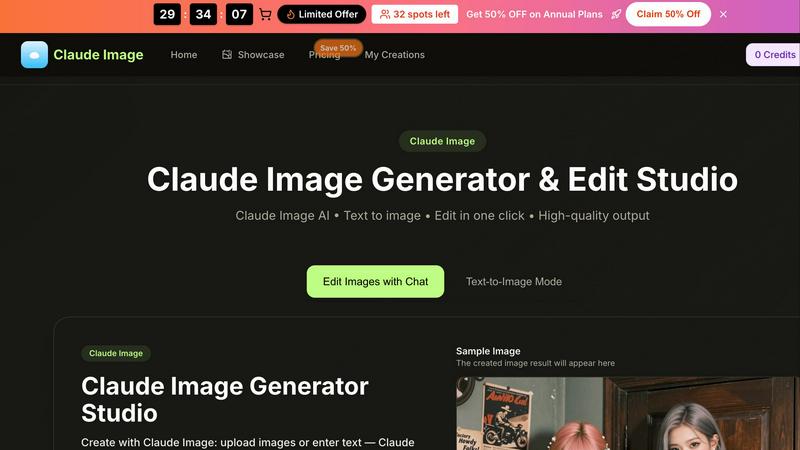
Visual Comparison
Claude Image
Proofapp

Feature Comparison
Claude Image
Text-to-Image Generation
With Claude Image's text-to-image feature, users can simply describe their desired image using natural language. The AI will interpret the description and generate a corresponding image in seconds, eliminating the need for complex prompts or technical jargon. This makes it easy for anyone to create visuals, whether they want a simple graphic or an intricate artwork.
Image Editing Capabilities
Claude Image isn't just about generating new images; it also offers robust editing tools. Users can upload existing images and enhance them with various adjustments. This includes refining colors, adding text, or applying different artistic styles, all while maintaining high-resolution quality. This feature is perfect for those looking to restore old photos or reimagine their visuals.
Style Transfer Options
One of the standout features of Claude Image is its ability to apply different artistic styles to a single subject. Users can upload an image and choose from various styles, such as photorealistic, anime, or oil painting. Claude Image then blends the original image with the selected style, providing a unique and creative output that showcases the subject in new and exciting ways.
High-Quality Output
Claude Image ensures that all generated and edited images maintain a high level of quality. Whether you are creating images for personal use, social media, or professional projects, you can count on Claude Image to deliver pro-ready results. The tool is optimized to produce detailed, high-resolution images quickly, allowing users to focus more on creativity and less on technical constraints.
Proofapp
Visual Commenting
Proofapp allows users to click anywhere on a screenshot to leave contextual feedback. This eliminates confusion about feedback location and ensures that comments are pinned exactly where they belong, making it easier for teams to understand and implement changes.
Multi-Breakpoint Testing
Automatically capture and review your website at multiple breakpoints for both desktop and mobile. This feature ensures that feedback is relevant and applicable across different devices, streamlining the review process and enhancing user experience.
Real-time Collaboration
With real-time collaboration features, your team can see comments and feedback as they are made. This allows for immediate responses and tracking of progress, transforming the feedback loop into a dynamic and interactive process that promotes teamwork.
Secure Share Links
Proofapp provides secure, expirable links for sharing projects with clients. This means you can easily send them access without requiring an account, ensuring that your feedback process remains smooth and secure while keeping client information protected.
Use Cases
Claude Image
Product Photography
E-commerce businesses can leverage Claude Image to create compelling product images in no time. By generating high-quality visuals that highlight products effectively, businesses can enhance their online listings without the need for expensive photography equipment or studio setups.
Photo Restoration
Claude Image is an excellent tool for restoring old or damaged photographs. Users can upload their images and use the editing features to fix colors, enhance details, and revive the original beauty of their cherished memories. This is particularly valuable for preserving family history.
Virtual Try-Ons
Fashion retailers can utilize Claude Image to offer virtual try-ons for apparel, glasses, or accessories. By generating images that showcase products on different models or backgrounds, customers can better visualize how items will look before making a purchase, enhancing the shopping experience.
Custom Avatar Creation
Individuals looking to create unique avatars for social media or gaming platforms can rely on Claude Image for this purpose. By simply providing a description of their desired avatar, users can generate personalized representations that reflect their style and personality.
Proofapp
Freelance Projects
Freelancers can use Proofapp to gather precise feedback from clients without the hassle of endless email threads. By pinning comments directly on designs, freelancers can save hours on revisions and maintain a professional image.
Agency Workflows
Agencies managing multiple projects can streamline their approval processes using Proofapp. The platform’s visual feedback tools help teams navigate client requests efficiently, reducing the time spent on revisions and increasing project turnaround.
Marketing Campaign Reviews
Marketing teams can utilize Proofapp to visually review landing pages and campaigns collaboratively. By providing visual feedback, teams can ensure that all elements meet brand standards and client expectations before launch.
Design Iterations
Design teams can leverage Proofapp to receive clear and actionable feedback on their designs. By allowing team members to comment directly on the designs, they can make informed changes that align with project goals, leading to more cohesive and successful outcomes.
Overview
About Claude Image
Claude Image is a powerful and user-friendly AI image generator and editing tool designed for anyone looking to create stunning visuals quickly and efficiently. Whether you are a professional designer, a content creator, or simply someone who enjoys exploring their creativity, Claude Image provides a versatile platform to transform your ideas into high-quality images. With Claude Image, users can generate images from text descriptions or upload existing images for enhancement. Its intuitive interface allows for seamless editing with just a few clicks, making it accessible even for those without extensive graphic design experience. The tool supports various image formats and offers a wide range of styles and quality options, ensuring that your creations are not only visually appealing but also tailored to your specific needs. Best of all, Claude Image is free to try, with no signup required, making it an attractive option for anyone eager to dive into the world of AI-generated art.
About Proofapp
Proofapp is a cutting-edge visual feedback and website review platform designed to enhance collaboration among designers, developers, and their clients. It simplifies the feedback process by allowing users to upload any website URL and automatically capturing screenshots for both desktop and mobile views. With Proofapp, reviewers can pin comments directly on the design, create threaded replies, attach relevant files, and easily resolve feedback—all without the need for an account. This eliminates the chaos of scattered emails and vague revision notes, making feedback more visual, organized, and actionable. Ideal for freelancers collecting client insights or agencies managing multiple projects, Proofapp fosters an efficient feedback loop that saves time and minimizes miscommunication, ultimately boosting productivity and creativity.
Frequently Asked Questions
Claude Image FAQ
What formats does Claude Image support for uploads?
Claude Image supports various image formats, including JPG, PNG, and WEBP. Users can upload images up to a maximum size of 10MB, making it flexible for different needs.
Do I need to create an account to use Claude Image?
No, you do not need to sign up or create an account to use Claude Image. The tool is available for free to try, allowing users to explore its features without any commitment.
How can I achieve the best results with Claude Image?
To get the best results, be specific in your text descriptions. Include details about colors, styles, and other preferences. The more information you provide, the better Claude Image can tailor the output to your needs.
Can I edit images after generating them?
Yes, Claude Image allows users to edit images after generation. You can refine details, adjust colors, and apply different styles to enhance your creations further, ensuring they meet your expectations.
Proofapp FAQ
How does Proofapp improve the feedback process?
Proofapp enhances the feedback process by allowing users to leave visual comments directly on screenshots, which reduces miscommunication and speeds up revisions.
Is there a free trial available for Proofapp?
Yes, Proofapp offers a generous free trial that allows users to access full features for 60 days without requiring a credit card, enabling you to experience its benefits risk-free.
Can I share my projects without requiring clients to create an account?
Absolutely! Proofapp allows you to generate secure, expirable links that clients can use to view and comment on projects without needing to create an account.
What types of teams benefit from using Proofapp?
Proofapp is beneficial for a variety of teams, including freelance designers, small development teams, marketing agencies, and larger design teams looking for an efficient way to manage client feedback and streamline their workflows.
Alternatives
Claude Image Alternatives
Claude Image is a powerful image generator and editing studio that leverages advanced AI technology to help users create stunning visuals effortlessly. As part of the design tools category, it offers a user-friendly interface, making it accessible for both beginners and experienced designers. With its free-to-use model, Claude Image has gained popularity among those seeking to enhance their creative projects without the burden of costly software. However, users often find themselves exploring alternatives to Claude Image for various reasons. These may include the need for additional features, specific platform compatibility, or budget constraints. When searching for a suitable alternative, it’s essential to consider aspects such as ease of use, the breadth of features offered, and the overall cost, ensuring that the chosen tool aligns with personal or professional needs.
Proofapp Alternatives
Proofapp is a visual feedback and website review platform designed to enhance collaboration among designers, developers, and their clients. It streamlines the feedback process by allowing users to upload website URLs and automatically generating screenshots for review. This tool falls under the category of design tools, making it essential for anyone involved in creating or managing digital projects. However, users often seek alternatives to Proofapp for various reasons, such as pricing, feature sets, or compatibility with specific platforms. When searching for an alternative, it's important to consider factors like ease of use, the ability to integrate with existing workflows, and the types of feedback mechanisms available. Identifying the specific needs of your team can help you select a solution that not only meets your requirements but also enhances your overall project management efficiency.