
Cleanlist AI vs TrackMailBox
Side-by-side comparison to help you choose the right AI tool.

Cleanlist AI enriches your leads with verified emails and phone numbers for effective B2B outreach in seconds.
Last updated: February 26, 2026

TrackMailBox
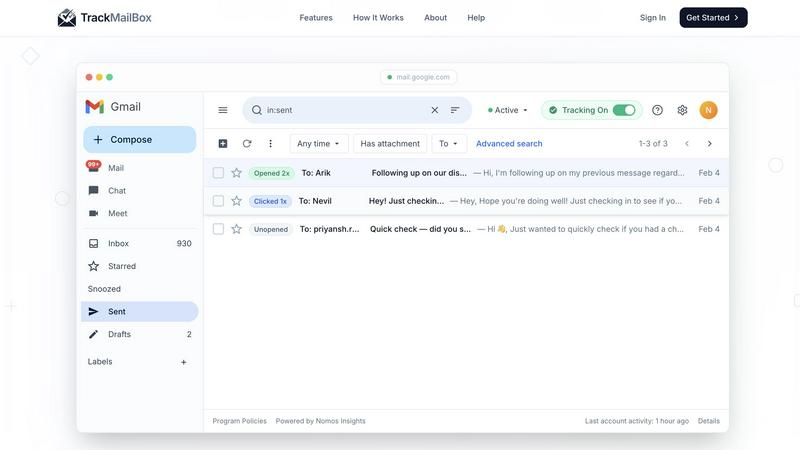
TrackMailBox is a free Chrome extension that provides real-time tracking of email opens and link clicks in Gmail.
Last updated: February 26, 2026
Visual Comparison
Cleanlist AI

TrackMailBox
Feature Comparison
Cleanlist AI
Waterfall Enrichment
Cleanlist's waterfall enrichment feature queries more than 15 data providers in a sequential manner to maximize coverage. This innovative approach significantly boosts the chances of obtaining accurate contact information, achieving a coverage rate of 85-95%, compared to the 50-70% typical of single-source solutions.
Email Verification
With Cleanlist's triple verification system, users can ensure that the email addresses they collect are valid and deliverable. The advanced catch-all detection process guarantees a remarkable 98% accuracy, helping teams reduce bounce rates and improve their email outreach effectiveness.
Smart Agents
Cleanlist AI incorporates intelligent smart agents that automatically normalize job titles, clean datasets, and score Ideal Customer Profiles (ICPs). This feature not only simplifies data management but also enhances the quality of leads by ensuring that every piece of information is structured and relevant for targeted outreach.
Playbook Builder
The Playbook Builder is a visual workflow automation tool that allows teams to create repeatable enrichment sequences effortlessly. Users can design and launch comprehensive playbooks tailored to their specific needs, enabling quick and efficient execution of their GTM strategies without the need for extensive technical expertise.
TrackMailBox
Unlimited Email Tracking
TrackMailBox offers unlimited email tracking, allowing you to monitor as many emails as you want without any costs. There are no hidden fees or premium tiers, making it an ideal solution for those who frequently send important emails.
Real-time Open Notifications
Receive instant notifications the moment your emails are opened. TrackMailBox ensures you know exactly when your recipients engage with your messages, helping you follow up effectively and strategically.
Link Click Tracking
With TrackMailBox, you can track which links in your emails are clicked and how often. This feature provides valuable insights into what content resonates with your recipients and can help you tailor your future communications for better engagement.
Detailed Engagement History
Access a comprehensive engagement history for each email directly within your Gmail interface. You'll see opens, clicks, and timestamps, allowing you to analyze the effectiveness of your email campaigns at a glance.
Use Cases
Cleanlist AI
Lead Enrichment
Sales teams can upload their leads into Cleanlist AI to enrich them with verified emails and phone numbers. This ensures that every outreach effort is backed by accurate contact information, ultimately increasing the chances of successful engagement.
CRM Cleanup
Over time, CRMs can accumulate outdated or inaccurate data. Cleanlist AI helps organizations maintain clean and up-to-date records by systematically verifying and enriching contact information, keeping data decay in check and ensuring that teams always have reliable data at their fingertips.
Targeted Marketing Campaigns
Marketers can leverage Cleanlist AI to build highly targeted lists of potential customers. By utilizing the platform's smart agents and enrichment capabilities, teams can identify decision-makers and tailor their marketing efforts for maximum impact, leading to higher conversion rates.
Event Follow-up
After attending events or trade shows, businesses can use Cleanlist AI to quickly enrich and follow up with leads. By reaching out within 24 hours while the leads are still warm, companies can significantly enhance their chances of converting these prospects into clients.
TrackMailBox
Freelancers Pitching Clients
Freelancers can use TrackMailBox to track their proposals and pitches, ensuring they know when potential clients have read their messages. This insight allows them to time their follow-ups effectively.
Sales Teams Closing Deals
Sales teams can benefit greatly from TrackMailBox by monitoring when leads open their emails and click on links to product demos or sales materials. This real-time data helps them prioritize their outreach efforts.
Recruiters Following Up with Candidates
Recruiters can streamline their communication with candidates by using TrackMailBox to see if their emails, such as interview invites or feedback, have been opened, ensuring a smoother hiring process.
Job Seekers Networking
Job seekers can utilize TrackMailBox to track their networking emails, ensuring they follow up with contacts who have engaged with their outreach. This feature can enhance their chances of securing job opportunities.
Overview
About Cleanlist AI
Cleanlist AI is a powerful data operating system designed specifically for modern go-to-market (GTM) teams. It streamlines the process of lead enrichment, ensuring that sales and marketing professionals have access to high-quality, verified contact data. By allowing users to upload a CSV or connect their CRM directly, Cleanlist leverages its unique waterfall enrichment engine to tap into over 15 data providers, including industry leaders such as Wiza, Findymail, and Lusha. This results in an impressive accuracy rate of 98% for the returned data. The platform is ideal for sales teams, marketers, and businesses looking to enhance their outreach efforts and improve lead conversion rates. With features like email verification, smart agents for data cleaning, and seamless CRM integrations, Cleanlist AI empowers teams to operate efficiently and effectively, ultimately driving growth and success in their outreach initiatives.
About TrackMailBox
TrackMailBox is a free and unlimited email tracking extension designed specifically for Gmail users. It addresses a common question among email senders: "Did they read it?" Unlike Gmail's default settings, which lack built-in read receipts, TrackMailBox provides a seamless solution for those who send important emails like proposals, pitches, or follow-ups. The tool eliminates the frustrations associated with other email tracking solutions that often impose restrictions, include unwanted signatures, or charge monthly fees. With TrackMailBox, you can track an unlimited number of emails without any branding, ensuring that your communications remain professional and clean. This extension is perfect for freelancers, sales teams, recruiters, job seekers, and founders—essentially anyone who relies on email for communication and wants to gain insights into their email engagement.
Frequently Asked Questions
Cleanlist AI FAQ
What types of data can Cleanlist AI provide?
Cleanlist AI provides a wide range of verified contact data, including emails, phone numbers, job titles, and other essential information to improve lead quality and outreach effectiveness.
How does the waterfall enrichment process work?
The waterfall enrichment process queries multiple data providers one after another, ensuring that if one provider does not yield a match, the system will continue to the next. This method maximizes data coverage and accuracy for your leads.
Is there a free trial available for Cleanlist AI?
Yes, Cleanlist AI offers a free plan that includes 30 credits per month. Users can explore the platform's features and capabilities without the need for a credit card.
How can I integrate Cleanlist AI with my existing tools?
Cleanlist AI provides native integrations with popular CRMs such as HubSpot, Salesforce, and Pipedrive, along with full API and webhook support, allowing for seamless integration into your existing workflows.
TrackMailBox FAQ
Is TrackMailBox really free?
Yes! TrackMailBox is completely free and unlimited. You can track as many emails as you want without any cost. There are no credit card requirements, hidden fees, or premium tiers involved.
How do I install TrackMailBox?
Installing TrackMailBox is easy. Simply add the extension from the Chrome Web Store. The installation process takes less than 30 seconds, and you can start tracking right away without any technical setup.
Will my recipients know I'm tracking my emails?
No, your recipients will not be aware that you are tracking your emails. TrackMailBox operates invisibly, meaning no signatures, logos, or labels are added to your outgoing messages.
Can I monitor engagement history for all my emails?
Absolutely! TrackMailBox provides a detailed engagement history for each email you send. You can view opens, clicks, and timestamps directly in your Gmail account, making it easy to analyze your email performance.
Alternatives
Cleanlist AI Alternatives
Cleanlist AI is a powerful AI-driven data enrichment tool designed for B2B marketing teams. It enables users to enhance their customer data by leveraging a waterfall enrichment engine that queries over 15 data providers to deliver verified contact information with a remarkable accuracy of 98%. As businesses evolve, users often seek alternatives to Cleanlist AI for various reasons, including pricing considerations, specific feature sets, or integration capabilities with their existing platforms. When searching for an alternative, it's essential to evaluate factors such as the accuracy of data provided, the breadth of integration options with your current tools, and the flexibility of the pricing plans to ensure it aligns with your team's needs. Additionally, consider the user experience and the availability of features that support your unique data enrichment workflow.
TrackMailBox Alternatives
TrackMailBox is a free email tracking extension designed specifically for Gmail users, enabling real-time open and click tracking without any limitations or branding. Users often seek alternatives to TrackMailBox for various reasons, including pricing, feature sets, and compatibility with other platforms. As you explore options, it's essential to consider factors such as ease of use, the comprehensiveness of tracking features, privacy policies, and whether the tool integrates seamlessly with your existing email workflows. When selecting an alternative, look for tools that offer unlimited tracking without hidden fees, ensure a clean email presentation, and provide detailed engagement insights. Prioritizing user privacy and data security is also crucial, as you want a solution that protects your information while delivering the insights you need.