
Clinic Comply vs File Studio
Side-by-side comparison to help you choose the right AI tool.

Clinic Comply
Streamline compliance for Australian healthcare with Clinic Comply, your all-in-one platform for accreditation and vendor management.
Last updated: March 11, 2026

File Studio
File Studio is your private offline toolkit for converting, editing, and managing files and PDFs.
Last updated: February 28, 2026
Visual Comparison
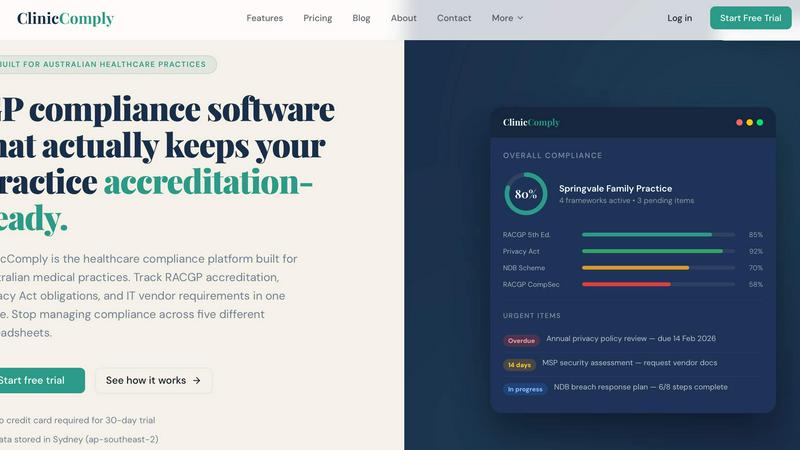
Clinic Comply
File Studio

Feature Comparison
Clinic Comply
RACGP Accreditation Management
Clinic Comply offers a comprehensive framework for managing RACGP accreditation. It includes guided checklists that are aligned with the 5th Edition Standards, making it easy to track compliance criteria. You can upload evidence documents directly linked to checklist items, ensuring you're always prepared for assessor visits. This feature also allows for one-click evidence pack downloads, saving time and reducing stress during audits.
Privacy Act Compliance Tracking
With dedicated tools for managing Privacy Act obligations, Clinic Comply helps practices navigate Australian privacy laws effortlessly. The platform provides templates and guidelines to ensure compliance with the Australian Privacy Principles (APPs). You can easily monitor pending tasks and overdue items, ensuring that your practice remains compliant with privacy regulations at all times.
IT Vendor Portal
The IT Vendor Portal streamlines communication between your practice and IT vendors. Instead of lengthy email chains, you can send secure upload links for vendors to submit essential documents directly. This feature automatically organizes and links these documents to the appropriate compliance criteria, making your evidence library more efficient and easier to manage.
Live Compliance Score
Clinic Comply features a dynamic compliance score that updates in real-time as you complete checklist items. This visual representation of your compliance status allows you to quickly identify areas that need attention. With an overall compliance score, practices can clearly see their progress and make informed decisions to enhance their compliance efforts.
File Studio
100% Offline Processing
Every single action in File Studio happens locally on your device. When you convert a PDF to images, merge documents, or compress a folder of photos, not one byte of your data is uploaded to the internet. This guarantees maximum privacy and security for sensitive files, and it also means you can work without an internet connection, anytime and anywhere.
Comprehensive PDF Toolkit
File Studio includes five powerful tools dedicated to PDF management. You can easily merge multiple documents into one, split a large PDF into individual pages, or reorder and rotate pages to create the perfect layout. It also lets you remove passwords from secured PDFs you have access to and clean metadata, all within the safe, offline environment of your desktop.
Versatile Image Conversion & Editing
With support for over 20 image formats, File Studio handles all your conversion needs. It seamlessly converts iPhone HEIC photos to universal JPGs, transforms WebP images for editing, and processes 14 different RAW camera formats. Beyond conversion, you can resize, compress, crop, add watermarks, and even create collages, making it a versatile hub for image preparation.
Efficient Batch Processing
Save immense time by processing hundreds of files at once. Whether you need to convert an entire folder of HEIC images to JPG, compress a batch of photos for a website, or split a stack of scanned contracts, File Studio can handle it in a single operation. This batch functionality works across both PDF and image tools, streamlining repetitive tasks effortlessly.
Use Cases
Clinic Comply
Simplifying Accreditation Preparation
For practices gearing up for an accreditation visit, Clinic Comply simplifies preparation. By having all required documentation linked to specific criteria, teams can ensure that nothing is overlooked. The ability to generate evidence packs with a single click means that practices can present organized and complete information to assessors.
Enhancing Team Collaboration
Clinic Comply fosters teamwork by providing a single source of truth for compliance-related tasks. Team members can access shared checklists and documents, ensuring everyone is on the same page. This collaboration reduces the risk of confusion and errors, especially as deadlines approach.
Streamlining Vendor Communication
Chasing IT vendors for documentation can be a time-consuming task. With Clinic Comply's IT Vendor Portal, practices can streamline this process, allowing vendors to upload necessary documents directly. This means less time spent on emails and more efficient record-keeping.
Keeping Up with Evolving Standards
As Australian healthcare compliance standards evolve, Clinic Comply ensures your practice stays up to date. The platform regularly updates to include new frameworks and criteria, so you can be confident that your compliance management aligns with the latest regulations.
File Studio
Preparing Documents for Secure Submission
Many online forms, like visa applications or client portals, require specific file formats and sizes. With File Studio, you can securely convert your PDF ID scans to JPG, compress the images to meet strict upload limits, and merge multiple pages into a single document—all offline to ensure your personal information never travels over the web unnecessarily.
Organizing and Archiving Client Work
Freelancers and photographers can use File Studio to efficiently manage project deliverables. Convert batches of RAW or HEIC photos to standard formats for client previews, create compressed versions for email, and assemble final image selections or contracts into a single, professional PDF portfolio. Doing this locally keeps unreleased work completely confidential.
Simplifying Personal Document Management
For anyone dealing with personal paperwork, File Studio is a lifesaver. You can merge multiple bank statements into a single PDF for tax season, split a large scanned manual into individual chapters, or remove personal metadata from a document before sharing it. The offline nature is perfect for handling sensitive items like tax forms or property deeds.
Optimizing Digital Content for Web Use
Bloggers, small business owners, and remote workers can quickly prepare images for websites, social media, or presentations. Resize photos to exact dimensions, compress them to load faster without losing quality, and convert modern formats like AVIF or WebP to more compatible types. Batch processing makes light work of updating an entire website's image gallery.
Overview
About Clinic Comply
Clinic Comply is an intuitive healthcare compliance platform tailored specifically for Australian medical practices. It simplifies the complex landscape of healthcare compliance by providing a centralized hub for tracking crucial requirements such as RACGP accreditation, Privacy Act obligations, and IT vendor specifications. Designed to eliminate the hassle of managing compliance across multiple spreadsheets, Clinic Comply ensures that all your compliance documentation and progress are accessible in one location. This platform is ideal for general practitioners, clinic managers, and healthcare administrators looking to streamline their compliance processes. With Clinic Comply, you can maintain accreditation readiness while saving valuable time and reducing the risk of errors, ultimately allowing you to focus more on patient care.
About File Studio
File Studio is your all-in-one, privacy-focused desktop toolkit for managing PDFs and images, and it does everything right on your own computer. In a world where we're constantly asked to upload files to the cloud, File Studio offers a powerful alternative: 100% offline processing. This means your sensitive documents—like passports, signed contracts, or client IDs—never leave your Mac or Windows PC. It's built for anyone who values security and simplicity, from photographers and freelancers handling client work to remote workers managing confidential agreements. The app packs over 15 essential tools into one clean interface, allowing you to merge, split, and password-protect PDFs, or convert, resize, and compress images across more than 20 formats including modern types like HEIC, WebP, and AVIF. With a straightforward one-time purchase and no subscriptions or accounts required, File Studio delivers reliable, powerful file management that puts your privacy first and streamlines your digital workflow.
Frequently Asked Questions
Clinic Comply FAQ
What is Clinic Comply?
Clinic Comply is a healthcare compliance platform specifically designed for Australian medical practices to manage accreditation, privacy obligations, and IT vendor compliance in one place.
How does Clinic Comply help with RACGP accreditation?
Clinic Comply provides guided checklists mapped to the RACGP 5th Edition Standards, allowing practices to easily track compliance requirements, upload evidence, and prepare for assessor visits.
Is my data secure with Clinic Comply?
Yes, Clinic Comply stores all data in Sydney (ap-southeast-2) and follows stringent security protocols to ensure your compliance information is safe and secure.
Can I try Clinic Comply before committing?
Absolutely! Clinic Comply offers a 30-day free trial with no credit card required, allowing you to explore its features and benefits before making a decision.
File Studio FAQ
Is my data ever uploaded to the cloud?
No, absolutely not. File Studio is designed with a core principle of privacy. All processing—every conversion, edit, and compression—is performed locally on your Mac or Windows computer. Your files never leave your device, ensuring 100% offline security. This is ideal for sensitive documents you don't want to risk uploading.
Do you offer a free trial?
Yes, File Studio offers a free trial so you can test all its features and ensure it fits your workflow before making a purchase. You can download the app and explore its 15+ tools to see how it handles your PDFs and images offline.
What formats does File Studio support for images?
File Studio supports a wide range of over 20 image formats. This includes common types like JPG and PNG, modern formats like HEIC (from iPhones), WebP, and AVIF, as well as 14 different professional RAW camera formats from manufacturers like Canon, Nikon, and Sony, making it incredibly versatile for all users.
Can I use File Studio on both Mac and Windows?
Yes, File Studio is fully compatible with both macOS and Windows operating systems. You purchase one license, and it works on your chosen platform. The interface and feature set are consistent across both, providing a reliable and familiar experience whether you're on a Mac or a PC.
Alternatives
Clinic Comply Alternatives
Clinic Comply is a specialized compliance platform designed for Australian medical practices, offering a streamlined approach to managing healthcare compliance. It allows users to easily track essential requirements such as RACGP accreditation, Privacy Act obligations, and IT vendor management all in one convenient location. By consolidating compliance tasks, Clinic Comply helps healthcare professionals avoid the hassle of juggling multiple spreadsheets. Users often seek alternatives to Clinic Comply for various reasons, including pricing, specific feature sets, or varying platform needs. When choosing an alternative, it's important to consider factors such as ease of use, integration capabilities with existing systems, support services, and how well the platform aligns with your practice's unique compliance requirements. Finding a solution that not only meets your budget but also enhances productivity is crucial for a successful transition.
File Studio Alternatives
File Studio is a powerful desktop application for managing, converting, and editing PDFs and images. It falls into the productivity and file management category, standing out by performing all tasks 100% offline on your computer, which is a major plus for privacy-conscious users. People often explore other options for various reasons. Some might be looking for a different pricing model, like a free tool or a subscription service. Others may need specific features not offered here, or require software that runs on a different operating system like Linux. When considering other software, think about your core needs. Key factors include whether you require cloud access or strict offline privacy, the specific file formats you work with most, and your budget for either a one-time purchase or an ongoing subscription. Matching these needs to a tool's capabilities will help you find the right fit.