
ClipMake vs WebP to PNG
Side-by-side comparison to help you choose the right AI tool.

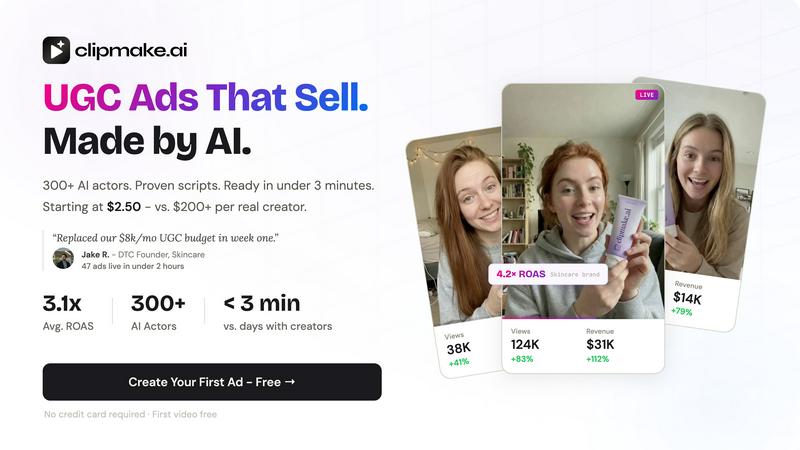
AI UGC video generator with 300+ AI actors. Create hyper-realistic video ads for Meta, TikTok, and YouTube in under 3 minutes. From $2.50/video.

WebP to PNG
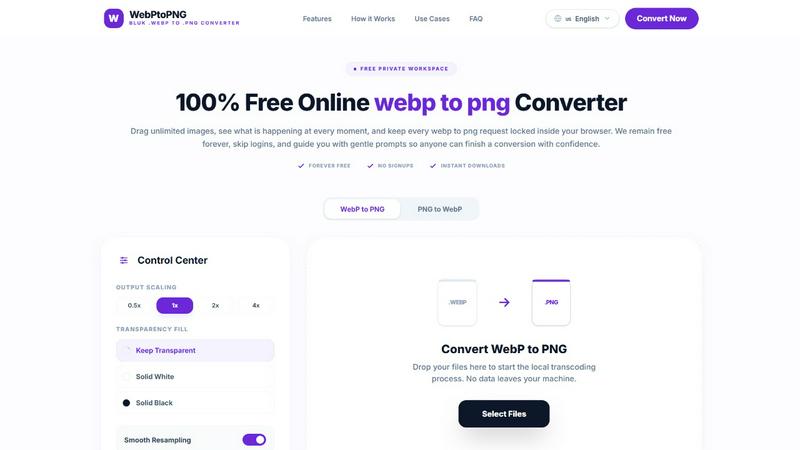
Convert WebP images to PNG for free, privately, and instantly right in your browser.
Last updated: February 28, 2026
Visual Comparison
ClipMake
WebP to PNG
Overview
About ClipMake
ClipMake generates UGC-style video ads using AI actors - no creators, no shoots, no editing. Built for e-commerce brands and performance marketers who need high-volume ad creative.
Pick from 300+ AI actors, input your product details, and get a finished video ad with natural voiceover, product visuals, and proven ad structures.
How it works:
- Pick an AI actor from the library or create a custom avatar.
- Generate hooks and scripts based on high-performing ad formats across Meta and TikTok.
- Select a scene template: unboxing, testimonial, tutorial, lifestyle, before/after, and more.
- Get your video in under 3 minutes. Download and publish.
Key capabilities:
- AI actors with natural lip sync, facial expressions, and body language
- Voice-matched dubbing in 20+ languages - preserves each actor's natural voice, not robotic TTS
- Product placement: upload a product image and the AI actor holds or interacts with it in the scene
- Script generation based on high-performing DTC and e-commerce ad structures
- 20+ scene templates for different ad formats
- Batch generation: create dozens of variations in one session to test hooks, actors, and scripts
- Pro Realism + VocalMatch mode for ultra-realistic rendering with precise lip sync
About WebP to PNG
WebP to PNG is your friendly, go-to tool for converting WebP images into the versatile PNG format, all within the privacy of your own browser. It's designed for anyone who needs a reliable, no-fuss conversion, from professional designers and developers to students and content creators. The core promise is simple: transform your images without any of the usual hassles. There are no uploads to mysterious servers, no mandatory accounts to create, and no hidden costs. Everything happens directly on your device, ensuring your family photos, project assets, and sensitive documents never leave your computer. With an intuitive drag-and-drop interface, you can convert single images or entire folders in batches, all while maintaining the original quality, color, and clarity. Whether you're preparing graphics for a website, adapting images for a presentation, or simply need a PNG for an app that doesn't support WebP, this tool provides a straightforward, efficient, and completely free solution that works seamlessly on both desktop and mobile.