
Coloring Book Engine vs HTML to PNG Converter
Side-by-side comparison to help you choose the right AI tool.

Coloring Book Engine
Effortlessly create stunning coloring books and videos from idea to publish-ready with Coloring Book Engine.
Last updated: February 28, 2026

HTML to PNG Converter
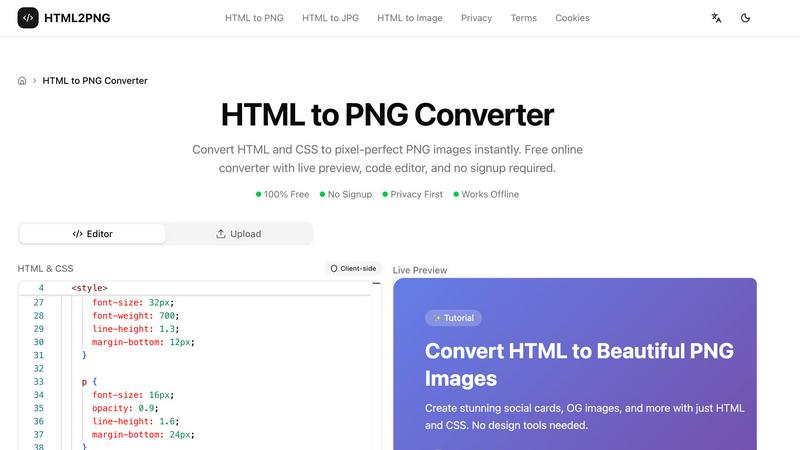
Transform your HTML and CSS into stunning PNG images instantly with our free, no-signup online converter featuring live preview and customization.
Last updated: March 11, 2026
Visual Comparison
Coloring Book Engine

HTML to PNG Converter
Feature Comparison
Coloring Book Engine
BYOK AI Integration
With the Bring Your Own Key (BYOK) AI integration, users can harness the power of AI while retaining full control over their data and model choices. This feature eliminates the need for subscription fees, allowing creators to pay only for their API usage and work independently without the pressure of ongoing costs.
Batch Workflow
CBE supports a highly optimized batch workflow that allows creators to generate multiple pages simultaneously. This feature is perfect for scaling projects from a single idea to a complete series, all within a single workspace. Users can efficiently manage their projects without having to switch between different tools.
KDP-Ready Exports
The tool ensures that all technical specifications required for Kindle Direct Publishing (KDP) are met. With KDP-ready exports, creators can confidently upload their files without second-guessing the formats, trim sizes, or margins, simplifying the publishing process significantly.
Video Creation Capabilities
In addition to producing coloring books, CBE enables creators to generate promotional videos and short clips tailored for platforms like YouTube Shorts and TikTok. This feature allows users to effectively market their coloring books and engage with audiences on social media, enhancing visibility and sales.
HTML to PNG Converter
Live Code Editor
The HTML to PNG Converter includes a Monaco-based code editor that features syntax highlighting, making it easy to write and read your code. The live preview functionality lets you see how your changes affect the output in real-time, ensuring you can make adjustments quickly and efficiently.
Multiple Output Formats
You have the flexibility to export your images in various formats, including PNG, JPG, and WebP. This allows you to choose the best format for your needs, whether you require lossless images, smaller file sizes, or good compression, catering to different use cases and requirements.
Support for Modern CSS
The tool supports a wide range of modern CSS features, including Flexbox, Grid layouts, gradients, shadows, and transforms. This means you can create visually stunning images that leverage contemporary design techniques without any limitations.
Built-in Templates
HTML to PNG Converter offers pre-built templates that you can use as a starting point for your designs. Whether you need a social media card, Open Graph image, or a styled code snippet, these templates can be customized to fit your needs, saving you time and effort.
Use Cases
Coloring Book Engine
Independent Artists
Independent artists can use CBE to transform their hand-drawn sketches into professional-quality coloring books. The streamlined process from sketching to publication allows them to focus on their creativity rather than technical details.
Educational Publishers
Educational publishers can create engaging coloring books for children that combine learning with fun. By utilizing CBE's batch workflow, they can produce thematic series that cater to various educational topics efficiently.
Marketing Teams
Marketing teams can leverage CBE to produce branded coloring books as part of promotional campaigns. The ability to create video content alongside the coloring books allows for a multi-faceted marketing approach that can attract and engage potential customers.
Hobbyists and Side Projects
Hobbyists looking to monetize their artistic skills can use CBE to easily create and sell coloring books. With no subscription fees and the option to work with local GPU resources, they can manage their projects flexibly and affordably.
HTML to PNG Converter
Create Social Media Graphics
With HTML to PNG Converter, you can easily design and generate social media cards and banners. The tool allows you to create visually appealing images that can enhance your online presence and engage your audience.
Generate Open Graph Images
You can quickly create Open Graph images for your blog posts or web pages. These images are essential for optimizing your content for social sharing, increasing visibility, and driving traffic to your site.
Convert Code Snippets to Images
Turn your code snippets into beautifully styled images for documentation or social media posts. This feature is particularly useful for developers who want to showcase their work in an attractive format that stands out.
Design Professional Invoices
Use the tool to convert HTML invoices or certificates into PNG images that can be easily shared and archived. This feature is beneficial for businesses looking to maintain a professional appearance in their communications.
Overview
About Coloring Book Engine
Coloring Book Engine (CBE) is an innovative desktop design tool that empowers creators to produce high-quality coloring books with ease. Designed for individual artists, teams, and publishing houses, CBE simplifies the entire process from initial concept to final publication. Unlike conventional tools that merely export PDFs, CBE provides a comprehensive end-to-end solution, incorporating everything from artwork processing to promotional video creation. A key feature is its BYOK (Bring Your Own Key) AI integration, which allows users to maintain control over AI model choices, ensuring privacy and cost-effectiveness without the burden of ongoing subscriptions. With KDP-ready exports and batch production capabilities, CBE allows creators to efficiently scale their coloring book ventures while preserving their unique artistic vision. Whether you are a solo creator or part of a larger team, CBE streamlines your workflow, making the journey from idea to published book straightforward and efficient.
About HTML to PNG Converter
HTML to PNG Converter is a powerful and user-friendly online tool designed to transform your HTML and CSS code into high-quality PNG images instantly. Ideal for web developers, designers, marketers, and content creators, this converter allows you to create pixel-perfect images directly from your code without needing to sign up or upload any files. With its client-side processing, your HTML and CSS remain on your device, ensuring your work is private and secure. The tool offers a live preview feature, so you can see the changes in real-time as you edit your code. Whether you need to create social media graphics, styled code snippets, or professional invoices, HTML to PNG Converter provides all the necessary functionality to make your projects shine.
Frequently Asked Questions
Coloring Book Engine FAQ
Is Coloring Book Engine a desktop app or a cloud service?
Coloring Book Engine is a desktop application that allows creators to work offline, utilizing local resources for optimal performance. This means that your data remains secure and private on your device.
What exactly does it speed up for coloring book creators?
CBE accelerates the entire process of coloring book creation, from initial ideation through to publishing. It combines AI-assisted tools for sketching and coloring with a streamlined workflow, significantly reducing time spent on production.
Is this a subscription?
No, Coloring Book Engine uses a one-time payment model for lifetime access. Users only pay for API usage when utilizing AI features, avoiding the hassle of recurring subscription fees.
Can I use this tool without AI?
Absolutely! CBE offers an optional AI-free workflow for those who prefer to create entirely by hand. You can provide your own hand-crafted artwork, and CBE will help you package it into a professional coloring book format.
HTML to PNG Converter FAQ
What types of images can I create with HTML to PNG Converter?
You can create PNG, JPG, and WebP images from your HTML and CSS code. This flexibility allows you to choose the format that best suits your needs.
Do I need to sign up to use the converter?
No, HTML to PNG Converter is completely free to use and does not require any signup. You can start converting your HTML to images right away.
Is my code secure when using this tool?
Yes, the tool operates client-side, meaning your HTML and CSS code never leaves your device. This ensures your work remains private and secure throughout the conversion process.
Can I use the tool offline?
Yes, HTML to PNG Converter works offline, allowing you to generate images without an internet connection. This feature is great for users who need to work in environments with limited connectivity.
Alternatives
Coloring Book Engine Alternatives
Coloring Book Engine is an innovative design tool that falls under the category of design software, specifically tailored for creating high-quality coloring books and promotional videos. This powerful desktop application streamlines the entire process from concept to publication, making it easier for individual creators, teams, and publishers to produce commercial-quality products. Users often seek alternatives to Coloring Book Engine for various reasons, including pricing concerns, specific feature requirements, or compatibility with different platforms. When choosing an alternative, it's essential to consider factors such as ease of use, workflow efficiency, available export options, and any unique features that may align with your creative goals.
HTML to PNG Converter Alternatives
HTML to PNG Converter is a specialized design tool that allows users to transform HTML and CSS code into high-quality PNG images, making it ideal for developers, designers, and marketers. This tool is especially useful for generating pixel-perfect images quickly, without the hassle of server uploads or complicated processes. Users often seek alternatives to HTML to PNG Converter due to factors like price, specific features they might need for their projects, or compatibility with different platforms. When looking for an alternative, it's essential to consider the tool's ease of use, performance, and whether it meets your specific requirements, such as support for modern CSS features or different image formats. Additionally, privacy and security should also be a priority, especially if you're working with sensitive data or proprietary designs.