
ConvertBankToExcel vs kill the sub
Side-by-side comparison to help you choose the right AI tool.

ConvertBankToExcel
ConvertBankToExcel quickly transforms your PDF bank statements into Excel, CSV, and more with 99% accuracy in 30.
Last updated: February 26, 2026

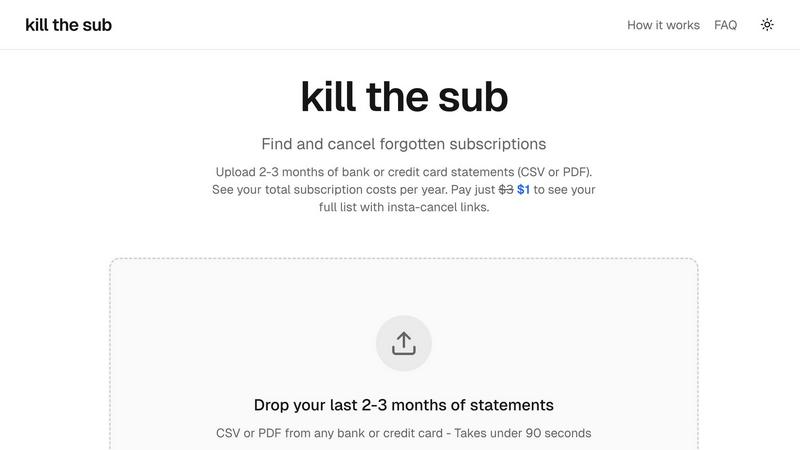
kill the sub
Easily find and cancel forgotten subscriptions in minutes with our AI tool, saving you money and hassle for just $3.
Last updated: March 26, 2026
Visual Comparison
ConvertBankToExcel

kill the sub
Feature Comparison
ConvertBankToExcel
99%+ Accuracy Rate
ConvertBankToExcel boasts an impressive accuracy rate of over 99%, a figure that has been verified by CPAs. This high level of precision ensures that the transaction data extracted from bank statements is reliable, minimizing the risk of errors in financial reporting and analysis.
Fast Processing Time
With the capability to process bank statements in under 30 seconds, ConvertBankToExcel significantly speeds up the conversion process. This rapid turnaround allows accounting professionals to focus on more critical tasks instead of spending hours on data entry, ultimately enhancing productivity.
Extensive Format Support
The platform offers nine different export formats, including QuickBooks (QBO/QFX/OFX/IIF), Excel, CSV, JSON, and XML. This versatility ensures that users can seamlessly integrate the converted data into their preferred accounting software or spreadsheets, catering to various financial needs.
Automatic Bank Detection
ConvertBankToExcel features automatic bank detection, allowing it to identify the user's bank effortlessly. This functionality streamlines the conversion process by eliminating the need for manual input and ensuring accurate extraction of transaction data from the right bank.
kill the sub
Upload Statements
Easily upload your last two to three months of bank or credit card statements in CSV or PDF format. The process is quick and simple, taking under 90 seconds to get started. This feature ensures that you can swiftly analyze your financial commitments without unnecessary delays.
AI Analysis
Our powerful AI technology works instantly to detect recurring charges and identify subscriptions hidden within your statements. This automated analysis saves you time and effort, allowing you to focus on the insights rather than the data sifting process.
Direct Cancel Links
For a one-time payment of just $3, you unlock instant access to a full list of your subscriptions along with direct cancel links for each service. This feature makes it easy to take immediate action, helping you cut unnecessary expenses with just a few clicks.
AI Cancellation Agent
An exclusive feature that sets Kill the Sub apart is the ability to let an AI agent handle cancellations for you. This agent is equipped with knowledge about various dark patterns and cancellation policies, ensuring a smooth process as it navigates the cancellation maze on your behalf.
Use Cases
ConvertBankToExcel
Mortgage Applications
When preparing applications for mortgages, it is essential to present organized bank statements to lenders. ConvertBankToExcel enables quick conversion of bank statements into the required format, making it easier to compile financial documents for approval processes.
Tax Preparation
During tax season, organizing financial statements is crucial for compliance and accurate filing. ConvertBankToExcel simplifies this task by converting bank statements into easily manageable formats, helping professionals ensure they meet IRS requirements and tax obligations.
Visa Applications
For individuals applying for visas or immigration processes, financial documentation plays a vital role. ConvertBankToExcel allows users to convert their bank statements into the necessary formats quickly, ensuring all financial requirements are met for visa applications.
Foreign Language Processing
ConvertBankToExcel can process bank statements in over 50 languages, complete with auto-translation features. This capability is particularly useful for international clients and professionals dealing with foreign currency transactions, enhancing accessibility and usability.
kill the sub
Personal Finance Management
Kill the Sub is perfect for individuals looking to streamline their personal finances. By identifying and canceling forgotten subscriptions, users can save money and allocate their budget more effectively, leading to better financial health.
Busy Professionals
For busy professionals who may not have time to sift through their monthly expenses, this tool provides a quick solution to manage subscriptions. With just a few clicks, they can identify and cancel unwanted services without disrupting their hectic schedules.
Students on a Budget
College students often juggle multiple financial commitments, making it essential to keep track of expenses. Kill the Sub helps students identify unnecessary subscriptions, allowing them to save money for more important expenses like tuition or textbooks.
Family Budgeting
Families can benefit significantly from using Kill the Sub to monitor shared subscriptions. By identifying recurring charges across multiple family members, they can make informed decisions about which services to keep or cancel, ultimately improving their overall budgeting strategy.
Overview
About ConvertBankToExcel
ConvertBankToExcel is an innovative AI-powered platform designed specifically for accounting professionals, aiming to revolutionize the tedious task of bank statement conversion. By leveraging advanced technology, ConvertBankToExcel eliminates the need for manual data entry, allowing users to effortlessly extract transaction data from PDF bank statements. This data is then automatically converted into a variety of formats including Excel, CSV, and QuickBooks, making it incredibly accessible and ready for use in financial analysis and reporting. With a remarkable accuracy rate exceeding 99% as verified by CPAs, the platform supports over 20 major banks across the US and Canada. Whether you are a CPA, bookkeeper, or anyone needing to process bank statements, ConvertBankToExcel simplifies the task and saves valuable time. The platform's free tier offers up to 7 pages daily without requiring credit card information, making it an ideal choice for those looking to streamline their workflow and reduce the burden of manual data entry in financial tasks.
About kill the sub
Kill the Sub is an innovative tool designed to help individuals effortlessly manage their subscriptions and cut unnecessary expenses. In today's world, where subscriptions can easily accumulate, it's common to forget about recurring payments that drain your finances. Kill the Sub steps in to simplify this process by allowing users to upload their recent bank or credit card statements. Within just two minutes, the tool identifies all recurring charges, providing users with a comprehensive overview of their annual subscription costs. This user-friendly service empowers everyone, from busy professionals to college students, by eliminating the hassle of tracking subscriptions. With a commitment to transparency and no hidden fees, Kill the Sub guarantees that if you do not save more than three dollars, you will receive a refund. Enjoy financial peace of mind while reclaiming control over your subscriptions.
Frequently Asked Questions
ConvertBankToExcel FAQ
How secure is my data with ConvertBankToExcel?
ConvertBankToExcel employs bank-grade encryption to protect your sensitive data. Additionally, all processed files are automatically deleted after 24 hours, ensuring that your information remains confidential and secure.
Can I use ConvertBankToExcel for multiple bank accounts?
Yes, ConvertBankToExcel allows for the consolidation of statements from multiple bank accounts into unified reports. This feature is especially beneficial for accounting professionals managing various clients or accounts.
Is there a limit to how many pages I can convert for free?
Yes, the free tier allows you to convert up to 7 pages daily without requiring a credit card. This feature enables users to try the platform and experience its capabilities before committing to a paid plan.
What types of bank statements can I convert?
ConvertBankToExcel supports a wide range of bank statement formats, including both digital and scanned PDFs. Its AI-powered OCR technology ensures accurate data extraction, regardless of the statement type.
kill the sub FAQ
How does Kill the Sub ensure my data is secure?
Your files are analyzed and immediately discarded once the analysis is complete. Nothing is stored, ensuring your privacy and security are prioritized throughout the process.
What types of statements can I upload?
You can upload bank or credit card statements in either CSV or PDF format. This flexibility allows you to use the tool with statements from any financial institution.
What happens if I don't save more than $3?
If you do not save more than three dollars after using Kill the Sub, we will provide you with a full refund. This guarantee reflects our confidence in our service and commitment to helping you manage your subscriptions effectively.
Can the AI agent handle all types of subscriptions?
The AI agent is trained to navigate various cancellation processes, including those with complex dark patterns. However, certain cancellations may require specific actions, such as phone calls or certified mail, which the agent will triage based on your subscriptions.
Alternatives
ConvertBankToExcel Alternatives
ConvertBankToExcel is an AI-powered bank statement conversion platform specifically designed for accounting professionals. It streamlines the tedious process of manual data entry by automatically extracting transaction data from PDF bank statements and converting it into various formats like Excel, CSV, and QuickBooks. This solution falls under the productivity and management category, making it an essential tool for CPAs, bookkeepers, and anyone who regularly works with financial data. Users often seek alternatives to ConvertBankToExcel for several reasons, including pricing, specific feature requirements, or compatibility with their existing workflows. When choosing an alternative, consider factors such as accuracy, processing speed, supported file formats, and the range of banks accommodated. It's also important to evaluate user reviews and trustworthiness to ensure you find a solution that meets your unique needs and enhances your productivity.
kill the sub Alternatives
Kill the Sub is a personal finance tool designed to help users quickly identify and cancel unwanted subscriptions. By allowing users to upload their bank or card statements, it efficiently finds all recurring payments and provides an overview of annual costs. This tool is particularly useful for anyone looking to manage their finances better, as it helps eliminate those pesky subscriptions that can sneak up on you. Users often seek alternatives to Kill the Sub for various reasons, such as pricing concerns, specific feature sets, or compatibility with their preferred platforms. When considering an alternative, it’s essential to evaluate the ease of use, the comprehensiveness of the subscription search, and any additional functionalities that might enhance your financial management experience. It's also important to look for transparency in pricing and a commitment to user satisfaction, ensuring you get value for your money.