
DiffScout vs Prompt Builder
Side-by-side comparison to help you choose the right AI tool.

DiffScout
DiffScout instantly alerts you to competitor price changes, so you can react faster and stay ahead in the market.
Last updated: February 28, 2026

Prompt Builder
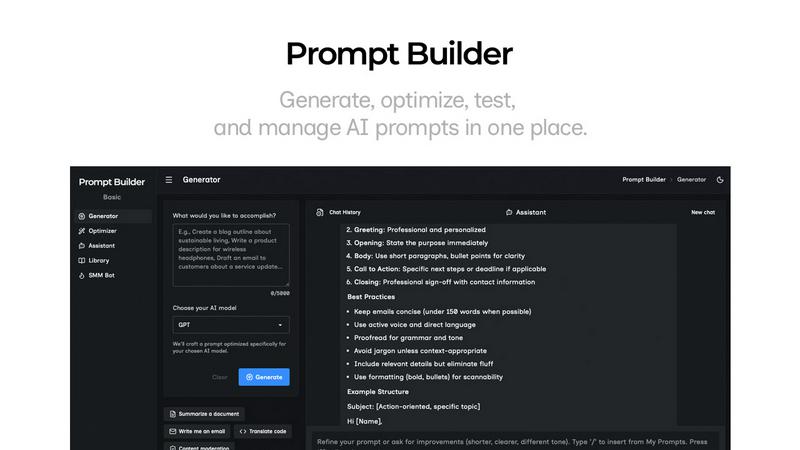
Generate, optimize, test, and manage AI prompts in one place. Turn an idea into a ready-to-use prompt in seconds.
Visual Comparison
DiffScout

Prompt Builder
Overview
About DiffScout
DiffScout is an innovative price monitoring tool specifically designed for e-commerce and SaaS companies. By leveraging advanced AI technology, it automates the tracking and analysis of competitor pricing, allowing businesses to stay competitive without the need for tedious manual checks. Users can simply paste any URL containing pricing information, and DiffScout will extract and monitor the prices in real-time. Whenever there is a price change—whether an increase or decrease—users receive instant email alerts, typically within 60 minutes. This functionality is crucial for procurement teams, resellers, and stakeholders who need to keep a close eye on market pricing trends. With its user-friendly interface and powerful capabilities, DiffScout empowers over 1,240 businesses to save significant amounts of money and time each month, ensuring they can respond quickly to market changes and optimize their pricing strategies effectively.
About Prompt Builder
Prompt Builder is a prompt engineering workspace for writing, testing, and saving prompts. Describe the task in plain English, and it helps you create a prompt that matches the model you choose. Start with a draft, refine it in chat, save or pin versions, then run them when you are ready. It works with GPT, Claude, Gemini, Llama, Mistral, DeepSeek, Grok, Perplexity, and more. You also get an Optimizer, an assistant for quick tests, and a library of reusable prompts and templates from the community. Turn an idea into a ready-to-use prompt in seconds. Refine it in chat, save it to your Library, and run it anytime.