DigitalMagicWand vs StudyPal
Side-by-side comparison to help you choose the right AI tool.
DigitalMagicWand
DigitalMagicWand is your all-in-one AI suite for effortlessly creating and editing images, audio, video, and text.
Last updated: March 18, 2026

StudyPal
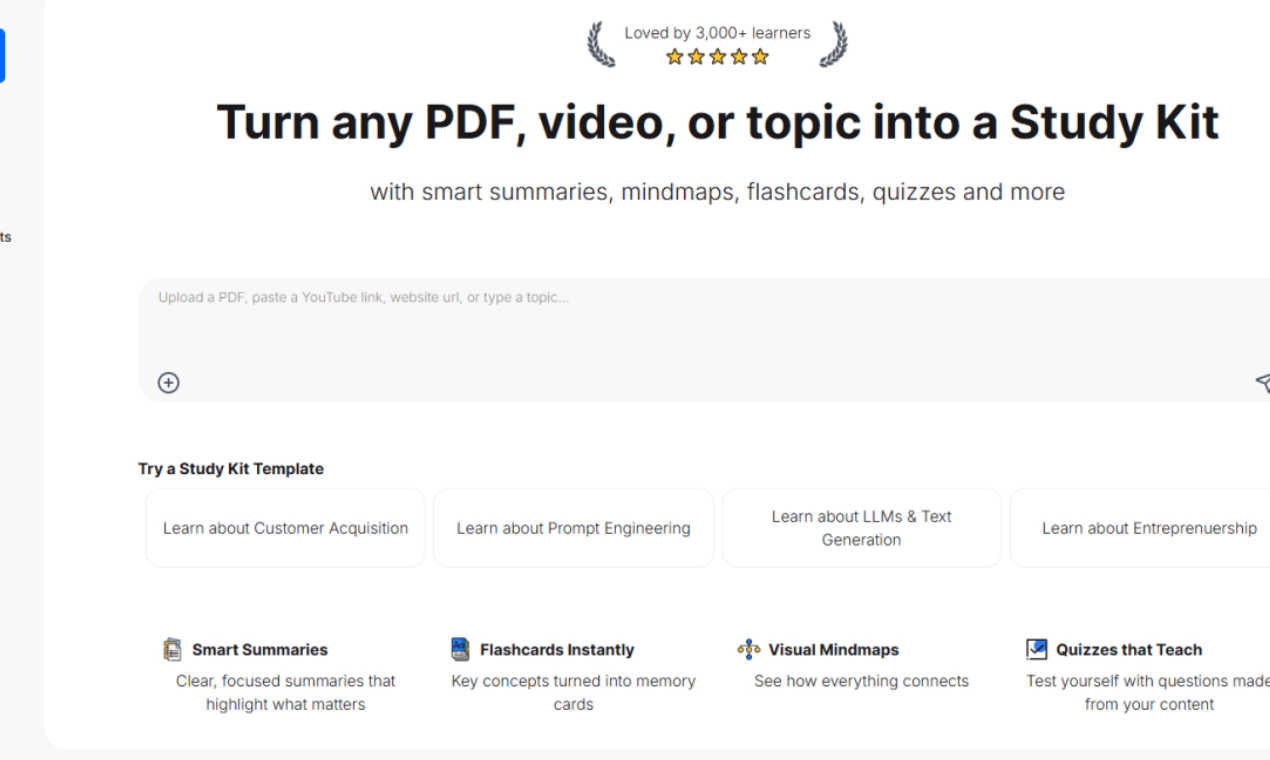
StudyPal instantly creates study kits with summaries, flashcards, and quizzes from your PDFs or videos.
Last updated: March 1, 2026
Visual Comparison
DigitalMagicWand

StudyPal
Feature Comparison
DigitalMagicWand
AI-Powered Text Analysis & Humanization
This feature includes two powerful tools. The Accurate AI Detector scans any text and provides a clear confidence score, instantly revealing if content was written by a human or generated by AI models like ChatGPT. Its counterpart, the Undetectable AI Text Humanizer, uses proprietary algorithms to rewrite AI-generated text, eliminating statistical patterns that trigger detectors. The result is natural, fluent writing that preserves your original message, perfect for academic, professional, or creative work where authenticity is key.
Professional Audio Stem Separation & MIDI Conversion
Transform your audio workflow with studio-grade precision. The UnMixIt™ Pro tool lets you effortlessly isolate vocals, drums, bass, and other instruments from any song, ideal for remixing, sampling, or creating acapellas. For musicians, Digital Ear™ Piano offers specialized, accurate MIDI transcription from piano recordings, capturing the nuance and expression of your performance. This turns audio ideas into editable digital music data instantly.
Advanced Text-to-Image & Vector Generation
Simply describe the visual you imagine, and watch our AI generate a stunning, high-quality image in seconds. The technology excels at rendering text within images and avoiding common AI artifacts. Go beyond pixels with the vector art generator; describe a logo or illustration, and receive a crisp, scalable .svg file that stays sharp at any size. This eliminates the need for complex design software for basic vector graphic creation.
Intelligent All-in-One Image Editor
This is your command center for photo manipulation. Stop manually editing and start creating by typing your requests. Want to swap a background, remove an unwanted object, restore an old photo, or try an AI face swap? Just describe what you want to happen. The editor intelligently executes these complex edits, making professional-grade image manipulation accessible to everyone, regardless of their Photoshop skills.
StudyPal
Smart Summaries
Stop getting lost in pages of text or hours of video. StudyPal's Smart Summaries feature distills your content into clear, focused overviews that highlight the key concepts and what truly matters. It cuts through the noise, giving you the core information you need to understand a topic quickly, so you can spend your time mastering ideas instead of just finding them.
Flashcards Instantly
Turn any concept into a powerful memory aid with automatically generated flashcards. StudyPal identifies key terms, definitions, and important facts from your source material and instantly converts them into digital flashcards. This allows for efficient, spaced repetition practice, which is scientifically proven to boost long-term retention and make studying for tests much more effective.
Visual Mindmaps
Understand how everything connects with automatically generated visual mind maps. This feature transforms linear information into a dynamic, branching diagram that shows the relationships between main ideas and supporting details. It's perfect for visual learners and helps in building a holistic understanding of complex subjects, making it easier to recall information during exams or discussions.
Quizzes that Teach
Test your knowledge with personalized quizzes generated directly from your study materials. These aren't generic questions; they are crafted from your specific PDF, video, or topic to ensure you're tested on what you actually need to know. This active recall practice not only assesses your understanding but also reinforces learning, turning study sessions into engaging and effective review.
Use Cases
DigitalMagicWand
Content Creators & Marketers
Bloggers, social media managers, and marketing teams can use the AI text tools to check content originality and humanize AI-assisted drafts for a genuine voice. They can generate unique custom images and vectors for articles and ads in minutes, and use the image editor to quickly create polished product photos or marketing visuals without a graphic designer.
Musicians & Audio Producers
Producers and DJs can use UnMixIt™ Pro to extract clean stems from songs for remixes and samples. Solo artists can create instant karaoke tracks or practice backings. Pianists and composers can transcribe their live performances or recordings into precise MIDI files using Digital Ear™ Piano, streamlining the notation and digital production process.
Students & Academics
Students can utilize the AI Detector to check their own work for unintended AI similarities and ensure academic integrity. The Text Humanizer can help rephrase complex research explanations into more natural language. They can also generate accurate diagrams, charts, or illustrative vectors for presentations and papers directly from text descriptions.
Everyday Users & Hobbyists
Anyone can have fun restoring old family photos by removing scratches and tears with the AI Image Editor. They can create personalized artwork for gifts or home decor using the text-to-image tools. For entertainment, users can easily make karaoke tracks for parties or isolate guitar parts from a song to learn them, all without any technical audio editing knowledge.
StudyPal
Academic Exam Preparation
A student facing finals can upload their textbook chapters, lecture slides, and recommended video links into StudyPal. In moments, they receive consolidated summaries, a mind map linking all major themes, flashcards for key terms, and a custom quiz. This comprehensive kit replaces disjointed notes and saves hours, allowing for more focused and productive review sessions.
Professional Upskilling
A marketing professional wanting to learn about "Customer Acquisition" can simply type the topic into StudyPal. The AI will generate a complete study kit from scratch, providing a summary of core strategies, a mind map of the funnel stages, flashcards for key metrics like CAC and LTV, and a quiz to test their new knowledge, all accelerating their career development.
Learning from Video Content
An aspiring developer watching a lengthy online tutorial about "Machine Learning" on YouTube can paste the video URL into StudyPal. The tool will process the lecture, extracting the core lessons into a written summary, creating flashcards for important algorithms, and building a quiz based on the instructor's key points, making passive watching an active learning experience.
Exploring New Hobbies
Someone curious about "Entrepreneurship" can use StudyPal to start their learning journey without knowing where to begin. By generating a starter kit from the topic name alone, they get a structured overview, visual connections between concepts like funding and business models, and key term flashcards, providing a clear and digestible roadmap for their new interest.
Overview
About DigitalMagicWand
DigitalMagicWand is your all-in-one creative suite powered by cutting-edge artificial intelligence. It's designed to simplify complex digital tasks, allowing anyone—from complete beginners to seasoned professionals—to enhance, transform, and create stunning content with ease. Whether you're working with images, audio, video, or text, DigitalMagicWand provides a comprehensive set of intuitive tools that feel like magic. Imagine being able to turn a simple text description into a breathtaking piece of art, isolate a vocal track from your favorite song for a karaoke night, or ensure your written content sounds perfectly human. That's the power at your fingertips. It's for content creators, marketers, musicians, students, and businesses looking to produce high-quality digital media without the steep learning curve or expensive software. The main value proposition is clear: democratizing advanced AI technology to unlock creativity and efficiency, saving you hours of manual work and technical hassle.
About StudyPal
StudyPal is your all-in-one AI study companion, designed to revolutionize how you learn by taking the heavy lifting out of studying. It transforms your raw materials—like dense PDFs, lengthy YouTube lectures, or even a simple typed topic—into a complete, interactive, and personalized learning toolkit in seconds. Imagine having a personal tutor who organizes your materials and creates clear summaries, visual mind maps, memory-boosting flashcards, and tailored practice quizzes just for you. That's the power of StudyPal. It's built for anyone who wants to learn smarter and faster, whether you're a student cramming for finals, a professional upskilling for a career move, or a curious mind exploring a new hobby. By adapting to your learning style and providing instant answers through its built-in AI tutor, StudyPal saves countless hours of manual note-taking and dramatically improves information retention. Loved by over 3,000 learners, it's learning, personalized and powered by AI, available whenever and wherever you need it.
Frequently Asked Questions
DigitalMagicWand FAQ
What makes DigitalMagicWand different from other AI tools?
DigitalMagicWand stands out by offering a comprehensive, integrated suite of tools for multiple media types—text, image, audio—all on one platform. Instead of juggling separate, specialized apps, you get a cohesive ecosystem. Our tools, like the industry-respected Digital Ear™ for MIDI and proprietary text humanizer, are built on specialized, advanced algorithms for superior results in their specific domains.
Do I need any technical skills to use these tools?
Not at all! DigitalMagicWand is designed with a user-friendly, approachable interface. Most tools work on a simple "upload and process" or "describe and create" principle. For example, you just type what you want to see in an image or describe the edit you want to make to a photo. The AI handles all the complex technical work in the background.
Is the AI Text Humanizer truly undetectable?
Our Undetectable AI Text Humanizer uses proprietary linguistic algorithms specifically designed to identify and rewrite the statistical patterns that AI detectors look for. While no tool can guarantee 100% success against every detector at all times, it is engineered to produce text that is indistinguishable from human writing across major detection platforms, giving you a significant advantage in achieving natural-sounding content.
What audio formats do the audio tools support?
The audio tools are built to handle all common audio file formats you typically work with, such as MP3, WAV, AIFF, and FLAC. This ensures you can upload your recordings, purchased tracks, or other audio files directly without needing to convert them first, making the workflow smooth and hassle-free.
StudyPal FAQ
What types of files can I upload to StudyPal?
StudyPal is designed to work with a variety of common study materials. You can upload PDF documents, paste links to YouTube lectures or other video content, or simply type in a topic you want to learn about. The AI will process any of these inputs to create your personalized Study Kit.
How does StudyPal personalize my learning?
StudyPal personalizes learning by generating all study aids—summaries, mind maps, flashcards, and quizzes—directly from the specific content you provide. Furthermore, its built-in AI tutor can answer your follow-up questions in context, adapting explanations to help you where you need it most, creating a tailored learning pathway.
Can I use StudyPal for group study sessions?
Absolutely! StudyPal is excellent for group study. You can create a shared Study Kit from your group's materials. The generated flashcards and quizzes provide a consistent study base for everyone, and the visual mind maps are great tools for sparking discussion and ensuring the whole group understands how concepts interlink.
Is there a limit to how many Study Kits I can create?
Limits on the number of Study Kits you can create typically depend on your subscription plan. It's best to check the current billing or pricing page within the StudyPal application for the most up-to-date information on the features and limits associated with free and paid plans.
Alternatives
DigitalMagicWand Alternatives
DigitalMagicWand is a versatile AI assistant platform designed to help you create and edit all kinds of digital content. It falls into the category of all-in-one AI tools, offering a suite of applications for working with images, audio, video, and text using artificial intelligence. Users often explore other options for various reasons. Some might be looking for a tool that fits a specific budget or offers a different pricing model. Others may need a platform that excels in one particular area, like advanced video editing or specialized text generation, rather than a broad suite. The choice can also come down to platform compatibility, ease of use, or specific workflow integrations. When evaluating alternatives, it's helpful to consider your primary needs. Think about which content types you use most—whether it's visuals, audio, or text—and look for tools that are strong in those areas. Also, consider your budget, the learning curve, and how well a potential tool integrates with your existing software or creative process.
StudyPal Alternatives
StudyPal is an AI-powered study companion that falls into the category of AI learning and productivity tools. It transforms your PDFs, videos, or typed topics into interactive study kits complete with summaries, mind maps, flashcards, and quizzes. People often look for alternatives for various reasons. Budget is a common factor, as some may seek a free tier with more features or a different pricing model. Others might need specific functionalities StudyPal doesn't offer, like integration with a particular platform or support for different file types. Finding the right tool is about matching your unique study habits and needs. When evaluating other options, consider what matters most to you. Think about the core features you'll use daily, your preferred learning style, and your budget. Also, check the types of content the tool can process and whether it works on your devices. The goal is to find a solution that feels like a natural extension of your study routine.