
DigitalMagicWand vs wan2-6.org
Side-by-side comparison to help you choose the right AI tool.
DigitalMagicWand
DigitalMagicWand is your all-in-one AI suite for effortlessly creating and editing images, audio, video, and text.
Last updated: March 18, 2026
wan2-6.org
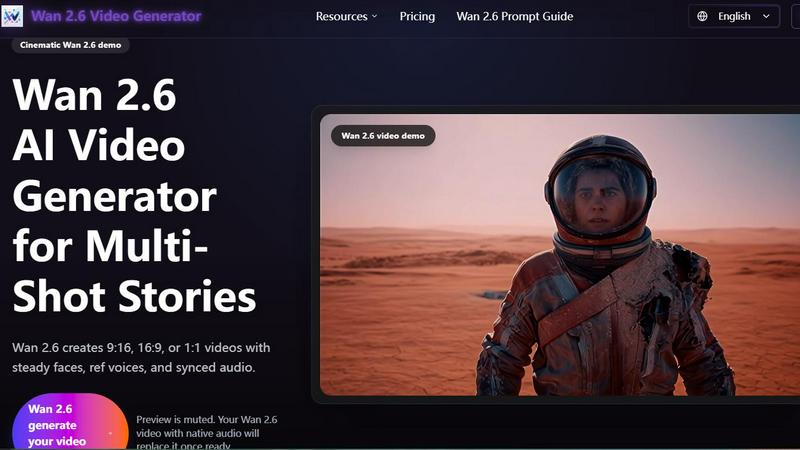
Wan 2.6's AI instantly creates 1080p multi-shot videos with perfect lip-sync and sound, no editing skills required.
Last updated: March 1, 2026
Visual Comparison
DigitalMagicWand

wan2-6.org
Feature Comparison
DigitalMagicWand
AI-Powered Text Analysis & Humanization
This feature includes two powerful tools. The Accurate AI Detector scans any text and provides a clear confidence score, instantly revealing if content was written by a human or generated by AI models like ChatGPT. Its counterpart, the Undetectable AI Text Humanizer, uses proprietary algorithms to rewrite AI-generated text, eliminating statistical patterns that trigger detectors. The result is natural, fluent writing that preserves your original message, perfect for academic, professional, or creative work where authenticity is key.
Professional Audio Stem Separation & MIDI Conversion
Transform your audio workflow with studio-grade precision. The UnMixIt™ Pro tool lets you effortlessly isolate vocals, drums, bass, and other instruments from any song, ideal for remixing, sampling, or creating acapellas. For musicians, Digital Ear™ Piano offers specialized, accurate MIDI transcription from piano recordings, capturing the nuance and expression of your performance. This turns audio ideas into editable digital music data instantly.
Advanced Text-to-Image & Vector Generation
Simply describe the visual you imagine, and watch our AI generate a stunning, high-quality image in seconds. The technology excels at rendering text within images and avoiding common AI artifacts. Go beyond pixels with the vector art generator; describe a logo or illustration, and receive a crisp, scalable .svg file that stays sharp at any size. This eliminates the need for complex design software for basic vector graphic creation.
Intelligent All-in-One Image Editor
This is your command center for photo manipulation. Stop manually editing and start creating by typing your requests. Want to swap a background, remove an unwanted object, restore an old photo, or try an AI face swap? Just describe what you want to happen. The editor intelligently executes these complex edits, making professional-grade image manipulation accessible to everyone, regardless of their Photoshop skills.
wan2-6.org
Multi-Shot Video Generation
Wan 2.6 excels at creating cohesive, multi-shot video sequences from a single prompt. Unlike tools that generate isolated clips, it builds short narratives with smooth transitions, varied angles (like close-ups and wide shots), and consistent cinematic elements such as handheld pans or steady tracking. This feature automatically stitches together a visual story, saving you hours of manual editing and sequencing to achieve a professional, dynamic flow in your final video.
Advanced Consistency & Lip-Sync
This is a standout feature that ensures professional results. Wan 2.6 uses advanced AI to maintain "steady faces" and consistent characters throughout your generated video. More impressively, it seamlessly syncs audio with lip movements (lip-sync) and keeps character voices stable ("ref voices"). This eliminates the common AI video pitfalls of morphing characters or unsynchronized audio, resulting in videos that look and sound natural and polished.
Flexible Input Modes
You can create videos in the way that suits you best. Wan 2.6 offers multiple input methods: describe your scene with a detailed text prompt (up to 2500 characters), upload a reference image to guide the style and subject, or provide a short video clip. You also have full control over the output, allowing you to set the duration (like 5 seconds), aspect ratio (1:1, 16:9, or 9:16 for different social platforms), and see the credit cost before generation.
High-Quality 1080p Output with Native Audio
Every video generated by Wan 2.6 is rendered in full high-definition 1080p resolution, ensuring your content looks sharp and professional on any screen. The videos include natively generated sound and audio that matches the scene's mood and action, all produced within the same AI process. This all-in-one generation means you get a complete, ready-to-use video file without needing separate tools for editing, rendering, or sound design.
Use Cases
DigitalMagicWand
Content Creators & Marketers
Bloggers, social media managers, and marketing teams can use the AI text tools to check content originality and humanize AI-assisted drafts for a genuine voice. They can generate unique custom images and vectors for articles and ads in minutes, and use the image editor to quickly create polished product photos or marketing visuals without a graphic designer.
Musicians & Audio Producers
Producers and DJs can use UnMixIt™ Pro to extract clean stems from songs for remixes and samples. Solo artists can create instant karaoke tracks or practice backings. Pianists and composers can transcribe their live performances or recordings into precise MIDI files using Digital Ear™ Piano, streamlining the notation and digital production process.
Students & Academics
Students can utilize the AI Detector to check their own work for unintended AI similarities and ensure academic integrity. The Text Humanizer can help rephrase complex research explanations into more natural language. They can also generate accurate diagrams, charts, or illustrative vectors for presentations and papers directly from text descriptions.
Everyday Users & Hobbyists
Anyone can have fun restoring old family photos by removing scratches and tears with the AI Image Editor. They can create personalized artwork for gifts or home decor using the text-to-image tools. For entertainment, users can easily make karaoke tracks for parties or isolate guitar parts from a song to learn them, all without any technical audio editing knowledge.
wan2-6.org
Social Media Content Creation
Ideal for creators and influencers who need a constant stream of eye-catching content. You can quickly generate TikTok-ready edits, Instagram Reels, or YouTube Shorts with trending aspect ratios (9:16, 1:1). Create engaging clips like a cat playing in a sunny room, a dramatic sunset walk, or a cozy coffee cup scene to captivate your audience without spending all day on editing.
Product Demos and Marketing Videos
Marketers and small businesses can use Wan 2.6 to produce high-quality product demonstration videos, explainer clips, or brand story content. Showcase a product in use with smooth camera moves and professional lighting, or create a short narrative around your service. The commercial use license and professional output make it a cost-effective tool for advertising and promotional campaigns.
Educational and Training Materials
Educators and trainers can transform lessons, concepts, or historical events into engaging visual stories. Instead of static slides, create a short video depicting a scientific process, a historical scene, or a step-by-step tutorial. The AI's ability to maintain consistent characters and scenes helps in clearly visualizing complex topics, making learning more interactive and memorable for students.
Filmmaking and Storyboarding
Independent filmmakers and storytellers can use Wan 2.6 as a powerful pre-visualization and storyboarding tool. Quickly generate multi-shot sequences to test scene compositions, lighting moods (like a foggy forest or a sunset rooftop), and camera movements before actual production. It's also perfect for creating proof-of-concept clips or full scenes for short films when resources are limited.
Overview
About DigitalMagicWand
DigitalMagicWand is your all-in-one creative suite powered by cutting-edge artificial intelligence. It's designed to simplify complex digital tasks, allowing anyone—from complete beginners to seasoned professionals—to enhance, transform, and create stunning content with ease. Whether you're working with images, audio, video, or text, DigitalMagicWand provides a comprehensive set of intuitive tools that feel like magic. Imagine being able to turn a simple text description into a breathtaking piece of art, isolate a vocal track from your favorite song for a karaoke night, or ensure your written content sounds perfectly human. That's the power at your fingertips. It's for content creators, marketers, musicians, students, and businesses looking to produce high-quality digital media without the steep learning curve or expensive software. The main value proposition is clear: democratizing advanced AI technology to unlock creativity and efficiency, saving you hours of manual work and technical hassle.
About wan2-6.org
Wan 2.6 is an innovative AI video generator designed to revolutionize the way creators produce engaging video content. It's a powerful online tool that transforms simple text prompts, images, or short video clips into stunning, professional-quality 1080p videos. The platform is specifically built for filmmakers, marketers, and educators who want to tell compelling multi-shot stories without the steep learning curve of traditional video editing software. Its core magic lies in its ability to maintain consistency—keeping shots, character faces, and voices steady and perfectly synced throughout a single generation run. This means you get coherent, polished videos with native sound and perfect lip-sync, all generated by AI. By handling the complex technical details like camera motion, lighting, and audio alignment, Wan 2.6 allows you to focus purely on your creative vision and storytelling. Best of all, you can start creating immediately with free starter credits and no credit card required, making professional video creation faster and more accessible than ever.
Frequently Asked Questions
DigitalMagicWand FAQ
What makes DigitalMagicWand different from other AI tools?
DigitalMagicWand stands out by offering a comprehensive, integrated suite of tools for multiple media types—text, image, audio—all on one platform. Instead of juggling separate, specialized apps, you get a cohesive ecosystem. Our tools, like the industry-respected Digital Ear™ for MIDI and proprietary text humanizer, are built on specialized, advanced algorithms for superior results in their specific domains.
Do I need any technical skills to use these tools?
Not at all! DigitalMagicWand is designed with a user-friendly, approachable interface. Most tools work on a simple "upload and process" or "describe and create" principle. For example, you just type what you want to see in an image or describe the edit you want to make to a photo. The AI handles all the complex technical work in the background.
Is the AI Text Humanizer truly undetectable?
Our Undetectable AI Text Humanizer uses proprietary linguistic algorithms specifically designed to identify and rewrite the statistical patterns that AI detectors look for. While no tool can guarantee 100% success against every detector at all times, it is engineered to produce text that is indistinguishable from human writing across major detection platforms, giving you a significant advantage in achieving natural-sounding content.
What audio formats do the audio tools support?
The audio tools are built to handle all common audio file formats you typically work with, such as MP3, WAV, AIFF, and FLAC. This ensures you can upload your recordings, purchased tracks, or other audio files directly without needing to convert them first, making the workflow smooth and hassle-free.
wan2-6.org FAQ
How do I start using Wan 2.6?
Getting started is easy and free! Simply visit the wan2-6.org website. New users receive free starter credits to try the platform—no credit card is required to sign up. From the main interface, you can choose your input method (text, image, or video), write or upload your prompt, adjust your settings like duration and aspect ratio, and generate your first video in minutes.
What kind of videos can I create with Wan 2.6?
You can create a wide variety of professional, multi-shot videos. The platform is excellent for social media clips, product demos, educational content, marketing ads, and cinematic storytelling. Example prompts include scenes like "a person walking on the beach at sunset" or "kids playing in a park." The AI handles diverse subjects, maintaining quality and consistency across genres.
Does Wan 2.6 support different video formats and aspect ratios?
Yes, it offers great flexibility for different platforms. You can generate videos in 1:1 (square), 16:9 (widescreen), or 9:16 (vertical) aspect ratios. This makes your content perfectly suited for YouTube, Instagram feeds, or TikTok/Reels without any manual cropping. The output is delivered in a standard video format ready for download and use.
Are the videos generated by Wan 2.6 free to use commercially?
Yes, videos created with Wan 2.6 are approved for commercial use. This means you can confidently use the generated videos in your marketing campaigns, social media channels, product promotions, and other commercial projects. The platform is built to help professionals and businesses create content they can directly use to grow their brand and reach.
Alternatives
DigitalMagicWand Alternatives
DigitalMagicWand is a versatile AI assistant platform designed to help you create and edit all kinds of digital content. It falls into the category of all-in-one AI tools, offering a suite of applications for working with images, audio, video, and text using artificial intelligence. Users often explore other options for various reasons. Some might be looking for a tool that fits a specific budget or offers a different pricing model. Others may need a platform that excels in one particular area, like advanced video editing or specialized text generation, rather than a broad suite. The choice can also come down to platform compatibility, ease of use, or specific workflow integrations. When evaluating alternatives, it's helpful to consider your primary needs. Think about which content types you use most—whether it's visuals, audio, or text—and look for tools that are strong in those areas. Also, consider your budget, the learning curve, and how well a potential tool integrates with your existing software or creative process.
wan2-6.org Alternatives
Wan 2.6 is a popular AI video generator that helps creators make professional-looking, multi-shot videos with perfect lip-sync and audio. It falls into the exciting categories of AI video and content creation tools, designed to simplify complex editing tasks. People love its ability to turn ideas into polished 1080p videos quickly. However, creators often explore other options for various reasons. You might be looking for a different pricing model, need specific features like longer video lengths or more control, or require the tool to work on a different platform like your mobile device. It's a normal part of finding the perfect fit for your unique projects and workflow. When searching for a different tool, it's wise to consider what matters most to you. Think about your budget, the types of videos you create most often, and how much time you want to spend learning the software. The goal is to find a solution that feels intuitive and empowers your creativity without unnecessary complexity.