
Editaimg vs Proofapp
Side-by-side comparison to help you choose the right AI tool.

Editaimg
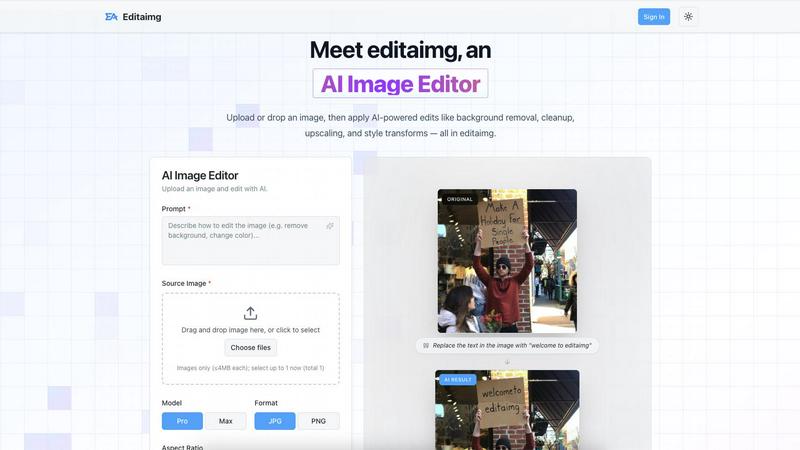
Editaimg is your friendly AI image editor that transforms photos with simple text commands.
Last updated: February 28, 2026

Proofapp
Streamline feedback with visual comments on your website, making design reviews faster and hassle-free for your team.
Last updated: March 4, 2026
Visual Comparison
Editaimg
Proofapp

Feature Comparison
Editaimg
Natural Language Image Editing
This is the heart of Editaimg. You can instruct the AI to make precise, localized changes to your images just by typing a command. For example, you can upload a photo and prompt it to "remove the trash can in the background," "place this vase on a wooden table," or "change the sky to a sunset." The AI understands your intent and executes the edit seamlessly, eliminating the need to manually select objects or use complex cloning tools. It makes advanced editing feel like having a conversation.
AI-Powered Object Removal & Cleanup
Effortlessly erase unwanted elements from your photos with intelligent inpainting. Whether it's photobombers in your travel shots, power lines cluttering a landscape, or temporary blemishes, this feature identifies the object and intelligently reconstructs the background for a clean, natural look. It goes beyond simple erasure by analyzing the surrounding pixels to fill in the gap convincingly, saving you from hours of tedious manual retouching.
Background Replacement & Scene Setting
Transform the context of any image instantly. This feature allows you to remove existing backgrounds completely or place subjects into entirely new environments. It's particularly powerful for creating realistic product shots; you can take a picture of an item on a plain white background and prompt Editaimg to set it "on a marble kitchen countertop" or "in a cozy living room," generating professional marketing material in seconds.
Style Transforms & Enhancement Tools
Apply artistic flair and technical improvements to your images with a few clicks. Editaimg offers a suite of enhancement tools, including AI upscaling to increase image resolution without losing detail, and style transforms that allow you to apply different color grades, lighting effects, or artistic filters. You can adjust the aspect ratio for different social media platforms and preview all changes instantly before finalizing your edit.
Proofapp
Visual Commenting
Proofapp allows users to click anywhere on a screenshot to leave contextual feedback. This eliminates confusion about feedback location and ensures that comments are pinned exactly where they belong, making it easier for teams to understand and implement changes.
Multi-Breakpoint Testing
Automatically capture and review your website at multiple breakpoints for both desktop and mobile. This feature ensures that feedback is relevant and applicable across different devices, streamlining the review process and enhancing user experience.
Real-time Collaboration
With real-time collaboration features, your team can see comments and feedback as they are made. This allows for immediate responses and tracking of progress, transforming the feedback loop into a dynamic and interactive process that promotes teamwork.
Secure Share Links
Proofapp provides secure, expirable links for sharing projects with clients. This means you can easily send them access without requiring an account, ensuring that your feedback process remains smooth and secure while keeping client information protected.
Use Cases
Editaimg
Enhancing E-commerce Product Photos
Small business owners and online sellers can use Editaimg to create professional, lifestyle-focused product images without expensive photoshoots. Simply upload a picture of your product on a plain background and use a prompt like "place this soap dispenser on a modern bathroom sink with natural lighting." This instantly generates appealing photos that help products stand out in online marketplaces and boost sales.
Perfecting Personal and Travel Photography
Anyone can rescue their favorite photos from common imperfections. Remove strangers from your landmark selfies, erase litter from a beautiful beach scene, or even swap a gloomy sky for a bright blue one. Editaimg helps you create the perfect version of your memories to share on social media or print for your home, all through simple text instructions.
Creating Marketing and Social Media Content
Content creators, marketers, and social media managers can rapidly produce eye-catching visuals. Need to update an old banner with new text? Use the Image Text Editor. Want to add a festive winter feel to a post? Apply the AI Snow effect. Editaimg streamlines the content creation process, allowing for quick iterations and consistent, high-quality visuals for campaigns and posts.
Rapid Prototyping and Design Mockups
Designers and entrepreneurs can use Editaimg to visualize ideas quickly. Mock up how a new logo might look on a website header, visualize furniture in a room, or see how different text overlays affect an ad design. The ability to make prompt-based changes allows for fast experimentation and client presentations without needing deep expertise in software like Photoshop.
Proofapp
Freelance Projects
Freelancers can use Proofapp to gather precise feedback from clients without the hassle of endless email threads. By pinning comments directly on designs, freelancers can save hours on revisions and maintain a professional image.
Agency Workflows
Agencies managing multiple projects can streamline their approval processes using Proofapp. The platform’s visual feedback tools help teams navigate client requests efficiently, reducing the time spent on revisions and increasing project turnaround.
Marketing Campaign Reviews
Marketing teams can utilize Proofapp to visually review landing pages and campaigns collaboratively. By providing visual feedback, teams can ensure that all elements meet brand standards and client expectations before launch.
Design Iterations
Design teams can leverage Proofapp to receive clear and actionable feedback on their designs. By allowing team members to comment directly on the designs, they can make informed changes that align with project goals, leading to more cohesive and successful outcomes.
Overview
About Editaimg
Editaimg is your friendly, AI-powered creative companion that transforms the way you edit images. It's a web-based platform designed to make professional-level photo editing accessible to everyone, regardless of their technical skills or artistic background. The core magic of Editaimg lies in its intuitive natural language interface. Instead of fumbling with complex sliders and tools, you simply describe what you want to change in plain English. Want to remove a distracting person from a vacation photo, replace a logo on a t-shirt, or set your product on a beautiful kitchen counter? Just type your request, and Editaimg's advanced AI gets to work. It's perfect for a wide range of users, from photographers and social media managers looking to polish their portfolios, to small business owners and e-commerce sellers who need stunning product shots, and even everyday individuals who want to perfect their personal photos. By combining powerful features like intelligent object removal, background replacement, and style transformation with a simple, prompt-based workflow, Editaimg delivers stunning visual results with minimal effort, all through a flexible, credit-based model that grows with your needs.
About Proofapp
Proofapp is a cutting-edge visual feedback and website review platform designed to enhance collaboration among designers, developers, and their clients. It simplifies the feedback process by allowing users to upload any website URL and automatically capturing screenshots for both desktop and mobile views. With Proofapp, reviewers can pin comments directly on the design, create threaded replies, attach relevant files, and easily resolve feedback—all without the need for an account. This eliminates the chaos of scattered emails and vague revision notes, making feedback more visual, organized, and actionable. Ideal for freelancers collecting client insights or agencies managing multiple projects, Proofapp fosters an efficient feedback loop that saves time and minimizes miscommunication, ultimately boosting productivity and creativity.
Frequently Asked Questions
Editaimg FAQ
How do I start editing an image with Editaimg?
Getting started is easy and requires no installation. First, visit the Editaimg website and sign in. Then, drag and drop your image file directly into the upload area or click to select it from your computer. Once your image is uploaded, you'll see a prompt box. Simply type in what you want to change, adjust any basic settings like aspect ratio, and click "Generate" to let the AI work its magic.
What kind of edits can I make using just text prompts?
You can make a wide variety of precise edits through text prompts. Common and powerful examples include: removing unwanted objects or people ("remove the person in the blue shirt"), replacing objects ("swap the red car for a blue bicycle"), changing backgrounds ("put me on a tropical beach"), adding elements ("add snowfall to this street"), and editing text within the image ("change the sign to read 'Open Now'").
What is the credit-based model and how does it work?
Editaimg operates on a credit system rather than a monthly subscription. You purchase packs of credits, and each AI generation or significant edit consumes a certain number of credits. This model offers great flexibility, as you only pay for what you use. It's cost-effective for both occasional users and those with heavier editing needs, as you can buy more credits as required without being locked into a recurring fee.
Is my uploaded image data kept private?
Editaimg is designed with user privacy in mind. The platform states that it offers tools like the Gemini Watermark Remover for "clean, privacy-first exports," indicating a focus on user control. For specific details on data retention, encryption, and usage policies, it is always recommended to review the platform's official Privacy Policy or Terms of Service for the most current and detailed information.
Proofapp FAQ
How does Proofapp improve the feedback process?
Proofapp enhances the feedback process by allowing users to leave visual comments directly on screenshots, which reduces miscommunication and speeds up revisions.
Is there a free trial available for Proofapp?
Yes, Proofapp offers a generous free trial that allows users to access full features for 60 days without requiring a credit card, enabling you to experience its benefits risk-free.
Can I share my projects without requiring clients to create an account?
Absolutely! Proofapp allows you to generate secure, expirable links that clients can use to view and comment on projects without needing to create an account.
What types of teams benefit from using Proofapp?
Proofapp is beneficial for a variety of teams, including freelance designers, small development teams, marketing agencies, and larger design teams looking for an efficient way to manage client feedback and streamline their workflows.
Alternatives
Editaimg Alternatives
Editaimg is a fantastic AI-powered image editor that lets you transform photos using simple text commands. It falls into the category of design and photo editing tools, making complex tasks like object replacement and background removal accessible to everyone. People often look for alternatives for various reasons. Some might need a different pricing model, like a subscription instead of credits, while others might be searching for a specific feature Editaimg doesn't have. Platform preference, such as needing a desktop app or more advanced manual controls, can also lead users to explore other options. When choosing an alternative, consider what matters most for your workflow. Think about your budget, the types of edits you do most often, and how you prefer to work. The best tool is the one that aligns with your specific needs and skill level, whether you prioritize ease of use, power, or a particular set of capabilities.
Proofapp Alternatives
Proofapp is a visual feedback and website review platform designed to enhance collaboration among designers, developers, and their clients. It streamlines the feedback process by allowing users to upload website URLs and automatically generating screenshots for review. This tool falls under the category of design tools, making it essential for anyone involved in creating or managing digital projects. However, users often seek alternatives to Proofapp for various reasons, such as pricing, feature sets, or compatibility with specific platforms. When searching for an alternative, it's important to consider factors like ease of use, the ability to integrate with existing workflows, and the types of feedback mechanisms available. Identifying the specific needs of your team can help you select a solution that not only meets your requirements but also enhances your overall project management efficiency.