
Fallom vs Fusedash
Side-by-side comparison to help you choose the right AI tool.

Fallom gives you real-time observability to track, debug, and optimize your AI agents and LLM calls.
Last updated: February 28, 2026

Fusedash turns your raw data into clear dashboards and charts so your team can act on insights instantly.
Last updated: March 3, 2026
Visual Comparison
Fallom
Fusedash

Feature Comparison
Fallom
End-to-End LLM Tracing
Fallom provides comprehensive, granular tracing for every LLM interaction in your system. You can track the full journey of a request, including the exact prompt sent, the model's output, any tool or function calls made by an agent, token usage, latency, and the calculated cost. This complete visibility is essential for understanding performance, debugging unexpected behavior, and optimizing each call for better efficiency and lower expenses.
Real-Time Cost Attribution & Dashboard
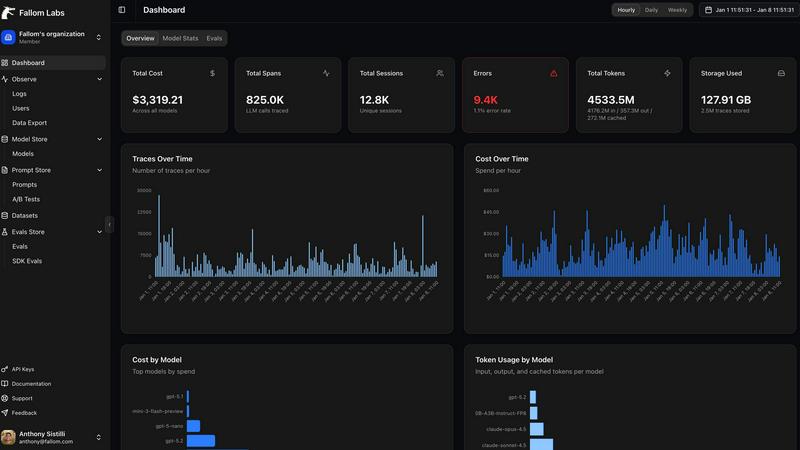
Gain instant clarity on your AI spending with Fallom's live dashboard. It automatically breaks down costs by model, user, team, or customer, turning opaque API bills into actionable insights. You can see a live feed of calls, monitor for spending anomalies, and attribute expenses accurately for internal chargebacks or client billing, ensuring full financial transparency and control over your AI budget.
Compliance-Ready Audit Trails
Built for regulated industries, Fallom creates immutable, detailed audit logs of every AI interaction. It supports critical compliance needs like model versioning, user consent tracking, and input/output logging, helping you meet requirements for standards like the EU AI Act, SOC 2, and GDPR. This feature provides the necessary documentation to demonstrate responsible AI usage and data handling.
Timing Waterfall & Tool Call Visibility
Debug complex, multi-step agent workflows with ease using Fallom's visual timing waterfall diagrams. These charts break down the exact sequence and duration of LLM calls, tool executions, and processing steps, making it simple to pinpoint latency bottlenecks. Coupled with deep visibility into every tool call—showing function names, arguments, and results—you can quickly identify and fix inefficiencies in your agentic chains.
Fusedash
Flexible Multi-Format Views
Fusedash understands that different stakeholders need information presented in different ways. That's why you can take a single, connected dataset and instantly present it as an executive KPI dashboard, a detailed chart for analysis, an interactive map for geo-analysis, or a narrative report with storytelling context. This flexibility eliminates the back-and-forth of creating custom reports for each audience, saving time and ensuring message consistency. You can customize layouts, apply universal filters, and set time ranges that work for each team's needs.
AI-Powered Chart Generator
Jumpstart your data storytelling with the AI chart generator. Simply upload a CSV or connect to an API, and Fusedash helps you create clear, effective visuals in minutes. The AI assists in selecting the most appropriate chart type for your data, applying meaningful comparisons, and refining labels to ensure the visual accurately tells your story. These charts can be used as powerful standalone assets for presentations or seamlessly dropped into larger dashboard views for comprehensive reporting.
Integrated AI Chat & Assistance
When you're exploring data and aren't sure where to begin, Fusedash's Smart Chat is your guide. Ask questions about your data in plain, natural language—like "What were sales in the northwest region last quarter?"—and get instant answers, suggested breakdowns, and recommendations for relevant metrics or charts. You can then instantly turn these insights into a new, shareable dashboard view, dramatically speeding up the journey from question to actionable visual report.
Unified Data Integration & Reusability
Stop rebuilding the wheel every time you need a report. Fusedash lets you bring data together from various sources—upload CSVs, connect directly to live APIs, or enrich your analysis with public datasets—all within one platform. Once connected, you can combine these datasets for a unified view and, most importantly, reuse the same prepared data and KPI definitions across countless charts, dashboards, and reports. This creates a single source of truth and ensures your metrics are always calculated consistently.
Use Cases
Fallom
Optimizing AI Agent Performance
Development teams use Fallom to monitor and debug their production AI agents. By analyzing timing waterfalls and tool call traces, engineers can identify why an agent is slow—perhaps a specific database query or external API call is lagging—and optimize the workflow to improve response times and user experience significantly.
Managing and Forecasting AI Costs
Finance and engineering leaders leverage Fallom's cost attribution features to track spending across different projects, teams, and models. This allows for accurate budgeting, forecasting, and internal chargebacks. Teams can identify if a specific feature or user is driving unexpected costs and take action, such as optimizing prompts or switching models, to stay within budget.
Ensuring Regulatory Compliance
Compliance and legal officers in healthcare, finance, or enterprise software use Fallom to maintain robust audit trails for AI systems. The platform logs all necessary data (inputs, outputs, model versions, user consent) in an immutable format, providing the evidence needed to pass security audits and demonstrate adherence to industry regulations and internal governance policies.
Improving LLM Application Reliability
SRE and DevOps teams implement Fallom for real-time monitoring and alerting on their LLM-powered applications. By watching the live dashboard for error spikes, latency increases, or hallucination rate changes, they can detect and resolve incidents proactively before they impact end-users, ensuring high reliability and uptime for critical AI services.
Fusedash
Executive KPI Review Dashboards
Leadership teams need a high-level, real-time view of business health without getting lost in the weeds. Fusedash enables the creation of clean, focused dashboards that aggregate key performance indicators from across the organization. Executives can monitor trends, filter by department or region, and quickly drill down when a metric changes to understand the underlying drivers, all from a single, always-updated view.
Marketing & Revenue Performance Tracking
Marketing and sales teams can use Fusedash to track campaign performance, pipeline health, and revenue metrics in one place. By connecting data from CRM, ad platforms, and web analytics, teams can build dashboards that show ROI, lead generation trends, and conversion rates. The storytelling feature is perfect for adding context to weekly reports, explaining what changed and what the next actions should be.
Operations & Real-Time Monitoring
For teams where minutes matter, such as IT, logistics, or customer support, Fusedash's real-time interfaces are essential. Connect to live APIs and databases to monitor fast-moving metrics like system uptime, transaction volumes, or support ticket backlogs. Set up alerts and visualizations that update instantly, allowing teams to identify and react to issues as they happen, ensuring smooth operational continuity.
Geographic Analysis with Map Visualizations
Businesses with a physical or regional component can leverage Fusedash's built-in map visualizations. Plot store performance, customer density, shipment logistics, or service coverage areas on interactive maps. This geo-analysis makes spatial patterns immediately obvious, helping with territory planning, resource allocation, and market expansion strategies by visually answering the "where" behind the data.
Overview
About Fallom
Fallom is your all-in-one observability platform built from the ground up for the age of AI. It's designed to bring crystal-clear visibility to the complex world of large language models (LLMs) and AI agents running in production. Think of it as a powerful dashboard that lets you see every single LLM call, trace every step of an agent's reasoning, and understand exactly what's happening under the hood of your AI applications. For developers and data scientists, this means you can debug a slow or failing agent in minutes instead of hours. For product and business leaders, it provides crucial insights into costs, usage patterns, and performance to ensure your AI initiatives are efficient and scalable. Fallom empowers teams to move fast with confidence, offering enterprise-grade features like compliance-ready audit trails and detailed cost attribution right out of the box. With its OpenTelemetry-native SDK, you can start tracing your applications in under five minutes, making advanced AI observability accessible to every team.
About Fusedash
Fusedash is an AI-powered data visualization platform designed to help teams transform their connected data into clear, actionable insights. It acts as a unified workspace where you can create decision-ready dashboards, interactive charts, detailed maps, and narrative reports without the need to rebuild the same logic across multiple, disconnected tools. The core value proposition is consistency and efficiency: you define your key metrics and KPIs once, and then reuse those consistent definitions across every view and report. This ensures everyone in the organization—from leadership to marketing to operations—is looking at the same trusted numbers. Fusedash is built for teams that are tired of manual reporting cycles and conflicting data stories. It empowers users to not only monitor what's happening through real-time interfaces but also to understand why it's happening by drilling down into segments, regions, or time periods. With integrated AI features like natural language data chat and smart visualization assistance, Fusedash makes data exploration and reporting faster and more accessible, turning raw data into a shared source of truth that drives alignment and action.
Frequently Asked Questions
Fallom FAQ
How quickly can I start using Fallom?
You can get started in under five minutes. Fallom uses a single, OpenTelemetry-native SDK that you integrate into your application. Once instrumented, traces will immediately begin flowing to your Fallom dashboard, requiring minimal setup or configuration to see your first data.
Does Fallom support all LLM providers?
Yes, Fallom is designed to be provider-agnostic. It works with every major LLM provider, including OpenAI, Anthropic, Google Gemini, and others via its OpenTelemetry foundation. This means you can monitor all your AI models from one unified platform without vendor lock-in.
How does Fallom handle sensitive or private data?
Fallom offers a Privacy Mode for sensitive deployments. This allows you to disable full content capture for prompts and responses, logging only the metadata (like timings, token counts, and costs) while redacting the actual text. You can configure these privacy controls per environment to balance observability with data security.
Can I use Fallom for A/B testing different models or prompts?
Absolutely. Fallom includes features for model A/B testing and a Prompt Store for version control. You can safely roll out a new model to a percentage of traffic or test different prompt variations, then use Fallom's analytics to compare their performance, cost, and quality metrics side-by-side before making a full switch.
Fusedash FAQ
What kind of data sources can I connect to Fusedash?
Fusedash offers flexible data integration options to suit various needs. You can start quickly by uploading CSV or Excel files directly. For live, updating data, you can connect to countless applications and databases via their APIs. The platform also supports enriching your views with public datasets, which is especially useful for adding geographic or market context to your internal data.
How does the AI Chat feature actually work?
The AI Chat, or Smart Chat, acts as an intelligent assistant within your data. You type questions in natural language, just as you would ask a colleague, such as "Show me monthly revenue for product X." The AI interprets your question, queries the connected dataset, and provides an answer in text form. It can also suggest the best way to visualize that answer—recommending a chart type or a new dashboard view—which you can then create with a single click.
Can I share the dashboards and reports I create with people outside my team?
Absolutely. A key function of Fusedash is to facilitate easy sharing and alignment. You can generate shareable links to your dashboards, charts, or narrative reports. Recipients can view the interactive visualizations, apply filters, and explore the data without needing a Fusedash account, making it simple to keep stakeholders, clients, or leadership informed with the latest insights.
Is Fusedash suitable for real-time data monitoring?
Yes, Fusedash is built to handle real-time monitoring scenarios. By connecting to live API data sources, you can create interfaces and dashboards that refresh at intervals you define—even as frequently as every minute. This is ideal for operational teams that need to monitor system health, live sales data, or social media mentions, allowing them to see changes and react promptly.
Alternatives
Fallom Alternatives
Fallom is a specialized observability platform for large language models (LLMs) and AI agents, falling into the development and AI operations category. It provides deep visibility into how your AI applications perform in production, tracking everything from prompts and costs to latency and tool calls. Users often explore alternatives for various reasons. These can include budget constraints, the need for a different feature set, or integration requirements with their existing tech stack. Some teams might be looking for a more general-purpose monitoring tool, while others may prioritize specific compliance or deployment options. When evaluating other solutions, it's wise to consider a few key areas. Look for robust LLM and agent tracing, clear cost attribution, and session-level context. Also, assess how easily it integrates into your workflow and whether it meets your specific security and compliance standards for audit trails.
Fusedash Alternatives
Fusedash is an AI-powered analytics and data visualization platform. It helps teams build dashboards, track KPIs, and generate narrative reports from their connected data sources. The platform is designed to provide consistent, decision-ready insights across an organization. Users often explore alternatives for various reasons. This could be due to specific budget constraints, the need for different integration capabilities, or a desire for features tailored to a particular industry or team size. The search for the right tool is a normal part of finding the perfect fit for a company's unique data stack and workflow requirements. When evaluating other options, consider your core needs. Key factors often include the ease of connecting to your data sources, the flexibility of visualization and reporting, the role of AI and automation features, and the overall user experience for both analysts and business stakeholders. It's also wise to assess the scalability and security standards of any platform you consider.