
Filator vs Prompt Builder
Side-by-side comparison to help you choose the right AI tool.

Filator provides 500+ free online tools to create, convert, and automate tasks effortlessly without any signup required.
Last updated: March 1, 2026

Prompt Builder
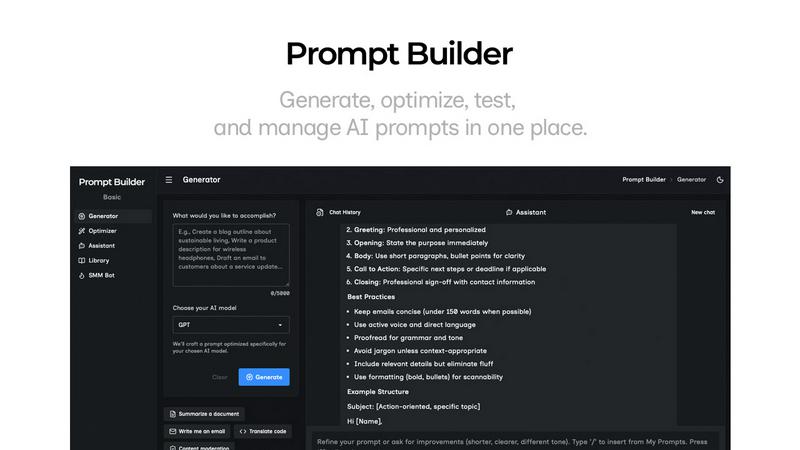
Generate, optimize, test, and manage AI prompts in one place. Turn an idea into a ready-to-use prompt in seconds.
Visual Comparison
Filator

Prompt Builder
Overview
About Filator
Filator is a professional digital workspace that aims to boost productivity by providing an extensive collection of over 500 online tools, all while prioritizing user privacy and time efficiency. This platform stands out by removing barriers such as signup walls, premium tiers, and data collection practices, allowing users to access tools instantly without hassle. It caters to a diverse audience including developers, designers, marketers, and professionals from more than 150 countries. The utility suite of Filator encompasses a wide range of functionalities, such as image conversion with 132 format combinations and various PDF processing tools. Additionally, it offers specialized developer utilities like JSON formatters and UUID generators. With the integration of AI-powered tools for content rewriting and hashtag generation, Filator serves as a comprehensive one-stop solution for various digital tasks, ensuring that users can complete their work efficiently and securely while keeping their data on their devices.
About Prompt Builder
Prompt Builder is a prompt engineering workspace for writing, testing, and saving prompts. Describe the task in plain English, and it helps you create a prompt that matches the model you choose. Start with a draft, refine it in chat, save or pin versions, then run them when you are ready. It works with GPT, Claude, Gemini, Llama, Mistral, DeepSeek, Grok, Perplexity, and more. You also get an Optimizer, an assistant for quick tests, and a library of reusable prompts and templates from the community. Turn an idea into a ready-to-use prompt in seconds. Refine it in chat, save it to your Library, and run it anytime.