
File Studio vs Fond
Side-by-side comparison to help you choose the right AI tool.

File Studio
File Studio is your private offline toolkit for converting, editing, and managing files and PDFs.
Last updated: February 28, 2026

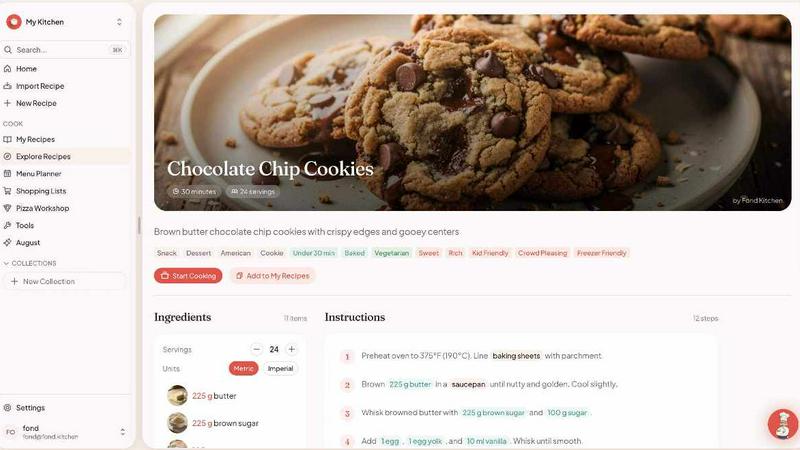
Fond is your AI cooking companion that manages recipes, plans meals, and helps you shop smarter so you can cook with confidence.
Last updated: March 11, 2026
Visual Comparison
File Studio

Fond
Feature Comparison
File Studio
100% Offline Processing
Every single action in File Studio happens locally on your device. When you convert a PDF to images, merge documents, or compress a folder of photos, not one byte of your data is uploaded to the internet. This guarantees maximum privacy and security for sensitive files, and it also means you can work without an internet connection, anytime and anywhere.
Comprehensive PDF Toolkit
File Studio includes five powerful tools dedicated to PDF management. You can easily merge multiple documents into one, split a large PDF into individual pages, or reorder and rotate pages to create the perfect layout. It also lets you remove passwords from secured PDFs you have access to and clean metadata, all within the safe, offline environment of your desktop.
Versatile Image Conversion & Editing
With support for over 20 image formats, File Studio handles all your conversion needs. It seamlessly converts iPhone HEIC photos to universal JPGs, transforms WebP images for editing, and processes 14 different RAW camera formats. Beyond conversion, you can resize, compress, crop, add watermarks, and even create collages, making it a versatile hub for image preparation.
Efficient Batch Processing
Save immense time by processing hundreds of files at once. Whether you need to convert an entire folder of HEIC images to JPG, compress a batch of photos for a website, or split a stack of scanned contracts, File Studio can handle it in a single operation. This batch functionality works across both PDF and image tools, streamlining repetitive tasks effortlessly.
Fond
AI Cooking Agent (August)
August is your always-available sous chef and teacher. This AI assistant learns from your cooking habits, preferred recipes, and skill level over time. You can ask it anything mid-recipe—from "what's a substitute for buttermilk?" to "why do I need to autolyse dough?"—and get instant, technique-focused answers. It can also suggest what to cook based on the ingredients in your fridge, making it an invaluable tool for reducing food waste and solving the "what's for dinner?" dilemma.
One-Click AI Recipe Import
Stop copying and pasting or screenshotting recipes. Fond's AI import lets you paste any recipe URL, and within seconds, it extracts just the crucial information: ingredients, steps, cook time, and servings. It intelligently removes all the ads, pop-ups, and long-winded life stories, saving you time and clutter. You can also import from photos or plain text, bringing all your scattered recipes into one clean, organized digital cookbook.
Smart Meal Planning & Shopping Lists
Plan your weekly meals with a simple drag-and-drop interface. As you add recipes to your calendar, Fond automatically builds a consolidated shopping list. It smartly groups items by grocery store aisle (like "Proteins" or "Dairy") and merges duplicates, so you never buy double. The list syncs in real-time with anyone you share a workspace with, perfect for households where more than one person shops.
Distraction-Free Cook Mode
Cook Mode turns your device into a dedicated kitchen assistant. It displays recipe instructions in a large, easy-to-read step-by-step format, with built-in timers you can start with one tap. The screen is designed to stay awake, so you don't have to touch it with messy hands. It keeps the focus on your cooking, providing a seamless, hands-free experience from start to finish.
Use Cases
File Studio
Preparing Documents for Secure Submission
Many online forms, like visa applications or client portals, require specific file formats and sizes. With File Studio, you can securely convert your PDF ID scans to JPG, compress the images to meet strict upload limits, and merge multiple pages into a single document—all offline to ensure your personal information never travels over the web unnecessarily.
Organizing and Archiving Client Work
Freelancers and photographers can use File Studio to efficiently manage project deliverables. Convert batches of RAW or HEIC photos to standard formats for client previews, create compressed versions for email, and assemble final image selections or contracts into a single, professional PDF portfolio. Doing this locally keeps unreleased work completely confidential.
Simplifying Personal Document Management
For anyone dealing with personal paperwork, File Studio is a lifesaver. You can merge multiple bank statements into a single PDF for tax season, split a large scanned manual into individual chapters, or remove personal metadata from a document before sharing it. The offline nature is perfect for handling sensitive items like tax forms or property deeds.
Optimizing Digital Content for Web Use
Bloggers, small business owners, and remote workers can quickly prepare images for websites, social media, or presentations. Resize photos to exact dimensions, compress them to load faster without losing quality, and convert modern formats like AVIF or WebP to more compatible types. Batch processing makes light work of updating an entire website's image gallery.
Fond
The Recipe Collector Getting Organized
If you have hundreds of recipes saved in browser bookmarks, on Pinterest, or in photos on your phone, Fond is your solution. You can quickly import them all into one centralized, searchable library. No more frantic searching—everything is neatly categorized and ready to use, finally bringing order to your culinary inspiration.
The Busy Household Reducing Stress
For families and roommates, Fond simplifies meal coordination. You can create a shared meal plan for the week that everyone can see. The automatically generated, synced shopping list ensures whoever goes to the store has the correct, updated list, eliminating miscommunication and last-minute trips.
The Curious Cook Building Skills
For cooks who want to move beyond just following instructions, Fond's AI agent, August, is a game-changer. It provides real-time answers to "why" and "how" questions, teaching the techniques behind the recipe. This turns every cooking session into a learning opportunity, helping you become a more confident and knowledgeable cook.
The Food Enthusiast Mastering a Craft
For those passionate about specific areas like pizza, bread, or coffee, Fond's specialized Modules offer deep-dive tools. The Pizza Workshop, for example, provides dough calculators, fermentation trackers, and oven guides to help you perfect your crust, catering to hobbyists who want professional-level control and insight.
Overview
About File Studio
File Studio is your all-in-one, privacy-focused desktop toolkit for managing PDFs and images, and it does everything right on your own computer. In a world where we're constantly asked to upload files to the cloud, File Studio offers a powerful alternative: 100% offline processing. This means your sensitive documents—like passports, signed contracts, or client IDs—never leave your Mac or Windows PC. It's built for anyone who values security and simplicity, from photographers and freelancers handling client work to remote workers managing confidential agreements. The app packs over 15 essential tools into one clean interface, allowing you to merge, split, and password-protect PDFs, or convert, resize, and compress images across more than 20 formats including modern types like HEIC, WebP, and AVIF. With a straightforward one-time purchase and no subscriptions or accounts required, File Studio delivers reliable, powerful file management that puts your privacy first and streamlines your digital workflow.
About Fond
Fond is your all-in-one intelligent kitchen companion, designed to transform how you manage recipes, plan meals, and learn to cook. It's built for home cooks who are tired of juggling bookmarks, cluttered notes, and last-minute grocery runs. At its heart is August, a built-in AI cooking assistant that acts as your personal culinary guide. Fond consolidates your entire cooking workflow: you can instantly import recipes from any website, photo, or text using AI that strips away the ads and lengthy stories. It then helps you generate personalized weekly meal plans in seconds based on your dietary preferences, skill level, or what ingredients you already have. While you cook, August is there to answer questions about techniques and substitutions in real-time. Beyond recipes, Fond offers drag-and-drop meal planning, automatically generated shopping lists sorted by grocery aisle, and a hands-free Cook Mode. It also introduces specialized "Modules" like the Pizza Workshop for enthusiasts who want to dive deep into the craft. Available across all your devices and fully synced, Fond brings order, knowledge, and confidence to your kitchen, making cooking less of a chore and more of a joyful craft.
Frequently Asked Questions
File Studio FAQ
Is my data ever uploaded to the cloud?
No, absolutely not. File Studio is designed with a core principle of privacy. All processing—every conversion, edit, and compression—is performed locally on your Mac or Windows computer. Your files never leave your device, ensuring 100% offline security. This is ideal for sensitive documents you don't want to risk uploading.
Do you offer a free trial?
Yes, File Studio offers a free trial so you can test all its features and ensure it fits your workflow before making a purchase. You can download the app and explore its 15+ tools to see how it handles your PDFs and images offline.
What formats does File Studio support for images?
File Studio supports a wide range of over 20 image formats. This includes common types like JPG and PNG, modern formats like HEIC (from iPhones), WebP, and AVIF, as well as 14 different professional RAW camera formats from manufacturers like Canon, Nikon, and Sony, making it incredibly versatile for all users.
Can I use File Studio on both Mac and Windows?
Yes, File Studio is fully compatible with both macOS and Windows operating systems. You purchase one license, and it works on your chosen platform. The interface and feature set are consistent across both, providing a reliable and familiar experience whether you're on a Mac or a PC.
Fond FAQ
How does Fond import recipes from websites?
Fond uses advanced AI to scan any recipe URL you provide. It intelligently identifies and extracts the key components—ingredients, step-by-step instructions, cook time, and serving size—while filtering out all the unrelated content like advertisements, pop-ups, and the blogger's personal story. This process typically takes just a few seconds, giving you a clean, standardized recipe in your collection.
Can I use Fond with my family or roommates?
Absolutely! Fond supports shared workspaces. You can invite family members or roommates to join your Fond space. This allows everyone to view and contribute to the same meal plan, add recipes to a shared collection, and see a live, synchronized shopping list. It's perfect for keeping the whole household on the same page.
What are Fond's "Modules"?
Modules are specialized workshops within Fond designed for specific culinary crafts. The first available Module is the Pizza Workshop, which includes tools like a dough calculator, fermentation tracker, and oven guides. Upcoming Modules include Bread Studio for sourdough baking and Coffee Lab for brewing. These provide deeper functionality for enthusiasts who want to geek out on the details of their hobby.
Is there a free version of Fond?
Yes, Fond offers a free plan to get started. This allows you to explore core features like recipe importing, basic meal planning, and using the AI assistant. You can upgrade to a paid plan to unlock advanced capabilities, such as unlimited recipe imports, more sophisticated meal planning tools, and access to premium Modules like the Pizza Workshop.
Alternatives
File Studio Alternatives
File Studio is a powerful desktop application for managing, converting, and editing PDFs and images. It falls into the productivity and file management category, standing out by performing all tasks 100% offline on your computer, which is a major plus for privacy-conscious users. People often explore other options for various reasons. Some might be looking for a different pricing model, like a free tool or a subscription service. Others may need specific features not offered here, or require software that runs on a different operating system like Linux. When considering other software, think about your core needs. Key factors include whether you require cloud access or strict offline privacy, the specific file formats you work with most, and your budget for either a one-time purchase or an ongoing subscription. Matching these needs to a tool's capabilities will help you find the right fit.
Fond Alternatives
Fond is a smart AI recipe manager that helps you plan meals, track nutrition, and cook with confidence. It falls into the category of productivity and kitchen management tools, designed to streamline everything from finding recipes to grocery shopping. People often explore alternatives for various reasons. You might be looking for a different pricing structure, a specific feature Fond doesn't offer, or better compatibility with other apps you use. Your personal cooking style and household needs are also key factors in finding the right fit. When evaluating other options, consider what matters most to your routine. Key aspects include how easily you can save recipes, the intelligence of meal planning, the utility of shopping lists, and whether nutrition tracking is automated. The best tool is one that seamlessly integrates into your life, reducing kitchen stress.