
ConvertBankToExcel vs Fintrack
Side-by-side comparison to help you choose the right AI tool.

ConvertBankToExcel
ConvertBankToExcel quickly transforms your PDF bank statements into Excel, CSV, and more with 99% accuracy in 30.
Last updated: February 26, 2026

Fintrack
Fintrack is your AI money copilot that tracks spending and finds hidden savings for you.
Last updated: March 19, 2026
Visual Comparison
ConvertBankToExcel

Fintrack
Feature Comparison
ConvertBankToExcel
99%+ Accuracy Rate
ConvertBankToExcel boasts an impressive accuracy rate of over 99%, a figure that has been verified by CPAs. This high level of precision ensures that the transaction data extracted from bank statements is reliable, minimizing the risk of errors in financial reporting and analysis.
Fast Processing Time
With the capability to process bank statements in under 30 seconds, ConvertBankToExcel significantly speeds up the conversion process. This rapid turnaround allows accounting professionals to focus on more critical tasks instead of spending hours on data entry, ultimately enhancing productivity.
Extensive Format Support
The platform offers nine different export formats, including QuickBooks (QBO/QFX/OFX/IIF), Excel, CSV, JSON, and XML. This versatility ensures that users can seamlessly integrate the converted data into their preferred accounting software or spreadsheets, catering to various financial needs.
Automatic Bank Detection
ConvertBankToExcel features automatic bank detection, allowing it to identify the user's bank effortlessly. This functionality streamlines the conversion process by eliminating the need for manual input and ensuring accurate extraction of transaction data from the right bank.
Fintrack
Your AI Copilot: Finny
Finny is your always-available financial companion. You can ask questions in natural language, like "How much did I spend eating out this month?" or "Where can I cut back?" Finny analyzes your connected accounts to give instant, personalized answers and recommendations. It also works proactively, sending you alerts for unusual spending, reminding you of expiring credits, and surfacing insights you might never have found on your own, making complex finance feel simple and conversational.
The Benefits Wallet
This feature tackles the "invisible leaks" in your finances. The Benefits Wallet automatically scans your transactions and connected accounts to find money you're entitled to but might be missing. It aggregates unused cashback rewards, loyalty points, store credits, expiring offers, and available discounts into one clear dashboard. Instead of letting these benefits slip away, Fintrack puts them front and center, effectively giving you "free money" you didn't know you had.
Unified Financial Dashboard
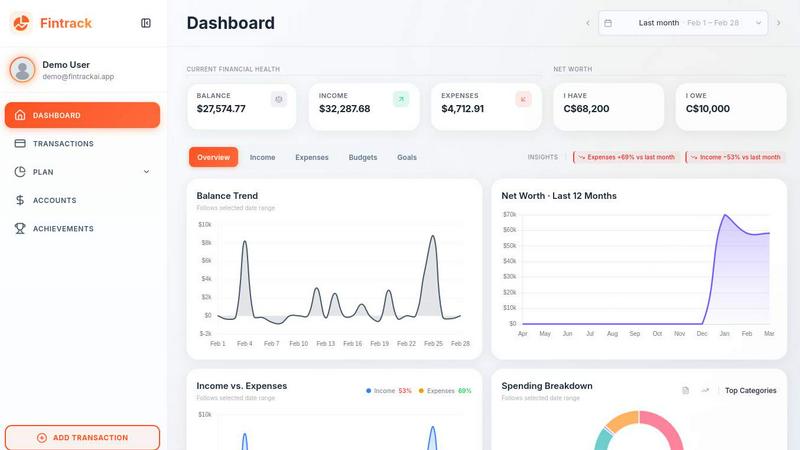
Say goodbye to logging into multiple bank apps and wrestling with spreadsheets. Fintrack's dashboard brings your entire financial picture into one, visually clear overview. You can see your total income, expenses, cash flow, budgets, and progress toward savings goals at a glance. Interactive charts let you explore spending trends over time, categorize your expenses, and understand exactly where your money is going with beautiful, easy-to-digest visuals.
Smart Alerts & Goal Tracking
Fintrack helps you stay on course automatically. Set spending caps for categories like dining or entertainment, and get real-time alerts if you're approaching your limit. For your savings goals—whether it's an emergency fund, a vacation, or a down payment—you can create a target and timeline. Fintrack visualizes your progress and, with Finny's help, suggests practical, small tweaks to your spending habits to help you reach your goals faster, without feeling deprived.
Use Cases
ConvertBankToExcel
Mortgage Applications
When preparing applications for mortgages, it is essential to present organized bank statements to lenders. ConvertBankToExcel enables quick conversion of bank statements into the required format, making it easier to compile financial documents for approval processes.
Tax Preparation
During tax season, organizing financial statements is crucial for compliance and accurate filing. ConvertBankToExcel simplifies this task by converting bank statements into easily manageable formats, helping professionals ensure they meet IRS requirements and tax obligations.
Visa Applications
For individuals applying for visas or immigration processes, financial documentation plays a vital role. ConvertBankToExcel allows users to convert their bank statements into the necessary formats quickly, ensuring all financial requirements are met for visa applications.
Foreign Language Processing
ConvertBankToExcel can process bank statements in over 50 languages, complete with auto-translation features. This capability is particularly useful for international clients and professionals dealing with foreign currency transactions, enhancing accessibility and usability.
Fintrack
For the Subscription Over-Spender
If you lose track of monthly subscriptions for services you no longer use, Fintrack is a lifesaver. Finny continuously monitors your recurring charges and will flag forgotten subscriptions, like a gym membership or a streaming service you signed up for once. It clearly shows these "invisible leaks," helping you cancel them and save hundreds of dollars per year effortlessly, just as it did for Marcus who saved $47 monthly.
For the Rewards & Cashback Optimizer
Many people earn credit card points, cashback, or loyalty rewards but fail to claim or use them before they expire. Fintrack's Benefits Wallet solves this by acting as a central hub for all your perks. It tracks and notifies you of expiring credits and unclaimed rewards, ensuring you never leave money on the table. Rachel, for example, discovered over $200 in benefits she didn't know about, which she then used for a fun date night.
For the Goal-Oriented Saver
Whether you're saving for a big purchase or building an emergency fund, staying motivated is key. Fintrack lets you set a specific financial goal with a target amount and date. The platform tracks your progress with a clear visual bar and provides personalized, actionable advice from Finny on how to adjust your spending to hit your target sooner, just like Camila who reached her savings goal two months early.
For Household & Couple Finance Management
Managing shared expenses with a partner or family can be tricky. Fintrack simplifies this by allowing you to safely connect and view multiple accounts in one shared household view. You can create joint budgets, track shared goals, and both get clarity on your combined financial health. This fosters transparency, reduces money-related stress, and makes planning for shared future expenses much smoother.
Overview
About ConvertBankToExcel
ConvertBankToExcel is an innovative AI-powered platform designed specifically for accounting professionals, aiming to revolutionize the tedious task of bank statement conversion. By leveraging advanced technology, ConvertBankToExcel eliminates the need for manual data entry, allowing users to effortlessly extract transaction data from PDF bank statements. This data is then automatically converted into a variety of formats including Excel, CSV, and QuickBooks, making it incredibly accessible and ready for use in financial analysis and reporting. With a remarkable accuracy rate exceeding 99% as verified by CPAs, the platform supports over 20 major banks across the US and Canada. Whether you are a CPA, bookkeeper, or anyone needing to process bank statements, ConvertBankToExcel simplifies the task and saves valuable time. The platform's free tier offers up to 7 pages daily without requiring credit card information, making it an ideal choice for those looking to streamline their workflow and reduce the burden of manual data entry in financial tasks.
About Fintrack
Fintrack is your friendly, AI-powered guide to financial clarity and control. It's designed for anyone who feels overwhelmed by spreadsheets, confused by where their money goes each month, or suspects they're missing out on savings and rewards. Fintrack goes beyond simple transaction tracking by connecting all your accounts into one beautiful dashboard and pairing it with Finny, an intelligent AI copilot that understands your finances. Finny doesn't just show you numbers; it explains them in plain language, answers your questions, and proactively uncovers hidden opportunities—like forgotten subscriptions or unclaimed cashback. Whether you're an individual building savings, a couple managing shared expenses, or a family planning for goals, Fintrack delivers the insight of a financial advisor with the simplicity of a modern app. It turns the chore of money management into an empowering habit, giving you the confidence that you're making the most of every dollar.
Frequently Asked Questions
ConvertBankToExcel FAQ
How secure is my data with ConvertBankToExcel?
ConvertBankToExcel employs bank-grade encryption to protect your sensitive data. Additionally, all processed files are automatically deleted after 24 hours, ensuring that your information remains confidential and secure.
Can I use ConvertBankToExcel for multiple bank accounts?
Yes, ConvertBankToExcel allows for the consolidation of statements from multiple bank accounts into unified reports. This feature is especially beneficial for accounting professionals managing various clients or accounts.
Is there a limit to how many pages I can convert for free?
Yes, the free tier allows you to convert up to 7 pages daily without requiring a credit card. This feature enables users to try the platform and experience its capabilities before committing to a paid plan.
What types of bank statements can I convert?
ConvertBankToExcel supports a wide range of bank statement formats, including both digital and scanned PDFs. Its AI-powered OCR technology ensures accurate data extraction, regardless of the statement type.
Fintrack FAQ
Is my financial data safe with Fintrack?
Absolutely. Security is our top priority. Fintrack uses bank-level, read-only encryption to connect to your financial institutions. This means we can see your transaction data to provide insights, but we cannot move money or make changes. Your login credentials are never stored on our servers. We treat your data with the utmost confidentiality and employ industry-leading security practices to keep it safe.
How does Finny, the AI assistant, work?
Finny is powered by a secure AI pipeline that analyzes your own financial data from your connected accounts. It learns your spending patterns, income, and goals over time. You can ask it questions in everyday language, and it will scan your transactions and history to give you a personalized answer. It also runs constant checks in the background to proactively find savings opportunities, alert you to unusual activity, and offer helpful recommendations.
What if Fintrack makes a mistake categorizing a transaction?
Fintrack's automated categorization is very smart, but it's not perfect—sometimes a coffee shop charge might be mislabeled. That's why we make it incredibly easy for you to correct it. Simply tap on any transaction and reassign it to the correct category. Finny learns from these corrections, making its future categorizations for that merchant or type of spend more accurate for you personally.
Can I use Fintrack on my mobile phone?
Yes! Fintrack offers a full-featured mobile app that puts your complete financial picture and Finny in your pocket. You can check your dashboard, get real-time spending alerts, ask Finny questions on the go, and access your Benefits Wallet anytime, anywhere. It’s designed to give you the same clarity and control whether you're at home or out and about.
Alternatives
ConvertBankToExcel Alternatives
ConvertBankToExcel is an AI-powered bank statement conversion platform specifically designed for accounting professionals. It streamlines the tedious process of manual data entry by automatically extracting transaction data from PDF bank statements and converting it into various formats like Excel, CSV, and QuickBooks. This solution falls under the productivity and management category, making it an essential tool for CPAs, bookkeepers, and anyone who regularly works with financial data. Users often seek alternatives to ConvertBankToExcel for several reasons, including pricing, specific feature requirements, or compatibility with their existing workflows. When choosing an alternative, consider factors such as accuracy, processing speed, supported file formats, and the range of banks accommodated. It's also important to evaluate user reviews and trustworthiness to ensure you find a solution that meets your unique needs and enhances your productivity.
Fintrack Alternatives
Fintrack is an AI-powered personal finance platform, often called a "money copilot." It belongs to the category of personal finance management tools that help you track spending, manage budgets, and gain insights into your financial habits. People look for alternatives for many reasons. Perhaps they need a different pricing plan, a specific feature like investment tracking, or an app that works seamlessly on their preferred device. Others might want a tool with a different design philosophy or one that connects to their specific bank. When choosing an alternative, consider what matters most to you. Key factors include the app's core features, its ease of use, security standards, subscription cost, and how well it integrates with your existing financial accounts. Finding the right fit is about matching the tool's strengths to your personal financial goals.