
FluentDictation vs Read PDF Aloud
Side-by-side comparison to help you choose the right AI tool.

FluentDictation
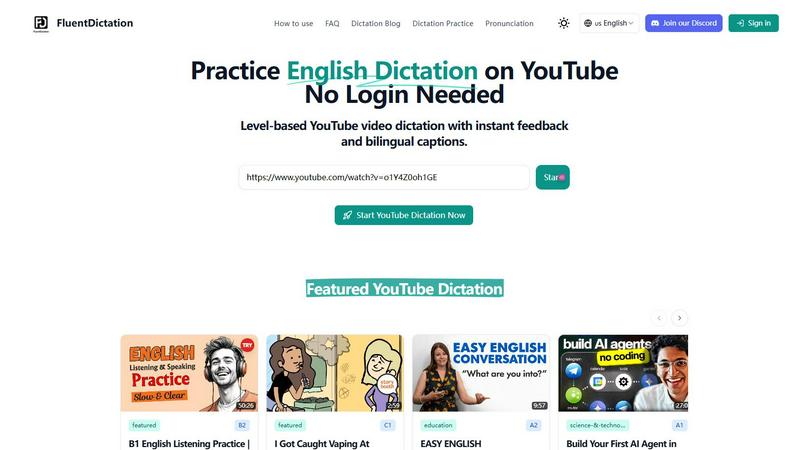
Practice English dictation on YouTube with instant feedback and bilingual captions for any level.
Last updated: February 28, 2026

Read PDF Aloud
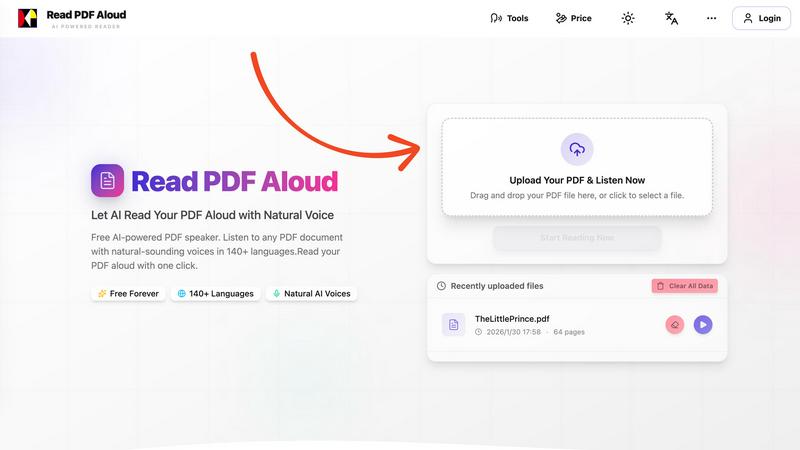
Easily listen to any PDF document aloud in natural voices, including scanned files, with 142 language options.
Last updated: February 26, 2026
Visual Comparison
FluentDictation
Read PDF Aloud
Feature Comparison
FluentDictation
Adaptive Dictation Levels
FluentDictation tailors the learning experience to your current ability. Whether you're just starting out at the A1 level or preparing for advanced proficiency tests, the platform ensures the dictation exercises are perfectly challenging. This adaptive approach means you're always practicing material that is achievable yet pushes you to improve, preventing frustration and keeping motivation high as you progress through different stages of English mastery.
Bilingual Subtitles & Instant Transcripts
Understanding every word is key to learning. FluentDictation provides side-by-side bilingual subtitles during exercises, offering clear translations to aid comprehension. After completing a dictation, you can instantly compare your typed text with the original transcript. This immediate comparison is invaluable for spotting specific errors, learning new vocabulary in context, and understanding sentence structure as used by native speakers.
Sentence-by-Sentence Focused Training
Instead of overwhelming you with long paragraphs, FluentDictation's player intelligently splits video audio into bite-sized sentences or phrases. You listen to a short, clear segment, type what you hear, and then move on. This method allows for intense focus on each unit of speech, making it easier to catch contractions, linking sounds, and tricky pronunciation that you can then practice repeating until you get it right.
Accent Diversity Library & Real-Time Feedback
The tool exposes you to a wide range of English accents—including British, American, Australian, and more—through its curated and user-submitted video library. This trains your ear to understand English as it's spoken globally. As you type, you receive instant accuracy feedback, highlighting mistakes in real time. This allows for on-the-spot correction and learning, turning every error into an immediate opportunity for improvement.
Read PDF Aloud
Free to Use
Read PDF Aloud offers free daily credits to all registered users, making it easy for anyone to enjoy its features without any cost. Just log in, and you can start converting your PDFs into audio instantly.
PDF OCR
With advanced Optical Character Recognition (OCR) technology, Read PDF Aloud can read not just standard PDFs but also scanned documents. This means you can upload any PDF file, and the application will identify and extract the text for you to listen to.
Natural AI Voices
Enjoy a diverse selection of realistic AI voices with different accents and tones. Choose from hundreds of natural-sounding voice options to enhance your listening experience, ensuring that the narration suits your content perfectly.
Cross-Platform Compatibility
Read PDF Aloud works seamlessly across various devices and operating systems. Whether you are using Windows, Mac, iPhone, iPad, Android, or Linux, you can access the application from any modern browser without any installation required.
Use Cases
FluentDictation
Exam Preparation (IELTS, TOEFL)
For learners targeting high scores on listening exams, FluentDictation is an ideal training partner. You can practice with educational videos specifically about exam strategies (like IELTS speaking tips) or use complex news reports and lectures to simulate the challenging audio found in these tests. The instant feedback helps identify recurring listening weaknesses, such as missing articles or prepositions, which are crucial for exam accuracy.
Improving Pronunciation and Speaking Fluency
The tool is not just about writing; it's built for speaking practice. After completing a dictation, you can use the "Shadowing Aloud" step. This involves speaking along with the original audio, mimicking the speaker's rhythm, tone, and pronunciation. This repeated, active practice is one of the most effective ways to sound more natural and fluent in conversational English.
Casual Learning with Enjoyable Content
Language learning should be fun! FluentDictation allows you to integrate practice seamlessly into your hobbies. Love music? Use song lyrics for dictation. Interested in science, tech, or beauty blogs? Use those videos. By practicing with content you genuinely enjoy, you're more likely to stick with it daily, turning passive watching into an active, rewarding learning session without it feeling like a chore.
Building Confidence with Authentic Materials
Beginners and intermediate learners often find real-world English too fast and intimidating. FluentDictation bridges this gap by letting you interact with authentic videos at your own pace. You control the playback, repeat sentences as needed, and have the support of bilingual hints. This process demystifies real speech, builds listening stamina, and gives you the confidence to understand English outside the classroom.
Read PDF Aloud
Studying for Exams
Students can use Read PDF Aloud to listen to their study materials, making it easier to absorb information. This auditory approach helps reinforce learning and can improve retention rates for complex subjects.
Proofreading Documents
Writers and editors can benefit from hearing their documents read aloud, allowing them to catch mistakes or awkward phrasing that they might miss during traditional reading. It's a perfect tool for enhancing the editing process.
Enjoying eBooks on the Go
For avid readers, Read PDF Aloud provides a convenient way to enjoy eBooks while commuting or during other activities. Simply upload your eBook PDF and listen to it as you go about your day.
Accessibility for Visual Impairments
Individuals with visual impairments can use Read PDF Aloud to access written content easily. The application empowers users by providing them with a way to engage with text that they might otherwise find challenging to read.
Overview
About FluentDictation
FluentDictation is your friendly gateway to mastering English through the videos you already love to watch. It’s a clever online tool that transforms any YouTube video into an interactive, personalized dictation exercise. Imagine practicing your listening and writing skills not with boring, robotic audio, but with real music videos, fascinating documentaries, engaging lessons, or your favorite vlogger's content. That's the magic of FluentDictation. It automatically works with a video's subtitles, breaking down authentic speech into manageable sentences for you to listen to and type out. It’s designed for everyone, from absolute beginners (A1) getting used to the sounds of English, to advanced learners (C1/C2) fine-tuning their skills for exams like IELTS. The platform goes beyond just listening; it helps you improve your pronunciation and speaking through shadowing exercises and provides instant feedback on your accuracy. Best of all, you can start learning immediately—no complicated sign-ups or logins are required. Just paste a YouTube link and dive into a fun, effective practice session that makes language learning feel less like study and more like exploration.
About Read PDF Aloud
Read PDF Aloud is an innovative browser-based application that revolutionizes how you interact with PDF documents by converting them into natural-sounding speech. With its cutting-edge AI technology, it supports over 142 languages and numerous voice options, making it an ideal tool for a diverse audience, including students, professionals, and casual readers. Whether you have a simple text PDF or a complex scanned document, Read PDF Aloud ensures you can listen to your content effortlessly. Its local-first processing philosophy means your data remains secure within your browser, providing a smooth experience across devices such as Windows, Mac, iPhone, iPad, and Android. The application is designed for seamless use, allowing you to pick up where you left off without any hassle. This accessibility is especially beneficial for those who prefer auditory learning or need assistance with reading due to visual impairments or language barriers. With Read PDF Aloud, you can easily proofread documents, study for exams, or simply enjoy your favorite eBooks while on the move.
Frequently Asked Questions
FluentDictation FAQ
Do I need to create an account to use FluentDictation?
No, you do not! One of the best features of FluentDictation is that you can start practicing immediately without any login or sign-up process. Simply visit the website, paste your YouTube link, and begin your dictation exercise. This makes it incredibly easy and fast to get started with your English practice.
Can I use any YouTube video with FluentDictation?
Yes, absolutely! You can turn almost any YouTube video into a dictation exercise by pasting its link into FluentDictation. The tool automatically syncs with the available subtitles. For the best experience, we recommend using videos that have clear audio and accurate English captions or subtitles enabled.
What if I make a mistake during the dictation?
Making mistakes is a core part of the learning process. FluentDictation provides instant feedback as you type, highlighting any errors in your text. After the exercise, you can review your answers side-by-side with the official transcript. This allows you to see exactly where you went wrong, understand the correct version, and learn from the error immediately.
How does FluentDictation help with my speaking?
FluentDictation aids your speaking through a dedicated step called "Shadowing Aloud." After completing the listening and typing exercise, you are encouraged to read the correct transcript aloud along with the original video audio. This practice helps you improve your pronunciation, intonation, rhythm, and overall speaking fluency by actively mimicking a native speaker.
Read PDF Aloud FAQ
How do I upload a PDF to Read PDF Aloud?
To upload a PDF, simply drag and drop your file into the designated area on the website or click to select a file from your device. The application supports all modern browsers.
Can I choose different voices and languages?
Yes, Read PDF Aloud supports over 142 languages and provides various natural-sounding voice options for each language. You can select your preferred voice before starting the reading.
Is my data secure while using Read PDF Aloud?
Absolutely! Read PDF Aloud processes most data locally within your browser. This means that your documents and personal information remain secure and are not stored on external servers.
Can I export the audio to listen offline?
Yes, Read PDF Aloud allows you to export the audio as MP3 files. This feature enables you to download your documents and listen to them on any device or audio player, even when you are offline.
Alternatives
FluentDictation Alternatives
FluentDictation is a fantastic tool in the English learning space, specifically designed to improve listening and speaking skills through interactive YouTube dictation exercises. It falls into the category of language learning apps that use authentic media to create an immersive practice environment. People often explore other options for various reasons. Maybe they need a tool that works on a different platform, like a mobile app, or they are looking for a different pricing model. Others might seek specific features, such as a wider variety of pre-made lessons, vocabulary builders, or integration with other learning resources. When searching for a similar tool, consider what matters most for your learning journey. Key aspects to compare include the type of content available (YouTube-based vs. proprietary lessons), the quality of speech recognition and feedback, whether it supports your target language level, and of course, the overall cost and accessibility across your devices.
Read PDF Aloud Alternatives
Read PDF Aloud is an innovative browser-based application that allows users to listen to their PDF documents with natural-sounding speech, making it a part of the AI Assistants and Audio & Music categories. Users often seek alternatives to Read PDF Aloud for various reasons, including pricing concerns, specific feature sets, or compatibility with different platforms. When choosing an alternative, it's essential to consider factors such as voice quality, language support, ease of use, and whether the service maintains user privacy and security. --- [{"question": "What is Read PDF Aloud?", "answer": "Read PDF Aloud is a browser-based application that converts PDF documents into natural-sounding speech using AI technology."}, {"question": "Who is Read PDF Aloud for?", "answer": "Read PDF Aloud is designed for anyone who prefers listening to text, including students, professionals, and individuals with visual impairments."}, {"question": "Is Read PDF Aloud free?", "answer": "Yes, Read PDF Aloud offers a free AI-powered service to listen to PDF documents."}]