
Fluidium vs Kling 4.0 AI
Side-by-side comparison to help you choose the right AI tool.

Fluidium lets you create beautiful, flowing digital art with just your touch.

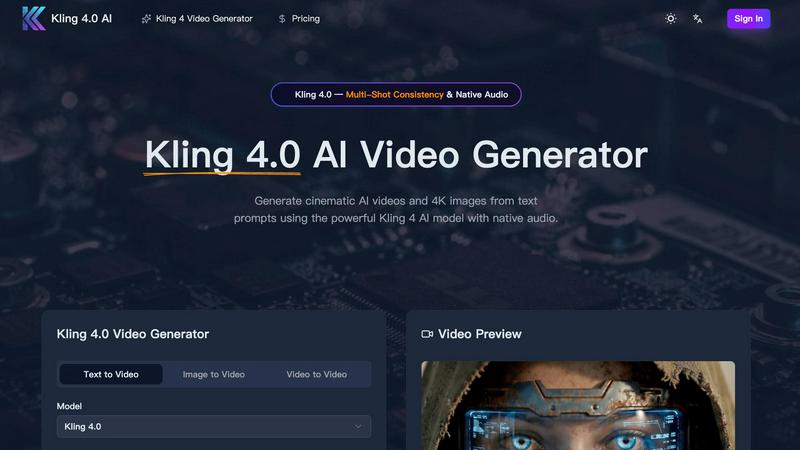
Kling 4.0 AI effortlessly creates stunning cinematic videos and 4K images from text prompts, complete with native audio and seamless storytelling.
Last updated: March 11, 2026
Visual Comparison
Fluidium

Kling 4.0 AI
Feature Comparison
Fluidium
Real-Time Interactive Fluids
Fluidium's heart is its incredibly responsive physics engine. Every tap, drag, or swipe sends ripples of color through the digital liquid, blending and reacting with stunning realism. The simulation runs in real-time, meaning there is zero lag between your gesture and the on-screen effect. This immediate feedback loop makes the experience feel tactile and magical, as if you're truly manipulating a viscous, colorful substance directly on your device's screen.
130+ Stunning Visual Presets
Jump right into creativity with a vast library of over 130 beautifully crafted presets. These are pre-configured combinations of color palettes, brush styles, and background effects that range from serene watercolors to energetic neon explosions. This feature is perfect for when you want instant gratification or need a spark of inspiration. Simply browse the collection, tap a preset, and immediately begin interacting with a completely new and unique fluid environment.
Custom Palette & Brush Studio
For those who want full creative control, Fluidium offers deep customization tools. You can design your own color palettes from scratch, choosing exact hues for the fluid, background, and accents. Furthermore, you can tailor your brushes, adjusting parameters like size, flow, and behavior to create your signature painting style. This transforms the app from a simple toy into a powerful digital art tool for creating personalized, shareable masterpieces.
Auto-Play & Recording Modes
Fluidium isn't just for active creation; it's also for relaxation and sharing. The Auto-Play mode lets you sit back and watch as the app generates its own ever-evolving fluid art, perfect for meditation or as a dynamic screen display. When you create something you love, use the built-in recording feature to capture high-quality videos of your sessions. You can then easily share these mesmerizing clips directly to social media, with friends, or save them to your camera roll.
Kling 4.0 AI
Text-to-Video Generation
Kling 4.0 allows users to create cinematic videos up to 15 seconds long, all from simple text descriptions. By converting natural language into visual scenes, it provides a seamless way for users to express their creativity without needing advanced video editing skills.
Character Consistency Across Shots
This feature ensures that characters maintain the same appearance, clothing, and styles throughout multiple scenes, facilitating coherent multi-shot storytelling. This is particularly useful for projects that involve complex narratives or character arcs.
Image-to-Video Conversion
With Kling 4.0, users can upload any static image and animate it with cinematic effects. This feature preserves the original composition while adding natural motion and animation, effectively transforming still images into engaging video content.
Native Audio & Multilingual Lip-Sync
Kling 4.0 generates synchronized audio that matches the video content, complete with multilingual lip-sync capabilities. This means users can create videos that are ready for publication, complete with voiceovers and sound effects, all in a single pass.
Use Cases
Fluidium
Digital Art & Creative Exploration
Artists and hobbyists can use Fluidium as a digital sketchpad for exploring color, form, and motion. The unpredictable nature of the fluid simulation can lead to unexpected and inspiring patterns that can be recorded and used as a basis for other artwork, backgrounds for digital projects, or simply as standalone abstract pieces. It's a fantastic tool for breaking creative blocks and experimenting with visual concepts in a low-pressure, fun environment.
Stress Relief & Mindfulness
The calming, flowing motion of the liquids makes Fluidium an excellent tool for mindfulness and stress relief. Engaging with the gentle, responsive visuals can provide a focused, meditative activity to help quiet the mind. You can use it for short mental breaks during a busy day, or set it to Auto-Play mode to create a serene, animated backdrop that promotes relaxation and reduces anxiety.
Educational Tool for Physics & Color
Teachers and curious minds can use Fluidium to demonstrate principles of fluid dynamics, viscosity, and color theory in an engaging, hands-on way. Watching how colors blend (like digital primary colors mixing into secondaries), how forces propagate through a medium, and how different "brush" settings affect the simulation provides an intuitive understanding of complex concepts that is both educational and entertaining.
Dynamic Visual Display & Entertainment
Turn your iPad or iPhone into a captivating piece of living art for your home or office. When set in Auto-Play mode and placed on a stand, Fluidium acts as a beautiful, ever-changing digital painting or screensaver. It's also a wonderful source of entertainment and a conversation starter when friends are over, allowing everyone to play and create together on a shared screen.
Kling 4.0 AI
Marketing and Advertising
Marketers can leverage Kling 4.0 to create visually striking promotional videos that capture their brand's message effectively. By generating videos from text prompts, they can quickly produce content tailored to specific campaigns or audience segments.
Storyboarding and Prototyping
Filmmakers and content creators can utilize Kling 4.0 for storyboarding, allowing them to visualize scenes and character interactions before moving into full production. This accelerates the creative process and helps in refining ideas.
Educational Content Creation
Educators and trainers can generate engaging video content to enhance their teaching materials. By transforming textual information into visual aids, they can improve understanding and retention for their students.
Social Media Content Generation
With the rise of video content on social media platforms, influencers and businesses can use Kling 4.0 to create eye-catching videos quickly. This helps maintain a consistent posting schedule while ensuring high-quality output that stands out in crowded feeds.
Overview
About Fluidium
Fluidium is a breathtaking interactive art application that transforms your iOS device into a dynamic canvas of flowing color. At its core, it's a real-time fluid simulation that responds instantly to your touch, allowing you to paint with vibrant, swirling liquids. Created by the award-winning developer behind the popular app Uzu, Fluidium is designed for anyone seeking a blend of creative expression, digital relaxation, and visual spectacle. Its main value proposition is delivering a powerful, professional-grade simulation that feels magical and responsive, right at your fingertips. Whether you're an artist looking for inspiration, someone wanting to de-stress with mesmerizing visuals, or just a fan of beautiful technology, Fluidium turns your screen into a living, breathing work of art. You don't need any artistic training to create stunning patterns; simply touch, drag, and watch as complex and endlessly unique visuals unfold in real-time.
About Kling 4.0 AI
Kling 4.0 AI is a cutting-edge video generation tool that leverages advanced artificial intelligence to transform text prompts into stunning cinematic videos and high-quality 4K images. Designed for content creators, filmmakers, and marketing professionals, Kling 4.0 simplifies the video creation process by allowing users to generate visually compelling content without needing technical skills. With its intuitive interface, users can input natural language descriptions, upload images, or select existing videos as references, and watch as the AI brings their ideas to life. The powerful Kling 4 AI model ensures that every output maintains professional quality, making it suitable for various applications, from social media marketing to creative storytelling. With features like multi-shot consistency and native audio generation, Kling 4.0 not only streamlines production workflows but also enhances the overall storytelling experience.
Frequently Asked Questions
Fluidium FAQ
What devices is Fluidium compatible with?
Fluidium is built exclusively for iOS devices (iPhone and iPad) using Apple's Metal graphics technology. This ensures it delivers smooth, real-time performance and dazzling visual effects on any supported device, from older models to the latest iPads and iPhones. It is not currently available for Android or desktop computers.
Do I need an internet connection to use Fluidium?
No, you do not. Once Fluidium is downloaded from the App Store, all of its features--including the 130+ presets, custom tools, and recording functions--work completely offline. This makes it a perfect creative and relaxation tool for use anywhere, whether you're on a plane, commuting, or just away from Wi-Fi.
Can I share or export the art I create?
Absolutely! Fluidium includes a robust recording feature that allows you to capture high-quality video of your fluid art sessions. You can save these videos directly to your device's camera roll. From there, you can easily share them on social media platforms, send them to friends via messaging apps, or import them into other video editing software for further use.
Is Fluidium a free app or does it require a purchase?
Fluidium is a premium application that requires a one-time purchase to download from the iOS App Store. The purchase gives you full, unrestricted access to all current and future features, including all presets, customization tools, and recording capabilities, with no subscriptions or additional in-app purchases required.
Kling 4.0 AI FAQ
What types of videos can I create with Kling 4.0 AI?
You can create a variety of videos, including promotional clips, educational content, and creative storytelling pieces. The platform supports text-to-video, image-to-video, and video-to-video generation.
Do I need any technical skills to use Kling 4.0 AI?
No, Kling 4.0 is designed to be user-friendly, allowing anyone to create professional-quality videos with minimal effort. Simply enter your prompts or upload images, and the AI will handle the rest.
How long does it take to generate a video?
Kling 4.0 AI produces videos in seconds, making it an efficient tool for quick content creation. You can generate and download your high-definition videos almost immediately after entering your prompts.
Is there support for different languages?
Yes, Kling 4.0 AI includes multilingual lip-sync capabilities, allowing you to create videos that can be understood by diverse audiences. This feature makes it an excellent choice for global outreach initiatives.