
Formflow vs ToolPortal
Side-by-side comparison to help you choose the right AI tool.

Formflow is a no-code form builder that quickly creates interactive, personalized forms to enhance lead generation.
Last updated: March 1, 2026

ToolPortal
ToolPortal is your go-to online directory with over 300 free tools for developers, designers, and content creators to streamline their tasks.
Last updated: April 4, 2026
Visual Comparison
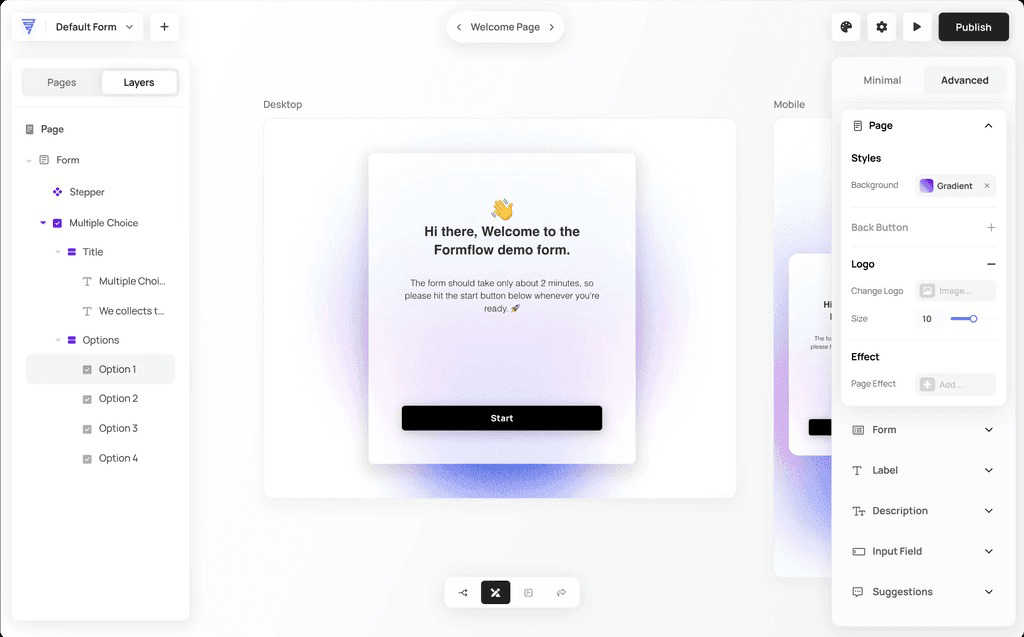
Formflow
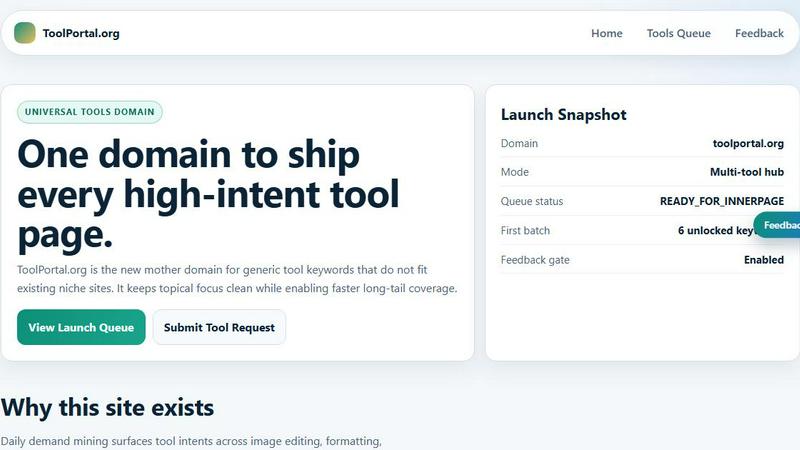
ToolPortal
Feature Comparison
Formflow
AI-Powered Form Builder
With the Formflow Copilot, you can create any form in seconds using AI technology. Simply enter your prompt, and watch as the Copilot generates a fully functional form complete with smart logic and validation, all in moments.
Drag-and-Drop Interface
Formflow's user-friendly drag-and-drop builder allows you to create powerful forms quickly. This feature includes visual branching logic, enabling you to design complex forms without needing to write any code.
In-Flow Analytics
Gain instant insights into user interactions with in-flow analytics. Monitor visitor numbers, exit rates, and conversion rates directly within the form builder to optimize your forms for maximum impact.
Fully Customizable Designs
Design on-brand forms with ease. Formflow offers fully customizable design options, allowing you to implement dynamic, multi-step forms that significantly boost conversion rates.
ToolPortal
Comprehensive Tool Index
ToolPortal features a dense index of 261 live tools organized into specific categories, including generators, checkers, converters, formatters, and image editing tools. This organization allows users to quickly navigate to the tools they need without unnecessary friction.
Dual Search Modes
Users can choose between two search methods: a direct keyword search for when they know the exact tool name or a task description mode that suggests tools based on the stated job. This flexibility caters to both experienced users and those who may be unsure of what they need.
Daily Refresh Cycle
ToolPortal is committed to continuous improvement, with new pages and UI updates being rolled out daily. This ensures that users always have access to the latest tools and features, enhancing the overall experience and keeping the content fresh and relevant.
Instant Access Without Login
One of the standout features of ToolPortal is that it requires no login or account creation. Users can open any tool page and run it immediately, eliminating barriers to access and allowing for a seamless workflow.
Use Cases
Formflow
Lead Generation
Businesses can utilize Formflow to create effective lead capture forms that engage users right from the start. By customizing forms to align with their brand, companies can increase their contact list and convert leads more effectively.
Surveys and Feedback
Formflow is perfect for launching surveys and gathering customer feedback. Marketers can design interactive questionnaires that adapt based on user responses, yielding more accurate and actionable insights.
Event Registrations
Organize events seamlessly with Formflow by creating registration forms that are engaging and easy to complete. This helps in managing attendee data efficiently while enhancing the user experience.
E-Commerce Solutions
Integrate Formflow into e-commerce platforms to handle product orders, customer inquiries, and payment processes. The platform’s flexibility allows businesses to streamline transactions while keeping the user experience intuitive and enjoyable.
ToolPortal
Social Media Content Creation
Content creators can utilize the text styling tools available in ToolPortal, such as glitch or gothic text generators, to produce eye-catching social media posts. This allows for enhanced engagement and unique branding.
Quick Image Editing
Marketers and designers can use the image tools to crop photos, remove backgrounds, and prepare assets for various platforms in a matter of minutes. This efficiency is crucial for meeting tight deadlines in the fast-paced digital landscape.
Validation and Quality Checks
Developers can rely on the validation tools for tasks such as checking DMARC records or running speed tests to ensure their projects meet quality standards before publishing. This helps maintain a high level of professionalism.
Format Conversion
Students and professionals alike can benefit from the conversion tools offered by ToolPortal, which allow for quick and easy transformation of units, time, and text formats. This is particularly useful for those working on reports or data analysis.
Overview
About Formflow
Formflow is not just another form-building tool; it is an innovative interactive experience builder crafted specifically for marketers and business owners. This user-friendly platform allows you to design forms that not only capture vital data but also embody your brand's unique identity. With Formflow's intuitive no-code editor, users can easily create personalized forms that engage visitors from the outset, enhancing user interaction significantly. The platform boasts essential features such as real-time email validation and seamless third-party integrations, transforming the process of form creation into a dynamic and creative endeavor. By moving away from traditional static forms, Formflow enables businesses to develop forms that serve as an organic extension of their websites. This ensures that every user interaction is meaningful and impactful. With Formflow, you're not just building forms; you're creating interactive experiences that lead to better engagement and higher conversion rates. Join a growing community of marketers and businesses that are revolutionizing their lead capture strategies and enhancing customer interactions.
About ToolPortal
ToolPortal is a robust online directory offering over 300 free, browser-based tools designed to cater to a wide range of needs. Whether you're looking to convert text formats, validate JSON code, edit images, or perform SEO checks, ToolPortal has something for everyone. It serves as a one-stop-shop for developers, marketers, writers, and anyone who needs quick access to practical online utilities without the hassle of installation or sign-up. The intuitive interface allows users to search for tools by keyword or describe their task in plain language, making it easy to find the right tool in seconds. With a focus on user experience, ToolPortal ensures that all tools are live and ready to use immediately, streamlining workflows and enhancing productivity.
Frequently Asked Questions
Formflow FAQ
What makes Formflow different from other form builders?
Formflow stands out because it combines AI technology with a user-friendly no-code interface, allowing marketers to create interactive and personalized forms quickly and efficiently, enhancing user engagement.
Can I customize the forms I create with Formflow?
Yes, Formflow offers extensive customization options, enabling you to design forms that reflect your brand's identity. You can modify colors, layouts, and even add images or logos to ensure consistency.
Is there a free trial available for Formflow?
Absolutely! Formflow is free forever, and you can start using it without needing to provide a credit card. This allows you to explore all its features and capabilities risk-free.
What types of integrations does Formflow support?
Formflow features seamless integrations with various third-party apps and services, making it easy to connect with your existing workflow and tools. This includes integrations for email marketing, CRM systems, and more.
ToolPortal FAQ
What types of tools does ToolPortal offer?
ToolPortal offers a wide variety of tools across categories such as generators, checkers, converters, formatters, and image editing utilities. This diversity ensures that users can find tools for nearly any online task.
Do I need to create an account to use ToolPortal?
No, ToolPortal does not require any account creation or login. Users can access and run tools directly in their browser without any barriers, making it quick and easy to get started.
How often are new tools added to ToolPortal?
ToolPortal features a daily refresh cycle, meaning new tools and updates are continually being integrated into the platform. This commitment to freshness ensures users have access to the latest tools available.
Can I search for tools without knowing their names?
Absolutely! ToolPortal allows users to describe their tasks in plain language, and it will suggest the best-fit tools based on that description. This user-friendly feature helps those who may not be familiar with specific tool names.
Alternatives
Formflow Alternatives
Formflow is an innovative no-code form builder designed specifically for marketers and business owners who want to create personalized and engaging forms. By utilizing a user-friendly drag-and-drop interface, Formflow makes it easy to design forms that not only collect essential data but also enhance user engagement and reflect your brand's identity. As users explore different form-building tools, they may seek alternatives due to factors like pricing, specific feature sets, or the need for platform compatibility. When looking for alternatives to Formflow, consider the core functionalities that matter most to your business. Evaluate the ease of use, customization options, and whether the platform provides essential features such as conversational logic or multi-step forms. Additionally, assess the overall cost and any integrations that will support your existing workflows. Finding the right fit can significantly impact your lead generation and customer interaction strategies.
ToolPortal Alternatives
ToolPortal is a robust online tools directory designed specifically for developers, designers, SEO professionals, and content creators. With over 300 free browser-based tools, it offers a wealth of resources across various categories, including productivity, web development, and SEO. Users often seek alternatives to ToolPortal for several reasons, such as varying feature sets, user interface preferences, or specific platform needs that might not be met by ToolPortal. When looking for an alternative, consider factors like the types of tools offered, ease of navigation, user experience, and whether the platform requires any installation or sign-up. It's also essential to assess the reliability and support provided, as well as how frequently the tools are updated to meet current industry standards.