
GAAbstract vs Prompt Builder
Side-by-side comparison to help you choose the right AI tool.

GAAbstract
Create stunning, publication-ready graphical abstracts in seconds with GAAbstract's intuitive AI tool.
Last updated: February 28, 2026

Prompt Builder
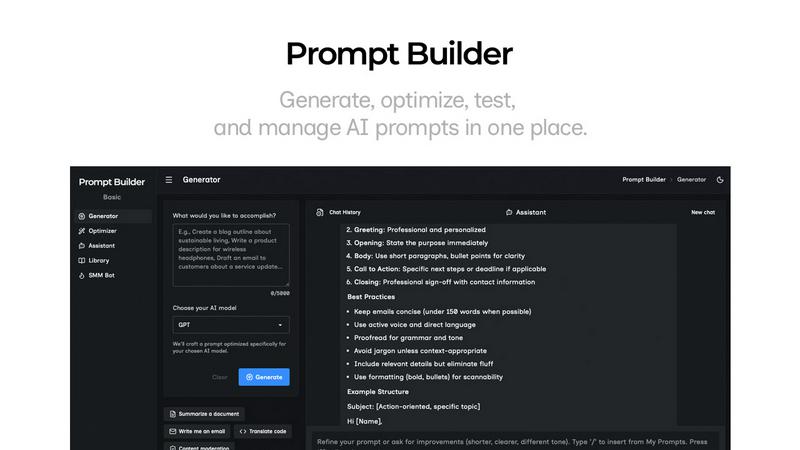
Generate, optimize, test, and manage AI prompts in one place. Turn an idea into a ready-to-use prompt in seconds.
Visual Comparison
GAAbstract

Prompt Builder
Overview
About GAAbstract
GAAbstract is an innovative AI tool designed specifically for researchers seeking to enhance the presentation of their written abstracts. By transforming text-based abstracts into visually engaging graphical representations, GAAbstract addresses the common challenge of effectively conveying complex research findings. This tool is particularly valuable for academics and researchers who need to summarize their work succinctly for various platforms, including journal submissions, conference presentations, and social media. GAAbstract streamlines the process of visual communication, allowing users to focus on their research rather than spending hours on graphic design. Its user-friendly interface ensures clarity and consistency across graphical abstracts, making it an indispensable asset for the research community. With GAAbstract, researchers can generate high-quality visuals quickly, saving both time and cognitive energy while still delivering impactful messages.
About Prompt Builder
Prompt Builder is a prompt engineering workspace for writing, testing, and saving prompts. Describe the task in plain English, and it helps you create a prompt that matches the model you choose. Start with a draft, refine it in chat, save or pin versions, then run them when you are ready. It works with GPT, Claude, Gemini, Llama, Mistral, DeepSeek, Grok, Perplexity, and more. You also get an Optimizer, an assistant for quick tests, and a library of reusable prompts and templates from the community. Turn an idea into a ready-to-use prompt in seconds. Refine it in chat, save it to your Library, and run it anytime.