
Gaffa vs Playwriter
Side-by-side comparison to help you choose the right AI tool.

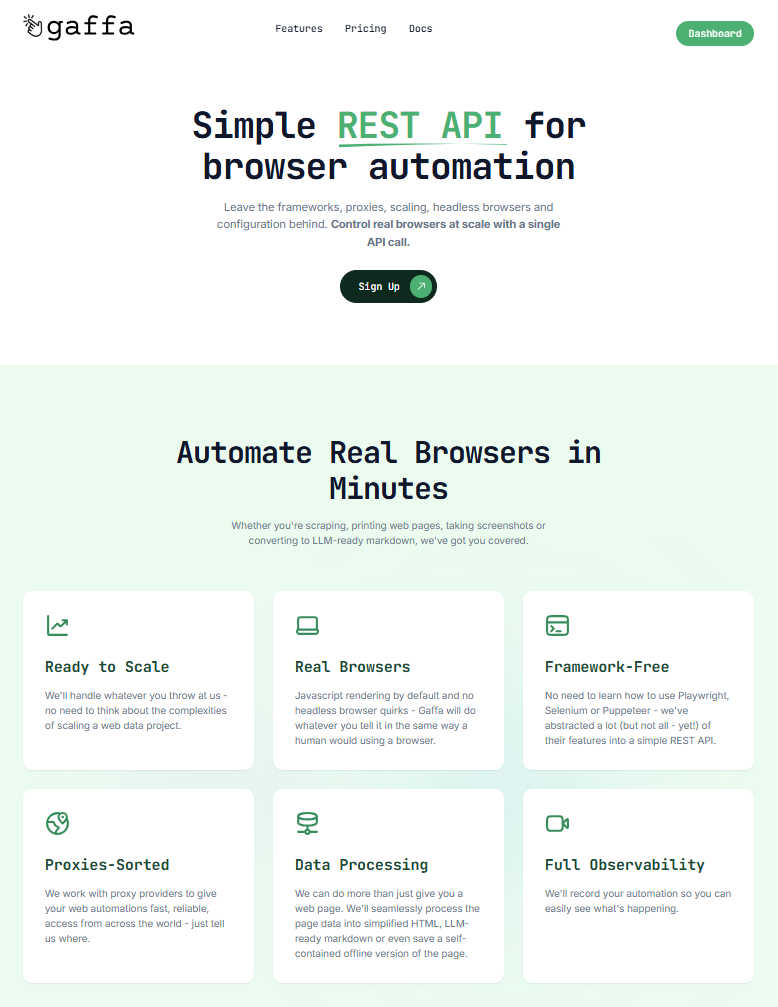
Gaffa is a simple API that automates real browsers for easy web scraping and data extraction.
Last updated: February 28, 2026

Playwriter
Playwriter lets your agents control Chrome directly with AI, using existing sessions and tools without extra memory or bot detection.
Last updated: March 18, 2026
Visual Comparison
Gaffa
Playwriter

Feature Comparison
Gaffa
Simple REST API
Gaffa abstracts away the complexities of frameworks like Playwright or Selenium. Instead of managing headless browsers and writing intricate scripts, you control real browsers at scale with straightforward HTTP requests. This means you can launch sophisticated automations from any programming language or environment, dramatically reducing development time and learning curves.
Real Browser Automation
Forget about headless browser quirks and issues with JavaScript rendering. Gaffa uses real, fully-fledged browsers to execute your commands. This ensures your automations behave exactly like a human user would, allowing you to reliably interact with modern, dynamic web applications that often block simpler HTTP requests or headless clients.
Built-in Proxy Management
Gaffa seamlessly integrates with a network of fast, reliable residential proxies from around the world. You don't need to source, rotate, or manage proxies yourself. Simply specify your target geographic location in your API request, and Gaffa handles the rest, providing you with the local IP addresses needed to access region-specific content or avoid rate limits.
Advanced Data Processing
Gaffa does more than just fetch a page. It can process the retrieved data into the format you need. Choose from raw HTML, simplified clean HTML, LLM-ready markdown, structured JSON via built-in parsing, or even full-page screenshots. This saves you the step of post-processing and delivers data that's ready for analysis, storage, or immediate use in your applications.
Playwriter
Seamless Browser Integration
Playwriter allows your AI agents to work within your existing Chrome session, retaining all logins, extensions, and cookies. This eliminates issues related to bot detection and ensures a more efficient browsing experience.
Full Automation API
With a single execute tool, Playwriter provides access to the complete Playwright API without the need for wrappers or complicated setups. This low-context usage ensures that agents can run any Playwright code in a streamlined manner.
Real-Time Collaboration
Playwriter promotes collaboration by allowing users to see exactly what the agent is doing in real time. Users can intervene when necessary, such as solving captchas or managing consent walls, enhancing the overall workflow.
Advanced Debugging Tools
The integrated debugger includes features like breakpoints and live code editing, enabling developers to troubleshoot and refine their scripts effectively. Coupled with network interception, users can analyze requests and responses seamlessly.
Use Cases
Gaffa
Market Research and Price Monitoring
Automate the collection of product prices, specifications, and availability from competitor websites and e-commerce platforms. Gaffa's real browsers and proxies allow you to gather this data at scale without being blocked, enabling you to build dynamic pricing models and stay ahead of market trends with reliable, up-to-date information.
Lead Generation and Data Enrichment
Build targeted lead lists by scraping business directories, professional networks, and public databases. Gaffa can navigate search results, click through profiles, and extract structured contact information and company details, enriching your CRM with valuable data points to fuel your sales and marketing efforts.
Content Aggregation for AI and LLMs
Train or feed large language models with high-quality, current web data. Gaffa's ability to output clean, LLM-ready markdown is perfect for this. You can automate the collection of articles, documentation, forum discussions, and news, transforming messy web content into a structured corpus for your AI projects.
Automated Testing and Monitoring
Continuously monitor your own or a client's website for uptime, functionality, and content changes. Use Gaffa to simulate user journeys—like logging in, adding items to a cart, or submitting forms—and capture screenshots or alerts if anything breaks or appears incorrectly, providing a powerful external monitoring tool.
Playwriter
Automated Testing
Developers can leverage Playwriter to create automated tests for web applications, ensuring that all functionalities work correctly across different scenarios. The integration with existing browser sessions helps maintain consistency in testing.
Web Scraping
Playwriter is ideal for web scraping tasks where data needs to be extracted from various websites. The tool can navigate complex sites, bypass bot detection, and store scraped data efficiently, all while using your logged-in session.
Performance Monitoring
By using Playwriter, teams can monitor website performance in real time. The tool’s capabilities allow for detailed analysis of network requests, helping identify bottlenecks and improve overall site performance.
Collaborative Content Generation
Content teams can utilize Playwriter to generate and curate web content collaboratively. The agent can automate repetitive content tasks while team members step in for creative input, ensuring efficiency without sacrificing quality.
Overview
About Gaffa
Tired of the endless battle with anti-bot systems, proxy management, and brittle scraping scripts? Gaffa is here to change the game. It's a powerful, developer-friendly API designed to make browser automation and web scraping simple, reliable, and scalable again. Think of Gaffa as your dedicated automation team, handling all the messy infrastructure details so you can focus on what matters: the data. With a single REST API call, you can instruct Gaffa to perform complex actions like navigating, clicking, scrolling, and filling forms using real browsers that mimic natural human behavior. This allows you to access data from even the most stubborn, JavaScript-heavy websites. Gaffa delivers the results in your preferred format, whether that's raw HTML, clean and structured markdown (perfect for feeding into LLMs), parsed JSON, or even screenshots. Built for developers, data scientists, and businesses that need consistent, large-scale access to web data without the operational headaches, Gaffa's core promise is to turn the complexity of web automation into a simple, dependable API that just works, letting you stop fighting for data and start using it.
About Playwriter
Playwriter is a powerful tool designed to enhance the capabilities of AI agents by allowing them to utilize your actual browser session. Unlike traditional AI solutions that either operate in a headless mode or provide limited browser access, Playwriter integrates seamlessly with your existing Chrome setup, including all your logins, cookies, and extensions. This means that your agents can perform web tasks without encountering bot detection issues or the limits imposed by fixed toolsets. Playwriter's architecture combines a Chrome extension and a command-line interface (CLI), enabling full automation and allowing for real-time collaboration. It is particularly beneficial for developers, testers, and professionals who rely on accurate and efficient web browsing for their tasks. With robust features like accessibility snapshots, a powerful debugger, and a network interceptor, Playwriter provides a comprehensive solution for automating and controlling web interactions effectively.
Frequently Asked Questions
Gaffa FAQ
What is a credit and how is it calculated?
Credits are Gaffa's unit of consumption. They are calculated based on two main factors: browser time and proxy bandwidth. Browser runtime is billed at 1 credit per 30 seconds (or 2 credits per 30 seconds if screen recording is on). When using residential proxies, bandwidth is charged at 1500 credits per 1GB used. Each successful API request deducts the corresponding credits from your monthly plan allowance.
Does Gaffa offer a free trial?
Yes! You can sign up for a free account and immediately start using the Gaffa API to build and test automations on our dedicated demo site (demo.gaffa.dev). This allows you to explore all the key features, test your scripts, and understand the workflow without any cost or commitment before upgrading to a paid plan for use on the open web.
What is Gaffa's refund policy?
Gaffa offers a straightforward refund policy. If you request a refund before using any credits within your current billing month, we will be happy to process it. This gives you a risk-free window to ensure the service works for your specific use case on live sites after trying the demo.
Do unused credits roll over to the next month?
No, credits do not roll over. The credit allowance included with your monthly subscription plan is reset at the start of each new billing cycle. Any unused credits from the previous period will expire, so it's best to plan your usage according to your monthly allowance.
Playwriter FAQ
How do I install Playwriter?
To install Playwriter, first add the Chrome extension and then install the CLI using the command npm i -g playwriter. Lastly, teach your agent to use Playwriter with npx -y skills add remorses/playwriter.
Is Playwriter secure to use?
Yes, Playwriter operates entirely on your local machine, meaning that no data is sent to remote servers. The Chrome extension connects to a local WebSocket relay, ensuring secure communication without exposing sensitive information.
Can multiple agents use Playwriter simultaneously?
Absolutely! Playwriter's relay multiplexes sessions, allowing multiple agents or CLI instances to control the same browser at the same time without interference.
What platforms does Playwriter support?
Playwriter is designed to work with any MCP client, including popular tools such as Cursor, Claude, and VS Code, providing flexibility for developers and teams to integrate it into their existing workflows.
Alternatives
Gaffa Alternatives
Gaffa is a powerful API in the analytics and data category that automates real browsers to make web scraping and data extraction simple and reliable. It handles the complex infrastructure so developers and businesses can focus on using the data, not fighting to get it. Users often explore alternatives for various reasons. Your specific needs around budget, required feature sets, or particular platform integrations might lead you to compare options. It's a smart way to ensure you're getting the best possible tool for your project's unique demands. When evaluating different solutions, consider a few key factors. Look for reliability against anti-bot measures, ease of integration into your existing workflow, the quality of data output formats, and transparent pricing that scales with your usage. The goal is to find a service that removes complexity while delivering consistent results.
Playwriter Alternatives
Playwriter is an innovative tool designed to control Chrome using AI through a Command Line Interface (CLI) or a Machine Control Protocol (MCP). It falls under the category of automation, providing users with a seamless way to integrate AI agents into their browsing experience. With Playwriter, users can leverage their actual browser session, complete with logins and extensions, making it an attractive solution for those seeking advanced web automation. Users often search for alternatives to Playwriter for various reasons, including pricing, specific feature sets, and compatibility with different platforms. When considering an alternative, it's essential to evaluate factors such as ease of use, the level of automation offered, support for integrations with existing tools, and overall cost-effectiveness. A well-rounded alternative should not only meet your automation needs but also enhance your browsing experience without compromising security or functionality.