
Gaffa vs qtrl.ai
Side-by-side comparison to help you choose the right AI tool.

Gaffa is a simple API that automates real browsers for easy web scraping and data extraction.
Last updated: February 28, 2026

qtrl.ai
qtrl.ai helps QA teams scale testing with AI agents while keeping full control and governance.
Last updated: February 27, 2026
Visual Comparison
Gaffa
qtrl.ai

Feature Comparison
Gaffa
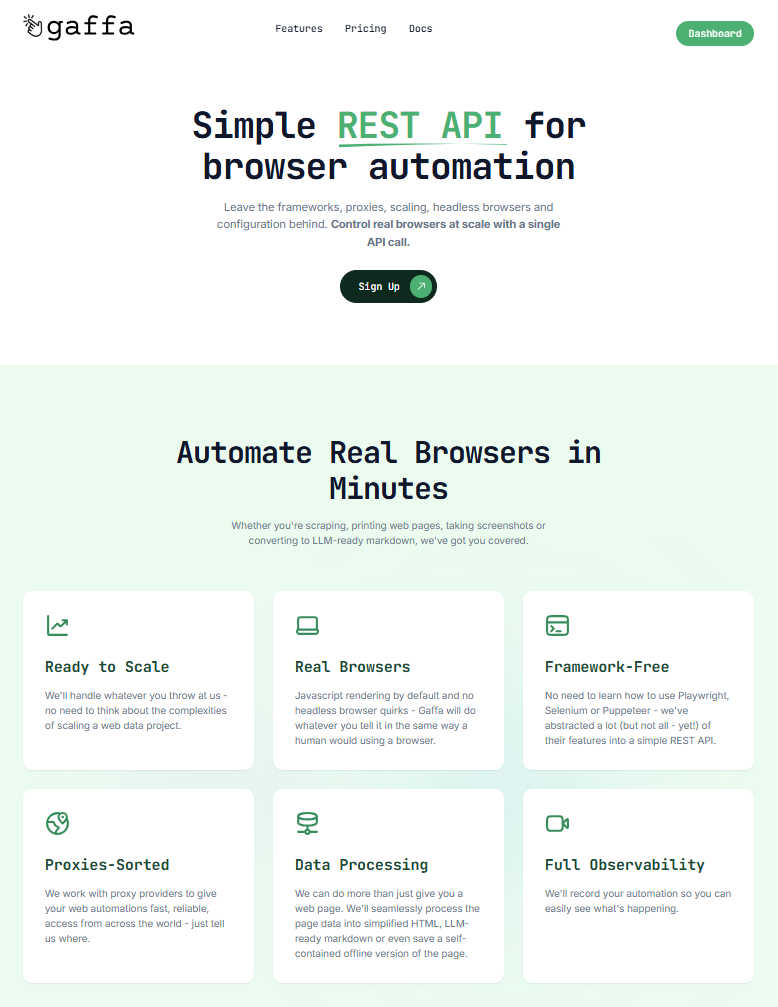
Simple REST API
Gaffa abstracts away the complexities of frameworks like Playwright or Selenium. Instead of managing headless browsers and writing intricate scripts, you control real browsers at scale with straightforward HTTP requests. This means you can launch sophisticated automations from any programming language or environment, dramatically reducing development time and learning curves.
Real Browser Automation
Forget about headless browser quirks and issues with JavaScript rendering. Gaffa uses real, fully-fledged browsers to execute your commands. This ensures your automations behave exactly like a human user would, allowing you to reliably interact with modern, dynamic web applications that often block simpler HTTP requests or headless clients.
Built-in Proxy Management
Gaffa seamlessly integrates with a network of fast, reliable residential proxies from around the world. You don't need to source, rotate, or manage proxies yourself. Simply specify your target geographic location in your API request, and Gaffa handles the rest, providing you with the local IP addresses needed to access region-specific content or avoid rate limits.
Advanced Data Processing
Gaffa does more than just fetch a page. It can process the retrieved data into the format you need. Choose from raw HTML, simplified clean HTML, LLM-ready markdown, structured JSON via built-in parsing, or even full-page screenshots. This saves you the step of post-processing and delivers data that's ready for analysis, storage, or immediate use in your applications.
qtrl.ai
Enterprise-Grade Test Management
qtrl provides a robust, centralized system for all your testing artifacts. You can create and organize test cases, build detailed test plans, and execute structured test runs. Everything is linked for full traceability, allowing you to see exactly which requirements are covered by which tests. This creates clear audit trails and is built to support compliance needs, giving managers and stakeholders complete confidence in the testing process.
Autonomous QA Agents
This is the intelligent engine of qtrl. These AI-powered agents can execute high-level instructions on demand. You can describe a test scenario in natural language, like "test the checkout flow as a guest user," and the agent will run it in a real browser. They operate within your defined rules and can run continuously across different environments, providing scalable automation that adapts to your application's changes without constant manual script updates.
Progressive Automation Model
qtrl doesn't force you to jump into full AI automation. You start where you are comfortable, writing clear test instructions for the agents to follow. As trust builds, you can let qtrl suggest and generate new tests automatically based on coverage gaps or requirement changes. Every step is reviewable and approvable, ensuring your team always stays in the driver's seat while gradually increasing efficiency.
Governance by Design
Trust and control are foundational to qtrl. The platform offers permissioned autonomy levels, so you decide how much freedom the AI agents have. There are no black-box decisions; you get full visibility into what the agents are doing. Combined with enterprise-ready security, encrypted secrets management, and the fact that secrets are never exposed to the AI, qtrl provides the governance framework necessary for serious engineering teams to adopt AI confidently.
Use Cases
Gaffa
Market Research and Price Monitoring
Automate the collection of product prices, specifications, and availability from competitor websites and e-commerce platforms. Gaffa's real browsers and proxies allow you to gather this data at scale without being blocked, enabling you to build dynamic pricing models and stay ahead of market trends with reliable, up-to-date information.
Lead Generation and Data Enrichment
Build targeted lead lists by scraping business directories, professional networks, and public databases. Gaffa can navigate search results, click through profiles, and extract structured contact information and company details, enriching your CRM with valuable data points to fuel your sales and marketing efforts.
Content Aggregation for AI and LLMs
Train or feed large language models with high-quality, current web data. Gaffa's ability to output clean, LLM-ready markdown is perfect for this. You can automate the collection of articles, documentation, forum discussions, and news, transforming messy web content into a structured corpus for your AI projects.
Automated Testing and Monitoring
Continuously monitor your own or a client's website for uptime, functionality, and content changes. Use Gaffa to simulate user journeys—like logging in, adding items to a cart, or submitting forms—and capture screenshots or alerts if anything breaks or appears incorrectly, providing a powerful external monitoring tool.
qtrl.ai
Scaling Beyond Manual Testing
For QA teams overwhelmed by repetitive manual test cycles, qtrl offers a clear path forward. They can begin by documenting their existing manual tests as structured instructions in qtrl's management module. From there, they can progressively automate the most tedious flows using the AI agents, freeing up human testers for more complex exploratory work and dramatically increasing test coverage and execution speed.
Modernizing Legacy QA Workflows
Companies stuck with outdated, script-heavy automation frameworks can use qtrl to transition smoothly. Instead of maintaining brittle scripts, teams can leverage qtrl's adaptive memory and AI agents to generate more resilient tests. The platform integrates with existing CI/CD pipelines and tools, allowing for a gradual modernization without a disruptive, all-at-once overhaul of the current process.
Ensuring Governance in Enterprise QA
Large organizations with strict compliance and audit requirements need control alongside automation. qtrl's full traceability from requirement to test execution, combined with its permissioned autonomy and detailed audit logs, makes it ideal. Engineering leads can scale QA efforts with AI while providing auditors with clear evidence of what was tested, when, and what the outcome was.
Empowering Product-Led Engineering Teams
Development teams that practice continuous deployment need fast, reliable feedback on quality. qtrl integrates into their workflow, allowing developers to write high-level test instructions for features they build. The autonomous agents can then execute these tests across environments as part of the CI/CD process, providing continuous quality feedback without requiring developers to become experts in test automation frameworks.
Overview
About Gaffa
Tired of the endless battle with anti-bot systems, proxy management, and brittle scraping scripts? Gaffa is here to change the game. It's a powerful, developer-friendly API designed to make browser automation and web scraping simple, reliable, and scalable again. Think of Gaffa as your dedicated automation team, handling all the messy infrastructure details so you can focus on what matters: the data. With a single REST API call, you can instruct Gaffa to perform complex actions like navigating, clicking, scrolling, and filling forms using real browsers that mimic natural human behavior. This allows you to access data from even the most stubborn, JavaScript-heavy websites. Gaffa delivers the results in your preferred format, whether that's raw HTML, clean and structured markdown (perfect for feeding into LLMs), parsed JSON, or even screenshots. Built for developers, data scientists, and businesses that need consistent, large-scale access to web data without the operational headaches, Gaffa's core promise is to turn the complexity of web automation into a simple, dependable API that just works, letting you stop fighting for data and start using it.
About qtrl.ai
qtrl.ai is a modern QA platform designed to help software teams scale their quality assurance efforts without sacrificing control or governance. It uniquely combines enterprise-grade test management with powerful, trustworthy AI automation. At its core, qtrl provides a centralized hub where teams can organize test cases, plan test runs, trace requirements to coverage, and track quality metrics through real-time dashboards. This structured foundation ensures clear visibility into what's been tested, what's passing, and where potential risks lie for engineering leads and QA managers.
Where qtrl truly stands apart is its progressive AI layer. Instead of forcing a risky, "black-box" AI-first approach, qtrl introduces intelligent automation gradually. Teams can start with simple manual test management and, when ready, leverage built-in autonomous agents. These agents can generate UI tests from plain English descriptions, maintain them as the application evolves, and execute them at scale across multiple browsers and environments. This makes qtrl perfect for product-led engineering teams, QA groups moving beyond manual testing, companies modernizing legacy workflows, and enterprises that require strict compliance and audit trails. Ultimately, qtrl's mission is to bridge the gap between the slow pace of manual testing and the brittle complexity of traditional automation, offering a trusted path to faster, more intelligent quality assurance.
Frequently Asked Questions
Gaffa FAQ
What is a credit and how is it calculated?
Credits are Gaffa's unit of consumption. They are calculated based on two main factors: browser time and proxy bandwidth. Browser runtime is billed at 1 credit per 30 seconds (or 2 credits per 30 seconds if screen recording is on). When using residential proxies, bandwidth is charged at 1500 credits per 1GB used. Each successful API request deducts the corresponding credits from your monthly plan allowance.
Does Gaffa offer a free trial?
Yes! You can sign up for a free account and immediately start using the Gaffa API to build and test automations on our dedicated demo site (demo.gaffa.dev). This allows you to explore all the key features, test your scripts, and understand the workflow without any cost or commitment before upgrading to a paid plan for use on the open web.
What is Gaffa's refund policy?
Gaffa offers a straightforward refund policy. If you request a refund before using any credits within your current billing month, we will be happy to process it. This gives you a risk-free window to ensure the service works for your specific use case on live sites after trying the demo.
Do unused credits roll over to the next month?
No, credits do not roll over. The credit allowance included with your monthly subscription plan is reset at the start of each new billing cycle. Any unused credits from the previous period will expire, so it's best to plan your usage according to your monthly allowance.
qtrl.ai FAQ
How does qtrl's AI handle changes in my application's UI?
qtrl's autonomous agents are designed with adaptive memory. They build a living knowledge base of your application by learning from every exploration and test execution. When the UI changes, this context helps the AI understand the new structure. It can often adjust test steps automatically, and when it can't, it will flag the test for human review, making maintenance far less brittle than traditional coded automation.
Is my test data and application access secure with an AI agent?
Absolutely. Security and governance are core to qtrl's design. The platform uses enterprise-grade security practices. Crucially, any sensitive data like passwords or API keys are stored as encrypted environment secrets. These secrets are never exposed to the AI agent during execution; the system injects them securely, ensuring your credentials and data remain protected at all times.
Can I use qtrl if I only want test management without AI?
Yes, definitely. qtrl is built on a progressive automation model. You can use it solely as a powerful, structured test management platform from day one. The AI features are there to augment your workflow when you're ready. You can introduce AI-assisted test generation and execution at your own pace, starting with simple instruction-based execution and increasing autonomy over time.
How does qtrl integrate with our existing development tools?
qtrl is built to fit into real-world engineering workflows. It offers integrations for requirements management tools and full support for CI/CD pipelines. This means you can trigger test runs automatically from a pull request or a build, and feed results back into your monitoring dashboards. It's designed to work alongside your current toolchain, not replace it entirely.
Alternatives
Gaffa Alternatives
Gaffa is a powerful API in the analytics and data category that automates real browsers to make web scraping and data extraction simple and reliable. It handles the complex infrastructure so developers and businesses can focus on using the data, not fighting to get it. Users often explore alternatives for various reasons. Your specific needs around budget, required feature sets, or particular platform integrations might lead you to compare options. It's a smart way to ensure you're getting the best possible tool for your project's unique demands. When evaluating different solutions, consider a few key factors. Look for reliability against anti-bot measures, ease of integration into your existing workflow, the quality of data output formats, and transparent pricing that scales with your usage. The goal is to find a service that removes complexity while delivering consistent results.
qtrl.ai Alternatives
qtrl.ai is an AI-powered QA platform in the test management and automation category. It helps teams organize tests, execute runs, and gain visibility into quality through structured data and real-time dashboards. Its standout feature is an AI layer that can generate and maintain UI tests from natural language. Users often explore alternatives for various reasons. These can include budget constraints, the need for different feature sets, or specific integration requirements with their existing development stack. Some teams might prioritize pure open-source tools or seek a solution focused solely on manual test case management without an automation component. When evaluating other options, consider your team's primary needs. Key factors include the platform's scalability, its support for both manual and automated testing workflows, the ease of integrating with your CI/CD pipeline, and the depth of reporting and analytics offered. The ideal tool should align with your current QA maturity while supporting your growth toward more advanced practices.