
Glossa vs Read PDF Aloud
Side-by-side comparison to help you choose the right AI tool.

Glossa provides real-time AI translation of sermons in over 100 languages, making your church accessible to everyone.
Last updated: February 26, 2026

Read PDF Aloud
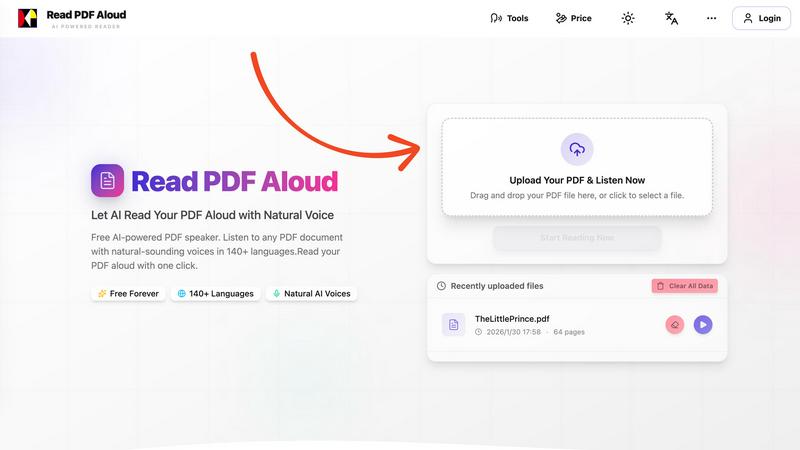
Easily listen to any PDF document aloud in natural voices, including scanned files, with 142 language options.
Last updated: February 26, 2026
Visual Comparison
Glossa

Read PDF Aloud
Feature Comparison
Glossa
Real-Time AI Translation
Glossa utilizes cutting-edge AI technology to provide real-time translations, ensuring that translations are delivered in fractions of a second. This ultra-low latency feature keeps the translations in sync with the speaker, allowing congregation members to follow along without missing a beat.
Voice Cloning
With Glossa's voice cloning feature, churches can use the speaker's own voice for translations, making the experience feel more personal and authentic. This innovative technology enhances the emotional connection between the speaker and the audience, providing comfort to listeners as they hear the familiar tones of their pastor.
Easy Setup
Getting started with Glossa is a breeze. Churches only need a laptop and an internet connection to connect their audio system or microphone. Setup can be completed in less than ten seconds, allowing churches to focus on their worship services rather than technical challenges.
Affordable Pricing
Glossa offers a simple and transparent pricing structure, charging only $5 per language per hour. This competitive pricing allows churches of all sizes to access high-quality translation services without the burden of costly equipment or additional staffing, making it an economical choice for multilingual congregations.
Read PDF Aloud
Free to Use
Read PDF Aloud offers free daily credits to all registered users, making it easy for anyone to enjoy its features without any cost. Just log in, and you can start converting your PDFs into audio instantly.
PDF OCR
With advanced Optical Character Recognition (OCR) technology, Read PDF Aloud can read not just standard PDFs but also scanned documents. This means you can upload any PDF file, and the application will identify and extract the text for you to listen to.
Natural AI Voices
Enjoy a diverse selection of realistic AI voices with different accents and tones. Choose from hundreds of natural-sounding voice options to enhance your listening experience, ensuring that the narration suits your content perfectly.
Cross-Platform Compatibility
Read PDF Aloud works seamlessly across various devices and operating systems. Whether you are using Windows, Mac, iPhone, iPad, Android, or Linux, you can access the application from any modern browser without any installation required.
Use Cases
Glossa
Multilingual Sunday Services
Glossa is perfect for churches that host multilingual Sunday services, allowing congregants from diverse backgrounds to understand the sermon in their native language. This inclusivity enhances the worship experience and fosters a sense of belonging among all attendees.
Special Events and Conferences
For churches organizing special events or conferences with international guests, Glossa enables seamless communication across language barriers. This ensures that all participants can engage fully with the content, workshops, and discussions, regardless of their primary language.
Bible Study Groups
Multilingual Bible study groups can benefit from Glossa by providing real-time translations of discussions and materials. This feature helps all participants to delve deeper into the study of scripture, enriching their understanding and connection to the texts.
Community Outreach Programs
Churches engaging in community outreach programs can use Glossa to communicate effectively with diverse populations. By offering translations in various languages, churches can better connect with and serve their communities, ensuring that everyone feels welcomed and understood.
Read PDF Aloud
Studying for Exams
Students can use Read PDF Aloud to listen to their study materials, making it easier to absorb information. This auditory approach helps reinforce learning and can improve retention rates for complex subjects.
Proofreading Documents
Writers and editors can benefit from hearing their documents read aloud, allowing them to catch mistakes or awkward phrasing that they might miss during traditional reading. It's a perfect tool for enhancing the editing process.
Enjoying eBooks on the Go
For avid readers, Read PDF Aloud provides a convenient way to enjoy eBooks while commuting or during other activities. Simply upload your eBook PDF and listen to it as you go about your day.
Accessibility for Visual Impairments
Individuals with visual impairments can use Read PDF Aloud to access written content easily. The application empowers users by providing them with a way to engage with text that they might otherwise find challenging to read.
Overview
About Glossa
Glossa is an innovative real-time AI translation service tailored specifically for churches with multilingual congregations. Understanding the challenge of language barriers in worship settings, Glossa facilitates seamless communication by capturing the pastor's audio, transcribing it, and translating it into over 100 languages simultaneously. This service allows congregation members to connect through their smartphones, listening to translations in their preferred language using earbuds. With no need for expensive interpretation equipment or volunteer translators, Glossa makes it easy for everyone to engage fully in worship and receive the message in their heart language. Whether serving a small immigrant church or a large international ministry, Glossa is dedicated to fostering inclusivity and participation among diverse congregations. For just $5 per language per hour, this service empowers churches to transcend language differences and create a more unified worship experience.
About Read PDF Aloud
Read PDF Aloud is an innovative browser-based application that revolutionizes how you interact with PDF documents by converting them into natural-sounding speech. With its cutting-edge AI technology, it supports over 142 languages and numerous voice options, making it an ideal tool for a diverse audience, including students, professionals, and casual readers. Whether you have a simple text PDF or a complex scanned document, Read PDF Aloud ensures you can listen to your content effortlessly. Its local-first processing philosophy means your data remains secure within your browser, providing a smooth experience across devices such as Windows, Mac, iPhone, iPad, and Android. The application is designed for seamless use, allowing you to pick up where you left off without any hassle. This accessibility is especially beneficial for those who prefer auditory learning or need assistance with reading due to visual impairments or language barriers. With Read PDF Aloud, you can easily proofread documents, study for exams, or simply enjoy your favorite eBooks while on the move.
Frequently Asked Questions
Glossa FAQ
How does Glossa ensure translation accuracy?
Glossa leverages the latest in AI technology, trained on a vast array of biblical texts, to ensure high accuracy in translations. This specialized training helps the service handle specific religious vocabulary and context effectively.
What equipment do I need to use Glossa?
To use Glossa, you only need a laptop and an internet connection. You can connect your existing audio system or microphone to Glossa without the need for any special hardware, making it incredibly accessible for churches.
Can I try Glossa before committing to a plan?
Yes! Glossa offers 4 hours of free usage for new users, allowing churches to experience the service and its capabilities before making a financial commitment.
Is there support available if I encounter issues?
Absolutely! Glossa provides 24/7 email and phone support to assist users with any questions or technical issues they may encounter while using the service. This ensures a smooth experience for all users.
Read PDF Aloud FAQ
How do I upload a PDF to Read PDF Aloud?
To upload a PDF, simply drag and drop your file into the designated area on the website or click to select a file from your device. The application supports all modern browsers.
Can I choose different voices and languages?
Yes, Read PDF Aloud supports over 142 languages and provides various natural-sounding voice options for each language. You can select your preferred voice before starting the reading.
Is my data secure while using Read PDF Aloud?
Absolutely! Read PDF Aloud processes most data locally within your browser. This means that your documents and personal information remain secure and are not stored on external servers.
Can I export the audio to listen offline?
Yes, Read PDF Aloud allows you to export the audio as MP3 files. This feature enables you to download your documents and listen to them on any device or audio player, even when you are offline.
Alternatives
Glossa Alternatives
Glossa is an innovative AI translation service tailored for churches with multilingual congregations, enabling real-time translation of sermons into over 100 languages. This user-friendly platform captures audio, transcribes it, and provides translations that congregants can access on their smartphones, making it easier for everyone to engage in worship. Users often seek alternatives to Glossa for various reasons, including pricing, feature sets, and specific platform requirements. When choosing an alternative, it's essential to consider factors like language support, ease of use, and the ability to integrate with existing technology. Ensuring that any alternative can effectively bridge the language gap for your congregation is paramount.
Read PDF Aloud Alternatives
Read PDF Aloud is an innovative browser-based application that allows users to listen to their PDF documents with natural-sounding speech, making it a part of the AI Assistants and Audio & Music categories. Users often seek alternatives to Read PDF Aloud for various reasons, including pricing concerns, specific feature sets, or compatibility with different platforms. When choosing an alternative, it's essential to consider factors such as voice quality, language support, ease of use, and whether the service maintains user privacy and security. --- [{"question": "What is Read PDF Aloud?", "answer": "Read PDF Aloud is a browser-based application that converts PDF documents into natural-sounding speech using AI technology."}, {"question": "Who is Read PDF Aloud for?", "answer": "Read PDF Aloud is designed for anyone who prefers listening to text, including students, professionals, and individuals with visual impairments."}, {"question": "Is Read PDF Aloud free?", "answer": "Yes, Read PDF Aloud offers a free AI-powered service to listen to PDF documents."}]