
HD Photo Converter vs Z Image Turbo
Side-by-side comparison to help you choose the right AI tool.

HD Photo Converter
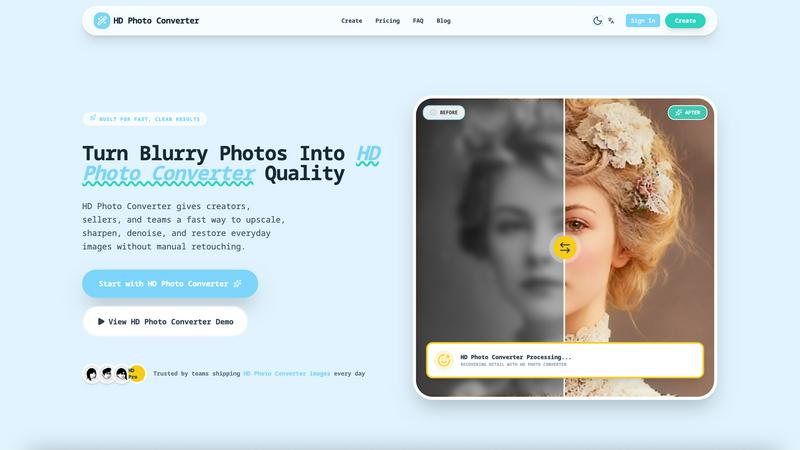
HD Photo Converter instantly turns blurry photos into sharp, high-definition images with AI.
Last updated: March 11, 2026

Z Image Turbo
Z Image Turbo generates stunning 1024px images in under a second, empowering creators with ultra-fast, high-quality visuals without needing a GPU.
Last updated: March 11, 2026
Visual Comparison
HD Photo Converter
Z Image Turbo

Feature Comparison
HD Photo Converter
One-Click AI Enhancement
Simply upload your photo, and with a single click, the AI goes to work. It intelligently analyzes your image to apply the perfect balance of upscaling for size, sharpening for detail, and denoising for a clean finish. This all-in-one process eliminates the need to juggle multiple tools or complex settings, delivering a professionally enhanced image in under 5 seconds.
Intelligent Portrait & Face Recovery
This feature specifically targets portraits, expertly recovering facial details that are often lost in low-light conditions or due to image compression. It enhances clarity in eyes, skin texture, and hair while maintaining a natural and consistent look. It's perfect for improving profile pictures, campaign photos, or any portrait where preserving identity and enhancing quality is key.
Batch Processing for Bulk Upscaling
Need to enhance an entire catalog of product photos or a folder of old scans? HD Photo Converter's batch processing capability lets you upscale and improve multiple images at once with just one click. This saves an enormous amount of time compared to manual editing or running complex scripts, making it ideal for teams and businesses with high-volume image needs.
Side-by-Side Preview Before Download
Before you commit to your enhanced image, the tool provides a clear, side-by-side comparison of the original and the AI-processed version. This instant preview allows you to verify the quality of the enhancement, ensuring you get the exact result you want before downloading the final HD photo, giving you complete confidence in the output.
Z Image Turbo
Turbo Diffusion Core
The turbo diffusion core is engineered for speed, enabling low-latency sampling that allows users to receive instant feedback on their image requests. This feature is essential for creators who need to iterate quickly and efficiently during the design process.
Style Presets
Z Image Turbo offers an array of built-in style presets like cinematic, product, portrait, anime, and illustration. With just one click, users can select a desired style that aligns with their project, ensuring consistent branding and aesthetics across multiple images.
Negative Prompt Guidance
This feature provides users with enhanced control over their image outputs by allowing them to specify elements they wish to exclude. This ensures that unwanted artifacts or styles do not appear in the generated images, leading to cleaner and more focused visuals.
Batch Generation Mode
Z Image Turbo's batch generation mode allows users to create dozens of variations in a single session. This feature is particularly useful for teams needing to explore multiple design directions quickly without the repetitive task of generating each image individually.
Use Cases
HD Photo Converter
eCommerce Product Listing Enhancement
Online sellers and shop owners can use HD Photo Converter to instantly upgrade low-quality supplier images into crisp, clean catalog assets. This improves product clarity for customers, reduces the chance of marketplace listing rejections, and helps create a more professional and trustworthy storefront with visually consistent imagery.
Social Media Content Preparation
Creators, influencers, and social media managers can ensure their feeds always look polished. The tool quickly prepares photos taken from various devices and under different conditions, removing compression artifacts and enhancing details to create eye-catching thumbnails, stories, and posts that stand out in a crowded feed.
Family Photo Archive Restoration
Breathe new life into cherished old photographs, scanned prints, or faded digital memories. HD Photo Converter is excellent for restoring vintage portraits and family photos by reducing noise, fixing blurriness, and recovering lost details, allowing you to preserve and share your history in stunning high definition.
Professional Portrait Retouching
Photographers, models, and agencies can streamline their workflow by using HD Photo Converter for initial retouching. It provides a fast foundation by automatically enhancing skin texture, sharpening facial features, and improving overall image clarity, freeing up more time for creative adjustments and artistic decisions.
Z Image Turbo
Product Photography
E-commerce businesses can utilize Z Image Turbo to quickly generate high-quality product images that showcase their merchandise in various styles. The ability to create consistent lighting and design makes it ideal for online stores.
Storyboarding
For film and animation projects, Z Image Turbo enables artists and directors to create storyboards rapidly. This allows teams to visualize scenes and character interactions before moving into full production, saving time and resources.
Game Concept Art
Game developers can take advantage of Z Image Turbo to generate concept art that captures the look and feel of their game worlds. The consistent character and style fidelity ensure that visual elements align with the overall game design.
Marketing Campaigns
Marketers can leverage Z Image Turbo to create engaging visuals for advertising campaigns. By producing compelling images in seconds, they can quickly test different concepts and approaches, optimizing their strategies for better audience engagement.
Overview
About HD Photo Converter
HD Photo Converter is your friendly, AI-powered assistant for transforming ordinary or problematic photos into stunning, high-definition images. It's built for anyone who wants professional-looking results without the complexity of traditional photo editing software. Whether you're a creator polishing social media content, a business owner enhancing product photos, or someone looking to restore precious family memories, this tool simplifies the entire process. Its core value lies in delivering faster, cleaner, and more predictable photo improvements. Instead of spending minutes or hours manually retouching blurry, noisy, or low-resolution images, you can upload a photo and get a sharper, cleaner, and more detailed version in just seconds. It combines powerful AI functions like upscaling, sharpening, denoising, and portrait recovery into one seamless workflow, making high-quality visual output accessible to everyone, regardless of their technical skill level.
About Z Image Turbo
Z Image Turbo is an advanced, speed-optimized text-to-image AI generator designed specifically for creators and developers who demand high-quality visuals without the long wait times typically associated with image generation. By leveraging its turbo diffusion core coupled with latency-optimized sampling, Z Image Turbo produces stunning 1024px images in an average first-frame latency of just 0.7 seconds when running on A100 hardware. This makes it an exceptional choice for anyone needing rapid, reliable image outputs, from graphic designers to marketers and game developers. The model allows for quick iterations, enabling users to describe any scene, product, or artistic style using natural language prompts. With built-in style presets such as cinematic, product, portrait, anime, or illustration, you can generate sharp and artifact-free visuals in mere seconds. Moreover, Z Image Turbo supports negative prompt guidance for precise control over image attributes, making it a versatile tool for various applications.
Frequently Asked Questions
HD Photo Converter FAQ
How many free images can I process?
Every user gets 1 free HD image generation per day. This is a great way to test the tool's capabilities with your own photos regularly without any commitment. For more frequent use, you can purchase credit packs to continue enhancing images.
What kind of image formats does it support?
HD Photo Converter supports common image formats like JPG and PNG. You can upload your blurry or low-quality photos in these formats, and the tool will process and provide you with a high-quality download in a compatible format, typically a high-resolution JPG or PNG file.
Is it difficult to use for beginners?
Not at all! HD Photo Converter is designed with a zero-learning curve. The process is a simple three-step flow: upload your image, click the enhance button, and download the result. There are no complicated settings or technical knowledge required, making it accessible for everyone.
Can I use it for commercial projects?
Absolutely. HD Photo Converter is built to deliver reliable, repeatable quality suitable for commercial use. Many brands and teams use it to prepare images for websites, marketing materials, and product listings. It's a trusted tool for creating publish-ready assets that help drive customer trust and engagement.
Z Image Turbo FAQ
How does Z Image Turbo ensure image quality?
Z Image Turbo utilizes a turbo diffusion core that focuses on latency-optimized sampling, allowing for high-resolution outputs with sharp textures and balanced lighting, ensuring that every image is production-ready.
Can I use Z Image Turbo for commercial projects?
Yes, all paid plans of Z Image Turbo include a commercial license, allowing users to leverage generated images for business purposes without any watermarks.
What hardware do I need to run Z Image Turbo locally?
Z Image Turbo is designed to run comfortably on systems with 8-12 GB of VRAM, making it accessible for both local deployment and lean cloud setups.
Is there a way to save generated images?
Absolutely! Users can easily export their generated images for presentations, mockups, or any other application, ensuring that high-quality visuals are always at their fingertips.
Alternatives
HD Photo Converter Alternatives
HD Photo Converter is an AI-powered tool in the image enhancement category, designed to quickly transform portraits and photos into sharper, cleaner, and more professional-looking high-definition images. It's built for creators, businesses, and everyday users who want to streamline their photo improvement without diving into complex editing software. Users often explore alternatives for a variety of reasons. This could be due to budget constraints, a need for different features like batch processing or specific filters, or simply because they require a tool that works on a different platform, such as a mobile app or a specific operating system. Finding the right fit depends on your unique workflow and goals. When choosing an alternative, it's wise to consider a few key factors. Think about the core features you need most, your comfort level with different interfaces, and the value for the price. A good alternative should match your technical skill level and efficiently solve the specific photo enhancement challenges you face most often.
Z Image Turbo Alternatives
Z Image Turbo is an ultra-fast text-to-image AI generator designed to help creators and developers quickly produce high-quality visuals. With the ability to generate sharp 1024px images in under a second, it caters to a wide range of applications in the image and photo category. However, users often seek alternatives due to various reasons, including pricing structures, feature sets, or compatibility with specific platforms and hardware requirements. When exploring alternatives, it's essential to consider factors such as image quality, generation speed, ease of use, and the flexibility of the pricing model. Look for options that provide similar functionality while aligning with your specific needs, whether that’s batch generation, style presets, or licensing terms. The right choice will depend on your unique requirements as a creator or developer.