
CyberInterviewPrep.com - Master Cyber Interviews with AI Coaching vs How to Sketch
Side-by-side comparison to help you choose the right AI tool.

CyberInterviewPrep.com - Master Cyber Interviews with AI Coaching
CyberInterviewPrep.com uses AI to give you realistic, role-specific cybersecurity interview practice and feedback.
Last updated: March 18, 2026

How to Sketch
Turn any photo into a beautiful pencil sketch instantly with our free AI tool.
Last updated: March 1, 2026
Visual Comparison
CyberInterviewPrep.com - Master Cyber Interviews with AI Coaching
How to Sketch
Feature Comparison
CyberInterviewPrep.com - Master Cyber Interviews with AI Coaching
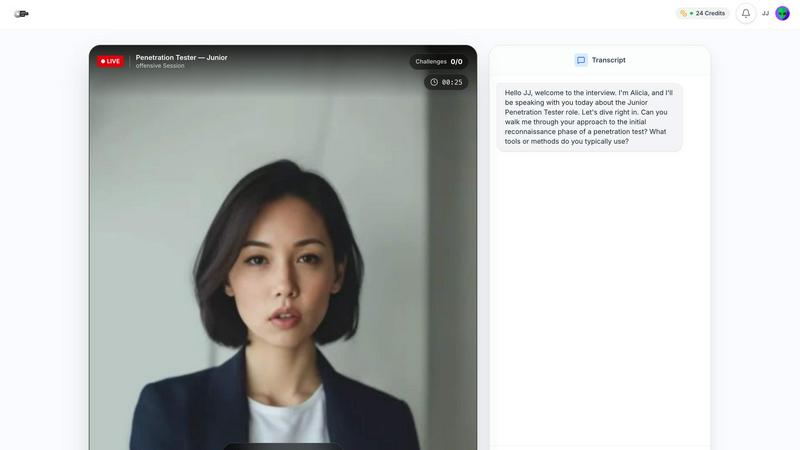
Live AI Interviewer
This is the core of the platform. The AI acts as a realistic interviewer, conducting sessions in real-time. It doesn't just ask a preset list of questions; it listens to your responses and asks intelligent follow-up questions to probe deeper into your knowledge, just like a real CISO or senior engineer would. This dynamic interaction prepares you for the curveballs and pressure of a live panel.
Role-Specific Interview Simulations
The platform offers tailored practice for the exact job you're targeting. You can choose simulations for specific roles like SOC Analyst, Penetration Tester, Incident Responder, or Cloud Security Engineer. Each simulation is loaded with curated, role-relevant questions and scenarios, ensuring your practice is focused and effective for your desired career path.
Detailed Performance Report Card
After every mock interview or quest, you receive a comprehensive breakdown of your performance. This isn't just a simple score; it's a detailed "Report Card" that gives you an overall grade and, more importantly, pinpoints your specific strengths and the exact areas where you need improvement. This precise feedback allows you to focus your study efforts efficiently.
Hands-On Certification Quests
Go beyond Q&A with practical, scenario-based "Quests." These are real-world capstone projects where you tackle tasks like analyzing security logs, triaging incidents, or putting response steps in the correct order. You receive messages and guidance in real-time as you work, and your score updates dynamically. Passing these quests (typically at a score of 80) validates your practical skills.
How to Sketch
AI-Powered Sketch Converter
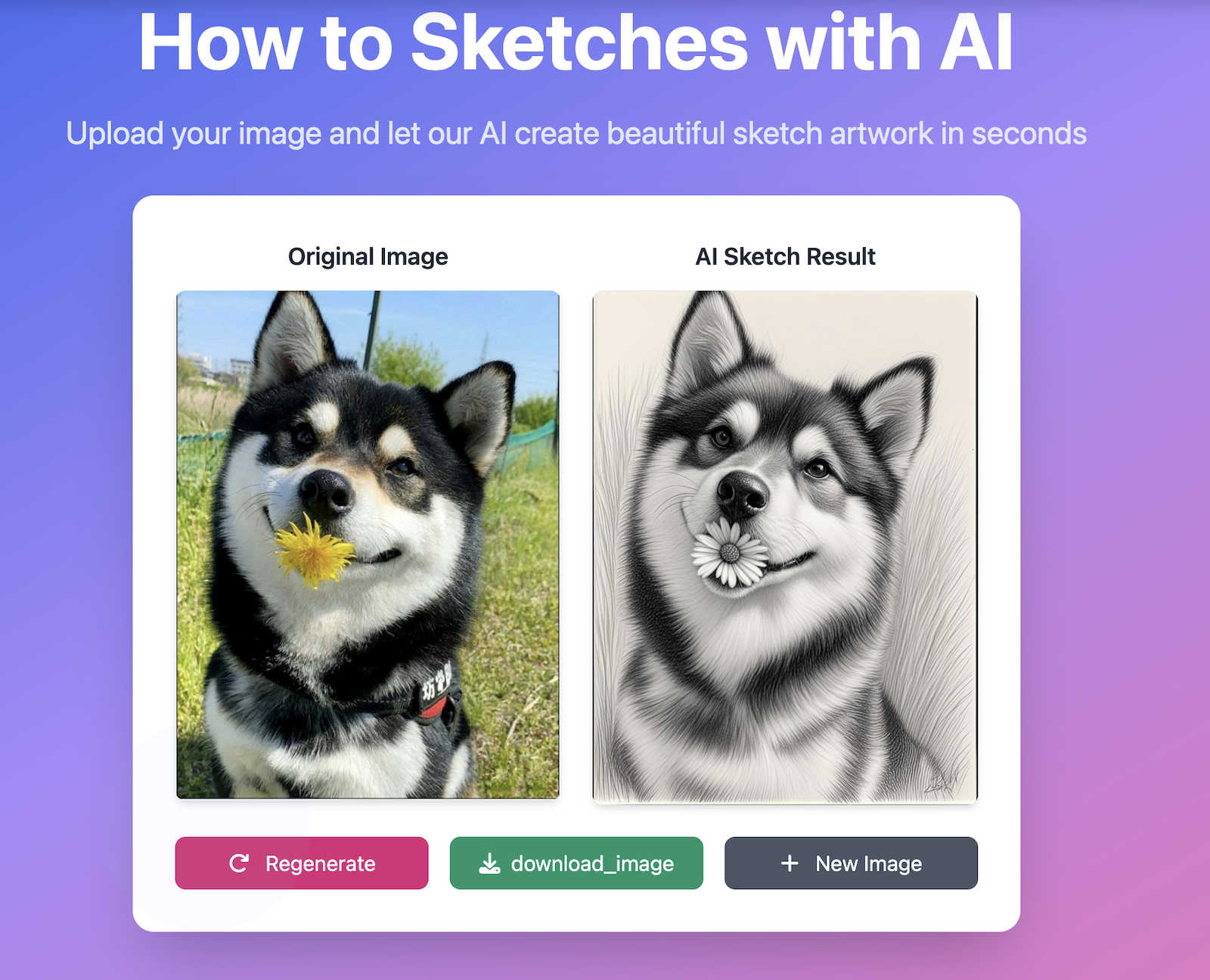
Our advanced AI tool is the star of the show. Simply upload any photo, and our intelligent algorithms will analyze it to create a beautiful sketch effect in seconds. It preserves important details and proportions, allowing you to generate realistic pencil portraits, clean outlines, or artistic hand-drawn styles effortlessly. It's the perfect starting point for learning or finding inspiration without needing any prior drawing skills.
Expert-Led Tutorial Library
Beyond the AI tool, we offer a comprehensive and growing collection of step-by-step tutorials. Created by professional artists, these guides cover everything from the absolute basics of sketching to advanced techniques for specific subjects like animals, landscapes, and portraits. Each tutorial is designed to be easy to follow, helping you build your skills progressively and with confidence.
Completely Free & Accessible
How to Sketch is committed to being completely free. You can access our AI sketch converter, the entire tutorial library, and all community resources without any hidden fees, subscriptions, or watermarks. Everything works directly in your web browser on any device, ensuring you can learn and create anytime, anywhere, with no barriers to entry.
Supportive Global Community
We foster a welcoming and supportive community for artists of all levels from around the world. This multilingual environment allows you to share your work, gain inspiration from others, and connect with fellow sketching enthusiasts. It's a space to grow, get feedback, and be part of a collective creative journey.
Use Cases
CyberInterviewPrep.com - Master Cyber Interviews with AI Coaching
Preparing for a Technical Interview at a Top Tech Firm
If you're aiming for a cybersecurity role at companies like Netflix, Apple, or Meta, our platform is trained on real question patterns from these organizations. Use the Live AI Interviewer to simulate the high-pressure, in-depth technical grilling these companies are known for, so you can walk into the actual interview with confidence and proven practice.
Career Transition into Cybersecurity
Breaking into the field can be daunting. CyberInterviewPrep provides a structured path. Start with role-specific resources and quests to build foundational knowledge, then use the AI mock interviews to practice articulating your skills and learning from the detailed feedback, effectively bridging the gap between theoretical knowledge and interview-ready performance.
Upskilling for a Promotion or New Specialization
Already in cybersecurity but looking to move into a more advanced role like Penetration Tester or Cloud Security Engineer? The platform allows you to target your practice precisely. Use the specialized simulations and quests to master the new domain's jargon, processes, and technical challenges before you interview internally or externally for that promotion.
Overcoming Interview Anxiety and Ghosting
The platform addresses common career frustrations. By practicing in a realistic, yet safe, AI-driven environment, you can reduce interview anxiety and build confidence. Furthermore, by benchmarking your performance against successful hires and ranking in the top percentiles, you significantly increase your chances of standing out to recruiters and landing an offer.
How to Sketch
Learning the Basics from Scratch
Complete beginners can use our platform as a structured starting point. You can begin by using the AI converter to see how a photo translates into a sketch, then immediately follow our foundational tutorials to learn the core techniques, strokes, and principles behind creating your own original sketches step-by-step.
Finding Artistic Inspiration
If you're feeling stuck or need a creative spark, upload a personal photo to the AI converter. Transforming a familiar image into a sketch can reveal new artistic perspectives and compositions, providing a unique inspiration for your next hand-drawn project or helping you visualize a scene before you draw it freehand.
Creating Quick Art Projects
For hobbyists, students, or content creators who need a sketch quickly for a project, greeting card, or social media post, our AI tool is perfect. You can generate a polished, artistic sketch from a photo in seconds, saving hours of manual work while still achieving a personalized, hand-crafted aesthetic.
Improving Specific Sketching Skills
Artists looking to improve in a specific area, like animal anatomy or landscape perspective, can dive directly into our specialized tutorials. The focused lessons provide practical techniques and knowledge you can practice, using the AI-generated sketches as references or starting points for your own detailed studies.
Overview
About CyberInterviewPrep.com - Master Cyber Interviews with AI Coaching
CyberInterviewPrep.com is your AI-powered career coach, built specifically to help you conquer cybersecurity job interviews. Founded by experts who've successfully navigated the hiring processes at top-tier companies like FAANG and leading security firms, we understand the unique pressure and technical depth these interviews require. Our platform moves far beyond static question lists. Instead, it features a dynamic "Live AI Interviewer" that conducts realistic, conversational mock interviews. This AI listens to your answers, asks challenging follow-up questions, and probes your technical knowledge with real-world scenarios like log analysis, attack simulations, and code reviews. Designed for roles ranging from SOC Analyst and Penetration Tester to Cloud Security Engineer and Incident Responder, the platform provides a comprehensive career-readiness suite. After each session, you get a detailed "Report Card" with a performance grade and specific feedback on strengths and weaknesses. We also help you polish your CV with AI analysis, offer certificate-earning "Quests" for hands-on practice, and provide curated study resources. Our mission is simple: to give you the confidence, skills, and competitive edge to not just pass, but dominate your next cybersecurity interview.
About How to Sketch
How to Sketch is your friendly, all-in-one online platform designed to unlock the world of sketching for everyone, regardless of your current skill level. At its heart is a powerful, free AI tool that transforms any photograph into a beautiful sketch in seconds. Whether you want a realistic pencil portrait, a clean outline drawing, or a more artistic hand-drawn style, you can achieve it with just a few clicks—no artistic skills or complex software required. But How to Sketch is much more than just a converter; it's a complete learning hub. We complement our AI technology with a growing library of expert tutorials that teach the fundamentals and advanced techniques of sketching, from animals and landscapes to portraits. Built for complete beginners and hobbyists alike, our platform is fast, intuitive, and works directly in your web browser with no downloads, sign-ups, or annoying watermarks. Our core mission is to make the art of sketching accessible, educational, and inspiring for a global community, providing all the tools and guidance you need to start your creative journey today.
Frequently Asked Questions
CyberInterviewPrep.com - Master Cyber Interviews with AI Coaching FAQ
How realistic is the AI interviewer compared to a human?
Our Live AI Interviewer is designed to mimic a human hiring panel as closely as possible. It conducts conversations in real-time, asks unpredictable follow-up questions based on your answers, and challenges you on technical gaps. Users often report that the experience feels remarkably similar to their actual interviews, including the curveball questions that test critical thinking under pressure.
What cybersecurity roles do you support for practice?
We cover a wide range of in-demand positions. This includes foundational roles like SOC Analyst and Incident Responder, as well as more specialized ones like Penetration Tester (Red Team), Cloud Security Engineer, and roles focused on areas such as Identity & Access Management. Our question banks and scenarios are curated specifically for each role's required knowledge.
What is included in the "Report Card" feedback?
Your Report Card provides a complete performance analysis. You receive an overall score and grade, plus a breakdown of how you performed across different technical domains and soft skills. It highlights your specific strengths and, most valuably, identifies the exact topics or question types where you lost points, giving you a clear roadmap for what to study next.
What are "Quests" and how do they help?
Quests are interactive, hands-on learning modules that simulate real-world security tasks. Instead of just answering questions, you might analyze log files, respond to a simulated breach, or sequence incident response steps. You get feedback as you go, and a final score upon completion. They are designed to prove and improve your practical, job-ready skills in a engaging way.
How to Sketch FAQ
How does the AI sketch converter work?
Our AI analyzes your uploaded image and applies advanced algorithms to interpret the lines, shadows, and shapes. It then recreates the image with the stylistic elements of a hand-drawn sketch, preserving important details and proportions to give you a realistic and artistic result in just a few seconds.
What image formats are supported?
We support common image formats including JPG, PNG, and GIF. To ensure fast processing for everyone, we have a maximum file size limit of 5MB for uploads.
Is my uploaded image stored?
Your privacy is important to us. Uploaded images are temporarily stored on our servers only for the duration required to process them into a sketch. All images are automatically and permanently deleted after 24 hours.
Do I need to create an account or pay to use How to Sketch?
No, not at all! How to Sketch is completely free to use. You can access the AI sketch converter and all our tutorials without any sign-up, download, or payment. We are committed to keeping art education accessible and free for our global community.
Alternatives
CyberInterviewPrep.com - Master Cyber Interviews with AI Coaching Alternatives
CyberInterviewPrep.com is an AI-powered career platform designed specifically for cybersecurity professionals. It falls into the education and learning category, focusing on helping candidates master technical interviews through realistic, interactive simulations with an AI interviewer that provides detailed feedback. Users often explore alternatives for various reasons. Budget is a common factor, as some may seek more affordable or free resources. Others might look for platforms with a different feature mix, such as a stronger focus on community, mentorship, or a broader library of non-interview learning materials. Finding the right tool depends on individual career goals and learning preferences. When evaluating alternatives, it's wise to consider what matters most for your preparation. Key aspects include the realism of the interview practice, the depth and specificity of feedback provided, the range of cybersecurity roles covered, and whether the platform offers supplemental resources like resume review or structured learning paths to build foundational knowledge.
How to Sketch Alternatives
How to Sketch is a friendly online platform in the design and generative art category. Its main draw is a free AI tool that instantly turns your photos into beautiful pencil sketches, but it also offers a library of expert tutorials to help you learn the art of drawing yourself. People often look for alternatives for a few common reasons. They might need a tool that works on a specific device or operating system, like a mobile app. Others might be searching for different artistic styles beyond pencil sketches, or they may require advanced editing features for professional projects. Pricing is also a key factor, as some similar tools require subscriptions or place watermarks on free outputs. When choosing an alternative, consider what matters most for your project. Think about the output style you want, whether you need to use it on your phone or computer, and your budget. Also, check if the platform is easy to use and if it respects your privacy by clearly stating how it handles your uploaded images.