
HuntingPad vs ToolPortal
Side-by-side comparison to help you choose the right AI tool.

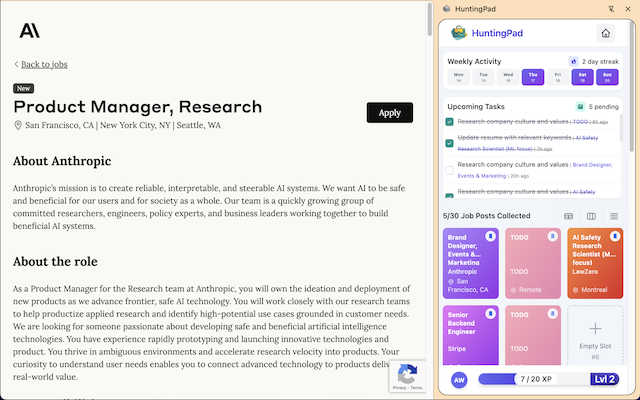
HuntingPad is a Chrome extension that streamlines job applications, matches your resume, and tracks your progress.
Last updated: March 1, 2026

ToolPortal
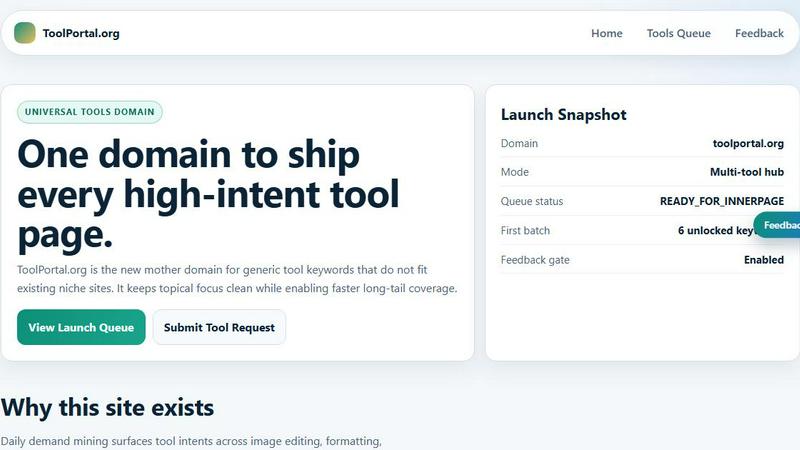
ToolPortal is your go-to online directory with over 300 free tools for developers, designers, and content creators to streamline their tasks.
Last updated: April 4, 2026
Visual Comparison
HuntingPad
ToolPortal
Feature Comparison
HuntingPad
One-Click Job Capture
HuntingPad allows users to save job postings from any website with a single click. This feature eliminates the tedious manual entry of job details, enabling users to focus on finding the right opportunities rather than managing data.
Smart Reminders
Never miss an application deadline again with HuntingPad's smart reminders. Users receive timely notifications about upcoming deadlines, ensuring they stay organized and on track during their job search.
AI-Powered Insights
The extension provides AI-driven insights that suggest when to follow up on applications. This feature helps users maintain effective communication with recruiters, increasing their chances of securing interviews.
Resume Matching and Customization
HuntingPad offers AI-powered resume matching that analyzes job postings against your resume. This feature provides compatibility scores and suggests customizations to improve your application’s relevance for specific roles, making your submissions more impactful.
ToolPortal
Comprehensive Tool Index
ToolPortal features a dense index of 261 live tools organized into specific categories, including generators, checkers, converters, formatters, and image editing tools. This organization allows users to quickly navigate to the tools they need without unnecessary friction.
Dual Search Modes
Users can choose between two search methods: a direct keyword search for when they know the exact tool name or a task description mode that suggests tools based on the stated job. This flexibility caters to both experienced users and those who may be unsure of what they need.
Daily Refresh Cycle
ToolPortal is committed to continuous improvement, with new pages and UI updates being rolled out daily. This ensures that users always have access to the latest tools and features, enhancing the overall experience and keeping the content fresh and relevant.
Instant Access Without Login
One of the standout features of ToolPortal is that it requires no login or account creation. Users can open any tool page and run it immediately, eliminating barriers to access and allowing for a seamless workflow.
Use Cases
HuntingPad
Streamlined Job Applications
Professionals can use HuntingPad to simplify their application process by capturing job postings from various sites, instantly saving them into one organized location without the hassle of switching between tabs.
Enhanced Resume Tailoring
Job seekers can leverage the AI-powered resume matching feature to enhance their resumes. By receiving suggestions for tweaks based on job listings, users can tailor their applications effectively to stand out from the competition.
Deadline Management
With smart reminders, users can effectively manage their job application deadlines. This feature ensures they are always aware of when to submit applications, follow up, or schedule interviews, thus reducing the chances of missing out on opportunities.
Increased Interview Opportunities
By utilizing AI insights for follow-ups and tailored applications, users can increase their chances of landing interviews. The combination of automated processes and personalized touches ensures that job seekers remain competitive in a crowded job market.
ToolPortal
Social Media Content Creation
Content creators can utilize the text styling tools available in ToolPortal, such as glitch or gothic text generators, to produce eye-catching social media posts. This allows for enhanced engagement and unique branding.
Quick Image Editing
Marketers and designers can use the image tools to crop photos, remove backgrounds, and prepare assets for various platforms in a matter of minutes. This efficiency is crucial for meeting tight deadlines in the fast-paced digital landscape.
Validation and Quality Checks
Developers can rely on the validation tools for tasks such as checking DMARC records or running speed tests to ensure their projects meet quality standards before publishing. This helps maintain a high level of professionalism.
Format Conversion
Students and professionals alike can benefit from the conversion tools offered by ToolPortal, which allow for quick and easy transformation of units, time, and text formats. This is particularly useful for those working on reports or data analysis.
Overview
About HuntingPad
HuntingPad is an innovative Chrome extension designed specifically for ambitious job seekers looking to streamline their job hunting process. In a highly competitive job market, professionals often find themselves overwhelmed with numerous applications and the chaos of managing multiple job boards. HuntingPad addresses these challenges by allowing users to capture job postings from various platforms, including LinkedIn, Indeed, and Glassdoor, with just a single click. Not only does it automate the tracking of applications, but it also harnesses the power of AI to provide personalized resume matching and compatibility scores. This helps candidates tailor their applications effectively, enhancing their chances of landing interviews. With a strong commitment to user privacy, HuntingPad ensures all data is stored locally on your device, which means your job search remains confidential and secure. Whether you are a developer, manager, or any professional aiming to take charge of your job search, HuntingPad provides a seamless and efficient solution that integrates effortlessly into your existing workflow, transforming your job search into a strategic advantage rather than a burdensome task.
About ToolPortal
ToolPortal is a robust online directory offering over 300 free, browser-based tools designed to cater to a wide range of needs. Whether you're looking to convert text formats, validate JSON code, edit images, or perform SEO checks, ToolPortal has something for everyone. It serves as a one-stop-shop for developers, marketers, writers, and anyone who needs quick access to practical online utilities without the hassle of installation or sign-up. The intuitive interface allows users to search for tools by keyword or describe their task in plain language, making it easy to find the right tool in seconds. With a focus on user experience, ToolPortal ensures that all tools are live and ready to use immediately, streamlining workflows and enhancing productivity.
Frequently Asked Questions
HuntingPad FAQ
How does HuntingPad ensure my data is secure?
HuntingPad places a strong emphasis on privacy, storing all user data locally on their devices. This means that no personal information is shared with third parties, ensuring your job search remains confidential.
Can I use HuntingPad on multiple job boards?
Yes, HuntingPad is designed to capture job postings from any career site, including popular platforms like LinkedIn, Indeed, and Glassdoor. This flexibility allows you to manage all your job applications in one place.
Is there a limit to the number of job postings I can save?
HuntingPad does not impose a limit on the number of job postings you can save. You can capture as many opportunities as you find relevant, helping you maintain a comprehensive overview of your job search.
Is there a cost associated with using HuntingPad?
HuntingPad can be installed for free, and users can start organizing their job applications without the need for a credit card. This gives you the opportunity to experience the benefits of the extension without any initial investment.
ToolPortal FAQ
What types of tools does ToolPortal offer?
ToolPortal offers a wide variety of tools across categories such as generators, checkers, converters, formatters, and image editing utilities. This diversity ensures that users can find tools for nearly any online task.
Do I need to create an account to use ToolPortal?
No, ToolPortal does not require any account creation or login. Users can access and run tools directly in their browser without any barriers, making it quick and easy to get started.
How often are new tools added to ToolPortal?
ToolPortal features a daily refresh cycle, meaning new tools and updates are continually being integrated into the platform. This commitment to freshness ensures users have access to the latest tools available.
Can I search for tools without knowing their names?
Absolutely! ToolPortal allows users to describe their tasks in plain language, and it will suggest the best-fit tools based on that description. This user-friendly feature helps those who may not be familiar with specific tool names.
Alternatives
HuntingPad Alternatives
HuntingPad is an innovative Chrome extension designed to enhance the job application process by providing a more organized and efficient way to manage applications. It falls under the category of productivity and management tools, specifically tailored for job seekers. Users often search for alternatives due to various reasons such as pricing, the desire for additional features, or the need for compatibility with different platforms. When considering alternatives, it's important to evaluate factors like ease of use, the comprehensiveness of features, data privacy, and how well the tool integrates into your existing workflow. As the job market evolves, many professionals seek solutions that not only streamline their job search but also provide unique functionalities that may be missing in HuntingPad. Alternatives might offer different pricing models, more specialized features, or better support for specific industries. When choosing an alternative, look for tools that prioritize user experience, provide robust tracking capabilities, and offer reliable security measures to protect your personal information.
ToolPortal Alternatives
ToolPortal is a robust online tools directory designed specifically for developers, designers, SEO professionals, and content creators. With over 300 free browser-based tools, it offers a wealth of resources across various categories, including productivity, web development, and SEO. Users often seek alternatives to ToolPortal for several reasons, such as varying feature sets, user interface preferences, or specific platform needs that might not be met by ToolPortal. When looking for an alternative, consider factors like the types of tools offered, ease of navigation, user experience, and whether the platform requires any installation or sign-up. It's also essential to assess the reliability and support provided, as well as how frequently the tools are updated to meet current industry standards.