
Image-to-Image AI vs ShotAI
Side-by-side comparison to help you choose the right AI tool.
Image-to-Image AI
Transform your existing images into stunning new styles with AI guidance.
Last updated: March 1, 2026

ShotAI
ShotAI is an all-in-one platform that uses advanced AI to effortlessly create stunning images and videos from text descriptions.
Last updated: March 11, 2026
Visual Comparison
Image-to-Image AI
ShotAI

Feature Comparison
Image-to-Image AI
Intuitive Browser-Based Interface
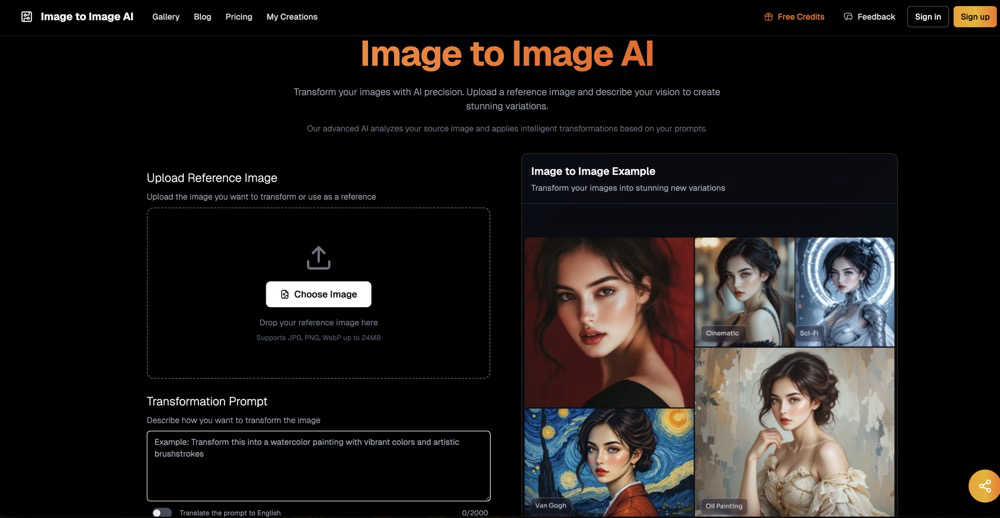
Jump right into creativity without any barriers. Image-to-Image AI runs entirely in your web browser, eliminating the need for powerful hardware or complex software downloads. The clean, user-friendly dashboard guides you from uploading your image to generating stunning results in a straightforward, step-by-step process, making advanced AI art accessible to everyone.
Precise Creative Control with Prompts
Your vision drives the transformation. By simply typing a description into the transformation prompt box, you tell the AI exactly what you want to achieve. Want to see your photo "as a watercolor painting in a rainy Paris street" or your sketch "as a detailed 3D render"? You describe it, and the AI interprets your words to apply the new style, mood, or elements while respecting your original image's structure.
Flexible Output Customization
Tailor your results to fit your project's needs. The tool offers multiple aspect ratios (like 1:1 for Instagram or 16:9 for wallpapers), allows you to generate between 1 and 4 variations at once, and includes privacy settings. You can choose to share your creation publicly to inspire the community or keep it private, with exclusive private mode access for VIP users.
Advanced AI-Powered Processing
Behind the simple interface lies cutting-edge technology. Image-to-Image AI uses state-of-the-art diffusion models trained on millions of images to intelligently analyze your picture's content, style, and structure. This allows it to perform sophisticated transformations—from enhancing details and upscaling resolution to completely reimagining art styles—while maintaining the essence and quality of your original upload.
ShotAI
Text to Image
Transform your text descriptions into stunning, high-quality images with ease. ShotAI uses advanced AI models like Gemini Nano Banana and Seedream 4.0 to comprehend your vision, producing photorealistic images that capture intricate details and nuances.
Image to Image
Edit and enhance existing images using AI precision. With this feature, users can modify styles, change specific elements, or create variations of an image while preserving the original composition, making it perfect for iterative design processes.
Text to Video
Bring your ideas to life with AI-generated videos in a matter of minutes. Users simply describe their scene, and ShotAI's powerful tools, such as Sora 2 and VEO3, create professional-quality videos that incorporate realistic motion, physics, and synchronized audio, making video creation accessible to everyone.
AI Effects
Streamline your creative process with a variety of image and video templates. Users can easily upload their photos to generate professional AI-enhanced images and videos, allowing for quick transformations without needing extensive editing skills.
Use Cases
Image-to-Image AI
Social Media Content Creation
Easily generate a consistent yet unique visual theme for your feeds. Transform a single product photo into multiple artistic styles for a campaign, create eye-catching variations of a portrait for a profile series, or turn simple snapshots into polished, professional-looking graphics that stand out and engage your audience without requiring hours of manual editing.
Concept Art and Ideation for Artists
Quickly visualize and iterate on creative concepts. Digital artists and illustrators can upload a rough sketch or a reference photo and use descriptive prompts to see it rendered in different artistic styles, from cyberpunk to impressionist. This accelerates the brainstorming process, provides fresh inspiration, and helps refine ideas before committing to a final piece.
Professional Photo Enhancement
Breathe new life into existing photographs. Enhance blurry or low-resolution landscape shots into crisp, detailed masterpieces, professionally retouch portraits by applying flattering lighting or stylistic filters, or restore and colorize old vintage photos with modern AI clarity, making them perfect for print or digital archives.
Brand and Design Exploration
Experiment with visual branding elements efficiently. Designers can upload a logo or mascot and generate numerous artistic variations to explore different aesthetics—like metallic, neon, or hand-drawn styles. This is invaluable for presenting creative options to clients, testing how a design looks in different contexts, or refreshing brand assets.
ShotAI
Content Creation for Social Media
Social media managers can utilize ShotAI to quickly create eye-catching visuals and videos that resonate with their audience. By transforming text prompts into engaging content, they can maintain a consistent posting schedule without sacrificing quality.
Marketing Campaigns
Digital marketers can leverage ShotAI to produce promotional materials and videos tailored to their campaigns. With the ability to generate high-quality imagery and video content at scale, marketers can enhance brand engagement and drive conversions.
Creative Projects for Artists
Visual artists can use ShotAI to explore new creative avenues by generating unique images and videos based on their ideas. The platform allows artists to experiment with various styles and effects, fostering innovation in their work.
Educational Content Development
Educators and trainers can create visually appealing instructional materials using ShotAI. By converting complex concepts into easy-to-understand visuals and videos, they can enhance learning experiences and improve knowledge retention.
Overview
About Image-to-Image AI
Image-to-Image AI is your friendly, web-based creative studio that uses the power of artificial intelligence to transform any picture into something new and extraordinary. Think of it as having a digital artist on call, ready to reimagine your photos, sketches, or designs in just seconds. At its core, this tool intelligently understands the content of your uploaded image and then applies your creative vision, guided by a simple text prompt. Whether you want to turn a simple portrait into a classic oil painting, enhance a blurry landscape into a crisp masterpiece, or generate multiple artistic variations of a logo, Image-to-Image AI makes it possible with ease.
Designed for everyone, it works directly in your web browser with no complicated software to download. This makes it perfect for professional graphic designers seeking quick inspiration, social media creators needing eye-catching content, artists exploring new styles, or anyone who just wants to have fun with their photos. The platform puts advanced AI image transformation technology into a remarkably accessible interface. You provide the starting image and a guiding idea, and the AI handles the complex work of restructuring and rendering, all while preserving the essential composition of your original. It's the fastest, most intuitive way to experiment, create, and bring your visual ideas to life.
About ShotAI
ShotAI is a professional, AI-powered platform designed for seamless photo and video creation. By harnessing the latest advancements in artificial intelligence, it empowers creators to generate high-quality visual content without the hassle of switching between multiple tools. Ideal for content creators, digital marketers, social media managers, and visual artists, ShotAI simplifies the creative process with its all-in-one solution. Users can effortlessly create stunning images and videos using various preset templates and advanced AI models, significantly accelerating their workflow. With competitive pricing and a user-friendly interface, ShotAI makes it easy for anyone to transform their ideas into breathtaking visuals, allowing for more time to focus on creativity rather than technicalities.
Frequently Asked Questions
Image-to-Image AI FAQ
What kind of images can I upload?
You can upload most common image formats, including JPG, PNG, and WebP files, with a maximum size of 24MB per image. This covers everything from smartphone photos and digital artwork to scanned sketches and screenshots, giving you a wide range of starting points for your AI transformations.
How does the transformation prompt work?
The transformation prompt is your instruction manual for the AI. You describe in plain English (or your native language, as there's a translation option) how you want your image changed. Be as descriptive as you like—mention styles (e.g., "oil painting"), settings ("on Mars"), moods ("dark and moody"), or specific details. The AI uses this text to guide its creative process.
Are my uploaded images and creations private?
You have control over your privacy. You can set creations to "Public," where they may be featured in the community gallery, or "Private," where they are kept solely for your eyes. Note that the Private mode is a feature available specifically to VIP users, ensuring their work remains confidential.
What are credits and how do I get them?
Credits are the tokens used to generate images on the platform. Each transformation costs a certain number of credits (for example, a basic transform may cost 2 credits). New users typically receive free credits to start experimenting. You can earn more through promotions or purchase additional credits via the pricing plans to continue creating.
ShotAI FAQ
How long does it take to generate content?
Content generation with ShotAI is remarkably fast, typically taking just a few minutes from the moment you input your description until you receive your final image or video.
What AI models does ShotAI use?
ShotAI employs a variety of advanced AI models, including Gemini Nano Banana, Seedream 4.0, Sora 2, and VEO3, among others, to ensure high-quality and diverse content generation.
Can I use the generated content commercially?
Yes, users can utilize the generated content for commercial purposes. This allows creators, marketers, and businesses to leverage AI-generated visuals in their marketing campaigns, social media, and other commercial endeavors.
What formats are supported for export?
ShotAI supports a variety of export formats for both images and videos, ensuring compatibility with most platforms and allowing easy integration into your existing workflows.
Alternatives
Image-to-Image AI Alternatives
Image-to-Image AI is a free, browser-based tool that uses artificial intelligence to transform your existing pictures into new artistic styles. It falls into the category of AI-powered creative software, specifically focusing on guided image transformation where you provide both a source image and a text prompt to direct the AI. Users often explore alternatives for various reasons. Some may need more advanced editing features, different pricing models like subscription plans for commercial use, or software that integrates directly with other professional design platforms. Others might be looking for specific AI models or styles that a particular tool specializes in. When choosing an alternative, consider what matters most for your projects. Key factors include the cost structure, the range of artistic styles and controls offered, whether it works online or requires an app, and how it handles the privacy of your uploaded images. The best choice depends on balancing these features with your specific creative needs and workflow.
ShotAI Alternatives
ShotAI is an innovative AI photo and video creation platform that leverages cutting-edge AI technology to help creators produce stunning visuals. It consolidates various tools into one user-friendly interface, making it easier for individuals to explore their creative potential without the hassle of juggling multiple applications. However, users often search for alternatives to ShotAI due to factors like pricing, specific feature sets, or unique platform requirements that may better suit their individual needs. When looking for alternatives, consider important factors such as the range of features offered, ease of use, and any specific capabilities that may enhance your creative projects. Additionally, evaluate the pricing models to ensure they align with your budget. Ultimately, finding the right platform means balancing your creative aspirations with the tools that best support them.