
Image to URL vs ThumbnailMaker
Side-by-side comparison to help you choose the right AI tool.

Image to URL
Instantly turn your images into permanent, shareable web links for free with no signup required.
Last updated: February 28, 2026

ThumbnailMaker
Easily create eye-catching thumbnails with AI for your videos, boosting clicks and engagement in just seconds, no design skills required.
Last updated: April 4, 2026
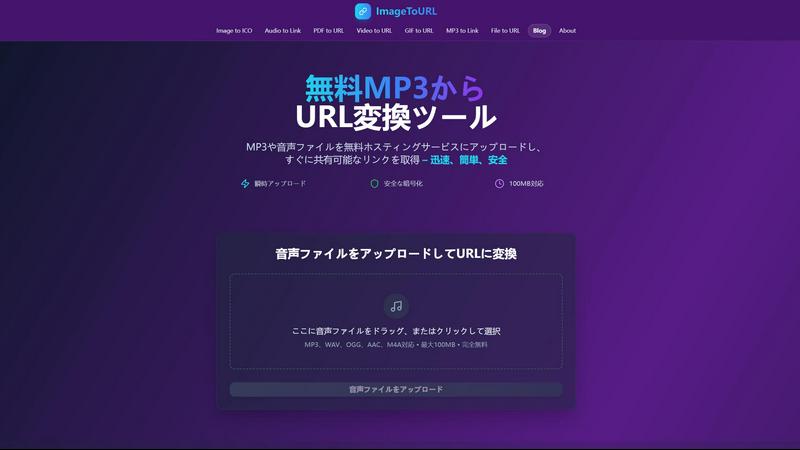
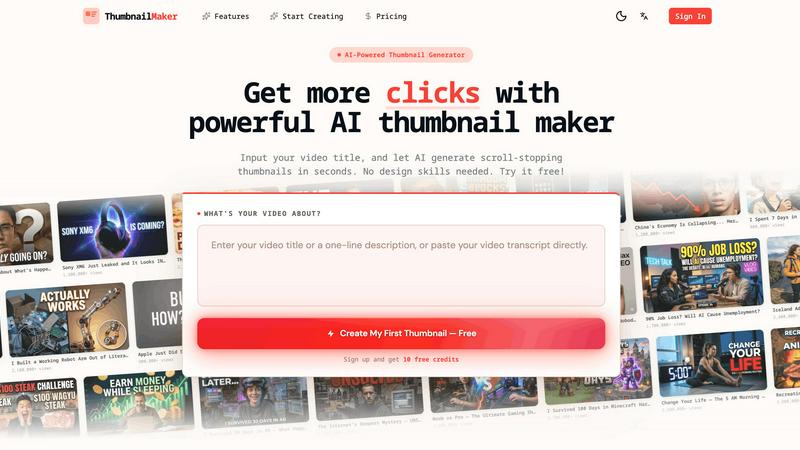
Visual Comparison
Image to URL
ThumbnailMaker
Feature Comparison
Image to URL
Lightning-Fast Conversion
Say goodbye to long upload waits. Image to URL is engineered for speed, converting your images into permanent, shareable links in under three seconds. The process is so quick that you can upload and share an image almost as fast as you can think of it. This incredible speed is powered by optimized servers and a global content delivery network (CDN), ensuring that whether you're uploading a screenshot or a product photo, the experience is consistently instantaneous and smooth.
Permanent, Never-Expiring Links
The standout feature of Image to URL is the permanence of its links. Once you upload an image, the generated URL is yours forever. It will never expire, break, or become unavailable due to inactivity. This is a game-changer for developers, content creators, and businesses who rely on stable links for their websites, documentation, blogs, and social media posts. You can embed these links with confidence, knowing they will work for your audience today, tomorrow, and years from now.
No Registration Required & Simple Interface
Ease of use is paramount. You can start using Image to URL immediately without creating an account or sharing any personal information. The interface is beautifully simple: just drag your image file onto the webpage or click to browse. It even supports pasting screenshots directly from your clipboard (Ctrl+V / Cmd+V). This frictionless access makes it the perfect tool for quick, one-time shares or for anyone who values their privacy and time.
Secure and Private Hosting
Your images are handled with care and security. All uploads are protected with enterprise-grade encryption, both during the transfer and while stored on secure servers. The service is built with privacy in mind, meaning your images are not used for advertising, tracking, or any other purpose. You get a private, direct link to your content without any hidden tracking pixels or intrusive ads surrounding it, making it a trustworthy choice for personal and professional use.
ThumbnailMaker
AI-Powered Thumbnail Generator
Our AI thumbnail generator is the heart of ThumbnailMaker. By simply entering your video title, the AI analyzes your content and proposes engaging thumbnail designs within seconds. This feature eliminates the need for design expertise, making it accessible for everyone.
Style Clone & Transfer
With the style clone and transfer feature, you can import thumbnails from successful YouTube videos by pasting their URLs. The tool then extracts the design style, allowing you to either replicate it closely or remix it for a fresh take, ensuring your thumbnails resonate with proven visual strategies.
Fix & Refine Options
ThumbnailMaker allows you to tweak and refine your thumbnails after generating them. If something doesn't look right, simply specify the changes you want, and the AI will regenerate the thumbnail in seconds. This iterative process means you can achieve the perfect look without starting from scratch.
Face Consistency & Brand Identity
When you upload your photo, ThumbnailMaker ensures that your face remains consistent across all generated thumbnails. This feature helps build a recognizable brand identity, making your content instantly identifiable to your audience.
Use Cases
Image to URL
Web Development and Design
Frontend developers and designers constantly need to share image assets, mockups, and UI prototypes with clients and team members. Instead of using bulky email attachments or complex cloud drives, they can use Image to URL to get a permanent link in seconds. This link can be easily dropped into project management tools, code repositories, or communication channels like Slack, ensuring everyone has immediate access to the latest visual without any login hurdles.
Blogging and Content Creation
Bloggers, writers, and digital content creators can streamline their workflow by using Image to URL to host images for their articles and newsletters. By converting images to permanent URLs, they ensure that their blog visuals never result in broken image icons, which can hurt SEO and reader experience. It's also perfect for embedding images in content management systems (CMS) like WordPress or Ghost without using up valuable hosting storage space.
Social Media Management and Marketing
Social media managers often need to share the same high-quality image across multiple platforms and scheduling tools. Uploading an image to Image to URL once provides a single, reliable source link that can be used everywhere. This is especially useful for creating social media posts, ads, or sharing visual content in community forums and groups, guaranteeing consistency and eliminating the risk of links failing after a campaign has launched.
Quick Sharing and Collaboration
For everyday quick shares, whether it's a screenshot of a bug for IT support, a funny meme for a group chat, or a photo from an event, Image to URL is the fastest path from your device to a shareable link. Its no-sign-up policy and clipboard paste feature make it ideal for impromptu collaboration. Students can share diagrams for study groups, remote teams can exchange visual feedback, and friends can easily post images to forums that require URL-based uploads.
ThumbnailMaker
YouTuber Launching a New Series
If you're a YouTuber starting a new series, you can use ThumbnailMaker to create distinctive thumbnails that reflect your brand and the content's theme. The AI helps generate multiple options, making it easier to choose one that stands out.
Social Media Content Creator
As a social media influencer, having visually appealing thumbnails for your videos is crucial. ThumbnailMaker allows you to create thumbnails quickly, enhancing your content's visibility across platforms like Instagram and TikTok.
Educator or Online Course Creator
If you are creating educational content or online courses, thumbnails that clearly communicate the subject matter are essential. ThumbnailMaker helps you design informative and appealing thumbnails that attract potential students to your videos.
Brand Promoter or Affiliate Marketer
For brand promoters or affiliate marketers, effective thumbnails can significantly increase click-through rates. With ThumbnailMaker, you can create enticing thumbnails that highlight products or services, driving more traffic to your promotional content.
Overview
About Image to URL
Image to URL is your go-to online solution for transforming any image into a permanent, shareable web link in a matter of seconds. At its core, it's a fast, reliable, and completely free image hosting service designed to simplify how you share visual content online. Whether you're a web developer needing to embed mockups, a blogger looking to illustrate posts, a social media manager scheduling content, or just someone who wants to share a picture quickly, this tool removes all the usual friction. The main value proposition is stunningly simple: drag, drop, and get a permanent URL that will never expire, ensuring your images stay accessible forever. Unlike many free services that delete files after a short time or clutter your links with ads, Image to URL provides a clean, direct link delivered via a global CDN for fast loading everywhere. With no registration required for the free tier and a secure, encrypted platform, it offers peace of mind alongside incredible convenience. It's the digital equivalent of giving your image a permanent home on the web, ready to be shared anywhere, anytime.
About ThumbnailMaker
ThumbnailMaker is an innovative AI-powered tool designed to help content creators generate stunning thumbnails in mere seconds. Whether you're a YouTuber, Twitch streamer, or any digital content creator, eye-catching thumbnails are essential for capturing viewers' attention and boosting click-through rates. This tool simplifies the process, enabling users with no design skills to create professional-looking thumbnails effortlessly. By inputting a video title, ThumbnailMaker's AI quickly analyzes the content and generates multiple thumbnail options tailored to maximize viewer engagement. With features that allow for customization, style transfer, and real-time adjustments, ThumbnailMaker empowers creators to enhance their visual branding and grow their audience effectively.
Frequently Asked Questions
Image to URL FAQ
Is Image to URL really free to use?
Yes, absolutely! The core service of converting images to permanent URLs is completely free and does not require you to create an account. You can upload images up to 2MB in size (supporting JPG, PNG, and GIF formats) and receive a never-expiring link instantly. For users who need higher limits, access to upload history, and other advanced features, there is an optional premium plan available.
What happens to my images? Are they private?
Your privacy and security are taken seriously. Uploaded images are stored on secure servers with enterprise-grade encryption. The service is designed to be private; your images are not used for advertising, sold to third parties, or publicly displayed in a gallery. Only someone with the exact unique link you generate can view the image, making it a secure choice for most sharing needs.
What is the maximum file size I can upload?
For free users, the maximum file size for a single image upload is 2MB. This is sufficient for most standard-resolution screenshots, web images, and product photos. If you require support for larger files, signing in with a premium plan will increase this limit significantly, allowing you to host higher-resolution images without compression.
Can I upload multiple images at once?
The standard free upload interface is designed for single, quick conversions. However, the website mentions a "Bulk Upload" feature. To access bulk uploading capabilities and convert multiple images to URLs simultaneously, you typically need to sign in to the service. This feature is a major time-saver for professionals handling large batches of images.
ThumbnailMaker FAQ
How does ThumbnailMaker generate thumbnails?
ThumbnailMaker uses advanced AI algorithms to analyze the video title and content, generating multiple thumbnail designs that are optimized for visual impact and engagement.
Can I upload my own images for thumbnails?
Yes, ThumbnailMaker allows you to upload your own photos to personalize your thumbnails. This helps in maintaining a consistent brand identity by incorporating your likeness into the designs.
Is there a limit to how many thumbnails I can create?
Initially, users receive 10 free credits upon signing up. Each thumbnail generation consumes a credit, but you can purchase additional credits if needed to create more thumbnails.
What if I'm not satisfied with the generated thumbnails?
ThumbnailMaker offers a fix and refine feature that lets you make adjustments to generated thumbnails. You can specify what you want changed, and the AI will regenerate the thumbnail based on your feedback, ensuring you get the desired look.
Alternatives
Image to URL Alternatives
Image to URL is a free, no-registration tool in the image hosting category that instantly turns your pictures into permanent, shareable links. It's a fantastic solution for quick sharing and embedding, but sometimes you might need something different. People look for alternatives for various reasons. You might need to upload larger files, require advanced editing features, or want more organizational control like albums and galleries. Perhaps you need a platform that integrates directly with your favorite apps or offers a different pricing model for high-volume use. When exploring other options, consider what matters most for your workflow. Key factors include the maximum file size allowed, the longevity of the links (permanent vs. temporary), overall upload speed, and any additional features like privacy controls or analytics. Finding the right fit depends on balancing these needs with ease of use.
ThumbnailMaker Alternatives
ThumbnailMaker is a free thumbnail creator and generator designed to help users create eye-catching thumbnails in seconds. Falling under the categories of Image & Photo and Image Generation, it harnesses the power of AI to assist users, regardless of their design skills, in boosting click-through rates (CTR) and growing their channels effectively. Many users seek alternatives to ThumbnailMaker for various reasons, including pricing concerns, the need for additional features, or compatibility with different platforms. When choosing an alternative, it's essential to consider factors like ease of use, available design templates, customization options, and overall effectiveness in enhancing visual appeal. Finding an alternative that meets your specific needs can significantly impact your content's performance and engagement.