
Img Editor vs ThumbnailMaker
Side-by-side comparison to help you choose the right AI tool.

Img Editor
Create breathtaking AI-generated images in seconds with Img Editor's intuitive design and powerful image generation.
Last updated: February 28, 2026

ThumbnailMaker
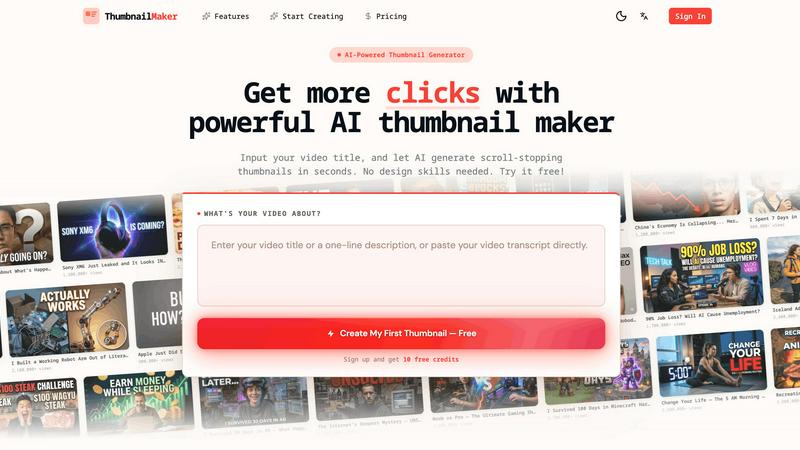
Easily create eye-catching thumbnails with AI for your videos, boosting clicks and engagement in just seconds, no design skills required.
Last updated: April 4, 2026
Visual Comparison
Img Editor

ThumbnailMaker
Feature Comparison
Img Editor
Text to Image
This feature allows users to generate images based on text descriptions. Simply input your idea, and Img Editor's AI will interpret the text to create a unique image that matches your vision, making it easy to bring your concepts to life.
Image Editing
Img Editor not only generates images but also provides robust editing tools to refine and enhance your creations. Users can adjust colors, apply filters, and make other modifications to ensure the final product meets their specifications.
Prompt Generator
The built-in prompt generator assists users in formulating effective descriptions for image creation. This tool is particularly useful for those who may struggle to articulate their ideas, offering suggestions that inspire creativity and innovation.
High-Quality Image Options
Img Editor offers various image quality settings, including 1K, 2K, and 4K resolutions. This ensures that whether you need standard images for social media or ultra-high-definition visuals for professional use, you can achieve the quality required for your projects.
ThumbnailMaker
AI-Powered Thumbnail Generator
Our AI thumbnail generator is the heart of ThumbnailMaker. By simply entering your video title, the AI analyzes your content and proposes engaging thumbnail designs within seconds. This feature eliminates the need for design expertise, making it accessible for everyone.
Style Clone & Transfer
With the style clone and transfer feature, you can import thumbnails from successful YouTube videos by pasting their URLs. The tool then extracts the design style, allowing you to either replicate it closely or remix it for a fresh take, ensuring your thumbnails resonate with proven visual strategies.
Fix & Refine Options
ThumbnailMaker allows you to tweak and refine your thumbnails after generating them. If something doesn't look right, simply specify the changes you want, and the AI will regenerate the thumbnail in seconds. This iterative process means you can achieve the perfect look without starting from scratch.
Face Consistency & Brand Identity
When you upload your photo, ThumbnailMaker ensures that your face remains consistent across all generated thumbnails. This feature helps build a recognizable brand identity, making your content instantly identifiable to your audience.
Use Cases
Img Editor
Social Media Content Creation
With Img Editor, marketers and social media managers can quickly create eye-catching visuals to enhance their posts. The ability to generate multiple images daily allows for consistent and engaging content that attracts audience attention.
Digital Art Projects
Artists can leverage Img Editor's AI capabilities to experiment with different styles and concepts, creating unique pieces that serve as inspiration for their original work. The platform's flexibility encourages artistic exploration without financial constraints.
Product Visualization
Businesses can use Img Editor to create professional-grade images of their products, enhancing their online presence. This feature helps in showcasing products in an appealing way, which can lead to increased sales and customer interest.
Educational Materials
Educators and content creators can utilize Img Editor to produce custom visuals for presentations, e-books, and online courses. The platform allows for the creation of tailored images that align perfectly with the educational content, making learning more engaging.
ThumbnailMaker
YouTuber Launching a New Series
If you're a YouTuber starting a new series, you can use ThumbnailMaker to create distinctive thumbnails that reflect your brand and the content's theme. The AI helps generate multiple options, making it easier to choose one that stands out.
Social Media Content Creator
As a social media influencer, having visually appealing thumbnails for your videos is crucial. ThumbnailMaker allows you to create thumbnails quickly, enhancing your content's visibility across platforms like Instagram and TikTok.
Educator or Online Course Creator
If you are creating educational content or online courses, thumbnails that clearly communicate the subject matter are essential. ThumbnailMaker helps you design informative and appealing thumbnails that attract potential students to your videos.
Brand Promoter or Affiliate Marketer
For brand promoters or affiliate marketers, effective thumbnails can significantly increase click-through rates. With ThumbnailMaker, you can create enticing thumbnails that highlight products or services, driving more traffic to your promotional content.
Overview
About Img Editor
Img Editor is a revolutionary, entirely free AI image generation platform that empowers creatives from all walks of life. Whether you are an artist, designer, marketer, or simply a visual enthusiast, Img Editor provides the essential tools to transform your imaginative concepts into stunning visuals effortlessly. Utilizing cutting-edge AI technology, the platform allows users to generate high-quality, professional-grade images in just seconds. One of the standout features is the ability to produce up to 10 images daily for free, with options to earn unlimited bonus generations through active community engagement. With an intuitive interface tailored for both beginners and experienced professionals, Img Editor is the perfect solution for anyone keen on exploring the exciting realms of digital art and design. The platform encourages creativity, enabling users to create everything from simple graphics to complex artistic pieces with ease.
About ThumbnailMaker
ThumbnailMaker is an innovative AI-powered tool designed to help content creators generate stunning thumbnails in mere seconds. Whether you're a YouTuber, Twitch streamer, or any digital content creator, eye-catching thumbnails are essential for capturing viewers' attention and boosting click-through rates. This tool simplifies the process, enabling users with no design skills to create professional-looking thumbnails effortlessly. By inputting a video title, ThumbnailMaker's AI quickly analyzes the content and generates multiple thumbnail options tailored to maximize viewer engagement. With features that allow for customization, style transfer, and real-time adjustments, ThumbnailMaker empowers creators to enhance their visual branding and grow their audience effectively.
Frequently Asked Questions
Img Editor FAQ
How many images can I generate for free each day?
You can generate up to 10 images daily for free. Additionally, active participation in the community allows you to earn unlimited bonus generations.
What types of image quality does Img Editor support?
Img Editor supports various image quality settings, including 1K, 2K, and 4K resolutions, catering to different needs, whether for social media or professional projects.
Is there a limit on the number of prompts I can create?
There is no limit on the number of prompts you can create. You can experiment as much as you like, generating diverse images based on your unique descriptions.
Can I edit the images I generate?
Yes, Img Editor includes robust image editing tools, allowing you to refine and enhance your generated images with various adjustments, filters, and modifications.
ThumbnailMaker FAQ
How does ThumbnailMaker generate thumbnails?
ThumbnailMaker uses advanced AI algorithms to analyze the video title and content, generating multiple thumbnail designs that are optimized for visual impact and engagement.
Can I upload my own images for thumbnails?
Yes, ThumbnailMaker allows you to upload your own photos to personalize your thumbnails. This helps in maintaining a consistent brand identity by incorporating your likeness into the designs.
Is there a limit to how many thumbnails I can create?
Initially, users receive 10 free credits upon signing up. Each thumbnail generation consumes a credit, but you can purchase additional credits if needed to create more thumbnails.
What if I'm not satisfied with the generated thumbnails?
ThumbnailMaker offers a fix and refine feature that lets you make adjustments to generated thumbnails. You can specify what you want changed, and the AI will regenerate the thumbnail based on your feedback, ensuring you get the desired look.
Alternatives
Img Editor Alternatives
Img Editor is a cutting-edge AI image generation platform designed to help users create stunning, professional-quality visuals quickly and easily. As part of the Image & Photo category, it caters to a wide range of users, from artists and designers to marketers and hobbyists. Despite its remarkable features, many users seek alternatives due to factors such as pricing structures, additional functionalities, or specific platform compatibility requirements that may better suit their individual needs. When searching for alternatives to Img Editor, it’s essential to consider several key factors. Look for platforms that offer similar AI capabilities, intuitive user interfaces, and flexible features that can accommodate both novice and experienced users. Additionally, evaluate the pricing models and community engagement opportunities, as these can significantly enhance your overall creative experience and access to resources.
ThumbnailMaker Alternatives
ThumbnailMaker is a free thumbnail creator and generator designed to help users create eye-catching thumbnails in seconds. Falling under the categories of Image & Photo and Image Generation, it harnesses the power of AI to assist users, regardless of their design skills, in boosting click-through rates (CTR) and growing their channels effectively. Many users seek alternatives to ThumbnailMaker for various reasons, including pricing concerns, the need for additional features, or compatibility with different platforms. When choosing an alternative, it's essential to consider factors like ease of use, available design templates, customization options, and overall effectiveness in enhancing visual appeal. Finding an alternative that meets your specific needs can significantly impact your content's performance and engagement.