
img2img AI vs ThumbnailMaker
Side-by-side comparison to help you choose the right AI tool.

img2img AI
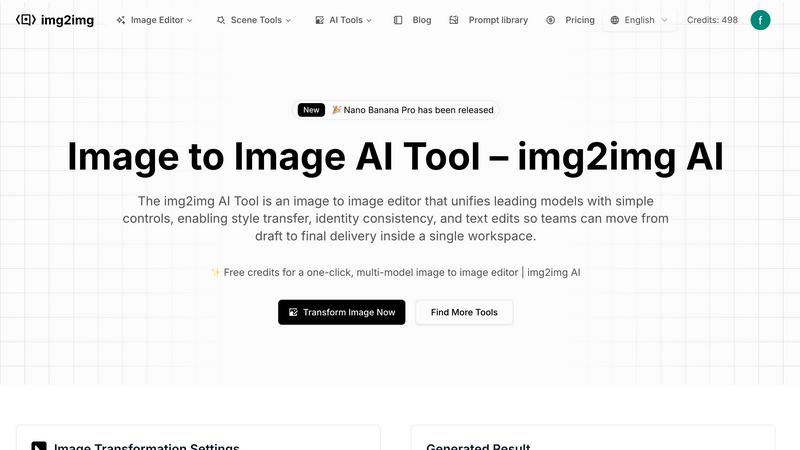
img2img AI transforms your images with simple controls and powerful AI models in one workspace.
Last updated: February 28, 2026

ThumbnailMaker
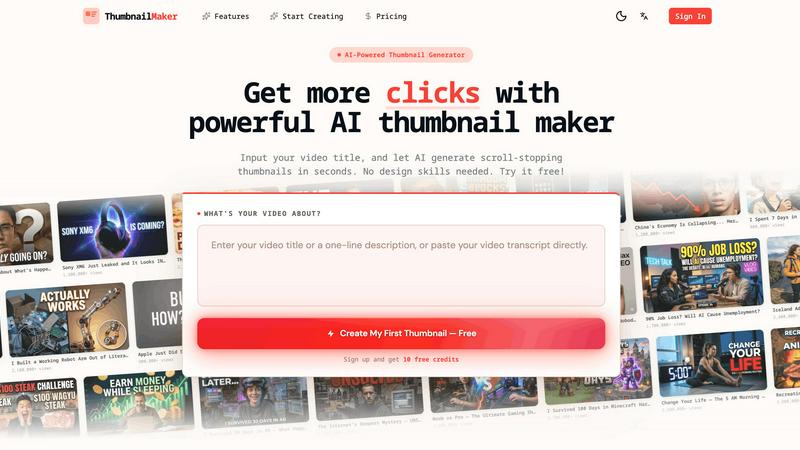
Easily create eye-catching thumbnails with AI for your videos, boosting clicks and engagement in just seconds, no design skills required.
Last updated: April 4, 2026
Visual Comparison
img2img AI
ThumbnailMaker
Feature Comparison
img2img AI
Unified AI Model Gateway
img2img AI consolidates access to leading and emerging AI image generation models in one place. This means you no longer need to switch between different tools or platforms to test which engine works best for your specific project—be it portrait enhancement, product styling, or artistic scene generation. You can seamlessly compare results from various models like Nano Banana and others directly within the same workspace, choosing the perfect output for your needs without the file-shuffling chaos.
One-Click Effects & Batch Presets
Speed up your workflow with ready-made style, lighting, and retouch presets. Apply cinematic filters, turn a photo into an oil painting, or achieve a consistent corporate headshot look with just one click. For larger projects, you can apply these presets in batch mode, ensuring visual consistency across entire sets of images. This feature is perfect for maintaining a uniform aesthetic in campaign materials or social media posts, making high-volume editing tasks manageable and efficient.
Natural Language Editing
Edit your images using simple, plain English instructions. Just type what you want to change, like "make the background white," "change the jacket color to blue," or "enhance the lighting," and the img2img AI Tool interprets your command and applies the edits directly. This intuitive approach removes the steep learning curve of traditional complex photo editing software, making advanced image transformation accessible to everyone on your team, regardless of their design expertise.
Comprehensive Scenario Toolkit
The platform is built with practical, everyday business needs in mind. It offers specialized toolkits and templates for common scenarios like portrait editing, product photography, and style transfer. These curated tools handle specific tasks—such as relighting, skin retouching, background swaps, or applying artistic styles—while preserving important details. This structured approach guides you to professional results faster, covering everything from quick fixes to advanced creative explorations.
ThumbnailMaker
AI-Powered Thumbnail Generator
Our AI thumbnail generator is the heart of ThumbnailMaker. By simply entering your video title, the AI analyzes your content and proposes engaging thumbnail designs within seconds. This feature eliminates the need for design expertise, making it accessible for everyone.
Style Clone & Transfer
With the style clone and transfer feature, you can import thumbnails from successful YouTube videos by pasting their URLs. The tool then extracts the design style, allowing you to either replicate it closely or remix it for a fresh take, ensuring your thumbnails resonate with proven visual strategies.
Fix & Refine Options
ThumbnailMaker allows you to tweak and refine your thumbnails after generating them. If something doesn't look right, simply specify the changes you want, and the AI will regenerate the thumbnail in seconds. This iterative process means you can achieve the perfect look without starting from scratch.
Face Consistency & Brand Identity
When you upload your photo, ThumbnailMaker ensures that your face remains consistent across all generated thumbnails. This feature helps build a recognizable brand identity, making your content instantly identifiable to your audience.
Use Cases
img2img AI
Marketing & E-commerce Asset Creation
Marketing teams can rapidly refresh product images, create multiple themed versions for A/B testing, or generate compelling visuals for ads and landing pages. Need a summer-themed background for a winter product shot? Or want to place your product in different lifestyle settings? img2img AI makes it simple, ensuring all visuals stay on-brand and high-quality, which is essential for driving engagement and conversions.
Design & Creative Production
Graphic designers and artists can use img2img AI to accelerate their creative process. Transform rough sketches into polished illustrations, experiment with different artistic styles for a client project, or generate unique textures and elements. It serves as a powerful ideation and execution tool, helping bridge the gap between initial concept and final artwork without requiring manual, time-consuming edits in multiple software programs.
Social Media & Content Marketing
Content creators and social media managers can produce a high volume of eye-catching graphics quickly. Easily resize and reformat images for different platforms, apply trending filters or styles to photos, and create cohesive visual stories for campaigns. The batch editing capabilities are especially useful for creating consistent series of posts, saving hours of repetitive work while keeping the feed looking professional and engaging.
Corporate Communications & HR
HR departments and internal comms teams can ensure brand consistency in all employee-facing and public materials. Use the portrait editing tools to standardize headshots for the company website or LinkedIn, create uniform presentation graphics, or design engaging internal announcement banners. The tool helps maintain a professional and cohesive visual identity across all touchpoints with minimal design overhead.
ThumbnailMaker
YouTuber Launching a New Series
If you're a YouTuber starting a new series, you can use ThumbnailMaker to create distinctive thumbnails that reflect your brand and the content's theme. The AI helps generate multiple options, making it easier to choose one that stands out.
Social Media Content Creator
As a social media influencer, having visually appealing thumbnails for your videos is crucial. ThumbnailMaker allows you to create thumbnails quickly, enhancing your content's visibility across platforms like Instagram and TikTok.
Educator or Online Course Creator
If you are creating educational content or online courses, thumbnails that clearly communicate the subject matter are essential. ThumbnailMaker helps you design informative and appealing thumbnails that attract potential students to your videos.
Brand Promoter or Affiliate Marketer
For brand promoters or affiliate marketers, effective thumbnails can significantly increase click-through rates. With ThumbnailMaker, you can create enticing thumbnails that highlight products or services, driving more traffic to your promotional content.
Overview
About img2img AI
img2img AI is your all-in-one, browser-based workspace for transforming images with the power of artificial intelligence. Designed specifically for teams and professionals, it streamlines the entire visual content creation process by unifying powerful AI models with an incredibly user-friendly interface. Think of it as your central hub where you can take any image—from a rough sketch to a product photo—and guide it to become a high-impact, on-brand visual asset. The core mission is to eliminate the hassle of juggling multiple applications, allowing you to perform sophisticated edits like style transfer, background replacement, quality enhancement, and text-based modifications all within a single tab.
Whether you're a marketer needing to refresh a catalog, a designer turning concepts into polished art, or a content creator crafting social media graphics, img2img AI simplifies your workflow from the initial draft to the final delivery. It emphasizes identity consistency and design integrity, ensuring that every image you generate or edit perfectly aligns with your brand's visual identity. By bringing top AI engines, a library of prompts, and practical editing tools together, img2img AI turns creative uncertainty into a scalable, efficient, and collaborative process, saving you significant time and effort while boosting your visual output.
About ThumbnailMaker
ThumbnailMaker is an innovative AI-powered tool designed to help content creators generate stunning thumbnails in mere seconds. Whether you're a YouTuber, Twitch streamer, or any digital content creator, eye-catching thumbnails are essential for capturing viewers' attention and boosting click-through rates. This tool simplifies the process, enabling users with no design skills to create professional-looking thumbnails effortlessly. By inputting a video title, ThumbnailMaker's AI quickly analyzes the content and generates multiple thumbnail options tailored to maximize viewer engagement. With features that allow for customization, style transfer, and real-time adjustments, ThumbnailMaker empowers creators to enhance their visual branding and grow their audience effectively.
Frequently Asked Questions
img2img AI FAQ
What kind of images can I upload to img2img AI?
You can upload common image formats including JPEG, PNG, and WEBP. The platform supports up to 4 images at a time, with each file having a maximum size of 15MB. For best results, start with a clear, well-lit photo as your base image to guide the AI transformation more effectively.
Do I need design skills to use img2img AI effectively?
Not at all! img2img AI is built to be accessible. Its natural language editing feature allows you to describe the changes you want in plain English. Furthermore, the one-click presets and scenario-based toolkits provide guided paths for common edits, making professional-grade image transformation achievable for users of all skill levels.
How does img2img AI ensure my images remain on-brand?
The tool offers features specifically for identity consistency. You can use batch presets to apply the same style or color correction across multiple images. The prompt library and industry templates also provide a starting point that aligns with professional standards. By keeping all your editing within one workspace, it's easier to maintain control over the final look and feel of all your visual assets.
Can I use img2img AI for team collaboration?
While the provided content emphasizes a streamlined workflow for teams, specific collaboration features like shared workspaces or project commenting are not detailed. The primary value for teams lies in the unified platform that standardizes the editing process, uses consistent AI models, and enables batch processing, which collectively makes team-based visual production more efficient and cohesive.
ThumbnailMaker FAQ
How does ThumbnailMaker generate thumbnails?
ThumbnailMaker uses advanced AI algorithms to analyze the video title and content, generating multiple thumbnail designs that are optimized for visual impact and engagement.
Can I upload my own images for thumbnails?
Yes, ThumbnailMaker allows you to upload your own photos to personalize your thumbnails. This helps in maintaining a consistent brand identity by incorporating your likeness into the designs.
Is there a limit to how many thumbnails I can create?
Initially, users receive 10 free credits upon signing up. Each thumbnail generation consumes a credit, but you can purchase additional credits if needed to create more thumbnails.
What if I'm not satisfied with the generated thumbnails?
ThumbnailMaker offers a fix and refine feature that lets you make adjustments to generated thumbnails. You can specify what you want changed, and the AI will regenerate the thumbnail based on your feedback, ensuring you get the desired look.
Alternatives
img2img AI Alternatives
img2img AI is a versatile tool in the design and generative art space, designed to transform images using AI. It helps users enhance style, edit backgrounds, and improve quality all within one streamlined workspace, making it a go-to for creating consistent, on-brand visuals. People often explore alternatives for various reasons. This could be due to budget constraints, a need for different specific features, or compatibility with their existing software ecosystem. Some users might require more advanced control, while others seek a simpler or more specialized tool for a single task. When evaluating other options, consider your primary needs. Look at the core AI capabilities, ease of use, and whether the tool supports batch processing for efficiency. Also, assess how well it maintains design integrity and if it fits seamlessly into your team's current workflow without causing disruption.
ThumbnailMaker Alternatives
ThumbnailMaker is a free thumbnail creator and generator designed to help users create eye-catching thumbnails in seconds. Falling under the categories of Image & Photo and Image Generation, it harnesses the power of AI to assist users, regardless of their design skills, in boosting click-through rates (CTR) and growing their channels effectively. Many users seek alternatives to ThumbnailMaker for various reasons, including pricing concerns, the need for additional features, or compatibility with different platforms. When choosing an alternative, it's essential to consider factors like ease of use, available design templates, customization options, and overall effectiveness in enhancing visual appeal. Finding an alternative that meets your specific needs can significantly impact your content's performance and engagement.