
HTML to PNG Converter vs ImgArt Ai
Side-by-side comparison to help you choose the right AI tool.

HTML to PNG Converter
Turn your HTML and CSS code into perfect PNG images instantly, for free and with no signup.
Last updated: March 3, 2026

ImgArt AI transforms your ideas into stunning anime, 3D, and chibi art for characters and digital creations.
Last updated: March 1, 2026
Visual Comparison
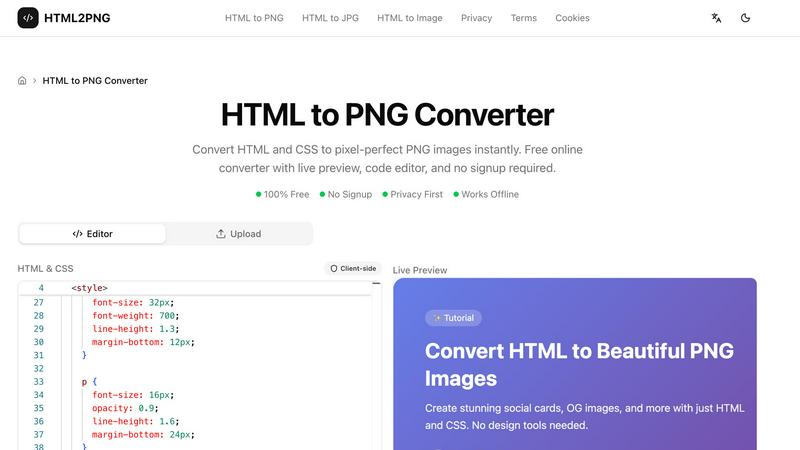
HTML to PNG Converter
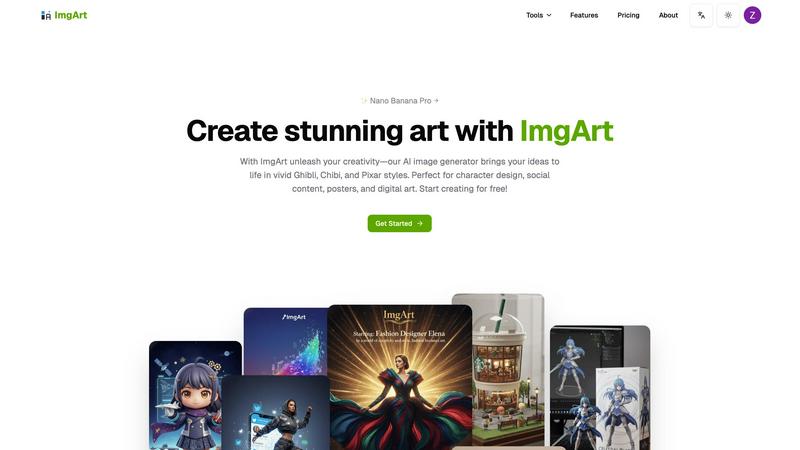
ImgArt Ai
Feature Comparison
HTML to PNG Converter
Live Preview & Built-in Code Editor
The tool features a real-time preview pane alongside a fully functional code editor. As you type or paste your HTML and CSS, you can immediately see how the final image will look. This instant feedback loop allows you to tweak styles, adjust layouts, and fix issues on the fly, making the design process interactive and efficient without needing to switch between different applications or constantly hit a "refresh" button.
Client-Side Conversion & Privacy First
All conversion magic happens directly in your browser using technologies like html2canvas. Your HTML code, CSS, and the resulting image never leave your computer. This client-side processing guarantees that your proprietary code, sensitive data, or creative work remains 100% private and secure. There are no server logs, no data transfers, and no risk of your assets being stored or seen by anyone else.
Flexible Output Customization
You have full control over the final image's specifications. Easily set the exact width in pixels, choose from practical presets like A4 or Letter paper sizes, and select a scaling factor (1x, 2x, 3x) for crisp retina displays. You can also choose a background color or opt for a transparent background, which is perfect for creating logos or images meant to be placed over other designs.
Starter Templates for Quick Creation
Jumpstart your projects with a selection of pre-built, customizable templates. Instead of starting from a blank slate, you can load templates for social media cards, Open Graph (OG) images, styled code snippets, or professional invoices. Just click "Try it," and the template code loads into the editor, ready for you to modify with your own text, colors, and branding.
ImgArt Ai
Free AI Image Generation with Multiple Models
Jumpstart your creativity without any cost! ImgArt offers free access to its powerful image generation, powered by a selection of advanced AI models. You can experiment with different engines like Nano Banana for hyper-realistic details, Flux Kontext for dynamic compositions, and ChatGPT-4o for playful, stylized outputs. This variety gives you the freedom to find the perfect tool for your specific project, all from a single, easy-to-use platform.
Text-to-Image and Image-to-Image Transformation
Bring your ideas to life in two flexible ways. Use the text-to-image feature to describe your vision in words—like "a serene samurai in a cherry blossom forest"—and watch the AI paint it into reality. Alternatively, use the image-to-image feature to upload a photo or sketch and transform it into a completely new artistic style, giving old images a fresh, imaginative twist with just a few clicks.
Advanced Editing with Nano Banana Pro
Take your creations to the next level with the professional-grade editing capabilities of the Nano Banana model. This feature allows for multi-image fusion, blending elements from different pictures into one cohesive piece. It also excels at maintaining character consistency across multiple images and enables natural language editing, letting you make precise adjustments simply by describing the change you want, such as "make the sky more dramatic" or "add a friendly dragon."
Diverse Creative Filters and Visual Styles
Unlock a world of artistic aesthetics with ImgArt's extensive style library. Instantly apply filters to generate artwork in beloved styles like the whimsical worlds of Studio Ghibli, the charming simplicity of Chibi characters, or the polished 3D look of Pixar animations. This feature makes it incredibly easy to achieve a specific mood or professional look, perfect for branding or thematic projects.
Use Cases
HTML to PNG Converter
Generating Social Media & Open Graph Images
Create eye-catching, branded images for social media posts, Twitter cards, or Open Graph previews that appear when your blog or product link is shared. By using HTML and CSS, you can ensure these images are consistently styled with your brand's fonts, colors, and logos, and you can even automate the generation of hundreds of unique images for different articles or products.
Creating Documentation and Tutorial Assets
Developers and technical writers can use the converter to generate clean, styled images of code snippets, terminal outputs, or UI component examples for their documentation, tutorials, or README files. This results in more readable and visually appealing guides compared to plain text code blocks.
Designing Business Documents
Quickly generate professional-looking business materials like invoices, receipts, quotes, or certificates directly from code. You can create a template with your company letterhead and then programmatically fill in client details, amounts, and dates, producing a polished PDF or image ready for sending.
Prototyping and Sharing UI/Web Design Mockups
Front-end developers and designers can quickly turn a static HTML/CSS prototype or a component idea into a shareable image. This is perfect for getting feedback from team members or clients on Slack, email, or project management tools without requiring them to run any code or open a browser.
ImgArt Ai
Character Design and Concept Art
Artists and game developers can rapidly prototype characters and creatures. Describe a "cyberpunk elf with neon tattoos" or upload a rough sketch to generate multiple detailed variations, exploring different outfits, poses, and expressions in minutes, which traditionally could take hours of manual drawing.
Engaging Social Media Content Creation
Social media managers and content creators can produce a constant stream of unique, eye-catching visuals. Generate custom illustrations for blog posts, create themed artwork for marketing campaigns, or design unique profile pictures and banners that stand out in a crowded feed, all tailored to your brand's aesthetic.
Personalized Digital Art and Posters
Hobbyists and fans can create custom artwork for their spaces. Transform a favorite photo into a Ghibli-style poster, imagine your pet as a Pixar character, or generate a stunning fantasy landscape to use as a desktop wallpaper. It’s perfect for creating personalized gifts or decorating your digital and physical environment.
Professional Graphic Design Elements
Designers can use ImgArt to quickly generate specific assets or inspiration. Create background textures, icon concepts, or stylized product mock-ups. The image-to-image feature is particularly useful for applying a consistent artistic style to a series of product photos or creating thematic visual elements for a website or presentation.
Overview
About HTML to PNG Converter
The HTML to PNG Converter is a free, powerful online tool that transforms your HTML and CSS code into beautiful, high-quality PNG images instantly. Think of it as a magic window that takes the code you write and turns it into a perfect picture, exactly as a web browser would display it. This tool is designed for web developers, designers, marketers, and anyone who needs to create visual assets quickly and directly from code, without the hassle of complicated software or manual screenshots. Its core value lies in its simplicity and power: you get a pixel-perfect, scalable image with just a few clicks. Best of all, the entire conversion happens securely in your own web browser. This means your code is never sent to a server, ensuring complete privacy, no sign-up is required, and you can even use it offline. Whether you're generating social media cards, Open Graph images for blog posts, styled code snippets, or business invoices, this converter provides a live preview and an intuitive editor to make the process smooth and efficient.
About ImgArt Ai
ImgArt Ai is your creative partner in the digital age, a powerful and user-friendly AI art generator designed to turn your imagination into stunning visuals in seconds. At its core, ImgArt is about democratizing high-quality art creation. Whether you're a professional graphic designer, a social media manager, a hobbyist artist, or someone with zero artistic training but a head full of ideas, this tool is built for you. It leverages cutting-edge AI models like Nano Banana Pro, Flux Kontext, and ChatGPT-4o to offer a versatile suite of features. You can start from a simple text description or upload an existing image to transform it, all while exploring a vast library of styles from iconic 3D animation and vivid anime to adorable chibi and enchanting Ghibli-inspired art. The main value proposition of ImgArt is its ability to massively expedite the creative workflow without compromising on quality or creative control. It handles the technical heavy lifting, allowing you to focus on the vision, making it the perfect solution for projects ranging from character design and digital posters to engaging social media content and unique artwork.
Frequently Asked Questions
HTML to PNG Converter FAQ
Is the HTML to PNG Converter really free?
Yes, it is completely free to use with no hidden costs, usage limits, or subscription tiers. You can convert as many images as you need without ever having to sign up for an account or provide payment information. The tool is supported as a free utility for the developer and designer community.
How does the conversion work without a server?
The tool uses a JavaScript library that acts like a mini-browser inside your own browser. It takes your HTML and CSS code, renders it virtually just like Chrome or Firefox would, and then paints that rendering onto an HTML5 Canvas element. This canvas can then be converted and downloaded as a PNG file, all locally on your machine.
Can I use custom fonts like Google Fonts in my image?
Absolutely. You can include links to external stylesheets, such as Google Fonts, within the <head> of your HTML code in the editor. The converter will fetch and use these web fonts during the rendering process, so your final PNG image will display your chosen typography perfectly.
What are the limitations of browser-based conversion?
Since the tool simulates a browser environment, it has the same limitations. Very complex CSS (like certain blend modes or advanced 3D transforms) might not render perfectly. Additionally, content that requires a live server or user interaction (like videos or scripts that change the DOM after loading) cannot be captured, as it takes a static snapshot of the initial render.
ImgArt Ai FAQ
Is ImgArt Ai really free to use?
Yes! ImgArt offers a free tier that allows you to start generating AI images and exploring its core features, including access to multiple AI models. This is a great way to test the platform's capabilities and see if it fits your creative workflow before considering any premium plans for higher volume or advanced features.
What is the difference between the AI models like Nano Banana and Flux?
Each AI model has its own strengths. Nano Banana is renowned for producing highly detailed, realistic images and offers advanced editing features. Flux models are excellent for general-purpose generation with strong compositional understanding. ChatGPT-4o image model is fantastic for achieving specific, popular artistic styles like Chibi or Ghibli. Experimenting with each will help you find your favorite.
Can I use the images I create for commercial projects?
You will need to review ImgArt's Terms of Service for the specific licensing details related to your account tier. Typically, images generated on free plans may have some restrictions, while paid plans often grant broader commercial usage rights. Always check the latest terms on their website to ensure your use case is covered.
How does the image-to-image feature work?
The image-to-image feature allows you to upload an existing photo, drawing, or graphic. You then provide a text prompt describing the new style or elements you want. The AI analyzes your uploaded image and uses your text description as a guide to transform it, preserving the original composition while applying the new artistic direction you've requested.
Alternatives
HTML to PNG Converter Alternatives
HTML to PNG Converter is a handy design tool that transforms your HTML and CSS code into clean, pixel-perfect PNG images. It's part of a broader category of web development and design utilities that help visualize code, create mockups, or generate images for documentation and social media. People often look for alternatives for various reasons. They might need a tool that runs on a specific operating system, offers a downloadable application, or provides advanced features like batch processing or API access. Budget is another common factor, as some users require a free tier for occasional use while others look for premium options with more capabilities. When choosing an alternative, consider your primary needs. Think about the output quality, ease of use, and whether you need a simple online tool or a more robust desktop application. Also, check for important features like a live preview editor, support for custom fonts, and the ability to handle complex CSS, as these can make a big difference in your workflow.
ImgArt Ai Alternatives
ImgArt Ai is a popular AI image generator that falls into the category of creative design tools. It's known for transforming text prompts into stunning digital art, character designs, and posters using advanced models like Nano Banana and Flux Kontext. It's a go-to for creators wanting to quickly visualize ideas. People often explore alternatives for various reasons. This could be due to budget constraints, a need for different artistic styles not covered by one tool, or specific platform requirements like needing a mobile app. Some users might seek more advanced control or simply want to compare what's available in a rapidly evolving market. When looking for a different tool, consider what matters most for your projects. Key factors include the quality and style of the AI's output, the pricing model and any free tiers, the ease of use, and any specialized features like advanced editing or consistent character generation. It's about finding the right fit for your unique creative workflow.