
ImgArt Ai vs Z Image Turbo
Side-by-side comparison to help you choose the right AI tool.

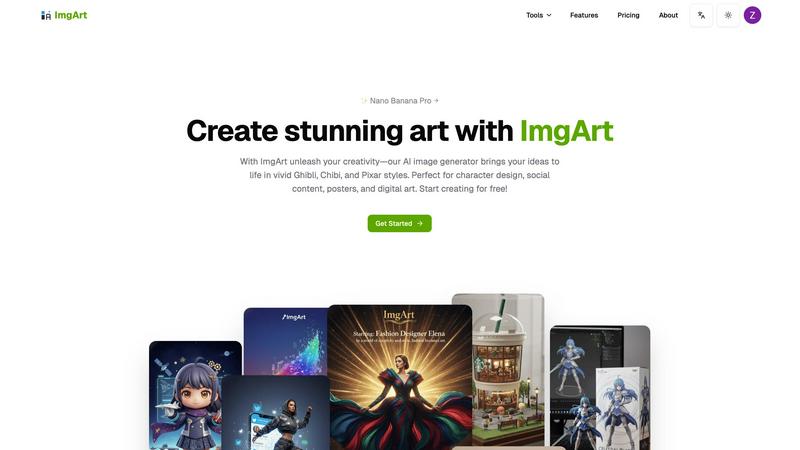
ImgArt AI transforms your ideas into stunning anime, 3D, and chibi art for characters and digital creations.
Last updated: March 1, 2026

Z Image Turbo
Z Image Turbo generates stunning 1024px images in under a second, empowering creators with ultra-fast, high-quality visuals without needing a GPU.
Last updated: March 11, 2026
Visual Comparison
ImgArt Ai
Z Image Turbo

Feature Comparison
ImgArt Ai
Free AI Image Generation with Multiple Models
Jumpstart your creativity without any cost! ImgArt offers free access to its powerful image generation, powered by a selection of advanced AI models. You can experiment with different engines like Nano Banana for hyper-realistic details, Flux Kontext for dynamic compositions, and ChatGPT-4o for playful, stylized outputs. This variety gives you the freedom to find the perfect tool for your specific project, all from a single, easy-to-use platform.
Text-to-Image and Image-to-Image Transformation
Bring your ideas to life in two flexible ways. Use the text-to-image feature to describe your vision in words—like "a serene samurai in a cherry blossom forest"—and watch the AI paint it into reality. Alternatively, use the image-to-image feature to upload a photo or sketch and transform it into a completely new artistic style, giving old images a fresh, imaginative twist with just a few clicks.
Advanced Editing with Nano Banana Pro
Take your creations to the next level with the professional-grade editing capabilities of the Nano Banana model. This feature allows for multi-image fusion, blending elements from different pictures into one cohesive piece. It also excels at maintaining character consistency across multiple images and enables natural language editing, letting you make precise adjustments simply by describing the change you want, such as "make the sky more dramatic" or "add a friendly dragon."
Diverse Creative Filters and Visual Styles
Unlock a world of artistic aesthetics with ImgArt's extensive style library. Instantly apply filters to generate artwork in beloved styles like the whimsical worlds of Studio Ghibli, the charming simplicity of Chibi characters, or the polished 3D look of Pixar animations. This feature makes it incredibly easy to achieve a specific mood or professional look, perfect for branding or thematic projects.
Z Image Turbo
Turbo Diffusion Core
The turbo diffusion core is engineered for speed, enabling low-latency sampling that allows users to receive instant feedback on their image requests. This feature is essential for creators who need to iterate quickly and efficiently during the design process.
Style Presets
Z Image Turbo offers an array of built-in style presets like cinematic, product, portrait, anime, and illustration. With just one click, users can select a desired style that aligns with their project, ensuring consistent branding and aesthetics across multiple images.
Negative Prompt Guidance
This feature provides users with enhanced control over their image outputs by allowing them to specify elements they wish to exclude. This ensures that unwanted artifacts or styles do not appear in the generated images, leading to cleaner and more focused visuals.
Batch Generation Mode
Z Image Turbo's batch generation mode allows users to create dozens of variations in a single session. This feature is particularly useful for teams needing to explore multiple design directions quickly without the repetitive task of generating each image individually.
Use Cases
ImgArt Ai
Character Design and Concept Art
Artists and game developers can rapidly prototype characters and creatures. Describe a "cyberpunk elf with neon tattoos" or upload a rough sketch to generate multiple detailed variations, exploring different outfits, poses, and expressions in minutes, which traditionally could take hours of manual drawing.
Engaging Social Media Content Creation
Social media managers and content creators can produce a constant stream of unique, eye-catching visuals. Generate custom illustrations for blog posts, create themed artwork for marketing campaigns, or design unique profile pictures and banners that stand out in a crowded feed, all tailored to your brand's aesthetic.
Personalized Digital Art and Posters
Hobbyists and fans can create custom artwork for their spaces. Transform a favorite photo into a Ghibli-style poster, imagine your pet as a Pixar character, or generate a stunning fantasy landscape to use as a desktop wallpaper. It’s perfect for creating personalized gifts or decorating your digital and physical environment.
Professional Graphic Design Elements
Designers can use ImgArt to quickly generate specific assets or inspiration. Create background textures, icon concepts, or stylized product mock-ups. The image-to-image feature is particularly useful for applying a consistent artistic style to a series of product photos or creating thematic visual elements for a website or presentation.
Z Image Turbo
Product Photography
E-commerce businesses can utilize Z Image Turbo to quickly generate high-quality product images that showcase their merchandise in various styles. The ability to create consistent lighting and design makes it ideal for online stores.
Storyboarding
For film and animation projects, Z Image Turbo enables artists and directors to create storyboards rapidly. This allows teams to visualize scenes and character interactions before moving into full production, saving time and resources.
Game Concept Art
Game developers can take advantage of Z Image Turbo to generate concept art that captures the look and feel of their game worlds. The consistent character and style fidelity ensure that visual elements align with the overall game design.
Marketing Campaigns
Marketers can leverage Z Image Turbo to create engaging visuals for advertising campaigns. By producing compelling images in seconds, they can quickly test different concepts and approaches, optimizing their strategies for better audience engagement.
Overview
About ImgArt Ai
ImgArt Ai is your creative partner in the digital age, a powerful and user-friendly AI art generator designed to turn your imagination into stunning visuals in seconds. At its core, ImgArt is about democratizing high-quality art creation. Whether you're a professional graphic designer, a social media manager, a hobbyist artist, or someone with zero artistic training but a head full of ideas, this tool is built for you. It leverages cutting-edge AI models like Nano Banana Pro, Flux Kontext, and ChatGPT-4o to offer a versatile suite of features. You can start from a simple text description or upload an existing image to transform it, all while exploring a vast library of styles from iconic 3D animation and vivid anime to adorable chibi and enchanting Ghibli-inspired art. The main value proposition of ImgArt is its ability to massively expedite the creative workflow without compromising on quality or creative control. It handles the technical heavy lifting, allowing you to focus on the vision, making it the perfect solution for projects ranging from character design and digital posters to engaging social media content and unique artwork.
About Z Image Turbo
Z Image Turbo is an advanced, speed-optimized text-to-image AI generator designed specifically for creators and developers who demand high-quality visuals without the long wait times typically associated with image generation. By leveraging its turbo diffusion core coupled with latency-optimized sampling, Z Image Turbo produces stunning 1024px images in an average first-frame latency of just 0.7 seconds when running on A100 hardware. This makes it an exceptional choice for anyone needing rapid, reliable image outputs, from graphic designers to marketers and game developers. The model allows for quick iterations, enabling users to describe any scene, product, or artistic style using natural language prompts. With built-in style presets such as cinematic, product, portrait, anime, or illustration, you can generate sharp and artifact-free visuals in mere seconds. Moreover, Z Image Turbo supports negative prompt guidance for precise control over image attributes, making it a versatile tool for various applications.
Frequently Asked Questions
ImgArt Ai FAQ
Is ImgArt Ai really free to use?
Yes! ImgArt offers a free tier that allows you to start generating AI images and exploring its core features, including access to multiple AI models. This is a great way to test the platform's capabilities and see if it fits your creative workflow before considering any premium plans for higher volume or advanced features.
What is the difference between the AI models like Nano Banana and Flux?
Each AI model has its own strengths. Nano Banana is renowned for producing highly detailed, realistic images and offers advanced editing features. Flux models are excellent for general-purpose generation with strong compositional understanding. ChatGPT-4o image model is fantastic for achieving specific, popular artistic styles like Chibi or Ghibli. Experimenting with each will help you find your favorite.
Can I use the images I create for commercial projects?
You will need to review ImgArt's Terms of Service for the specific licensing details related to your account tier. Typically, images generated on free plans may have some restrictions, while paid plans often grant broader commercial usage rights. Always check the latest terms on their website to ensure your use case is covered.
How does the image-to-image feature work?
The image-to-image feature allows you to upload an existing photo, drawing, or graphic. You then provide a text prompt describing the new style or elements you want. The AI analyzes your uploaded image and uses your text description as a guide to transform it, preserving the original composition while applying the new artistic direction you've requested.
Z Image Turbo FAQ
How does Z Image Turbo ensure image quality?
Z Image Turbo utilizes a turbo diffusion core that focuses on latency-optimized sampling, allowing for high-resolution outputs with sharp textures and balanced lighting, ensuring that every image is production-ready.
Can I use Z Image Turbo for commercial projects?
Yes, all paid plans of Z Image Turbo include a commercial license, allowing users to leverage generated images for business purposes without any watermarks.
What hardware do I need to run Z Image Turbo locally?
Z Image Turbo is designed to run comfortably on systems with 8-12 GB of VRAM, making it accessible for both local deployment and lean cloud setups.
Is there a way to save generated images?
Absolutely! Users can easily export their generated images for presentations, mockups, or any other application, ensuring that high-quality visuals are always at their fingertips.
Alternatives
ImgArt Ai Alternatives
ImgArt Ai is a popular AI image generator that falls into the category of creative design tools. It's known for transforming text prompts into stunning digital art, character designs, and posters using advanced models like Nano Banana and Flux Kontext. It's a go-to for creators wanting to quickly visualize ideas. People often explore alternatives for various reasons. This could be due to budget constraints, a need for different artistic styles not covered by one tool, or specific platform requirements like needing a mobile app. Some users might seek more advanced control or simply want to compare what's available in a rapidly evolving market. When looking for a different tool, consider what matters most for your projects. Key factors include the quality and style of the AI's output, the pricing model and any free tiers, the ease of use, and any specialized features like advanced editing or consistent character generation. It's about finding the right fit for your unique creative workflow.
Z Image Turbo Alternatives
Z Image Turbo is an ultra-fast text-to-image AI generator designed to help creators and developers quickly produce high-quality visuals. With the ability to generate sharp 1024px images in under a second, it caters to a wide range of applications in the image and photo category. However, users often seek alternatives due to various reasons, including pricing structures, feature sets, or compatibility with specific platforms and hardware requirements. When exploring alternatives, it's essential to consider factors such as image quality, generation speed, ease of use, and the flexibility of the pricing model. Look for options that provide similar functionality while aligning with your specific needs, whether that’s batch generation, style presets, or licensing terms. The right choice will depend on your unique requirements as a creator or developer.