
Kling Motion Control AI vs OpenAI Tools Hub
Side-by-side comparison to help you choose the right AI tool.

Kling Motion Control AI
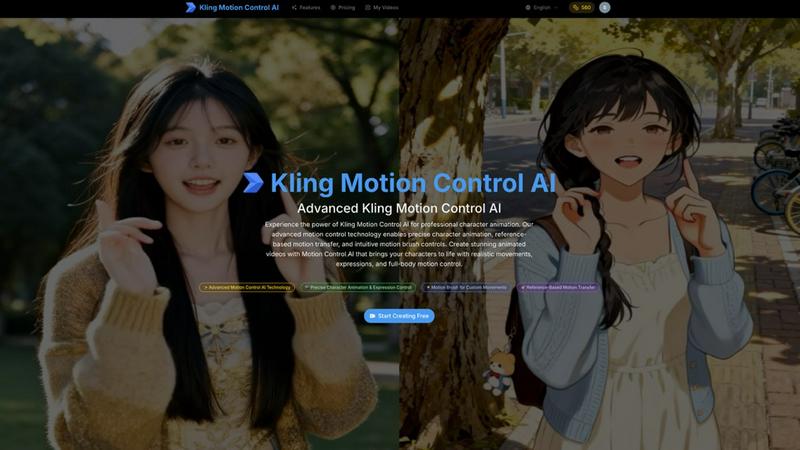
Kling Motion Control AI brings your characters to life with precise, intuitive animation powered by advanced AI.
Last updated: March 1, 2026

OpenAI Tools Hub
Discover expert AI tool reviews, comparisons, and 33+ free developer tools without signup, all designed to enhance your workflow.
Last updated: March 11, 2026
Visual Comparison
Kling Motion Control AI
OpenAI Tools Hub

Feature Comparison
Kling Motion Control AI
Advanced Motion Control AI Technology
At the heart of Kling is its sophisticated AI engine, which is trained to understand the physics of human and character movement. This isn't just about making parts wiggle; it's about creating animations with realistic weight, balance, and expression. The technology intelligently interprets your inputs to generate professional-grade motion that looks natural, giving you a level of quality previously reserved for studios with extensive resources.
Intuitive Motion Brush
This feature puts creative control directly in your hands—literally. You can simply "paint" motion paths directly onto your character image. Want your character to wave an arm or turn their head? Just draw the direction of the movement with the motion brush. It also includes smart tools like auto-segmentation to identify character parts quickly and a static brush to lock areas in place, ensuring only the elements you want to move actually do.
Reference-Based Motion Transfer
Why animate from scratch when you can use real-world movement as your guide? Upload a short video (3-30 seconds) of a person dancing, gesturing, or performing an action. Kling's AI will analyze that video, extract the motion data, and transfer those precise movements onto your character. This is a game-changer for achieving complex, lifelike animations like specific dance routines or expressive gestures with incredible accuracy.
Precise Character & Expression Control
Kling offers detailed control over your final animation. You can adjust the character's orientation, decide on the video length, and fine-tune how the motion is applied. This ensures the character's identity remains intact while performing the new actions. The platform gives you the tools to manage everything from subtle facial expressions to full-body motion control, resulting in a cohesive and professional animated video.
OpenAI Tools Hub
Expert Reviews
OpenAI Tools Hub features in-depth expert reviews of various AI tools, providing reliable ratings based on comprehensive testing. Each review includes detailed insights into performance, usability, and pricing. This transparency allows users to select tools that best fit their needs without falling for biased marketing claims.
Head-to-Head Comparisons
The platform offers side-by-side comparisons of competing tools, allowing users to evaluate features, pricing, and overall value at a glance. This makes it easier to identify which AI solution is the best fit for specific applications, whether it be for writing, coding, or other creative tasks.
AI Skills Map
The AI Skills Map is a unique feature that provides a directory of over 349 community-built skills specifically for Claude Code. Users can browse, install, and share skills, enhancing their development experience and expanding their capabilities in AI tool usage.
Free Developer Tools
OpenAI Tools Hub provides more than 33 free developer tools, including utilities like an AI ROI calculator, JSON to YAML converter, and a regex tester. These tools are available without any sign-up or account requirements, making them easy to access and use for various development tasks.
Use Cases
Kling Motion Control AI
Social Media Content Creation
Creators on platforms like TikTok, Instagram, and YouTube can use Kling to instantly transform their illustrations, logos, or mascots into engaging animated characters. This is perfect for making explainer videos, promotional clips, or simply adding a unique, animated flair to your posts that stands out in a crowded feed and boosts viewer engagement.
Independent Animation & Filmmaking
For indie animators and filmmakers, Kling dramatically reduces the barrier to entry for producing animated scenes. It allows small teams or solo creators to prototype character movements, create short films, or produce animated segments for live-action projects without needing years of animation training or expensive software suites.
Game Development & Prototyping
Game developers can use Kling to quickly animate character concepts, create lively NPCs (non-playable characters), or prototype in-game animations. It's an excellent tool for visualizing how a 2D character design would move in a game environment, helping to streamline the early creative and pitching phases of development.
Marketing & Advertising
Marketing teams can bring brand mascots and product illustrations to life in advertisements. Whether it's an animated billboard, a web banner, or a video ad, Kling helps create dynamic, attention-grabbing content that tells a story and connects with audiences on an emotional level, making brand messages more memorable.
OpenAI Tools Hub
For Developers
Developers can leverage OpenAI Tools Hub to find the best AI coding assistants, compare different tools, and access free utilities that enhance their workflow. With hands-on reviews and comparisons, they can make informed choices that improve their coding efficiency and productivity.
For Marketers
Marketers can benefit from the honest reviews and comparisons of AI tools focused on content generation, SEO, and customer engagement. By understanding the strengths and weaknesses of various platforms, they can select the right tools that align with their marketing strategies.
For Creatives
Creatives looking for AI tools for writing, image generation, or video production can explore the expert-reviewed resources on OpenAI Tools Hub. The platform's comprehensive insights help them choose tools that enhance their creative processes and output quality.
For Educators
Educators and trainers can utilize OpenAI Tools Hub to discover AI tools that can aid in teaching and learning processes. By comparing different educational tools and accessing free resources, they can select the best options to support their students’ learning experiences.
Overview
About Kling Motion Control AI
Kling Motion Control AI is a revolutionary platform that makes professional character animation accessible to everyone. Imagine being able to take a simple, static image—like a drawing, a photo, or a digital character—and bring it to life with realistic, nuanced movements in just a few clicks. That's the magic of Kling. It's designed for a wide range of creators, from social media influencers and marketers looking to make eye-catching content, to indie game developers and filmmakers who need to animate characters without a massive budget or a team of expert animators. The core value proposition is simplicity paired with powerful results. Instead of requiring you to learn complex 3D software or painstakingly animate frame-by-frame, Kling uses advanced artificial intelligence to understand motion and apply it to your characters with remarkable precision. It empowers you to focus on your creativity and storytelling, while it handles the complex technical work of creating fluid, believable animations.
About OpenAI Tools Hub
OpenAI Tools Hub is a comprehensive and free resource tailored specifically for developers, marketers, and creatives seeking unbiased reviews and comparisons of AI tools. With a focus on popular platforms like ChatGPT, Claude, Gemini, GitHub Copilot, and Cursor, OpenAI Tools Hub offers hands-on testing and honest analysis, ensuring that users make informed decisions. The platform boasts over 50 AI tools, providing real-world insights and ratings that are not influenced by paid rankings. Users can also access a variety of free resources, including an AI Skills Map featuring over 349 skills, a Backlinks Directory, and essential developer utilities. Notably, OpenAI Tools Hub doesn't require any sign-up or account creation, making it an accessible destination for anyone looking to explore and utilize AI technology effectively.
Frequently Asked Questions
Kling Motion Control AI FAQ
What kind of image can I upload to animate?
You can upload any clear, static image of a character, creature, or object. This includes digital illustrations, photographs, logos, and mascot designs. For best results, use an image with a well-defined subject against a relatively simple background so the AI can easily identify the character to animate.
How does the reference video motion transfer work?
You upload a short video (3-30 seconds, max 100MB) of a person or subject performing the motion you want. Kling's AI analyzes this video to understand the movement patterns, joint rotations, and timing. It then intelligently applies this extracted motion data to your static character image, creating a new animation that mimics the reference movement while maintaining your character's look.
What is the Motion Brush and how do I use it?
The Motion Brush is a direct, intuitive tool for creating custom animations. After uploading your image, you select the brush and literally draw lines or curves on the parts of the character you want to move. The direction of your brushstroke dictates the direction of the motion. It's like painting movement onto your character, giving you hands-on control for specific, customized actions.
What are the video output options?
Kling allows you to generate animated videos with options for different lengths (e.g., 10-second image-based or 30-second video-based animations) and resolutions, including professional 1080p quality. You can also choose to keep the original audio from your reference video or generate a silent clip, depending on your project needs.
OpenAI Tools Hub FAQ
What types of AI tools are reviewed on OpenAI Tools Hub?
OpenAI Tools Hub reviews a wide range of AI tools, including chatbots, writing assistants, image generation software, coding tools, video AI, audio AI, productivity enhancers, and marketing solutions.
Is there a cost to access the reviews and tools on OpenAI Tools Hub?
No, OpenAI Tools Hub is completely free to use. Users can access expert reviews, comparisons, and over 33 free developer tools without the need for sign-up or account creation.
How does OpenAI Tools Hub ensure the integrity of its reviews?
OpenAI Tools Hub tests every AI tool hands-on and publishes real ratings based on thorough analysis. The platform does not accept paid rankings, ensuring unbiased and honest reviews for its users.
Can I contribute to the AI Skills Map?
Yes, users can browse, install, and share community-built skills within the AI Skills Map. This collaborative feature allows developers to contribute their skills, enhancing the overall resource for the community.
Alternatives
Kling Motion Control AI Alternatives
Kling Motion Control AI is a powerful tool in the video animation category, designed to bring static images to life with realistic motion. It uses advanced AI to give creators precise control over character movements, making professional animation more accessible. People often explore other options for various reasons. This could be due to budget constraints, a need for different features, or because they work on a specific platform or operating system that isn't supported. Finding the right fit is a common step in any creative workflow. When looking at other animation tools, consider what matters most for your projects. Key factors include the learning curve, the quality and style of motion output, compatibility with your existing software, and of course, the overall cost. The best choice is one that balances power with ease-of-use for your specific needs.
OpenAI Tools Hub Alternatives
OpenAI Tools Hub is a comprehensive resource designed for developers, marketers, and creatives seeking unbiased reviews and comparisons of various AI tools. By providing insights into platforms like ChatGPT, Claude, and GitHub Copilot, it falls into the category of AI tool comparison and review hubs. Users often seek alternatives to OpenAI Tools Hub for various reasons, including pricing concerns, specific feature requirements, or compatibility with different platforms. When looking for an alternative, it's essential to consider factors such as the breadth of tools covered, the depth of analysis, ease of access, and additional resources available without the need for signup. --- [{"question": "What is OpenAI Tools Hub?", "answer": "OpenAI Tools Hub is a free resource offering expert AI tool reviews and comparisons, covering over 50 AI platforms."}, {"question": "Who is OpenAI Tools Hub for?", "answer": "OpenAI Tools Hub is designed for developers, marketers, and creatives looking for unbiased insights into AI tools."}, {"question": "Is OpenAI Tools Hub free?", "answer": "Yes, OpenAI Tools Hub is completely free to use, with no signup required."}, {"question": "What are the main features of OpenAI Tools Hub?", "answer": "Main features include AI tool reviews, comparisons, and free developer utilities like an AI Skills Map and a Backlinks Directory."}]