
AIPhotoTalk vs Kling o1
Side-by-side comparison to help you choose the right AI tool.

AIPhotoTalk transforms any photo into a realistic talking video in just 30 seconds, with stunning 4K quality and support for over 30 languages.
Last updated: March 11, 2026

Kling o1
Kling O1 effortlessly creates and edits stunning 1080p AI videos from text or images, all in one powerful platform.
Last updated: March 1, 2026
Visual Comparison
AIPhotoTalk
Kling o1

Feature Comparison
AIPhotoTalk
Professional Lip Sync Technology
AIPhotoTalk utilizes advanced AI algorithms to ensure perfect lip synchronization and natural facial expressions in your videos. This feature enhances the authenticity of your animations, making them feel more realistic and engaging for viewers.
Multi-language Voice Synthesis
With support for over 30 languages, AIPhotoTalk's multi-language voice synthesis allows you to reach a global audience. This feature is ideal for businesses and educators aiming to create inclusive content that resonates with diverse groups.
4K Professional Video Output
AIPhotoTalk generates videos in stunning 4K resolution, ensuring that your content looks sharp and professional. This high-quality output is perfect for business presentations, marketing campaigns, and any project where visual excellence is paramount.
30-Second Generation Speed
Speed is crucial in today's fast-paced digital environment. AIPhotoTalk's advanced processing technology enables you to create realistic talking videos in under 30 seconds, streamlining your workflow and saving valuable time.
Kling o1
7-in-1 Engine
The Kling O1 platform boasts an innovative 7-in-1 engine that unifies multiple creative capabilities. This includes text-to-video, image-to-video, reference generation, keyframe creation, content add/remove, style transformation, and shot extension. This holistic approach allows users to handle various video creation tasks within a single framework.
1080p HD Quality
Kling O1 delivers professional-grade video output with resolutions up to 1080p. Users can create videos that feature rich details, appropriate lighting, and smooth motion. The platform allows for the generation of short clips that can be extended to longer formats, making it versatile for different content needs.
Native Kling-Foley Audio
One of the standout features of Kling O1 is its native Kling-Foley audio technology. This ensures that sound effects, music, and voiceovers are perfectly synchronized with the on-screen actions, enhancing the overall viewing experience and making videos more immersive and engaging.
Multi-Elements Editing
Kling O1’s Multi-Elements mode revolutionizes video editing by allowing users to combine video inputs with text prompts. This facilitates complex edits, such as object replacement and style changes, all while maintaining a user-friendly interface. This feature empowers creators to execute their vision seamlessly.
Use Cases
AIPhotoTalk
Social Media Videos
AIPhotoTalk is perfect for creating engaging talking videos for platforms like TikTok and Instagram. Users can easily turn personal photos into captivating clips that grab attention and drive engagement.
AI Spokesperson Clips
Businesses can utilize AIPhotoTalk to create professional spokesperson clips that represent their brand. This feature is particularly useful for promotional videos, product launches, and corporate announcements.
Educational Explainer Videos
Educators can transform traditional learning materials into interactive explainer videos. By using AIPhotoTalk, teachers can create animated lessons that make complex topics more accessible and enjoyable for students.
Animated Historical Characters
History enthusiasts and educators can animate historical figures using AIPhotoTalk, bringing them to life for presentations or educational content. This innovative approach makes learning about history more engaging and memorable.
Kling o1
Social Media Content Creation
Kling O1 is perfect for creating scroll-stopping content for platforms like TikTok, Instagram Reels, and YouTube Shorts. Users can generate vertical 9:16 videos optimized for social media engagement, transforming simple concepts into polished video content in just minutes.
Marketing and Advertising
Marketing teams can leverage Kling O1 to turn ad concepts into professional-grade video content. The platform can produce product demonstrations, brand stories, and promotional videos that captivate audiences while keeping production costs low, making it an essential tool for modern marketing strategies.
Filmmaking and Pre-Visualization
Indie filmmakers and studios can utilize Kling O1 for pre-visualization purposes. The AI video generator allows filmmakers to create concept trailers and scene visualizations before actual shooting, enabling them to refine their ideas and approach, thus saving time and resources during production.
Educational Content Development
Kling O1 can also be a valuable asset for educators and content creators in the educational sector. By transforming complex topics into engaging videos, educators can enhance learning experiences and make information more accessible and enjoyable for students.
Overview
About AIPhotoTalk
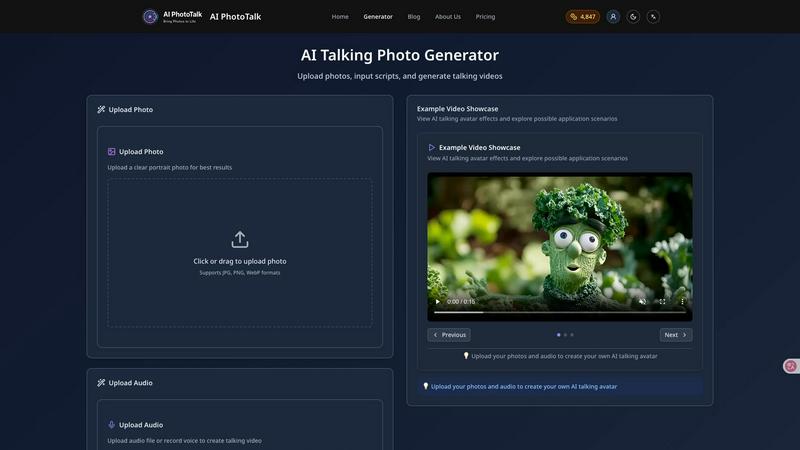
AIPhotoTalk is an innovative AI-powered tool that transforms static portrait photos into engaging, lifelike talking videos in mere seconds. This cutting-edge technology is designed for anyone who wants to create dynamic video content without the need for complex editing skills. Simply upload a clear photo, type your script, and watch as AIPhotoTalk generates a lip-synced video in real-time. It caters to a wide array of users, including marketers looking to enhance their promotional materials, educators seeking to make learning more interactive, and content creators eager to produce eye-catching social media clips. With AIPhotoTalk, you can easily bring your ideas to life, creating professional-quality videos that captivate your audience and convey your message effectively.
About Kling o1
Kling O1 is a revolutionary AI video generator and editor that reshapes how multimedia content is created. Developed by Kuaishou, it stands out as the world's first unified multi-modal video foundation model. This innovative platform integrates text-to-video, image-to-video, and comprehensive video editing capabilities in one powerful system. Designed for a diverse audience, from social media influencers and marketers to indie filmmakers, Kling O1 empowers users to produce exceptional 1080p videos effortlessly. Its unique 7-in-1 engine provides director-level control and Chain of Thought accuracy, ensuring precise video generation and editing. Whether you’re crafting engaging TikToks or professional marketing materials, Kling O1 simplifies the process of transforming ideas into captivating visual narratives.
Frequently Asked Questions
AIPhotoTalk FAQ
How does AIPhotoTalk work?
AIPhotoTalk works by using advanced AI technology to analyze uploaded photos and generate lip-synced talking videos. Simply upload a portrait, enter your script, and the tool creates a video in under 30 seconds.
What types of photos work best for AIPhotoTalk?
Clear, high-quality portrait photos yield the best results. The photo should have good lighting and a straightforward background to ensure realistic animation and lip-sync accuracy.
Can I use AIPhotoTalk for commercial purposes?
Yes, AIPhotoTalk offers a commercial use license, allowing businesses and creators to use the generated videos for professional applications, marketing, and content creation.
Is there a limit to the number of languages supported?
AIPhotoTalk supports over 30 languages, making it a versatile tool for creating content for diverse audiences. This feature allows users to reach and engage with a broader demographic effectively.
Kling o1 FAQ
What types of videos can I create with Kling O1?
With Kling O1, users can create a wide variety of videos, including social media clips, marketing content, educational videos, and even short films. The platform supports both text-to-video and image-to-video generation.
Is Kling O1 suitable for beginners?
Absolutely! Kling O1 is designed to be user-friendly, making it accessible for beginners while still offering advanced features for experienced creators. The intuitive interface helps users navigate the video creation process easily.
How does the Chain of Thought accuracy work?
Chain of Thought accuracy in Kling O1 enhances the video generation process by allowing the AI to interpret prompts more effectively. This results in better motion accuracy and realistic physics simulation, leading to higher-quality video outputs.
Can I edit existing videos with Kling O1?
Yes, Kling O1 provides robust video editing capabilities. Users can modify existing videos, add new elements, and perform complex edits through its Multi-Elements mode, making it a versatile tool for both creation and editing.
Alternatives
AIPhotoTalk Alternatives
AIPhotoTalk is an innovative AI-powered tool that allows users to transform static photos into engaging talking videos in just a matter of seconds. It fits within the video content creation category, serving a wide range of applications from social media clips to educational videos. Users often find themselves exploring alternatives due to factors like pricing, unique features, or specific platform compatibility that may better suit their needs. When considering alternatives to AIPhotoTalk, it's important to identify what features are most valuable for your projects. Look for options that offer user-friendly interfaces, quick rendering times, and flexibility in terms of output formats. Ensuring the tool meets your specific requirements, whether for marketing, education, or personal use, will ultimately enhance your content creation experience.
Kling o1 Alternatives
Kling O1 is an innovative AI video generator and editor that allows users to create high-quality 1080p videos from text or images seamlessly. This platform is ideal for a range of users, from social media influencers to marketers and indie filmmakers, due to its advanced capabilities and user-friendly design. However, users often seek alternatives to Kling O1 for various reasons such as pricing, specific feature sets, or compatibility with different platforms. When choosing an alternative, it's important to consider factors like video quality, ease of use, available editing tools, and whether the platform aligns with your creative needs and project requirements.