
Launch vs Opal
Side-by-side comparison to help you choose the right AI tool.

Discover and launch the latest AI products with a single unlimited subscription.
Last updated: February 28, 2026

Opal is a visual workspace that organizes all your projects and notes so you can find anything instantly.
Last updated: April 13, 2026
Visual Comparison
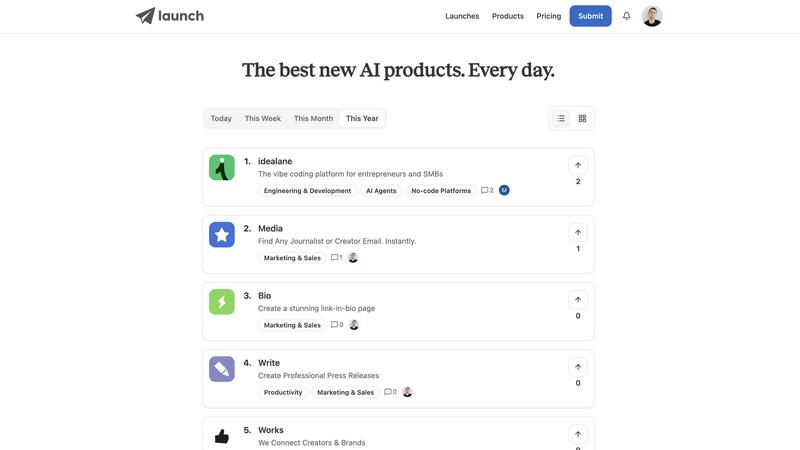
Launch
Opal

Feature Comparison
Launch
Community-Driven Product Launches
At its core, Launch provides a dedicated space for makers to formally introduce their AI products to the world. By submitting a launch, creators can present their tool's value proposition, features, and target audience to a community specifically interested in AI innovation. This process transforms a simple product release into an interactive event, opening the door for immediate feedback, questions, and early user engagement right from day one.
Interactive Feedback & Discussion Forums
Launch goes beyond a static directory by deeply integrating community interaction. Each product submission has its own space where users can leave comments, ask questions, and provide constructive feedback. This direct line from user to creator is invaluable for iterative development. Additionally, the platform hosts general forums where broader discussions about AI trends, challenges, and opportunities can take place among all members.
Competitive Ranking & Recognition System
To highlight quality and motivate creators, Launch employs a multi-tiered ranking system. Products can be sorted and discovered based on being "Rated," "Popular," "Latest," or by "Revenue." The platform crowns "Weekly Winners" and showcases "New & Noteworthy" entries, providing fantastic exposure. This gamified recognition, spanning daily, weekly, monthly, and yearly timelines, encourages makers to continuously improve their offerings.
Curated Discovery & Categorical Browsing
For users exploring the platform, Launch offers powerful tools to cut through the noise. You can browse launches by timeframe (Today, Week, Month, Year) or by specific, detailed categories like AI Agents, Ecommerce, No-code Platforms, or Data Analysis Tools. Sections like "This Week's Launch Picks," "Hidden Gems," and "5 Products You Missed" provide human-curated pathways to discovering the most interesting and valuable tools in the vast AI landscape.
Opal
The Infinite Visual Canvas
Opal's core is an expansive, zoomable canvas that acts like your digital desk. Instead of burying items in folders, you place them spatially—grouping related notes, stacking projects, or arranging items by priority. This visual layout leverages your brain's natural ability to remember locations, turning your workspace into a memorable map of your work. Everything remains visible, so important items stay in your peripheral vision and you can open what you need in seconds without digging.
Rich Media Block Editor
Create and edit content directly on your canvas using a powerful, markdown-based block editor. You're not limited to plain text; embed images, videos, PDFs, and files directly into your notes. This allows you to build comprehensive documents like scripts, manuals, or SOPs with rich context, all without ever leaving the visual environment of your Opal workspace.
Real-Time Collaboration & Sharing
Work together seamlessly. Invite team members or clients to your canvas to collaborate on notes and projects in real time. You can also publish any section of your canvas to the web with a shareable link, making it easy to present strategies, share knowledge bases, or gather feedback without granting full workspace access.
AI Integration & Smart Recall
Connect your AI assistant to Opal through its API using the Opal Recall skill. This allows your AI agent to access, reference, and surface information from your visual workspace. Need to find a specific client quote or an old pitch during a conversation? Your AI can instantly recall it from the spatial map you've built, acting as a powerful extension of your memory.
Use Cases
Launch
An AI Developer Seeking Early User Feedback
A solo developer has just built a beta version of a new AI-powered coding assistant. They use Launch to submit their product, detailing its unique features. Within hours, they receive comments from other developers testing the tool, reporting bugs, suggesting new features, and validating the core idea. This real-world feedback is far more actionable than building in isolation, helping them prioritize their roadmap effectively.
A Product Manager Scouting for Competitive AI Tools
A product manager at a SaaS company needs to research the latest AI tools in the marketing automation space. They browse Launch's "Marketing & Sales" category and sort products by "Popular" this month. They quickly compile a list of emerging competitors and innovative features, gaining crucial market intelligence that informs their own product strategy and partnership opportunities.
An Entrepreneur Looking to Validate a New AI Idea
An entrepreneur has a concept for an AI agent that manages personal finances but is unsure if there's market demand. Before writing a single line of code, they explore Launch's forums and similar products in the "Finance" category. They engage in discussions, gauge community interest in existing solutions, and identify gaps in the market, thereby de-risking their idea before committing significant resources.
An AI Enthusiast Staying Updated on Innovations
A professional who wants to leverage AI for personal productivity but is overwhelmed by the pace of change subscribes to the Launch newsletter. Every week, they receive a curated digest of "This Week's Launches" and "Hidden Gems" directly in their inbox. This allows them to effortlessly stay informed about the most promising new tools that can streamline their work and life.
Opal
Client & Project Management for Agencies
Keep every client project visible on one screen. Drag and drop client briefs, content calendars, asset links, and meeting notes into dedicated zones. See the status of all active jobs at a glance, prevent details from slipping through the cracks, and have everything for a client call ready and open side-by-side in seconds.
Content Creation & Editorial Planning
Map out your entire content strategy visually. Create zones for published posts, drafts, ideas, and keyword research. Visually link related concepts, track social post performance with embedded sheets, and lay out your weekly publishing schedule. This bird's-eye view prevents good ideas from getting lost and streamlines your creative workflow.
Personal Knowledge Management (PKM)
Build a true second brain that works the way you think. Instead of forcing ideas into rigid categories, connect research notes, book highlights, and personal insights spatially on your canvas. Use internal linking to create a web of knowledge that feels organic and is incredibly easy to navigate because you remember where you placed things.
Systemizing Business Operations
Document and access your business playbooks without the hassle. Create visual Standard Operating Procedures (SOPs) by placing checklists, tutorial videos, and template links directly on the canvas. New team members can see how processes interconnect visually, and everyone can find what they need without searching through a confusing file tree.
Overview
About Launch
Launch is the premier community-driven platform built specifically for the vibrant world of AI innovation. It acts as a central hub where creators, developers, and entrepreneurs can introduce their new AI tools and software to an engaged audience of early adopters, fellow makers, and potential users. For makers, it's a stage to gain visibility, collect invaluable early feedback, and refine their products based on real community insights. For enthusiasts and professionals, it's a curated discovery engine to find the most promising and useful AI solutions across categories like Productivity, Marketing, Development, and more. With a trusted community of over 1,900 makers, Launch fosters collaboration through comments, forums, and discussions. Its dynamic ranking system highlights outstanding products daily, weekly, monthly, and yearly, creating a motivating environment for continuous improvement. Whether you're looking to launch your next big idea or stay ahead of the AI curve, Launch is the essential ecosystem to connect, learn, and grow.
About Opal
Opal is a visual knowledge and project management workspace designed for people who think spatially. If you're tired of losing notes in nested folders or forgetting brilliant ideas because they're buried in a traditional app, Opal offers a refreshingly intuitive solution. It provides an infinite digital canvas where you can drag and drop notes, documents, files, and links—organizing them visually just like you would on a physical desk. This spatial memory approach means you remember where things are, not just what they're called, making retrieval instant and frustration-free. It's built for solopreneurs, consultants, agency owners, writers, and anyone whose business runs on conversations, details, and promises. Opal keeps your entire world of active projects, client details, and creative ideas visible and top-of-mind, so you can stop searching and start doing your best work without breaking your flow.
Frequently Asked Questions
Launch FAQ
What is Launch?
Launch is a dedicated online platform and community for discovering, launching, and discussing new AI products and tools. It serves as a meeting point for creators (makers) who want to introduce their AI software and early adopters who want to find and evaluate the latest innovations. It combines product directories with community features like comments, forums, and rankings.
How do I submit my product?
Submitting your product is straightforward. Click the "Submit" button typically found in the site's main navigation. You will be guided through a process to create a launch page for your AI product, which includes adding details like the product name, description, category, tags, and a link. Once submitted, it will be reviewed and then appear on the platform for the community to see and engage with.
How does voting work?
While the provided content doesn't detail a specific "voting" mechanism, it highlights a ranking system based on community engagement and performance. Products can be sorted by "Rated," "Popular," and "Latest." Engagement metrics like comments, views, and potentially external traction (like revenue or usage) likely contribute to a product's visibility in these ranked lists and special sections like "Weekly Winners."
What are Top Products and Archives?
"Top Products" refers to the various ranked lists and highlighted sections on Launch, such as the "Weekly Winners," "Popular" sorts, and curated picks. These are the products currently receiving the most attention and acclaim. "Archives" likely refers to the historical listings of all past launches, allowing users to browse products submitted in previous days, weeks, months, or years, ensuring great tools remain discoverable over time.
Opal FAQ
How is Opal different from tools like Notion or Google Docs?
While Notion and Docs are excellent for deep document creation, they rely on hierarchical folders, databases, and dashboards that can hide information. Opal is built on spatial memory. It gives you a single, infinite surface where everything is laid out visually. You don't search by title in a list; you look and remember where it is on your map, which is often a faster, more intuitive way to access the information you use daily.
Can I store files like PDFs and images in Opal?
Absolutely. Opal allows you to store and preview a wide variety of files directly on your canvas. You can drag and drop PDFs, images, spreadsheets, and more onto your workspace. These files become visual objects you can place near relevant notes and projects, so all your reference material is contextually organized and just a click away.
Is Opal good for team collaboration?
Yes, Opal supports real-time collaboration. You can share your entire workspace or specific sections with team members. Everyone can view, edit, and add notes simultaneously, making it perfect for collaborative brainstorming, project planning, and maintaining a shared source of truth that everyone can see and understand at a glance.
What happens if my canvas gets too cluttered?
The infinite canvas is designed to scale with you. You can zoom out for a high-level overview or zoom in to focus on a specific area. The power of spatial organization means you can create distinct zones or "desks" for different areas of your work (e.g., one zone for clients, one for personal projects). This keeps your mental map clear while still having everything in one connected space.
Alternatives
Launch Alternatives
Launch is a vibrant platform in the AI product discovery and launch space. It connects creators with a community to get feedback and compete for rankings, all accessible through an unlimited subscription model. It's a great hub for anyone wanting to build or find the next big AI tool. People often look for alternatives for various reasons. Maybe the subscription model doesn't fit their budget, or they need a platform focused on a different niche. Others might prioritize different features, like deeper analytics, a different type of community, or a pay-per-product model instead of a subscription. When evaluating other platforms, consider what matters most for your goals. Are you a maker seeking feedback, or a user hunting for tools? Look at the community size and engagement, the cost structure, and the specific features that support your primary need, whether it's launching, learning, or simply discovering new AI innovations.
Opal Alternatives
Opal is a visual project management and knowledge workspace designed for professionals. It falls into the productivity and management software category, helping users organize notes, documents, and files on an infinite digital canvas. This spatial approach prioritizes visual memory over traditional folder hierarchies. Users often explore alternatives to Opal for various reasons. Some may need a different pricing model or a free tier, while others might require specific integrations or platform compatibility not offered. The search for the right tool is highly personal, driven by unique workflows and team requirements. When evaluating alternatives, consider what matters most for your work. Key factors include your preferred method of organization, collaboration needs, the types of content you handle, and your budget. The goal is to find a tool that feels intuitive and actually gets used, rather than becoming another abandoned app.