
Magic Hour vs MakeAIVideo
Side-by-side comparison to help you choose the right AI tool.

Magic Hour
Magic Hour is your free AI studio to create professional videos and images in seconds.
Last updated: February 27, 2026

MakeAIVideo
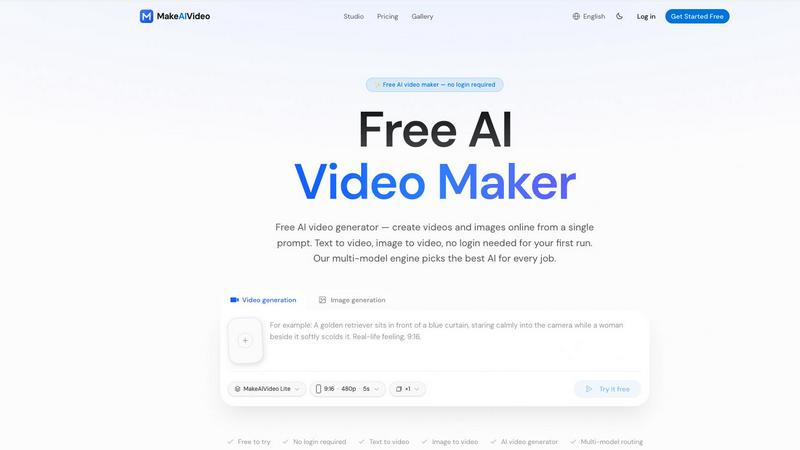
MakeAIVideo is an innovative AI video generator that creates stunning videos from text or images using advanced multi-model routing technology.
Last updated: March 18, 2026
Visual Comparison
Magic Hour

MakeAIVideo
Feature Comparison
Magic Hour
Text-to-Video & Image-to-Video
Bring your ideas to life instantly by generating videos from simple text descriptions or by animating your static images. Describe a scene like "a serene sunset over mountains," and Magic Hour's AI will create a cinematic clip. Alternatively, upload a photo and watch it transform into a moving video, perfect for creating dynamic social media posts or adding motion to product shots without any manual animation skills required.
AI Video Editor & Restyler (Video-to-Video)
Transform the look and feel of any existing video footage with the video-to-video tool. Apply new artistic styles, change the color grading, or alter the overall mood to match your brand or campaign theme. This feature is ideal for repurposing content, creating cohesive video series, or experimenting with different visual aesthetics without starting from scratch every single time.
AI Face Swap & Lip Sync
Easily personalize videos by swapping faces or syncing lip movements to new audio tracks. The AI Face Swap tool allows you to seamlessly place a person's face into a video, great for fun memes, localized ad variants, or conceptual scenes. The AI Lip Sync feature ensures that any talking photo or video character's mouth movements match your provided dialogue perfectly, creating realistic and engaging talking avatars or personalized video messages.
Unified AI Image Studio
Beyond video, Magic Hour is a complete image creation suite. Generate original images from text prompts with the AI Image Generator, then edit them using text-based commands in the AI Image Editor. You can also create professional headshots, upscale low-resolution images for crisp quality, remove backgrounds, and even swap faces in photos, all within the same seamless platform.
MakeAIVideo
Multi-Model Routing
MakeAIVideo employs a sophisticated multi-model routing engine that automatically selects the best AI model suited to your prompt. This means that depending on the task, you benefit from the most effective capabilities of models like Seedance, Veo, and more, ensuring high-quality video output tailored to your needs.
Zero Login Required
One of the standout features of MakeAIVideo is that you can begin creating videos without needing to create an account. This hassle-free access allows you to dive directly into video generation, making it perfect for those who want to quickly test the platform or generate content on the fly.
High-Quality Output
The platform generates cinematic-quality videos in under a minute, with options for up to 4K resolution. This ensures that whether you are creating content for social media, advertisements, or presentations, the visuals will be sharp and professional, meeting industry standards.
Dual-Channel Sound Design
Enhance your videos with dual-channel sound design, where audio is generated in sync with the visuals. This feature removes the need for post-production editing, allowing for a seamless audio-visual experience that elevates the overall quality of your videos.
Use Cases
Magic Hour
Short-Form Social Media & Ad Content
Quickly produce eye-catching videos and images for platforms like TikTok, Instagram Reels, and YouTube Shorts. Generate trending content from text ideas, restyle existing clips to stay on-brand, and create personalized ad variants for different audiences. This enables creators and marketers to publish fresh, engaging content daily without a lengthy production process.
Product Demos & Marketing Videos
Create compelling product demonstration videos by animating product images or applying sleek styles to footage. Marketers can quickly produce high-quality explainer videos, showcase features, and generate multiple localized versions for different markets using AI tools like lip sync and face swap, eliminating the need for costly and time-consuming reshoots.
Team Training & Internal Communications
Produce consistent and professional training clips, onboarding videos, or internal announcement messages. Teams can use talking photos for engaging presentations or restyle existing training materials to keep them visually fresh. The platform's ease of use allows anyone to create effective visual communication, not just dedicated video editors.
Personalized Content at Scale
Agencies and developers can use Magic Hour's API to integrate AI video and image generation directly into their applications. This allows for the creation of thousands of unique, personalized assets for campaigns, such as generating user-specific video messages, virtual try-ons, or personalized ad content that drives higher engagement and conversion rates.
MakeAIVideo
Social Media Content Creation
MakeAIVideo is ideal for social media managers looking to create engaging videos for platforms like Instagram and TikTok. The ease of use and rapid generation enables them to keep their content fresh and relevant without extensive resources or time.
Product Showcases
Businesses can utilize MakeAIVideo to create stunning product showcase videos quickly. By entering details about the product, users can generate high-quality promotional videos that highlight features and benefits, perfect for e-commerce and online marketing.
Educational Videos
Educators and content creators can leverage MakeAIVideo to produce informative videos that explain concepts clearly and creatively. The platform's ability to generate custom visuals based on text prompts allows for interactive and engaging learning materials.
Brand Storytelling
MakeAIVideo can help brands tell their stories through compelling narratives. By inputting key messages and themes, businesses can create videos that resonate with their audience, enhancing brand identity and customer engagement.
Overview
About Magic Hour
Magic Hour is your all-in-one, browser-based AI studio designed to make professional video and image creation fast, easy, and accessible to everyone. Whether you're a solo creator, a marketer on a tight deadline, or part of a team needing scalable content, Magic Hour empowers you to produce stunning visuals without the need for expensive equipment, complex software, or reshoots. Its core value proposition is simple: consolidate over 100 powerful AI tools into a single, intuitive platform where you can generate, edit, and enhance media in seconds. Start with a text prompt, an image, or a video clip, and transform it into engaging content. Need to create a video from a script? Use text-to-video. Want to apply a new artistic style to existing footage? Video-to-video has you covered. From personalizing content with AI Face Swap and Lip Sync to generating professional AI headshots and upscaling image quality, Magic Hour streamlines the entire creative workflow. It's built for rapid iteration, allowing you to create multiple variations, maintain a consistent brand style, and produce share-ready outputs for social media, ads, training clips, and more—all from your web browser.
About MakeAIVideo
MakeAIVideo is an innovative AI video generator that stands out as the first to utilize multi-model routing. This unique feature allows the platform to analyze your prompt dynamically and select the most suitable AI model for the task at hand, whether it be Seedance, Kling, Veo, Sora, Hailuo, or others. This flexibility ensures that users get the best possible results tailored to their specific needs. Designed for creators, marketers, and businesses alike, MakeAIVideo eliminates the typical barriers associated with video creation. You can generate videos effortlessly with no account required for your first video. Just visit the site, enter your prompt, and watch as your video comes to life. With its combination of automatic model selection and zero-friction access, MakeAIVideo offers an unparalleled experience for producing high-quality video content quickly and easily.
Frequently Asked Questions
Magic Hour FAQ
Is Magic Hour really free to use?
Yes! Magic Hour offers a robust free tier that gives you access to over 100 AI tools to start creating immediately. You can generate videos and images, use face swap, lip sync, and many other features without entering a credit card. This makes it easy to explore the platform's capabilities and integrate it into your workflow before considering any premium plans for higher-volume needs.
What kind of videos can I create with Magic Hour?
You can create a wide variety of video content, including cinematic scenes from text, animated clips from images, restyled existing videos, personalized messages with face swap and lip sync, social media ads, product demos, training clips, and animated memes. The platform is designed for versatility to meet the needs of creators, marketers, and businesses.
Do I need video editing experience to use Magic Hour?
Not at all. Magic Hour is built to be intuitive and user-friendly. The workflow is straightforward: upload or describe your media, choose a tool or template, and let the AI handle the complex part. You can preview and download your results quickly, making professional-grade video creation accessible to beginners while still offering powerful features for experienced creators.
Can I use Magic Hour for commercial projects?
Absolutely. Magic Hour is trusted by millions of creators and thousands of teams for commercial work, including advertising, client content, and social media marketing. The tools are designed to produce high-quality, shareable outputs suitable for professional use. For large-scale commercial deployment, their API and team plans offer the necessary scalability and terms.
MakeAIVideo FAQ
How does MakeAIVideo choose the AI model for my video?
MakeAIVideo's multi-model routing engine analyzes your prompt and automatically selects the AI model best suited for your specific needs. This ensures optimal results without requiring manual selection on your part.
Can I use MakeAIVideo for commercial purposes?
Yes, all plans offered by MakeAIVideo allow for commercial use of the generated videos. This makes it an excellent tool for businesses looking to produce marketing materials without worrying about licensing issues.
Is there a limit to how long my videos can be?
Free users can generate videos with a length of 5 to 10 seconds, while paid plans offer more flexibility with longer videos. The platform supports video lengths suitable for various formats and needs.
Do I need any video editing skills to use MakeAIVideo?
No, MakeAIVideo is designed to be user-friendly, allowing anyone to create videos without prior video editing experience. The intuitive interface and automated features simplify the entire process, making video creation accessible to everyone.
Alternatives
Magic Hour Alternatives
Magic Hour is a browser-based AI video generator and editor, squarely in the category of AI-powered content creation tools. It's designed to help creators, marketers, and teams produce professional videos quickly by using text prompts or existing media to generate, restyle, and personalize content. Users often explore alternatives for a variety of reasons. This could be due to budget constraints and different pricing models, a need for specific features not offered, or a preference for a desktop application over a web-based platform. Some may also be looking for tools that cater to a different type of workflow or output quality. When evaluating other options, it's wise to consider your primary use case, such as short-form social clips or product demos. Look closely at the core AI capabilities, like text-to-video or lip-sync quality, the ease of the editing workflow, and the overall value for your specific needs and team size.
MakeAIVideo Alternatives
MakeAIVideo is an innovative AI video generator that falls into the category of video creation tools. It stands out by offering multi-model routing, which means it intelligently selects the best AI model for your specific needs without requiring you to commit to just one option. This unique feature, along with the effortless access to video creation without the need for an account, makes it an attractive tool for users seeking to create videos quickly and efficiently. However, users often seek alternatives for various reasons, such as pricing structures, specific feature sets, or compatibility with different platforms. When choosing an alternative, consider factors like ease of use, the range of features offered, and whether the tool can cater to your specific video creation needs. It's essential to weigh these aspects to find a solution that aligns with your goals and budget.