
Matcharge - Subscription Manager vs Outbid
Side-by-side comparison to help you choose the right AI tool.

Matcharge - Subscription Manager
Matcharge simplifies managing your subscriptions, helping you track bills and avoid surprise charges for a stress-free.
Last updated: February 26, 2026

OutBid delivers instant job alerts from Upwork and AI-generated proposals via Telegram, helping freelancers apply faster and win more jobs.
Last updated: March 11, 2026
Visual Comparison
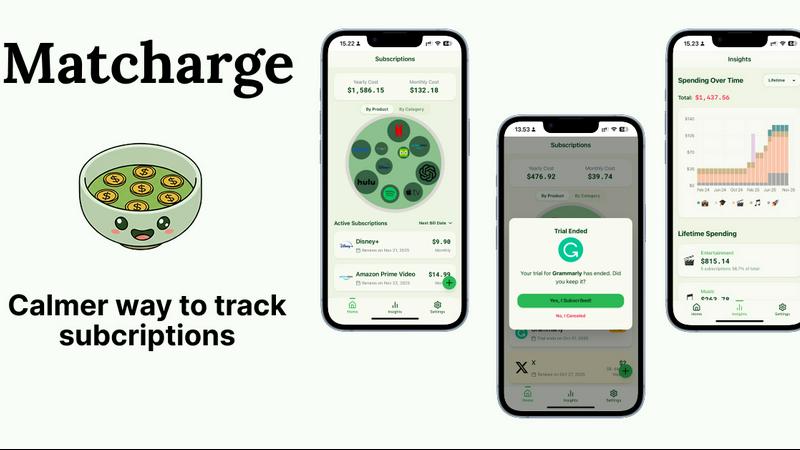
Matcharge - Subscription Manager
Outbid

Feature Comparison
Matcharge - Subscription Manager
Track Everything in One Place
Matcharge consolidates all your subscriptions and bills into a single, user-friendly dashboard. This feature allows you to easily organize and manage your recurring payments by product or category, making it effortless to keep track of your financial commitments.
Never Pay for Forgotten Trials
With Matcharge, you will never miss a reminder for an upcoming free trial expiration or a recurring charge. The app sends timely notifications, ensuring that you stay informed and avoid unexpected payments for services you may have forgotten about.
See Where Your Money Really Goes
Gain a clear understanding of your spending habits with Matcharge's insightful visualizations. The app provides a breakdown of your expenses by category, monthly and yearly totals, and a Zen-garden overview of your subscriptions, helping you identify patterns and manage your budget effectively.
Understand Your Habits Over Time
Matcharge offers beautiful charts that track your spending over time and highlight your top spending categories. This feature allows you to build awareness of your financial habits, enabling you to make informed decisions and foster a healthier relationship with your money.
Outbid
Instant Alerts
OutBid provides real-time job alerts within seconds of a new posting on Upwork. This feature ensures that freelancers can act quickly, applying for jobs before the majority of competitors even see the listings.
AI Proposals
With OutBid's AI proposal generation, each alert comes with a personalized proposal draft crafted specifically for the job at hand. This feature saves time and effort, allowing freelancers to copy, tweak, and submit their applications with minimal hassle.
Smart Filtering
Freelancers can take advantage of OutBid's smart filtering system, which allows them to see only the jobs that match their specific criteria. Filters can be set for skills, budget, experience level, and quiet hours, ensuring that users only receive notifications for relevant opportunities.
War Room Strategy Mode
When job competition is particularly fierce, OutBid’s War Room mode enables users to add custom instructions and regenerate proposals. This feature helps freelancers stand out in crowded job listings, increasing their chances of being selected.
Use Cases
Matcharge - Subscription Manager
Monitoring Multiple Subscriptions
For individuals with various subscriptions, such as streaming services, gym memberships, and software tools, Matcharge provides an efficient way to monitor all payments in one place, reducing the stress associated with managing multiple accounts.
Avoiding Unwanted Charges
If you frequently sign up for free trials, Matcharge’s reminder system ensures you are notified before any charges occur. This feature is particularly useful for those who want to explore new services without the risk of being charged unexpectedly.
Budgeting and Spending Awareness
Matcharge is ideal for users aiming to adopt more mindful spending habits. By visualizing their financial commitments and analyzing spending patterns, users can make better financial choices and stick to their budget.
Financial Planning for Families
Families can benefit from Matcharge by tracking household subscriptions, ensuring that everyone is aware of upcoming payments. This collaborative approach helps manage expenses and encourages discussions about budgeting and financial priorities.
Outbid
Early Application Advantage
Freelancers who want to be the first to apply for jobs can leverage OutBid's instant notifications. By receiving alerts within seconds, they can submit their proposals while the job is still fresh in the client's mind.
Time Management for Busy Professionals
For freelancers who have other commitments, OutBid provides a solution to efficiently manage their time. With automated job monitoring and proposal drafting, they can focus on their primary responsibilities while still pursuing freelance opportunities.
Proposal Writing Support for New Freelancers
New freelancers often struggle with writing effective proposals. OutBid’s AI-generated drafts offer valuable assistance, making it easier for them to craft compelling applications and increase their chances of landing jobs.
Enhanced Job Application Strategy
Experienced freelancers can utilize OutBid's War Room mode to refine their applications in competitive environments. This feature allows them to tailor their proposals based on client preferences, leading to a higher success rate.
Overview
About Matcharge - Subscription Manager
Matcharge is an innovative subscription management tool designed to help users track their recurring bills and subscriptions in a simple, organized manner. With a clean and intuitive interface, Matcharge empowers users to see all their subscriptions in one view, allowing them to understand where their money is going and avoid surprise charges. Whether you are a busy professional juggling multiple subscriptions or someone looking to streamline your finances, Matcharge caters to your needs. The main value proposition of Matcharge lies in its ability to provide peace of mind by reminding users about upcoming charges and trial expirations, ultimately helping them build mindful spending habits and regain control over their financial commitments.
About Outbid
OutBid is an innovative tool designed for freelancers who want to stay ahead in the competitive Upwork marketplace. It continuously monitors job postings on Upwork 24/7 and sends instant alerts via Telegram, allowing users to be among the first to apply for new opportunities. This proactive approach ensures that freelancers can respond to job postings within 60 seconds, significantly increasing their chances of being noticed by potential clients. Each alert includes a tailored, AI-written proposal draft that aligns with the specific job description and the user's skills, making it quick and easy to apply. OutBid is ideal for freelancers at any experience level, whether you are a busy professional who cannot constantly check job listings or a newcomer struggling with proposal writing. By streamlining the application process and providing real-time insights, OutBid empowers freelancers to win more jobs and maximize their earning potential.
Frequently Asked Questions
Matcharge - Subscription Manager FAQ
Do I need to connect my bank account to use Matcharge?
No, connecting your bank account is not necessary to use Matcharge. You can manually input your subscriptions and bills, giving you control over your financial data.
Can Matcharge cancel subscriptions for me automatically?
No, Matcharge does not have the capability to cancel subscriptions automatically. However, it provides reminders and insights to help you manage your subscriptions effectively.
Is Matcharge free to use?
Matcharge offers a free version with essential features. There is a Pro version available for users who want access to advanced features and additional insights.
How does the "Zen Garden" visualization work?
The "Zen Garden" visualization is a calming way to see all your subscriptions at a glance. It organizes your recurring payments into a beautiful and intuitive layout, making it easy to understand your financial situation at a moment's notice.
Outbid FAQ
How fast are the alerts?
OutBid sends alerts within 60 seconds of a job posting on Upwork, allowing users to be among the first to respond.
Do I need to be tech-savvy?
No, OutBid is designed to be user-friendly. Setting up the bot on Telegram takes less than 2 minutes, making it accessible for everyone.
Can I customize the proposals?
Yes, each AI-generated proposal can be easily edited to fit your personal voice and style before submission.
Is this affiliated with Upwork?
OutBid operates independently and is not officially affiliated with Upwork. It serves as a tool to enhance your experience on the platform.
Alternatives
Matcharge - Subscription Manager Alternatives
Matcharge - Subscription Manager is a mindful subscription management tool designed to help users track their bills, recurring charges, and free trials all in one convenient location. It belongs to the personal finance category, making it an essential resource for anyone looking to streamline their financial commitments and reduce the stress associated with managing multiple subscriptions. Users often seek alternatives to Matcharge for various reasons, including pricing considerations, feature sets, or compatibility with specific platforms. When choosing an alternative, it's important to evaluate the user interface, the ability to track diverse subscription types, and any unique features that may enhance your financial awareness. Finding a solution that aligns with your specific needs will ensure a more satisfying experience and better financial management.
Outbid Alternatives
Outbid is a productivity tool designed specifically for freelancers using Upwork. It offers real-time job alerts and AI-generated proposal drafts sent directly to your Telegram, ensuring you’re among the first to apply for new opportunities. This service streamlines the application process, enhancing your chances of standing out in a competitive marketplace. Users often seek alternatives to Outbid due to varying needs such as pricing, specific feature sets, or compatibility with different platforms. When looking for an alternative, consider factors like the level of customization available, the speed of alerts, and how well the service integrates with your existing workflow. It’s essential to choose a tool that aligns with your unique working style and enhances your overall productivity.