
Mimo AI vs tools.video
Side-by-side comparison to help you choose the right AI tool.

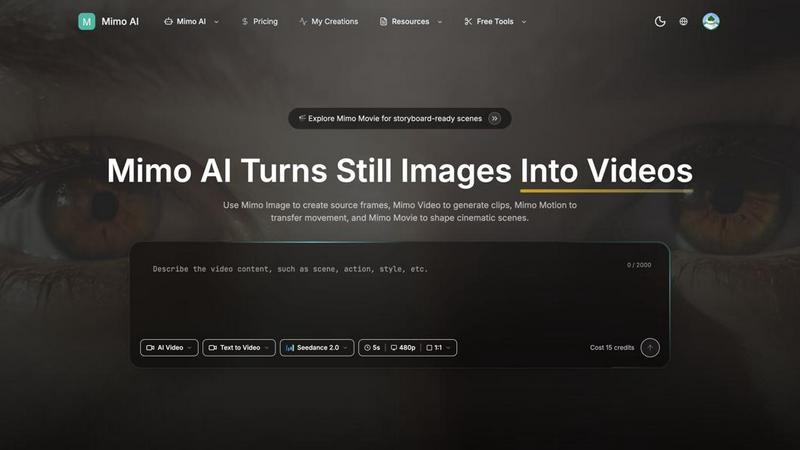
Mimo AI effortlessly transforms your images into stunning videos, enabling creators to produce professional-quality content in seconds.
Last updated: March 26, 2026

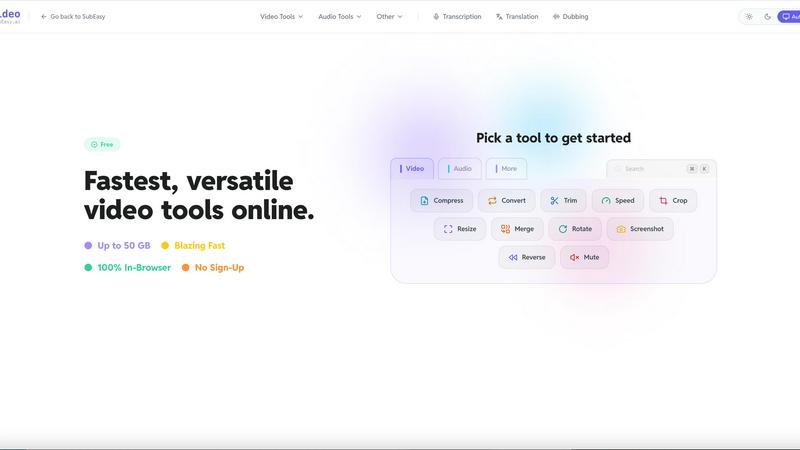
tools.video is a fast, free online video toolkit for compressing, converting, cropping, and trimming videos without watermarks or sign-ups.
Last updated: April 13, 2026
Visual Comparison
Mimo AI
tools.video
Feature Comparison
Mimo AI
Image to Video AI
Mimo AI's Image to Video feature allows users to transform static images into dynamic videos effortlessly. By applying natural motion and cinematic effects, creators can breathe life into their visuals, making them more engaging and appealing to audiences.
Text to Video
The Text to Video feature enables users to describe their vision in simple terms, allowing the AI to generate a perfect video based on text prompts. This functionality is perfect for those who want to create content without the need for extensive video editing skills.
Multiple AI Models
Mimo AI offers a selection of various AI models, such as Kling and Runway, tailored for different video styles and quality levels. This diversity allows users to choose the model that best fits their creative needs, enhancing the overall versatility of video production.
Fast Generation
With Mimo AI's optimized AI pipeline, users can generate videos in seconds. This speed is crucial for creators and marketers who need to produce content quickly to meet deadlines or engage their audience with timely updates.
tools.video
Video Compression
The video compression tool allows users to reduce the size of their video files without sacrificing quality. This feature is essential for those looking to save space or upload videos quickly to social media platforms. With tools.video, you can compress large files effortlessly, making it easier to share your content without lengthy upload times.
Format Conversion
tools.video supports an extensive range of formats, including MP4, MOV, WebM, and many others. This feature enables users to convert their videos to the format that best suits their needs, whether for web use, playback on different devices, or editing purposes. The process is straightforward and requires no additional software, making it accessible for everyone.
Editing Tools
The editing tools available on tools.video make it easy to trim, crop, mute, or merge video clips. These features are designed to be intuitive, allowing users to make quick edits without the need for complex software. Whether you are creating social media content or preparing educational materials, these tools help streamline the editing process.
Media Extraction
With the media extraction feature, users can convert videos to GIFs or extract high-quality MP3 audio tracks from their videos. This functionality is particularly useful for content creators who want to repurpose video content into other formats, such as creating engaging GIFs for social media or extracting audio for podcasts.
Use Cases
Mimo AI
Social Media Content Creation
Social media influencers and brands can leverage Mimo AI to produce eye-catching videos from their image libraries. By transforming still images into dynamic content, they can maintain a consistent posting schedule without the burden of time-consuming editing.
Marketing Campaigns
Marketers can utilize Mimo AI to create promotional videos that showcase products or services. The platform's ability to generate high-quality visuals quickly allows for rapid iteration and adjustment based on audience feedback, ensuring that marketing messages resonate effectively.
Educational Content Development
Educators and content creators can use Mimo AI to develop engaging instructional videos. By converting static diagrams or images into animated sequences, they can enhance learning experiences and improve information retention for students.
Art and Animation Projects
Artists and animators can explore their creativity using Mimo AI's tools. By generating unique visual narratives through image transformations and motion transfers, they can create compelling stories that captivate their audience.
tools.video
Content Creation for Social Media
Tools.video is perfect for social media managers and content creators who need to quickly edit and format videos for platforms like Instagram, Facebook, and TikTok. With its fast processing and user-friendly tools, you can create engaging content with minimal effort.
Educational Use
Educators can utilize tools.video to prepare instructional videos or presentations that require video editing. By easily trimming clips or converting formats, teachers can create professional-looking materials that enhance the learning experience for students.
Podcast Production
For podcasters, the media extraction feature is invaluable. You can quickly extract audio from video files, allowing for seamless integration of video content into audio formats. This can help diversify your content offerings and reach a broader audience.
Personal Projects
Individuals working on personal video projects, such as family videos or travel montages, will find tools.video incredibly helpful. The ability to compress large files and perform basic edits means that anyone can create polished videos without needing extensive technical knowledge.
Overview
About Mimo AI
Mimo AI is an innovative creative platform that seamlessly integrates four powerful tools: Mimo Video, Mimo Image, Mimo Motion, and Mimo Movie. Designed for creators, marketers, and teams, Mimo AI allows users to easily generate high-quality videos from still images, transfer motion from reference clips, and build cinematic scenes—all within a single web application. This streamlined workflow accelerates visual production, enabling users to create engaging content quickly and efficiently. Mimo AI's versatile credit-based usage system ensures that users can manage their resources flexibly, making it an ideal solution for both individual creators and larger teams looking to enhance their visual storytelling capabilities. With its user-friendly interface and advanced AI technology, Mimo AI transforms the way visual content is produced, making professional-quality videos accessible to everyone.
About tools.video
tools.video is a powerful web-based video processing suite that simplifies how you handle video and audio editing tasks. This tool is designed for speed and efficiency, making it ideal for creators, educators, and professionals who need reliable video solutions without the hassle of expensive software. With tools.video, users can perform various tasks, including video compression, format conversions, and basic editing—all directly in their browser. There's no need for account registration, and files are processed locally, ensuring that privacy is maintained. The platform supports large files up to 50 GB and offers a user-friendly interface that allows for quick and seamless workflows. Whether you are looking to compress a video for faster uploading or convert a file format for compatibility, tools.video provides a straightforward, no-frills approach to video processing that respects your time and resources.
Frequently Asked Questions
Mimo AI FAQ
What is Mimo AI and how do the tools fit together?
Mimo AI is a comprehensive creative platform that integrates Mimo Video, Mimo Image, Mimo Motion, and Mimo Movie. These tools work together to streamline video generation, image creation, motion transfer, and cinematic workflows, making it easier for users to produce professional-quality content.
What types of images work best with Mimo AI?
Mimo AI supports various image formats, including JPG, PNG, and WebP. To achieve the best results, images should be high-quality and relevant to the desired motion or theme, as this will enhance the final video output.
How long does it take to generate a video?
With Mimo AI's optimized AI pipeline, videos can be generated in a matter of seconds. This rapid production capability allows users to create and share content quickly, making it ideal for fast-paced environments like social media and marketing.
How does the credit system work?
Mimo AI operates on a flexible credit system, allowing users to pay as they go. Users start with free credits and can purchase additional credits as needed, ensuring that they can scale their usage according to their production requirements without financial strain.
tools.video FAQ
Is tools.video free to use?
Yes, tools.video is completely free to use. There are no hidden fees, subscriptions, or account registrations required to access its features.
What file types does tools.video support?
tools.video supports a wide array of file formats including MP4, MOV, MKV, WebM, AVI, and many more. It also provides multi-channel audio support, ensuring compatibility with various media types.
How long does processing take?
Processing times can vary based on the size of the file and the complexity of the task. However, tools.video is designed for speed, utilizing advanced technology to ensure that tasks are completed quickly and efficiently.
Does tools.video keep my files?
No, tools.video processes everything locally on your device. This means your files never leave your computer, ensuring maximum privacy and security while working on your projects.
Alternatives
Mimo AI Alternatives
Mimo AI is an innovative platform that specializes in transforming the creative process for users involved in content creation, design, and video production. By integrating tools for image-to-video conversion, AI image generation, motion transfer, and storyboard-ready scenes, it provides a seamless workflow for creators, marketers, and teams looking to produce high-quality visuals quickly and efficiently. Users often seek alternatives to Mimo AI for various reasons, including pricing structures, specific feature sets, or compatibility with existing workflows and platforms. When choosing an alternative, it’s essential to consider factors such as the range of features offered, ease of use, customer support, and how well the platform aligns with your creative goals and budget.
tools.video Alternatives
tools.video is a free, online video toolkit that belongs to the video processing category. It provides users with a variety of essential tools such as compression, conversion, and editing, all within a browser-based platform. This accessibility makes it appealing to creators, students, and professionals seeking quick and effective video solutions without the hassle of installations or expensive software. Users often search for alternatives to tools.video for various reasons, such as specific feature requirements, compatibility with different platforms, or preferences for unique editing capabilities. When evaluating alternatives, it’s important to consider factors like ease of use, range of features, pricing models, and whether the tool supports the video formats you need. A good alternative should provide the same level of convenience and functionality while meeting your specific needs.