
MyImageUpscaler vs Postmine
Side-by-side comparison to help you choose the right AI tool.

MyImageUpscaler
Enhance and upscale your images to 4K in seconds with AI, preserving sharp details and clarity effortlessly.
Last updated: February 26, 2026

Postmine
Capture trending posts and instantly turn them into a week's worth of ready-to-publish content with AI.
Last updated: April 13, 2026
Visual Comparison
MyImageUpscaler

Postmine
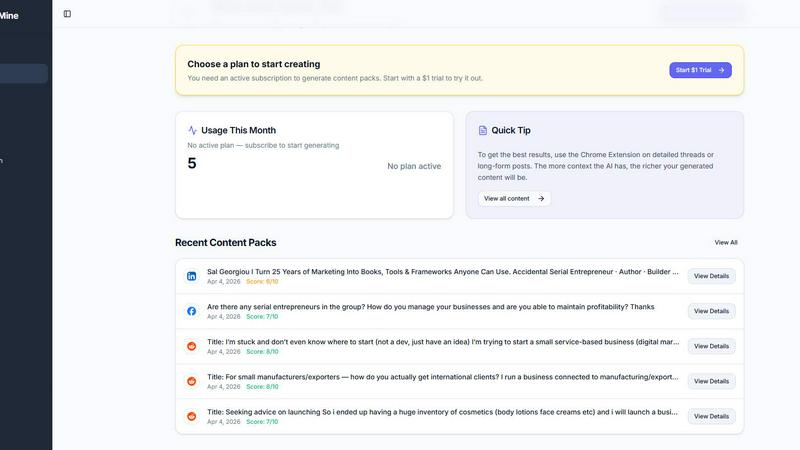
Feature Comparison
MyImageUpscaler
Advanced Detail Preservation
MyImageUpscaler uses state-of-the-art AI algorithms to ensure that image quality is maintained during the upscaling process. Unlike traditional methods that often result in blurry outputs, our technology preserves the fine details, ensuring that images remain sharp and professional-looking.
Fast Processing Times
Experience efficiency with MyImageUpscaler as it processes images in under 10 seconds. This rapid turnaround is ideal for users who need quick results without sacrificing quality, allowing them to focus on their projects instead of waiting around.
Batch Processing for Large Projects
Our platform supports batch processing, allowing users to upscale and enhance up to 500 images simultaneously. This feature is particularly advantageous for businesses and photographers who require bulk editing, saving them time and effort in managing multiple files.
Platform-Ready Presets
MyImageUpscaler offers platform-specific presets for popular social media channels such as Amazon, Instagram, YouTube, and TikTok. This means users can easily optimize their images for each platform's requirements, enhancing their visual appeal and engagement without additional editing.
Postmine
One-Click Chrome Extension Capture
The heart of Postmine is its intuitive Chrome Extension. Simply browse your social feeds as normal. When you see a post with great engagement or an interesting discussion, just right-click it and select "Generate Content Pack" from the menu. The extension captures the post instantly without you having to leave the page or switch tabs, making the process seamless and incredibly fast.
7-Format AI Content Generation
This is where Postmine saves you hours of work. Once you capture a post, the AI analyzes the discussion and automatically generates a complete content pack with seven different pieces, each optimized for a specific platform. You get a detailed blog post, a professional LinkedIn article, a punchy Twitter thread, a friendly Facebook post, an engaging Instagram caption with hashtags, a community-focused Reddit post, and a helpful FAQ. It's all done in under 30 seconds.
Custom Brand Voice Profiles
Tired of generic-sounding AI content? Postmine lets you define your unique Brand Voice. You can set your preferred tone (like professional, casual, or witty), specify your target audience, list key phrases you always use, and even note terms to avoid. Once saved, every piece of content generated will sound authentically like you or your brand, maintaining consistency across all your channels.
Built-in Content Calendar & Bulk Capture
Postmine isn't just a generator; it's a full content management system. The built-in Content Calendar lets you schedule your generated pieces, track what's coming up, and mark items as published. For power users, Bulk Capture Mode allows you to select multiple posts from your feed at once and batch-generate content packs for all of them, perfect for planning your entire week in one sitting.
Use Cases
MyImageUpscaler
E-commerce Sellers
E-commerce sellers can significantly benefit from MyImageUpscaler as it allows them to enhance product images quickly. Crisp, high-quality images can lead to better customer engagement and increased sales, making this tool essential for online retailers.
Content Creators on Social Media
Content creators resizing images for social media platforms can rely on MyImageUpscaler to maintain image quality while adjusting dimensions. By using our platform, they can create visually appealing posts that stand out, attracting more followers and engagement.
Real Estate Agents
Real estate agents preparing MLS listings can utilize MyImageUpscaler to ensure that property photos are presented in the best light. High-quality images can make a substantial difference in attracting potential buyers and showcasing properties effectively.
Photographers Managing Large Batches
Photographers dealing with a large volume of images can take advantage of MyImageUpscaler’s batch processing feature. This capability allows them to quickly enhance multiple photos, ensuring they can deliver high-quality work to clients without the tedious manual editing process.
Postmine
For the Social Media Manager
A social media manager responsible for multiple platforms can use Postmine to radically speed up their workflow. Instead of manually crafting unique posts for LinkedIn, Twitter, and Instagram from a single idea, they can capture a viral industry tweet and instantly have a week's worth of varied, platform-optimized content ready to schedule in their calendar, ensuring consistent posting with a unified brand voice.
For the Solopreneur or Consultant
Solopreneurs wearing many hats need to maximize their content output without sacrificing their personal touch. With Postmine, a consultant can right-click a insightful comment from a LinkedIn discussion they're part of, generate a content pack, and quickly have a professional blog post to publish on their site and complementary social posts to share their expertise, all while sounding exactly like them.
For Content and Marketing Teams
Marketing teams can use Postmine to fuel their content engine. A team member can use Bulk Capture to gather the week's most relevant Reddit threads and industry LinkedIn posts. In minutes, they have a repository of blog post ideas, social captions, and FAQ content that addresses exactly what their audience is talking about, making their strategy more agile and responsive.
For the Freelance Writer
A freelance writer creating content for clients can use Postmine to research and ideate faster. They can capture trending discussions in their client's niche and use the generated blog post as a high-quality first draft or detailed outline. The accompanying social media pieces can be presented as a bonus, adding extra value to their service package and impressing their clients.
Overview
About MyImageUpscaler
MyImageUpscaler is an innovative AI-powered image enhancement and upscaling platform tailored for businesses, content creators, and professionals seeking high-quality image outputs. Our cutting-edge technology allows users to upscale images by 2x to 4x, ensuring that sharpness and fine details are preserved throughout the process. This platform is particularly beneficial for e-commerce sellers who need crisp product images, content creators resizing visuals for social media, real estate agents preparing listings, and photographers managing large batches of photos. With a user-friendly interface and quick processing times—often under 10 seconds—MyImageUpscaler provides an effective solution for anyone looking to enhance their images without the hassle of complex software. Our free tier includes 10 credits with no credit card required, making it accessible for users to try out the service before committing to a paid plan that starts at just $9 per month.
About Postmine
Postmine is your all-in-one content creation engine that turns viral social media discussions into a full week's worth of content in under 30 seconds. It starts with a simple Chrome Extension that lets you right-click any trending post on LinkedIn, Reddit, Facebook, or X (Twitter) and capture it instantly. The magic happens when Postmine's AI transforms that single discussion into seven different, platform-ready pieces: a blog post, a LinkedIn article, a Twitter thread, a Facebook post, an Instagram caption, a Reddit post, and an FAQ. No more staring at a blank page. It's built for anyone who spots a great conversation online and thinks, "This would make an amazing post," but doesn't have hours to write and adapt it. Content creators, social media managers, marketing teams, solopreneurs, and freelance writers can all save over 5 hours per week. With features like Brand Voice Profiles to keep your content authentic, a built-in Content Calendar for scheduling, and the flexibility to use your own AI API key, Postmine gives you complete control from capture to publication.
Frequently Asked Questions
MyImageUpscaler FAQ
How can I upscale an image without losing quality?
MyImageUpscaler employs advanced neural networks to intelligently upscale images while preserving critical details, edges, and text clarity. This approach avoids the blurriness common with traditional methods, resulting in sharp, professional-grade 4K images.
What makes MyImageUpscaler the best AI image upscaler available?
MyImageUpscaler stands out due to its web-based convenience, superior text preservation, and affordable pricing. Unlike desktop software costing over $99, our online solution delivers professional-quality results without installation hassles, making it accessible for everyone.
Is there a free option available?
Yes! MyImageUpscaler provides a free tier that includes 10 credits for users to try the service without needing a credit card. This allows potential customers to test the features and see the results before deciding on a paid plan.
How long do my images stay on the platform?
Images uploaded to MyImageUpscaler are automatically deleted after 7 to 30 days, depending on the plan you choose. This ensures that your data remains secure while also providing you with sufficient time to download your enhanced photos.
Postmine FAQ
What social platforms does the Chrome Extension work with?
The Postmine Chrome Extension currently works directly on LinkedIn, Reddit, Facebook, and X (Twitter). These are the platforms where you can right-click a post and use the "Generate Content Pack" option instantly. Content is then generated for a wider range of platforms, including Instagram and your blog.
Can I use my own AI API key with Postmine?
Absolutely. Postmine offers a "Bring Your Own Key" (BYOK) model. You can connect your own API keys from providers like OpenAI, Claude, Gemini, or DeepSeek. This gives you full control over your AI costs and allows you to use the specific AI model you prefer and trust for generating your content.
How does the AI Relevance Scoring work?
When you capture a post, Postmine's AI automatically analyzes it and assigns a relevance score. This score helps you quickly identify which discussions have the highest potential for engaging content. It looks at factors like the depth of conversation, popularity, and thematic relevance, so you can focus your efforts on the posts that are truly worth repurposing.
What happens after my $1 trial ends?
The $1 trial gives you full access to the Starter plan features for 7 days. If you don't cancel, your subscription will automatically convert to the standard monthly Starter plan at $49 per month. You can cancel anytime before the 7-day trial ends to avoid being charged. There is also a flexible 10-Day Pass option for a one-time fee if you just need short-term access.
Alternatives
MyImageUpscaler Alternatives
MyImageUpscaler is an AI-powered image enhancement and upscaling tool designed to help businesses and content creators improve the quality of their images quickly and efficiently. This platform belongs to the productivity and management category, making it a valuable resource for anyone needing to upscale photos for various applications, such as e-commerce, social media, and real estate listings. Users often seek alternatives to MyImageUpscaler for several reasons, including pricing, specific feature sets, or compatibility with different platforms. When looking for an alternative, consider factors such as the quality of image enhancement, processing speed, batch processing capabilities, and whether the service meets your specific needs, such as watermark policies and auto-delete options.
Postmine Alternatives
Postmine is a powerful AI content creation tool in the productivity and management category. It helps users instantly capture trending social media posts and repurpose them into multiple platform-ready content pieces, saving hours of manual work. People often look for alternatives for various reasons. Budget is a common factor, as some may seek different pricing models or free tiers. Others might need specific features Postmine doesn't offer, like integration with a particular project management tool, or they may require support for different social platforms beyond the core ones. When evaluating other options, consider your primary needs. Look at the core functionality: can it capture content from your most-used networks and reformat it effectively? Check the AI flexibility—can you use your preferred model to control costs? Also, assess the workflow tools, like content calendars and scheduling, to ensure it fits seamlessly into your existing process.